MapKit (22)
LocationListView
Alert 설정
기존에 print로 해두었던 부분에 대해 Alert로 바꾸도록 한다.
1
2
3
4
5
6
7
8
9
10
11
12
13
14
15
16
17
18
19
20
21
22
23
24
25
26
// LocationListVM
@Published var alertItem: AlertItem?

func getCheckedInProfilesDictionary() {
    CloudKitManager.shared.getCheckedInProfilesDictionary { result in
        DispatchQueue.main.async { [self] in
            switch result {
            case .success(let checkedInProfiles):
                self.checkedInProfiles = checkedInProfiles
            case .failure(_):
                alertItem = AlertContext.unableToGetAllCheckedInProfiles
            }
        }
    }
}

// LocationListView
.alert(item: $viewModel.alertItem, content: {
    $0.alert
})

// AlertItem
static let unableToGetAllCheckedInProfiles = AlertItem(title:
    Text("Unable to Get Profiles"),
    message: Text("Unable to retrieve checked in profiles to all locations.\nPlease try again."),
    dismissButton: .default(Text("Ok")))
사실 크게 언급할만한건 없다.
LocationCell 보완
현재 DDGAnnotation에 Text("\(min(number, 99))") 이렇게 99까지만 해둔상태이다.
하지만 LocationCell과 일치하지 않기 때문에 이부분을 보완한다.
1
2
3
4
// before
AdditionalProfilesView(number: profiles.count - 4)
// after
AdditionalProfilesView(number: min(profiles.count - 4, 99))
여기도 언급할만한게 없어보인다.
LocationCell 보완 (optional)
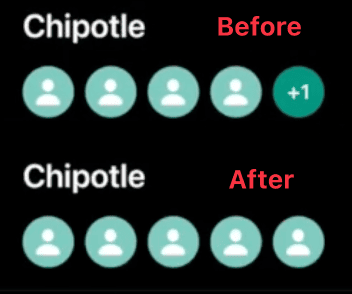
현재 5명일때 +1로 되는데, 5명까지는 아바타 이미지를 그대로 나오게하고 그 이후부터는 +2, +3 이렇게 되게 변경을 해보려 한다.
1
2
3
4
5
6
7
8
9
10
11
12
13
// before
if index <= 3 {
    AvatarView(image: profiles[index].createAvatarImage(), size: 35)
} else if index == 4 {
    AdditionalProfilesView(number: min(profiles.count - 4, 99))
}

// after
if index <= 3 || (index == 4 && profiles.count == 5) {
    AvatarView(image: profiles[index].createAvatarImage(), size: 35)
} else if index == 4 && profiles.count > 5 {
    AdditionalProfilesView(number: min(profiles.count - 4, 99))
}
이렇게 해주면 된다.
혹시라도 5번째 칸에서 로직이 헷갈릴 수 있으니, ForEach 순회 관점에서 간략하게 정리하면 다음과 같다.
- 현상: 체크인한 유저가 많아질 때, 모든 아바타를 나열하지 않고 최대 5개의 칸 안에서 정보를 요약해야 한다.
- 핵심 로직 (ForEach 순회):
- Index 0~3: 전체 인원수와 상관없이 항상 처음 4명의 아바타를 노출한다.
- Index 4 (판정 구간): 5번째 칸은 현재 전체 인원(
count)에 따라 역할이 변한다.count == 5: 딱 5명일 때는 마지막 5번째 유저의 아바타를 노출한다.count > 5: 6명 이상일 때는 얼굴 대신 나머지 인원수(+N)를 노출한다.
- 결과:
- 5명 체크인 시: 아바타 5개 노출.
- 6명 체크인 시: 아바타 4개 +
AdditionalProfilesView(+2)노출.
- 결론:
ForEach가 배열 전체를 순회하더라도, 인덱스 4번에서 전체 개수(count)를 체크함으로써 5번째 칸의 기능을 ‘개별 아바타’에서 ‘전체 요약’으로 전환할 수 있다.
이건 부가적인거라 해도 그만 안해도 그만.
Computed Property로 변경
현재 함수를 통해 이미지를 만드는데,
1
2
3
4
5
6
7
8
9
10
// DDGLocation
func createSquareImage() -> UIImage {
    guard let asset = squareAsset else { return PlaceholderImage.square }
    return asset.convertToUIImage(in: .square)
}

func createBannerImage() -> UIImage {
    guard let asset = bannerAsset else { return PlaceholderImage.banner }
    return asset.convertToUIImage(in: .square)
}
사실 이걸 굳이 함수로 하지않고 하나의 변수로 해서 Computed Property로 하는게 더 좋을듯 해서 바꿔보려한다.
사실 별거 없다.
1
2
3
4
5
6
7
8
9
10
var squareImage: UIImage {
    guard let asset = squareAsset else { return PlaceholderImage.square }
    return asset.convertToUIImage(in: .square)
}


var bannerImage: UIImage {
    guard let asset = bannerAsset else { return PlaceholderImage.banner }
    return asset.convertToUIImage(in: .banner)
}
DDGProfile도 바꿔준다.
1
2
3
4
var avatarImage: UIImage {
    guard let avatar = avatar else { return PlaceholderImage.avatar }
    return avatar.convertToUIImage(in: .square)
}
그리고 관련된 에러를 해결해준다. (코드 생략)
그렇다면 왜 바꾸는걸까?
기존의 createSquareImage()와 같은 함수를 squareImage라는 연산 프로퍼티로 변경하며 느낀 설계의 이점은 다음과 같다.
- 행위에서 속성으로의 관점 전환:
before:createImage처럼 이미지를 ‘만든다’는 행위(Action)에 포커스를 둠.after:var image처럼 객체가 가진 하나의 이미지 ‘속성(Property)’ 그 자체에 포커스를 둠.
- 호출부(View)의 가독성과 획일화:
before:BannerImageView(image: viewModel.location.createBannerImage())after:BannerImageView(image: viewModel.location.bannerImage)- View의
image파라미터에 값을 넘겨줄 때, ‘행위’를 호출하는 것보다 데이터 그 자체인 ‘속성’을 넘겨주는 것이 파라미터의 성격과도 일치하며 훨씬 직관적이다.
- 코드의 간결성:
- 호출 시 괄호
()를 생략할 수 있어 코드가 깔끔해지며, 별도의 파라미터 없이 내부 데이터만 가공해 반환하는 경우 연산 프로퍼티를 쓰는 것이 Swift의 관습에도 부합한다.
- 호출 시 괄호
- 결론:
- 결과물은 동일하더라도, 데이터를 사용하는 입장에서 ‘행위’가 아닌 ‘상태’로 접근하게 함으로써 뷰와 모델 사이의 데이터 흐름을 더 자연스럽게 연결할 수 있다.
1
2
3
4
5
6
7
8
9
10
11
12
13
14
15
16
17
18
19
20
21
22
23
24
25
26
27
28
29
30
31
32
33
34
35
36
37
38
39
40
41
42
43
44
45
46
47
48
49
50
// Constants
// Before
static func getPlaceholder(for dimension: ImageDimension) -> UIImage {
        return dimension == .square ? PlaceholderImage.square : PlaceholderImage.banner
    }
// After
var placeholder: UIImage {
        return self == .square ? PlaceholderImage.square : PlaceholderImage.banner
    }

// or
var placeholder: UIImage {
    switch self {
    case .square:
        return PlaceholderImage.square
    case .banner:
        return PlaceholderImage.banner
    }
}

// CKAsset
// before
func convertToUIImage(in dimension: ImageDimension) -> UIImage {
    let placeholder = ImageDimension.getPlaceholder(for: dimension)

    guard let fileUrl = self.fileURL else {
        return placeholder
    }

    do {
        let data = try Data(contentsOf: fileUrl)
        return UIImage(data: data) ?? placeholder
    } catch {
        return placeholder
    }
}

// after
func convertToUIImage(in dimension: ImageDimension) -> UIImage {
    guard let fileUrl = self.fileURL else {
        return dimension.placeholder
    }

    do {
        let data = try Data(contentsOf: fileUrl)
        return UIImage(data: data) ?? dimension.placeholder
    } catch {
        return dimension.placeholder
    }
}
이렇게 변경해주면 끝.
Github: Dub-Dub-Grub Repository
이 기사는 저작권자의 CC BY 4.0 라이센스를 따릅니다.