MapKit (27)
iOS 15 Update
CloudKit (1)
이전글이 너무 길어서 CloudKit쪽은 여기에 한다.
우선 여기서 다룰 주제는
Async/Await 이다.
상당히 흥미로운 부분이고, 뭐 이전에도 공부를 했지만 여러 각도에서 배우고 정리하면 좋으니까 여기에도 또 적어본다. 사실 Concurrency는 개인적으로 Swift에서 아주 중요하다고 생각 이전글은 여기
이번글은 methods 중심으로 헤더를 나눠서 정리할 생각.
그리고 이번 포스팅에서 코드를 변경하는 핵심 패턴은 바로 이것이다.
CompletionHandler➡️Async/Await
이 흐름을 중점적으로 보면서 코드가 어떻게 간결해지는지 파악해 둔다면 훨씬 도움이 될 것이다.
getUserRecord
코드 변경
getUserRecord 부터 손을 보도록 한다.
1
2
3
4
5
6
7
8
9
10
11
12
13
14
15
16
17
18
19
20
21
22
23
24
25
26
27
28
29
30
31
32
33
34
35
36
let container = CKContainer.default()

// Before
func getUserRecord() {
    CKContainer.default().fetchUserRecordID { recordID, error in
        guard let recordID = recordID, error == nil else {
            print(error!.localizedDescription)
            return
        }

        CKContainer.default().publicCloudDatabase.fetch(withRecordID: recordID) { userRecord, error in
            guard let userRecord = userRecord, error == nil else {
                print(error!.localizedDescription)
                return
            }

            self.userRecord = userRecord
            //print(self.userRecord)

            if let profileReference = userRecord["userProfile"] as? CKRecord.Reference {
                self.profileRecordID = profileReference.recordID
            }
        }
    }
}
// After
func getUserRecord() async throws {

    let recordID = try await container.userRecordID()
    let record = try await container.publicCloudDatabase.record(for: recordID)
    userRecord = record

    if let profileReference = record["userProfile"] as? CKRecord.Reference {
        self.profileRecordID = profileReference.recordID
    }
}
이렇게 코드가 간결해진다.
물론 이렇게 코드가 바뀌게되면 호출하는쪽에서 당연히 에러가 발생
1
2
3
4
5
6
7
8
// AppTabView
'async' call in a function that does not support concurrency
Call can throw, but it is not marked with 'try' and the error is not handled

.onAppear {
    CloudKitManager.shared.getUserRecord()
    viewModel.checkIfHasSeenOnboard()
}
바로 여기이다.
1
2
3
4
.task {
    try? await CloudKitManager.shared.getUserRecord()
    viewModel.checkIfHasSeenOnboard()
}
이렇게 바꿔주면 된다.
정리
여기서 잠깐 정리를 해보자면, (물론 이전글에서 다뤘지만 remind겸 여기에도 적으면 좋으니 정리.)
먼저 async를 사용하기 위해선 함수 뒤에 async를 사용해주면 된다.
1
2
3
func getUserRecord() async throws {
    // 생략
}
그렇다면 throws 는 뭘까?
바로 이전에도 언급을 했지만, 에러가 발생했을때 그 에러를 지금 이 함수의 주체인 내가 처리를 하는게 아니라, 해당 함수를 호출하는쪽에서 처리하도록 말 그대로 던진다라는 뜻.
물론 throws가 반드시 필요한건 아니다
1
2
3
4
5
6
7
8
9
10
11
12
13
14
15
16
17
// 1. 에러 없이 무조건 처리가 완료되는 비동기 함수 예시
func toggleLoadingStateWithDelay() async {
    isLoading = true

    // 💡 Task.sleep은 원래 throws를 던지지만, 여기서는 에러 처리를 씹고(try?)
    // 단순 딜레이 용도로만 사용하여 함수 자체는 throws하지 않게 설계함
    try? await Task.sleep(seconds: 1.5)

    isLoading = false
}

// 2. 에러는 없지만 비동기적으로 가공된 결과물을 리턴하는 함수 예시
func generateWelcomeMessage(for userID: String) async -> String {
    // 비동기적인 연산이나 로컬 DB 조회가 일어난다고 가정
    let greeting = "안녕하세요, 회원님!"
    return greeting
}
이런식으로 없어도 되기도 하다.
하지만 지금 우리의 코드를 보면
1
2
3
4
5
6
7
8
9
func getUserRecord() async throws {
    let recordID = try await container.userRecordID()
    let record = try await container.publicCloudDatabase.record(for: recordID)
    userRecord = record

    if let profileReference = record["userProfile"] as? CKRecord.Reference {
        self.profileRecordID = profileReference.recordID
    }
}
throws가 있다. 만약 지우면?
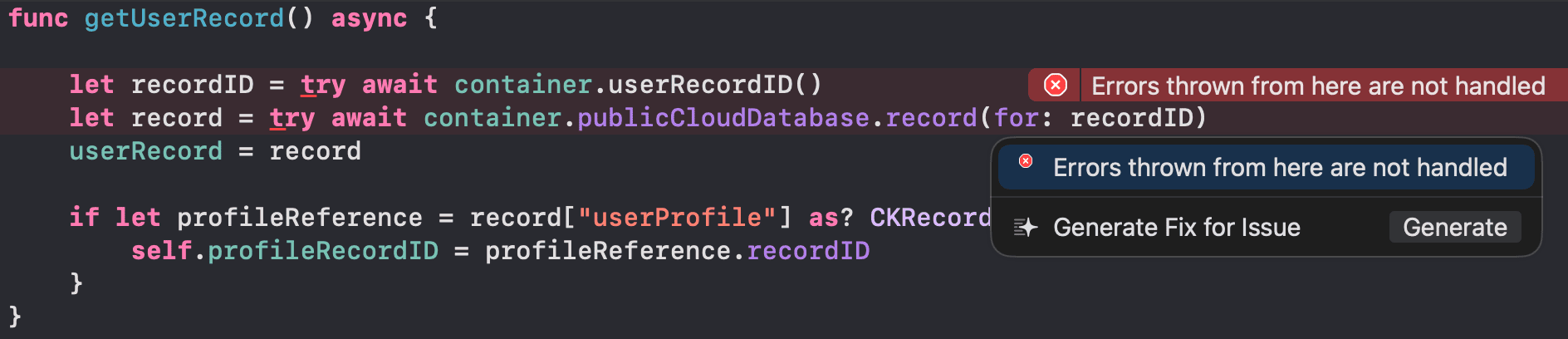
이렇게 try await를 사용한 부분에서 에러가 발생한다.
즉 이말은 저 코드 2줄에서 에러와 관련된 무언가가 있다는 것이다. (단지 직접적으로 코드에만 보이지 않을 뿐)
그래서 둘중에 하나를 옵션을 눌러서 확인을 해보면
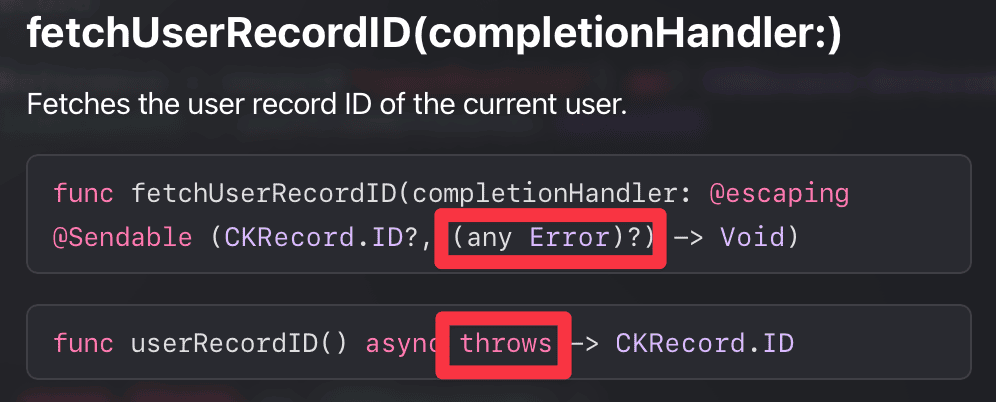
2개가 나오는데
첫번째는 CompletionHandler 두번째는 Async/Await
즉 구버전 가이드, 신버전 가이드로 보면 된다.
무튼 여기서도 보면 throws를 하고있다.
throws의 경우 함수안에 어떤 메서드가 throws를 가지고 있다면 그걸 품는 함수도 throws가 반드시 필요하다.
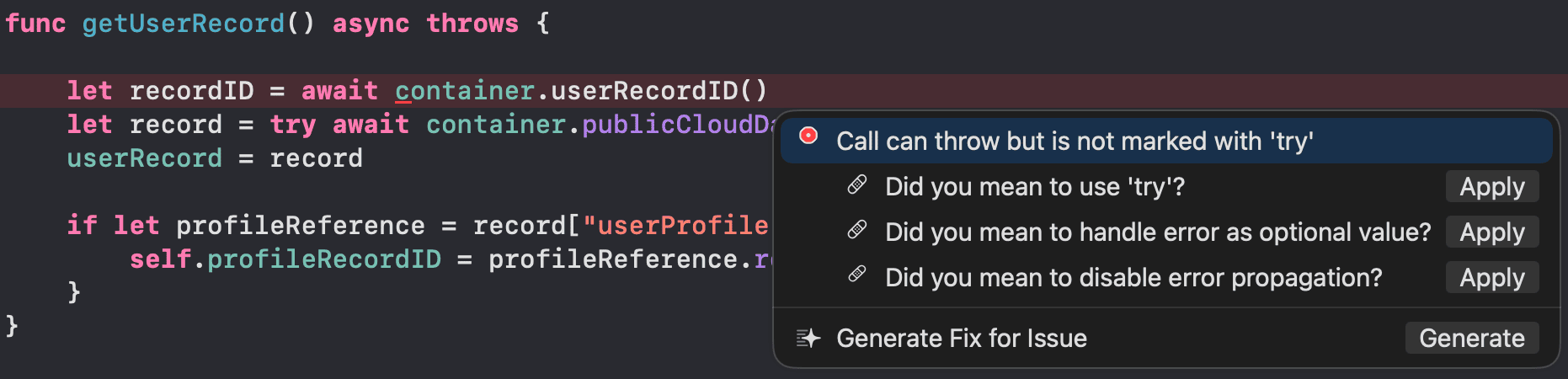
“Call can throw, but it is not marked with ‘try’” 에러의 의미는, *“이 함수는 실행 중 에러를 던질(throw) 수 있는 위험한 함수인데, 호출할 때 에러 대비용 마킹(try)을 안 해둬서 핸들링이 안 된다” 는 뜻이다.
try는 이전글참고
그래서 try를 쓰고 await를 안쓰면?
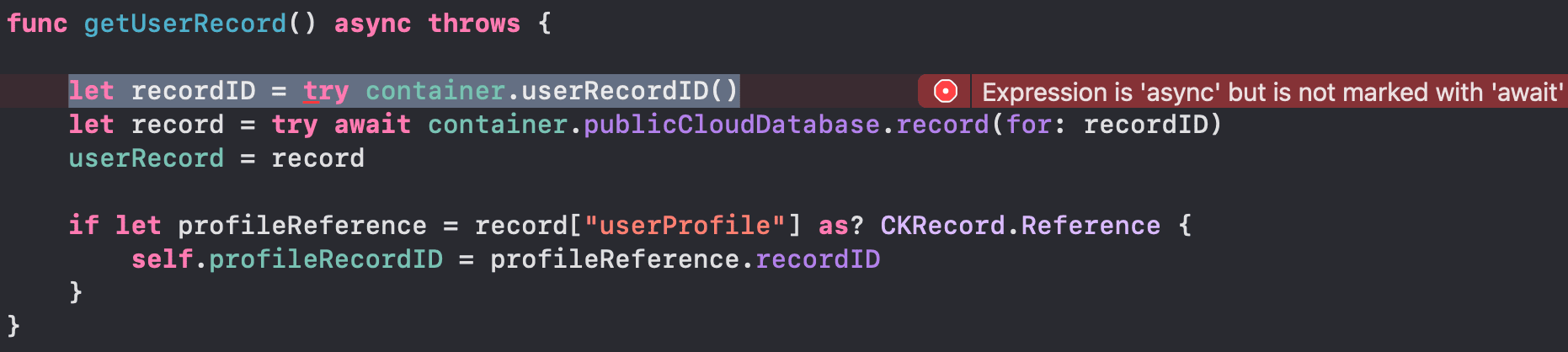
이렇게 에러가 발생한다 async인 비동기 함수라서 기다려줘야하는데 기다리는 await가 없다는것.
“그렇다면 나 이거 비동기 함수로 안 쓸 건데?” 하고 억지를 부리며 async와 await를 싹 지워버리면? 당연히 컴파일러가 통곡하며 에러를 뱉는다. 그 이유는 우리가 호출하려는 Apple의 내장 메서드(userRecordID()) 자체가 태생부터 비동기(async)로 설계된 함수이기 때문이다. 결국 알맹이가 비동기라면, 그걸 감싸는 껍데기(우리 함수)도 무조건 비동기(async)가 되어야 한다는 Swift Concurrency의 절대적인 규칙을 보여주는 대목이다.
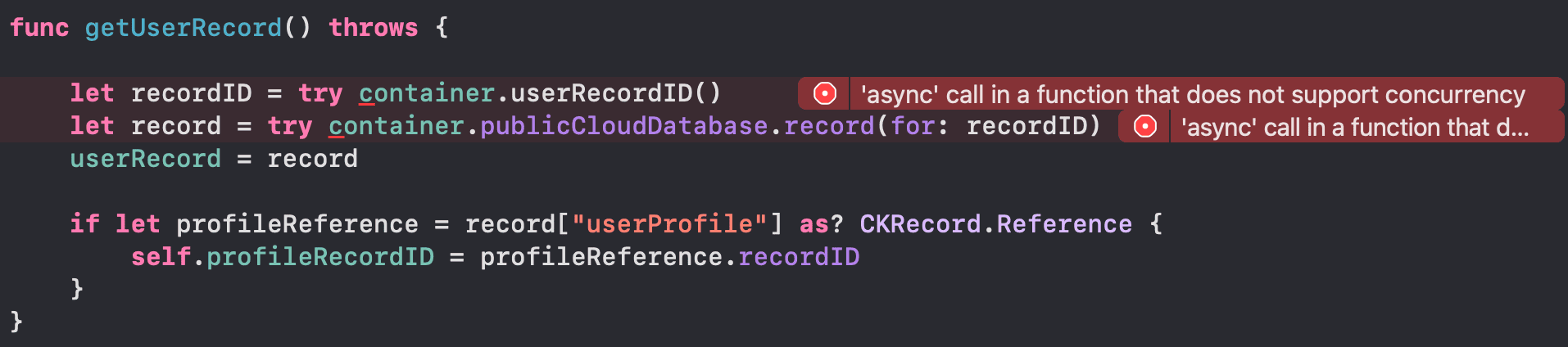
이렇게 에러가 발생, 그이유는? 위에 사진을 보면 userRecordID()자체가 비동기 함수이기 때문이다.
이렇게 정리를 리마인드겸 다시 해보았다.
getLocation
코드 변경 및 정리
1
2
3
4
5
6
7
8
9
10
11
12
13
14
15
16
17
18
19
20
21
22
23
24
25
26
27
28
29
// before
func getLocation(completed: @escaping (Result<[DDGLocation], Error>) -> Void) {
    let sortDescriptor = NSSortDescriptor(key: DDGLocation.kName, ascending: true)
    let query = CKQuery(recordType: RecordType.location, predicate: NSPredicate(value: true))

    query.sortDescriptors = [sortDescriptor]

    CKContainer.default().publicCloudDatabase.perform(query, inZoneWith: nil) { records, error in
        guard let records = records, error == nil else {
            completed(.failure(error!))
            return
        }

        let locations = records.map(DDGLocation.init)
        completed(.success(locations))
    }
}
// after
func getLocation() async throws -> [DDGLocation] {
    let sortDescriptor = NSSortDescriptor(key: DDGLocation.kName, ascending: true)
    let query = CKQuery(recordType: RecordType.location, predicate: NSPredicate(value: true))
    query.sortDescriptors = [sortDescriptor]

    let (matchResults, _) = try await container.publicCloudDatabase.records(matching: query)
    let records = matchResults.compactMap { _, result in
        try? result.get()
    }
    return records.map(DDGLocation.init)
}
여기는 이렇게 바뀌었다.
근데 let (matchResults, _) 왜 여기는 Tuple일까? 에 대해서 잠깐 이야기를 해본다면
1
(matchResults: [(CKRecord.ID, Result<CKRecord, any Error>)], queryCursor: CKQueryOperation.Cursor?)
publicCloudDatabase.records에서 records에 대해 Option키를 누른채로 확인을 해보면
위와 같이 2개를 return 하고 있는걸 알 수 있다. 그래서 Tuple로 한것. 위의 함수에선 Cursor가 필요없기에, _로 해두었다.
그리고 get()은 뭐지? 라는 생각이 들것 같아서
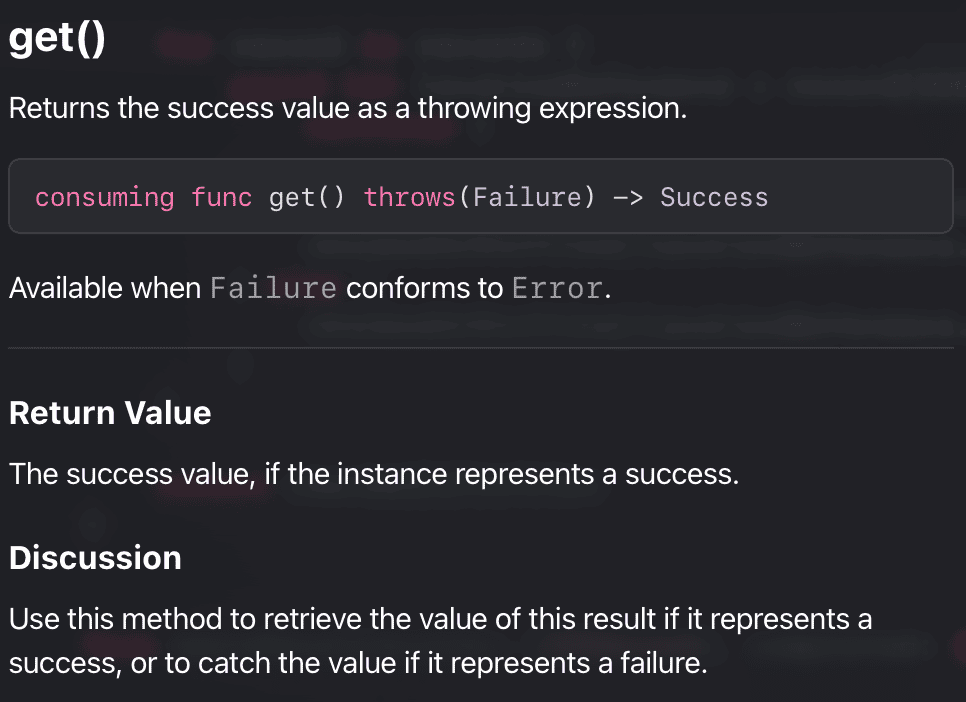
사진을 첨부한다.
그리고 Compact는 이전글확인
원래는 클로저가 받는게
1
(CKRecord.ID, Result<CKRecord, any Error>)
이렇게 된다. 근데 id는 필요가 없어서 _로 처리, 그리고 result로 묶은것
이걸 그래서 같이 묶어서 정리를 하면
get()을 통해 result에서 원하는 값만 (CKRecord) records에 넣어준다.
근데 try뒤에 ?를 붙여 옵셔널로 한 이유는 위에 이전글을 참고로 적긴 했지만 그 부분만 따오면
- try?
- do - catch 구문 없이도 사용이 가능하다.
- 에러 발생시 nil값을 반환.
- 에러가 발생하지 않으면 리턴 값의 타입은 옵셔널로 반환.
에러 발생시 nil을 반환하기도 하지만, compactMap을 통해 nil값을 걸러주고 또한 옵셔널로 리턴된 값에 대해 다시 옵셔널을 없애고 순수한 값으로 재정렬 해준다. 즉 옵셔널 바인딩을 해준다.
이제 이렇게 함수를 바꾸게 되면, 기존에 클로저(Completion Handler) 방식으로 호출하던 LocationMapViewModel 쪽에서는 바뀐 함수의 형태를 인식하지 못해 아래와 같은 에러가 발생한다.
1
2
3
4
5
6
7
8
9
10
11
12
13
14
15
16
17
18
19
20
21
22
23
24
25
26
27
Cannot infer type of closure parameter 'result' without a type annotation
Trailing closure passed to parameter of type 'DispatchWorkItem' that does not accept a closure

// LocationMapVM
// Before
func getLocations(for locationManager: LocationManager) {
    CloudKitManager.shared.getLocation { [self] result in
        DispatchQueue.main.async {
            switch result {
            case .success(let locations):
                locationManager.locations = locations
            case .failure(_):
                alertItem = AlertContext.unableToGetLocations
            }
        }
    }
}
// After
func getLocations(for locationManager: LocationManager) {
    Task {
        do {
            locationManager.locations = try await CloudKitManager.shared.getLocation()
        } catch {
            alertItem = AlertContext.unableToGetLocations
        }
    }
}
이때 Task가 반드시 필요한게
async/await로 작성한 함수를 호출할때는 Task 없이 사용하면 아래와 같은 에러가 발생한다.
1
2
3
4
5
6
7
8
9
'async' call in a function that does not support concurrency

func getLocations(for locationManager: LocationManager) {
    do {
        locationManager.locations = try await CloudKitManager.shared.getLocation()
    } catch {
        alertItem = AlertContext.unableToGetLocations
    }
}
그리고
1
2
3
@MainActor final class LocationMapViewModel: NSObject, ObservableObject, CLLocationManagerDelegate {
    //생략
}
이렇게 @MainActor를 명시해주었다.
MainActor는 이전글에서 적은적이 있으니 참고.
코드를 바꾸기전에 위의 코드들은
1
2
3
DispatchQueue.main.async {
    // 생략
}
이런식으로 Main Thread 에서 작업을 하는 함수들이었다.
그걸 이번에 Async/Await를 사용하면서 코드를 바꿨더라도, 위의 기능들이 main thread에서 작업이 되어야하는건 변함이 없다.
그래서 그냥 VM자체가 전부 Main Thread에서 작동이 되도록
@MainActor를 사용한것.
getCheckedInProfiles
코드 변경 및 정리
1
2
3
4
5
6
7
8
9
10
11
12
13
14
15
16
17
18
19
20
21
22
23
24
25
26
27
28
29
// Before
func getCheckedInProfiles(for locationID: CKRecord.ID, completed: @escaping (Result<[DDGProfile], Error>) -> Void) {
    let reference = CKRecord.Reference(recordID: locationID, action: .none)
    let predicate = NSPredicate(format: "isCheckedIn == %@", reference)
    let query = CKQuery(recordType: RecordType.profile, predicate: predicate)

    CKContainer.default().publicCloudDatabase.perform(query, inZoneWith: nil) { records, error in
        guard let records = records, error == nil else {
            completed(.failure(error!))
            return
        }

        let profiles = records.map { DDGProfile(record: $0) }
        completed(.success(profiles))
    }
}
// After
func getCheckedInProfiles(for locationID: CKRecord.ID) async throws -> [DDGProfile] {
    let reference = CKRecord.Reference(recordID: locationID, action: .none)
    let predicate = NSPredicate(format: "isCheckedIn == %@", reference)
    let query = CKQuery(recordType: RecordType.profile, predicate: predicate)

    let (matchResults, _) = try await container.publicCloudDatabase.records(matching: query)
    let records = matchResults.compactMap { _, result in
        try? result.get()
    }

    return records.map(DDGProfile.init)
}
전개 자체는 위의 getLocation과 같다.
1
2
3
4
5
6
7
8
9
10
11
12
13
14
15
16
17
18
19
20
21
22
23
24
25
26
27
28
29
30
31
32
33
// LocationDetailVM
// Before
func getCheckedInProfiles() {
    showLoadingView()
    CloudKitManager.shared.getCheckedInProfiles(for: location.id) { [self] result in
        DispatchQueue.main.async {
            switch result {
            case .success(let profiles):
                checkedInProfiles = profiles
            case .failure(_):
                alertItem = AlertContext.unableToGetCheckedInProfiles
            }
            hideLoadingView()
        }
    }
}
// After
func getCheckedInProfiles() {
    showLoadingView()
    Task {
        do {
            checkedInProfiles = try await CloudKitManager.shared.getCheckedInProfiles(for: location.id)
            hideLoadingView()
        } catch {
            hideLoadingView()
            alertItem = AlertContext.unableToGetCheckedInProfiles
        }
    }
}

@MainActor final class LocationDetailViewModel: ObservableObject {
    // 생략
}
여기까지 거의 흐름이 같다.
하지만 이때 에러가 또 발생하는데
1
2
3
4
5
6
7
8
9
Call to main actor-isolated initializer 'init(location:)' in a synchronous nonisolated context

@ViewBuilder func createLocationDetailView(for location: DDGLocation, in dynamicTypeSize: DynamicTypeSize) -> some View {
    if dynamicTypeSize >= .accessibility3 {
        LocationDetailView(viewModel: LocationDetailViewModel(location: location)).embedInScrollView()
    } else {
        LocationDetailView(viewModel: LocationDetailViewModel(location: location))
    }
}
바로 이 부분이다.
LocationDetailViewModel에 @MainActor를 추가하면서 위와 같은 에러가 생긴건데 이것도 간단하게 정리를 해보자면,
- 최초 원인:
LocationDetailViewModel상단에@MainActor를 달았다.- 이 순간, 이 클래스의 초기화 메서드(
init(location:))는 “반드시 메인 스레드(Main Actor) 안에서만 호출되어야 하는 안전 구역”으로 묶인다.
- 이 순간, 이 클래스의 초기화 메서드(
- 문제 발생: 그런데 이
init을 호출하여 인스턴스를 생성하는 함수인createLocationDetailView가LocationListViewModel내부에 존재하고 있었다. - 컴파일러의 태클:
LocationListViewModel은 아직@MainActor가 없는 일반(nonisolated) 컨텍스트다. 따라서 컴파일러가 “야, 일반 구역에서 왜 메인 액터 구역에 격리된 init을 마음대로 호출해? 안전하지 않아!” 라며Call to main actor-isolated initializer...에러를 뱉은 것이다. - 최종 해결: 인스턴스를 만드는 주체인
LocationListViewModel상단에@MainActor를 붙여줌으로써, 호출하는 쪽(ListVM)과 호출당하는 쪽(DetailVM의 init)의 메인 액터 격리 컨텍스트가 일치하여 에러가 사라진 것이다.
1
2
3
@MainActor final class LocationListViewModel: ObservableObject {
//생략
}
이렇게 MainActor를 또 추가해주면 된다.
일단 여기까지 작동이 잘 되는걸 알 수 있다.
참고사이트
강의에서 제공된 참고사이트들은 다음과 같다.
- Swift Concurrency Manifesto
- Swift Concurrency Roadmap
- WWDC 2021 - Async/Await Videos
- Swift Concurrency Docs
Github: Dub-Dub-Grub Repository