MapKit (34)
iOS 26 Update
일단 이건 강의가 있는게 아니라 완성된 코드만 있어서 코드를 비교해보고 바뀐점에 대해 적어보려고한다.
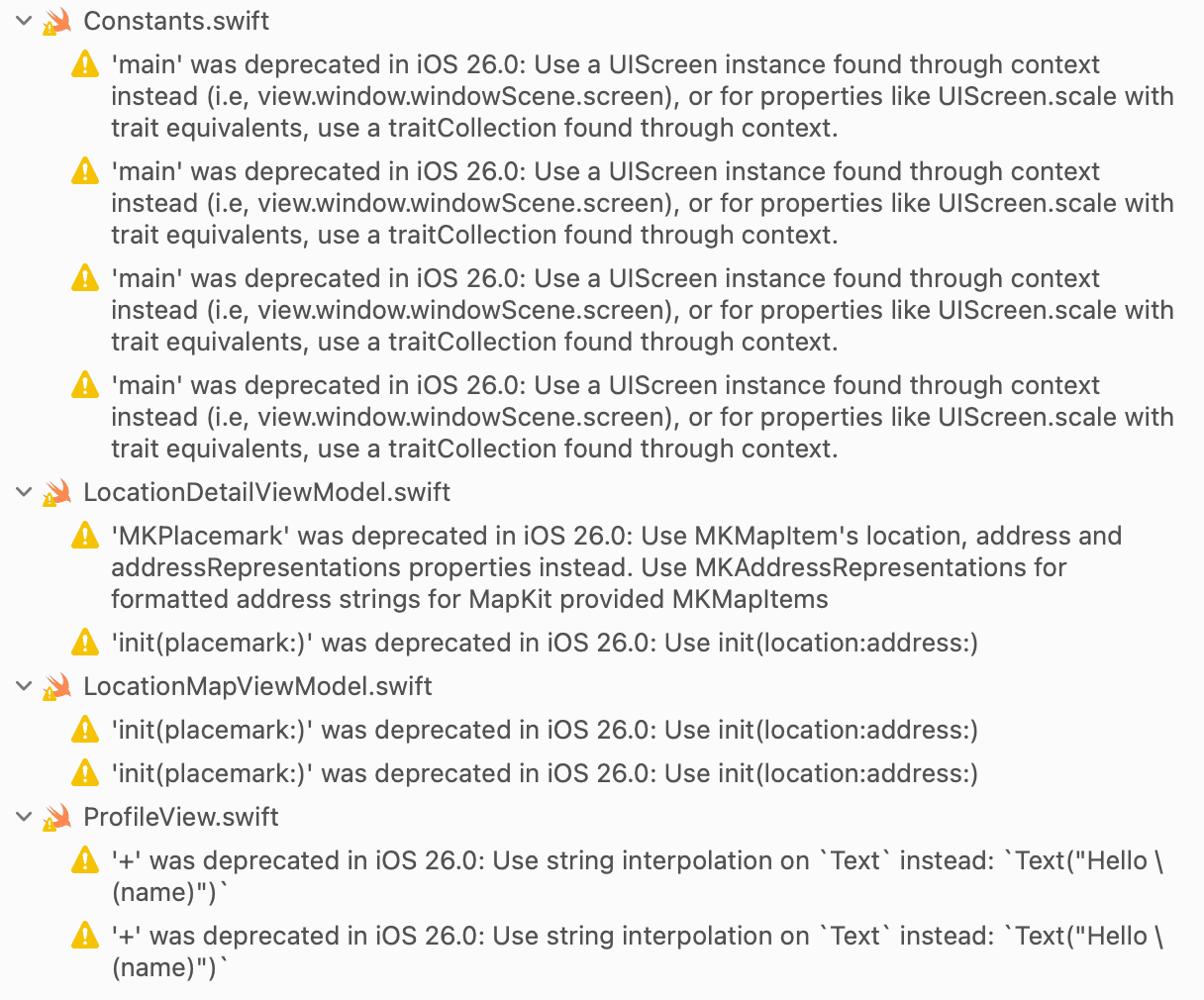
우선 버전을 26으로 바꾸니 Deprecated 관련 Warning이 많이 보인다.
천천히 해결해보도록 한다.
DDGLocation, Hashable 삭제
ProfileView
UI 일부 수정
1
2
3
4
// before
.background(Color(.secondarySystemBackground))
// after
.background(Color(.secondarySystemBackground), in: .rect(cornerRadius: 24, style: .continuous))
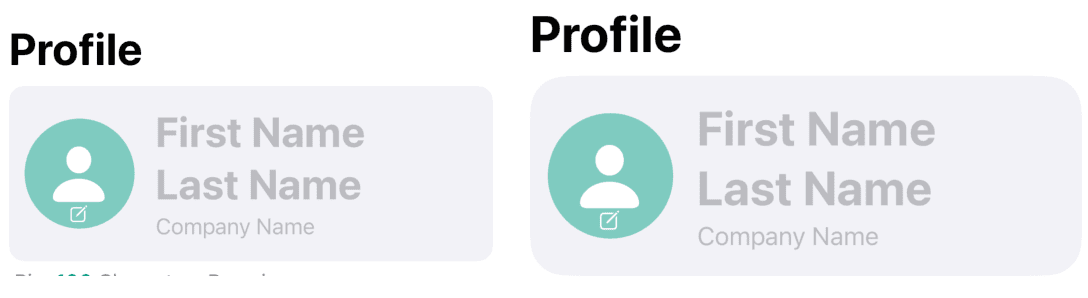
각 모서리를 보면 알겠지만, 조금 더 둥글게 모서리를 깎아주었다. (우측으로 조금 이동)
1
2
3
4
5
6
7
// before
CharactersRemainView(currentCount: viewModel.bio.count)
    .accessibilityAddTraits(.isHeader)
// after
CharactersRemainView(currentCount: viewModel.bio.count)
    .offset(x: 14)
    .accessibilityAddTraits(.isHeader)
offset을 통해 위치를 조금 옮겨 주었다. (사진 생략)
1
2
3
4
5
6
7
8
9
10
11
// before
TextField("Enter your bio", text: $viewModel.bio, axis: .vertical)
    // 생략
// after
TextField("Enter your bio", text: $viewModel.bio, axis: .vertical)
    // 생략
    .padding(8)
    .overlay {
        RoundedRectangle(cornerRadius: 24, style: .continuous)
            .stroke(.gray.opacity(0.5), lineWidth: 1)
    }
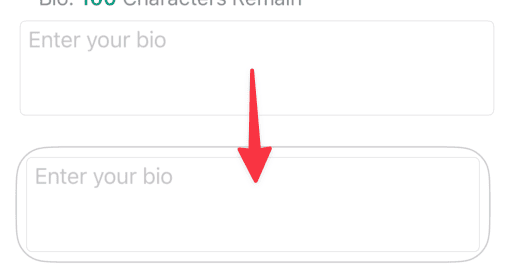
사진을 보면 알다시피 overlay를 통해 외부에 또다른 테두리를 하나 더 만들어 주었다.
DDGButton 삭제
1
2
3
4
5
6
7
8
9
10
11
12
13
14
15
// before
Button {
    viewModel.determineButtonAction()
} label: {
    DDGButton(title: viewModel.buttonTitle)
}
.padding(.bottom)
// after
Button(viewModel.buttonTitle) {
    viewModel.determineButtonAction()
}
.buttonStyle(.glassProminent)
.tint(.brandPrimary)

Spacer()
기존에는 action과 label을 분리한 trailing closure 방식이었다면, 지금은 title 기반 initializer를 사용하는 형태로 더 간결하게 변경되었다.
그리고 새로운게 나왔는데 glassProminent이다.
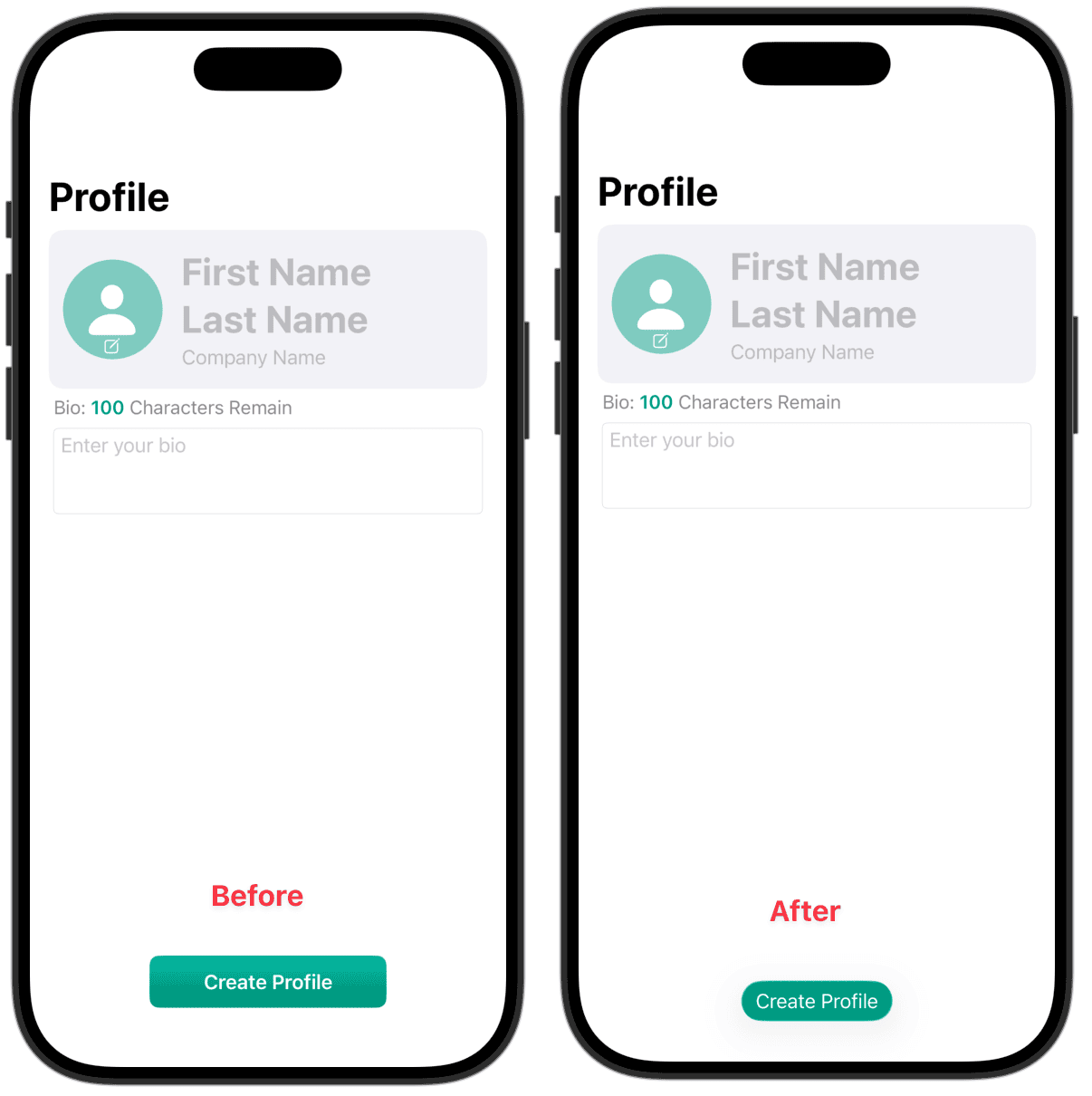
확실히 디자인이 달라졌다.
buttonStyle을 제거할 경우
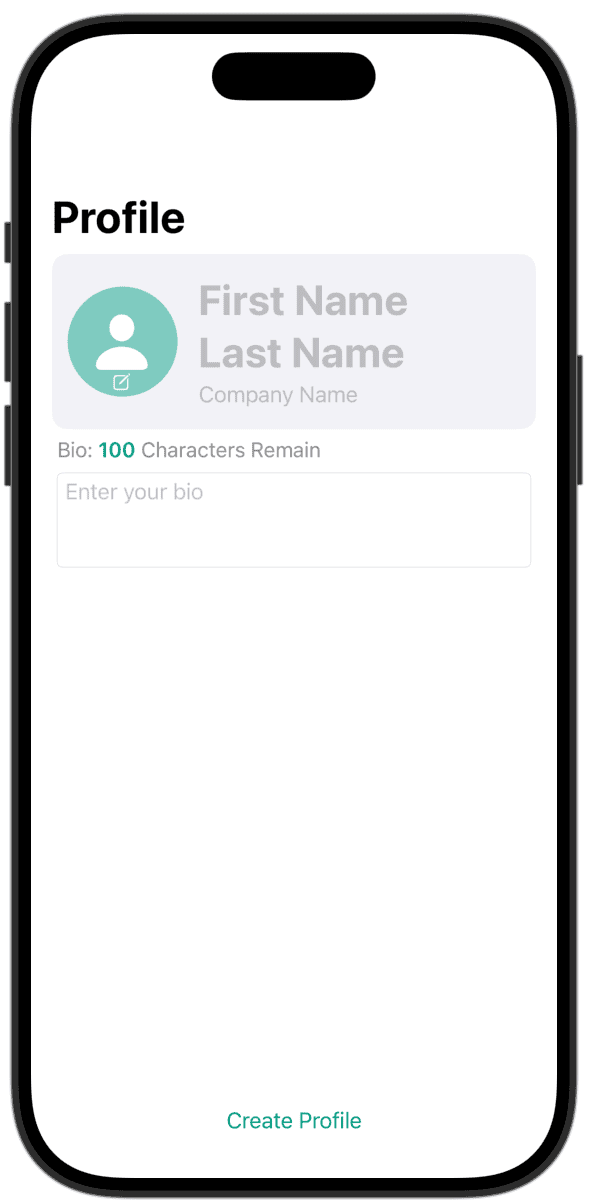
이렇게 버튼이라고 하기엔 그냥 Text만 있는 느낌이다.
그리고 spacer를 사용 해서 버튼을 위로 올려주었다. (사진은 생략)
Toolbar 수정
1
2
3
4
5
6
7
8
9
10
11
12
13
14
// before
.toolbar {
    ToolbarItemGroup(placement: .keyboard) {
        Button("Dismiss") {
            focusedTextField = nil
        }
    }
}
// after
.toolbar {
    ToolbarItemGroup(placement: .keyboard) {
        Button(role: .close) { focusedTextField = nil }
    }
}
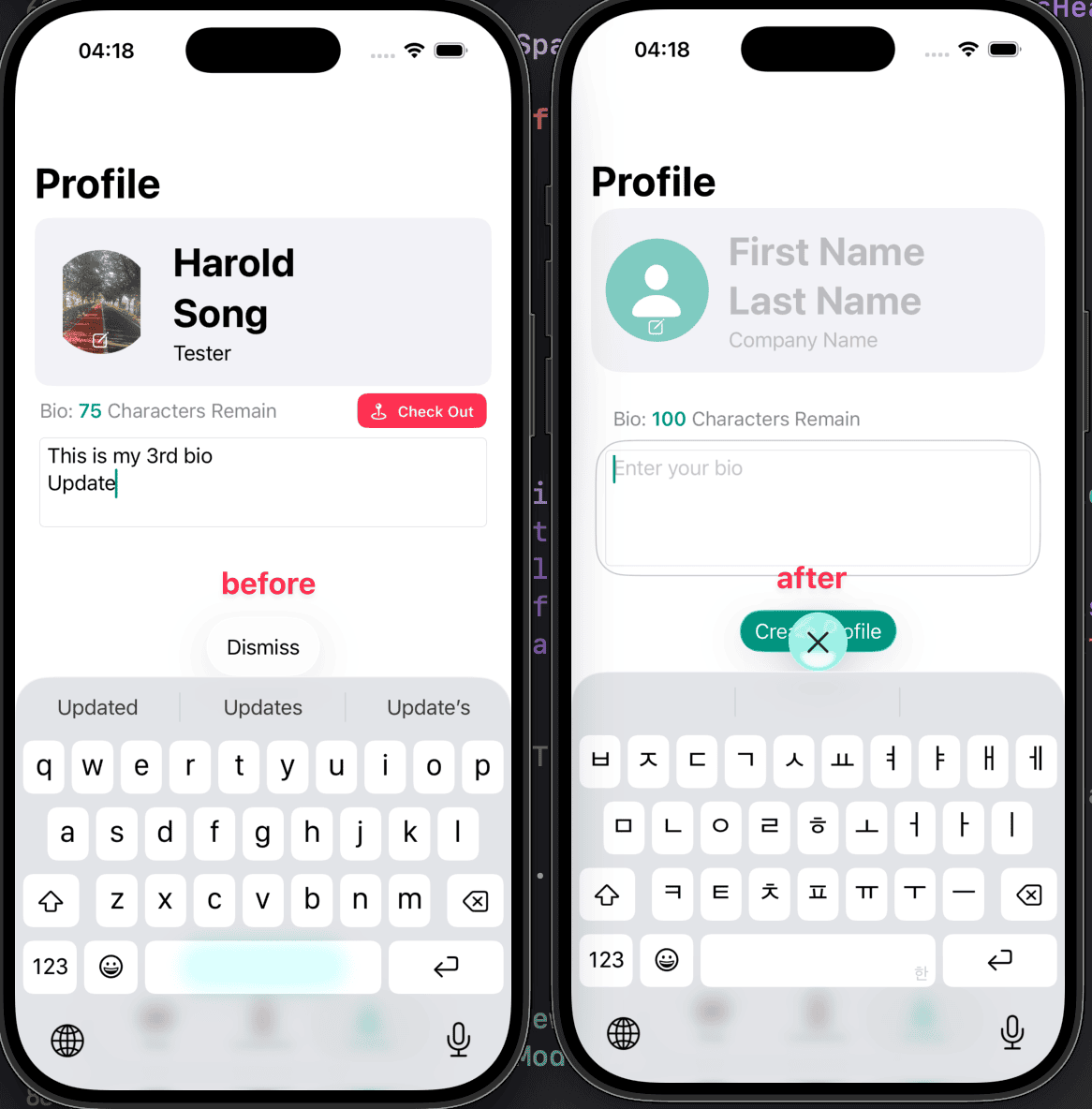
이렇게 버튼이 Dismiss에서 X로 좀 더 직관적으로 바뀌었다.
그리고
1
.navigationBarTitleDisplayMode(DeviceTypes.isiPhone8Standard ? .inline : .automatic)
iPhone8을 지원하던 Navigation title 보정을 삭제했다. (오래된 모델은 최신 os version 지원 ❌)
CharactersRemainView
1
2
3
4
5
6
7
8
9
10
11
12
13
14
15
16
17
18
19
// Before
var body: some View {
    Text("Bio: ")
        .font(.callout)
        .foregroundStyle(.secondary)
    +
    Text("\(100 - currentCount)")
        .bold()
        .font(.callout)
        .foregroundStyle(currentCount <= 100 ? Color.brandPrimary : Color(.systemPink))
    +
    Text(" Characters Remain")
        .font(.callout)
        .foregroundStyle(.secondary)
}
// After
Text("Bio: \(Text("\(remaining)").bold().foregroundStyle(currentCount <= 100 ? .brandPrimary : .pink)) Characters Remain")
    .font(.callout)
    .foregroundStyle(.secondary)
우선 + 가 Deprecated 되었다.
1
'+' was deprecated in iOS 26.0: Use string interpolation on `Text` instead: `Text("Hello \(name)")`
그래서 3개로 나뉘어졌던 Text를 하나로 이어 주었다.
TabView
1
2
3
4
5
6
7
8
9
10
11
12
13
14
15
16
17
18
19
20
21
22
23
// Before
TabView {
    LocationMapView()
        .tabItem { Label("Map", systemImage: "map") }

    LocationListView()
        .tabItem { Label("Locations", systemImage: "building") }

    NavigationView { ProfileView() }
        .tabItem { Label("Profile", systemImage: "person") }
}
// After
Tab("Map", systemImage: "map") {
                LocationMapView()
            }

Tab("Locations", systemImage: "building") {
    LocationListView()
}

Tab("Profile", systemImage: "person") {
    NavigationStack { ProfileView() }
}
이건 전부터 Deprecated 된걸 알고있었고, 강의에서도 이전걸 사용했지만, 나는 내 프로젝트에는 Tab으로 해서 사용을 하긴 했었다.
그래도 여기선 바꿔주었으므로 적용해서 적어둔다.
기존에는 View를 먼저 두고 그다음에 Modifier식으로 Tab을 설정했다면, 새로운 방식은 버튼처럼 Tab의 라벨링을 해주고 그안에 View를 담아주는 식으로 바뀌었다.
LocationDetailViewModel
1
2
3
4
5
6
7
8
9
10
11
12
13
14
15
// Before
func getDirectionsToLocation() {
    let placemark = MKPlacemark(coordinate: location.location.coordinate)
    let mapItem = MKMapItem(placemark: placemark)
    mapItem.name = location.name

    mapItem.openInMaps(launchOptions: [MKLaunchOptionsDirectionsModeKey: MKLaunchOptionsDirectionsModeWalking])

}
// After
func getDirectionsToLocation() {
    let mapItem = MKMapItem(location: location.location, address: nil)
    mapItem.name = location.name
    mapItem.openInMaps(launchOptions: [MKLaunchOptionsDirectionsModeKey: MKLaunchOptionsDirectionsModeWalking])
}
MKPlacemark가 Deprecated 되었다.
기존에는 MKMapItem에 placemark를 사용했으나 placemark 자체가 deprecated 되었으므로 mapItem을 똑같이 만들되, 받는 파라미터를 location으로 바꿔주었다.
LocationListView
1
2
3
4
// Before
@EnvironmentObject private var locationManager: LocationManager
// After
@Environment(LocationManager.self) private var locationManager
이건 iOS 26 특징이 아니긴한데, 바뀌었길래 (혹은 내가 놓쳤거나) 추가한다.
LocationCell
1
2
3
4
// Before
Image(uiImage: location.squareAsset.convertToUIImage(in: .square))
// After
Image(uiImage: location.squareImage)
이건 아마 squareImage로 function에서 computed property로 바꾸는 작업을 할때 내가 놓친 부분인것 같다.
iOS 26 변화의 특징은 아니다만 놓쳐서 기록.
1
2
3
4
5
6
7
8
9
10
11
12
13
14
15
16
17
18
19
20
21
22
23
24
// Before

fileprivate struct AdditionalProfilesView: View {

    var number: Int

    var body: some View {
        Text("+\(number)")
            // 생략
            .background(Color.brandPrimary)
            .clipShape(Circle())
    }
}
// After
fileprivate struct AdditionalProfilesView: View {

    var number: Int

    var body: some View {
        Text("+\(number)")
            // 생략
            .background(.brandPrimary, in: .circle)
    }
}
Modifer를 하나로 합친것 같아서 기록해둔다.
LocationMapView
1
2
3
4
// Before
@EnvironmentObject private var locationManager: LocationManager
// After
@Environment(LocationManager.self) private var locationManager
내용 생략
LocationMapViewModel
1
2
3
4
5
6
7
8
9
10
11
12
13
14
15
16
17
18
19
20
21
22
23
24
25
26
27
28
29
30
31
32
33
34
// Before
@MainActor
func getDirections(to location: DDGLocation) {
    guard let userLocation = deviceLocationManager.location?.coordinate else {
        return
    }
    let destination = location.location.coordinate

    let request = MKDirections.Request()
    request.source = MKMapItem(placemark: .init(coordinate: userLocation))
    request.destination = MKMapItem(placemark: .init(coordinate: destination))
    request.transportType = .walking

    Task {
        let directions = try? await MKDirections(request: request).calculate()
        route = directions?.routes.first
    }
}
// After
@MainActor
func getDirections(to location: DDGLocation) {
    guard let userLocation = deviceLocationManager.location else { return }
    let destination = location.location

    let request = MKDirections.Request()
    request.source = MKMapItem(location: userLocation, address: nil)
    request.destination = MKMapItem(location: destination, address: nil)
    request.transportType = .walking

    Task {
        let directions = try? await MKDirections(request: request).calculate()
        route = directions?.routes.first
    }
}
위의 LocationDetailViewModel과 똑같은데 이것도 역시 파라미터인 placemark가 deprecated가 되어서 location으로 바꿔주었다.
진짜 끝.
Github: Dub-Dub-Grub Repository