RunWay (17) 미러링 데이터 흐름 개선
문제 인식
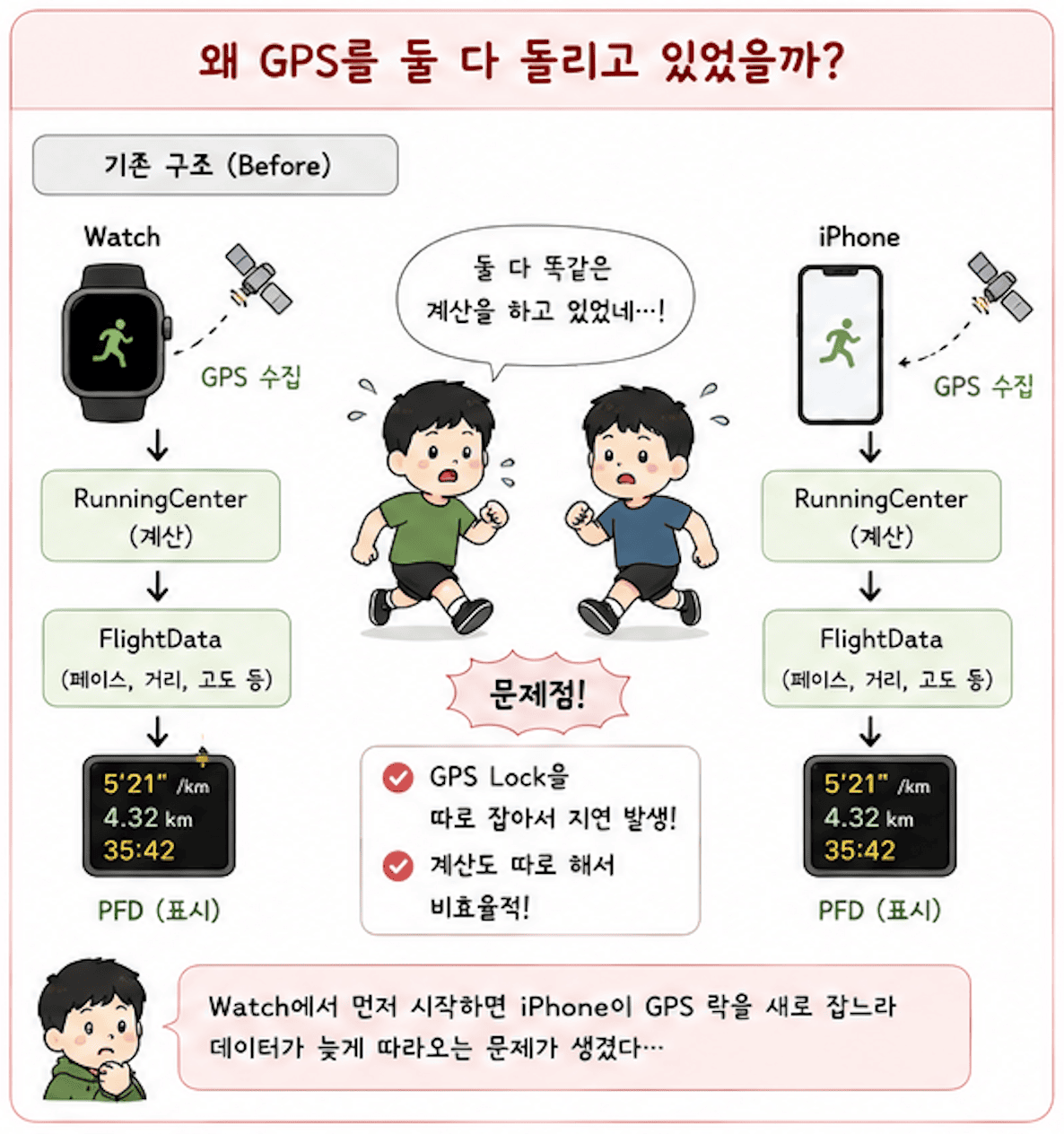
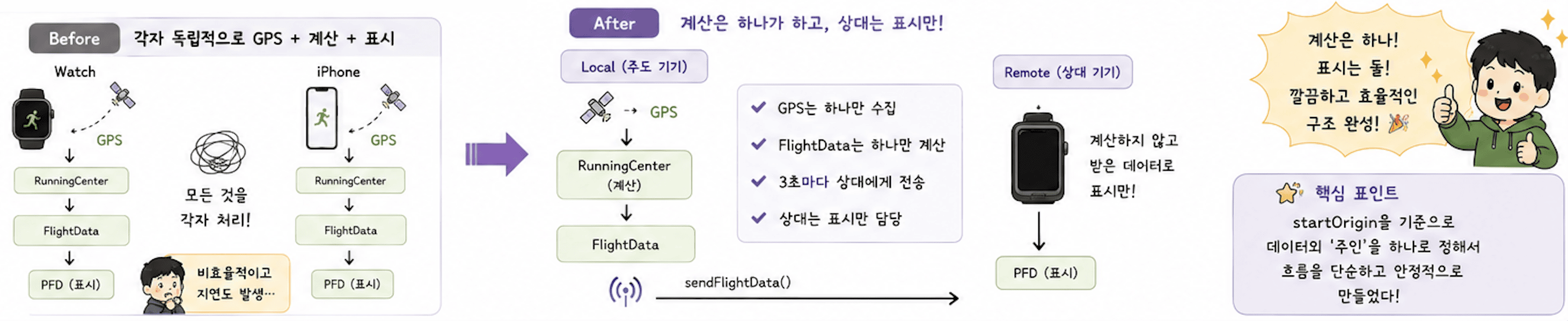
지금 구조는 미러링 중에도 iPhone과 Watch가 각자 독립적으로 위치 데이터를 처리하고 있다. Watch 주도 미러링이어도 iPhone이 자체 LocationService와 RunningCenter를 돌려서 GPS를 따로 수집하고 계산하는 식이다.
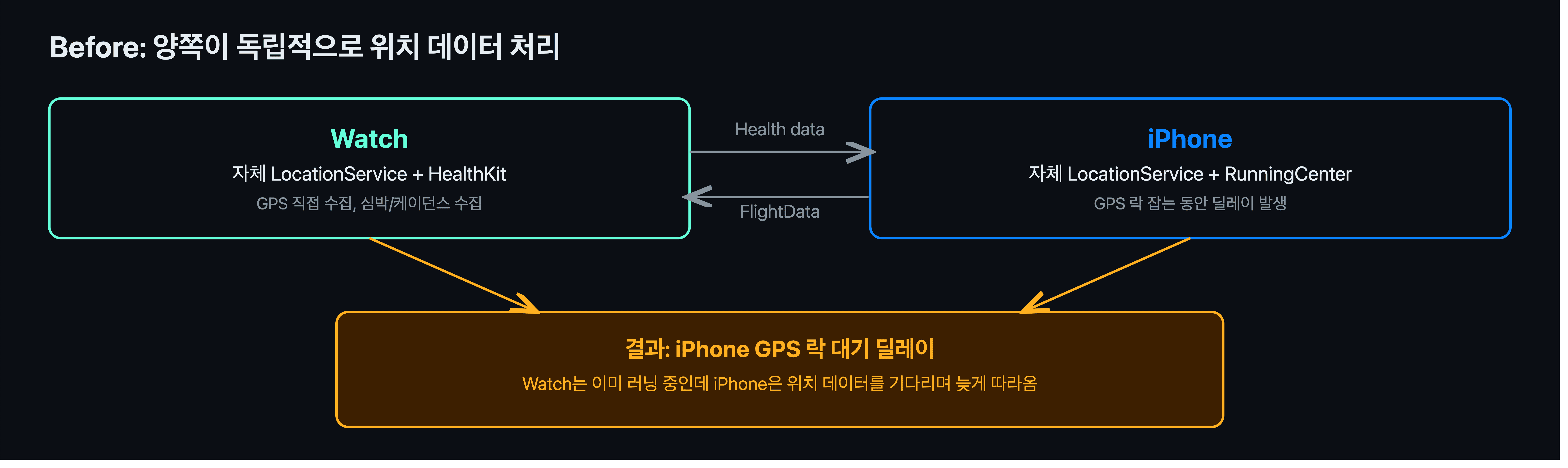
이 방식의 문제는 실제로 사용해보면서 드러났다. Watch에서 미러링으로 러닝을 시작하면 iPhone이 GPS 락을 새로 잡는 동안 딜레이가 생긴다. Watch는 이미 카운트다운을 마치고 러닝 중인데, iPhone은 위치 데이터를 기다리느라 늦게 따라오는 구조였다.
방향 전환: startOrigin 기준으로 정리하기
말로만 보면 “늦게 따라오는 것” 정도인데, 실제로 두 기기 숫자가 어떻게 벌어지는지 보면 좀 다르다.
위성 잡느라 늦은 만큼이 그대로 차이로 남고, 그 뒤로도 기기마다 계산이 미세하게 달라서 차이가 줄지 않고 유지된다. 손목과 손에 든 화면이 다른 숫자를 보여주는 것도 문제지만, 진짜 곤란한 건 저장할 때다. 둘 중 뭐가 맞는지 정할 근거가 없다.
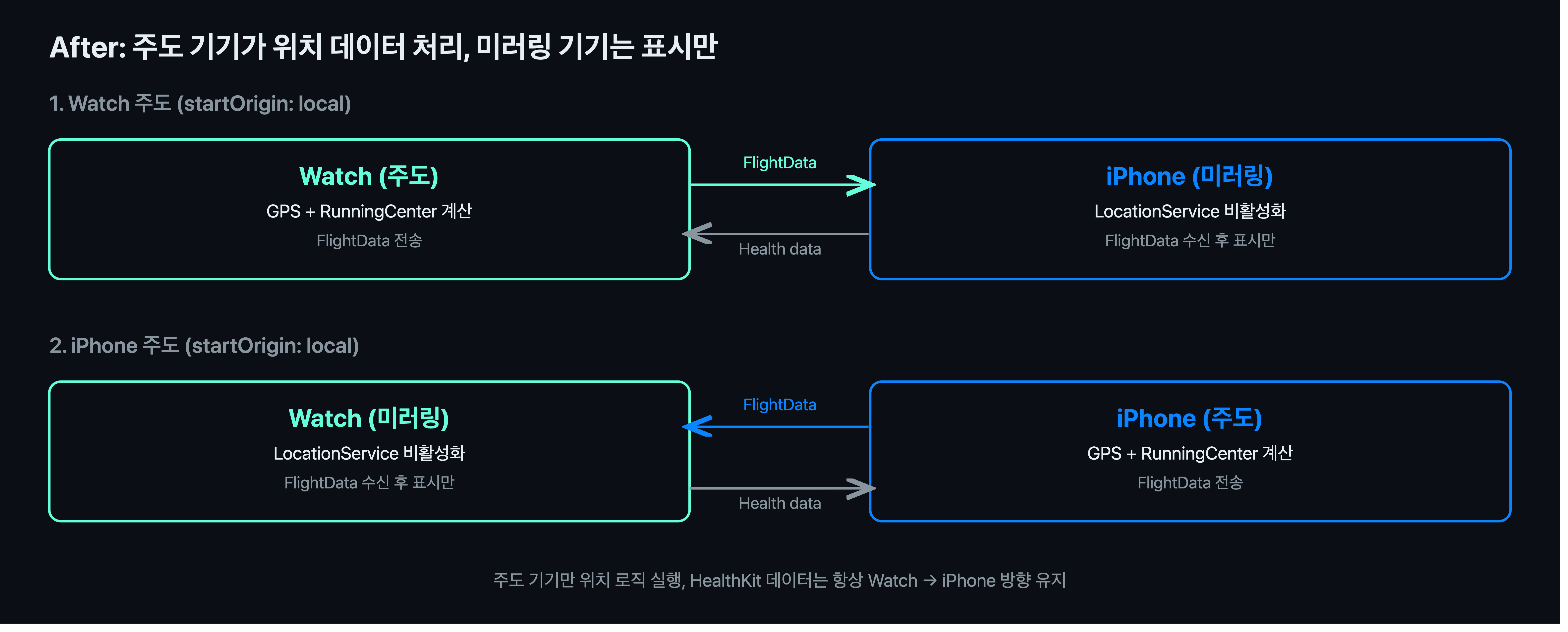
생각해보면 굳이 양쪽이 각자 GPS를 돌릴 필요가 없다. 미러링을 주도한 기기가 위치 계산을 전부 처리하고, 그 결과를 상대 기기로 전달하는 방식이 더 자연스럽다. 그래서 startOrigin을 기준으로 데이터 흐름 방향을 정리하기로 했다.
값을 만드는 곳을 하나로 두면 어긋날 일 자체가 없어진다. 이전글에서 runningMode를 시작 시점에 확정한 것과 같은 이야기다. 그때는 “언제 정할 것인가”였고, 이번엔 “어디서 정할 것인가”다.
구현하기
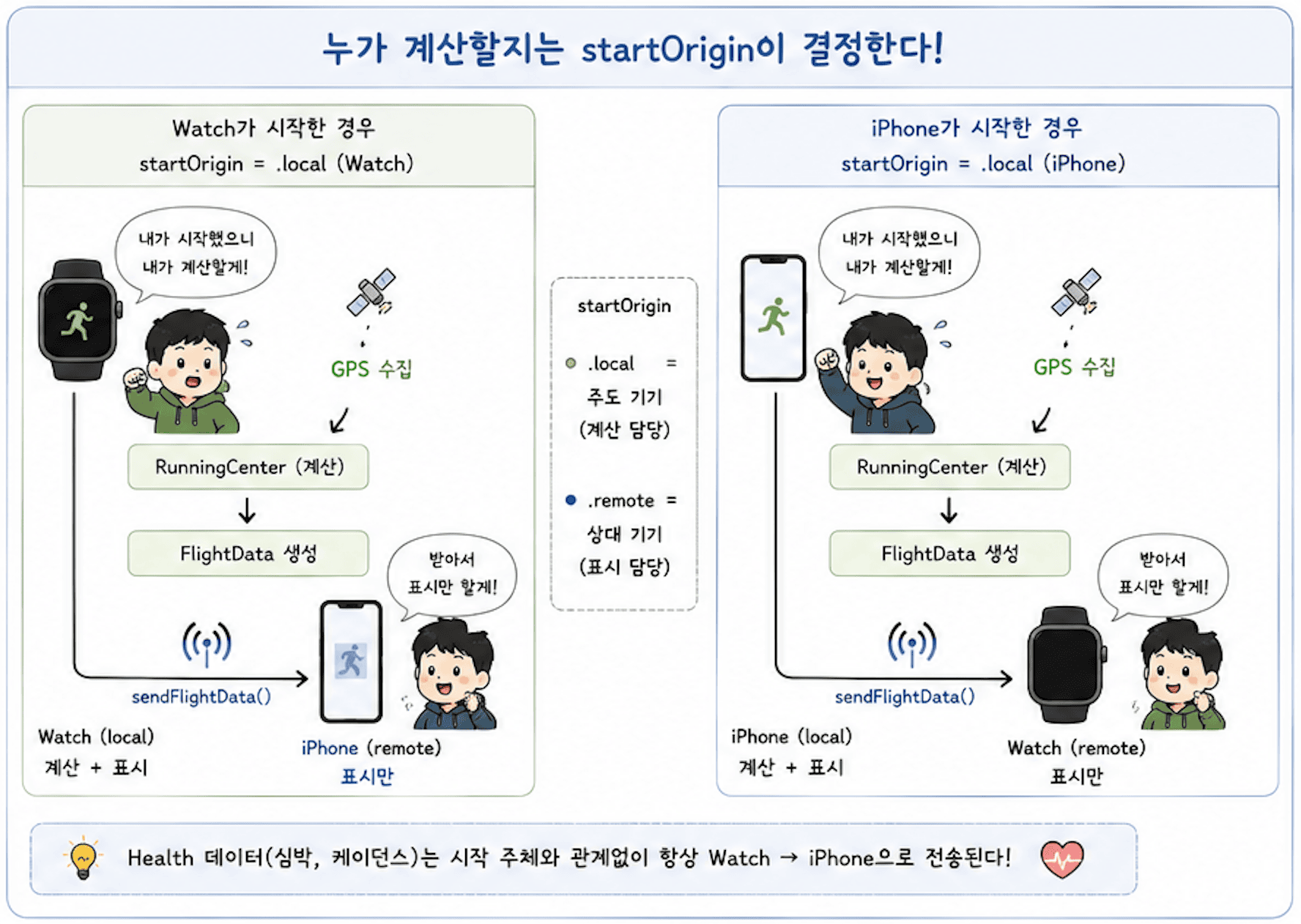
startOrigin은 이미 시작 주체를 구분하는 용도로 쓰고 있었다. .local이면 그 기기가 직접 카운트다운을 거쳐 시작한 경우이고, .remote면 상대 기기가 시작시킨 워크아웃을 미러링으로 받은 경우다. 이 값을 그대로 위치 추적 여부를 결정하는 기준으로 확장하기로 했다.
PFDView에서 GPS 활성화 여부 결정하기
iPhone
기존에는 runningMode == .mirrored를 기준으로 GPS 시작 여부를 결정하고 있었다. 이제는 startOrigin == .local일 때만 GPS를 켜도록 바꿨다. Watch 주도(.remote)일 때는 GPS를 아예 켜지 않고 상대가 보내는 FlightData를 받아서 표시만 하면 된다.
1
2
3
4
5
6
7
8
9
10
11
12
13
14
15
16
// before
.task {
    if HealthKitService.shared.sessionState?.runningMode == .mirrored {
        try? await Task.sleep(for: .seconds(3))
        runViewModel.start()
    }
    await runViewModel.startStream()
}

// after
.task {
    if HealthKitService.shared.startOrigin == .local {
        runViewModel.start()
    }
    await runViewModel.startStream()
}
3초 딜레이도 같이 제거했다. 기존엔 Watch 카운트다운과 타이밍을 맞추기 위한 임시방편이었는데, 이제 iPhone이 직접 주도하는 경우(.local)에만 GPS를 켜니 더 이상 필요 없다.
Watch
Watch는 기존에 조건 없이 무조건 스트림만 시작하고 있었다. 그런데 start()와 startStream()을 다시 들여다보니, 실제로는 둘 다 내부에서 runningMode == .standalone일 때만 GPS 관련 로직(locationService.startTracking(), runningCenter.streamFlightData())이 돌고 있었다.
1
2
3
4
5
6
7
8
9
10
11
12
13
14
15
16
17
18
19
20
21
22
23
24
25
26
27
28
29
30
func start() {
    isRunning = true
    isPaused = false
    lastReceivedTime = .now

    if HealthKitService.shared.sessionState?.runningMode == .standalone {
        locationService.startTracking()
    }

    timerCancellable.removeAll()
    // 타이머 로직 생략
}

func startStream() async {
    Task {
        for await data in HealthKitService.shared.streamHealthData() {
            self.healthData = data
            watchConnectivityService.sendHealthData()
        }
    }

    if HealthKitService.shared.sessionState?.runningMode == .standalone {
        Task {
            for await data in await runningCenter.streamFlightData() {
                self.flightData = data
                // 생략
            }
        }
    }
}
즉 미러링 중인 Watch에서 startStream()을 호출해도 실질적으로 흐르고 있던 건 streamFlightData()가 아니라 streamHealthData()였다. 위치 데이터는 어차피 standalone이 아니면 수집되지 않으니, .task에서 start()를 무조건 호출해봐야 locationService.startTracking()은 한 번도 실행되지 않는 셈이었다.
startOrigin == .local을 .task에 추가한 건 이 무의미한 start() 호출을 명시적으로 막기 위함이다. iPhone 주도(.remote)일 때는 GPS가 필요 없으니 start() 자체를 호출하지 않도록 정리했다.
1
2
3
4
5
6
7
8
9
10
11
12
// before
.task {
    await viewModel.startStream()
}

// after
.task {
    if HealthKitService.shared.startOrigin == .local {
        viewModel.start()
    }
    await viewModel.startStream()
}
다만 startStream()은 startOrigin 조건 밖에 그대로 두었다.
iPhone 주도이든 Watch 주도이든 Watch는 항상 심박/케이던스를 수집해서 iPhone에 보내야 하기 때문이다.
startStream() 내부의 streamHealthData()는 runningMode와 무관하게 항상 흘러야 하는 로직이고, streamFlightData()만 runningMode == .standalone일 때로 막혀 있던 것이니 굳이 .task 레벨에서 함수 호출 자체를 막을 이유가 없었다.
이제 두 기기 모두 자신이 직접 시작한 경우(.local)에만 GPS를 켜고, 상대가 시작한 경우(.remote)에는 위치 추적을 켜지 않는다. 단 건강 데이터 전송은 시작 주체와 무관하게 항상 동작한다.
주도 기기에서 FlightData 전송하기
GPS 활성화 조건을 startOrigin으로 정리했다면, 데이터를 상대 기기로 전송하는 부분도 같은 기준으로 맞춰야 한다. 그리고 이 과정에서 기존 구조의 허점도 하나 드러났다.
iPhone
기존에는 runningMode == .mirrored일 때 FlightData를 Watch로 전송하고 있었다. 이 조건은 “미러링 중인가”만 보기 때문에, Watch가 주도한 경우에도 iPhone이 FlightData를 Watch로 보내려 한다는 문제가 있었다. startOrigin == .local로 바꾸면 iPhone이 직접 시작한 경우에만 전송하게 된다.
1
2
3
4
5
6
7
8
9
10
11
12
13
14
15
16
17
18
19
20
21
22
23
// before
func startStream() async {
    for await data in await runningCenter.streamFlightData() {
        self.flightData = data
        // 생략
        if HealthKitService.shared.sessionState?.runningMode == .mirrored {
            watchConnectivityService.sendFlightData(data)
        }
        // 생략
    }
}

// after
func startStream() async {
    for await data in await runningCenter.streamFlightData() {
        self.flightData = data
        // 생략
        if HealthKitService.shared.startOrigin == .local {
            watchConnectivityService.sendFlightData(data)
        }
        // 생략
    }
}
Watch
Watch는 기존에 runningMode == .standalone일 때만 FlightData 스트림을 돌리고 있었고, iPhone으로 전송하는 코드 자체가 없었다. 즉 Watch 주도 미러링이어도 Watch가 계산한 FlightData는 Watch PFD에만 표시되고 iPhone으로는 전혀 전달되지 않았던 것이다.
startOrigin == .local 분기 안에 sendFlightData()를 추가하면서 이 경로를 새로 만들었다.
1
2
3
4
5
6
7
8
9
10
11
12
13
14
15
16
17
18
19
20
21
22
23
24
25
26
27
28
// before
func startStream() async {
    // streamHealthData 생략

    if HealthKitService.shared.sessionState?.runningMode == .standalone {
        Task {
            for await data in await runningCenter.streamFlightData() {
                self.flightData = data
                // 생략
            }
        }
    }
}

// after
func startStream() async {
    // streamHealthData 생략

    if HealthKitService.shared.startOrigin == .local {
        Task {
            for await data in await runningCenter.streamFlightData() {
                self.flightData = data
                watchConnectivityService.sendFlightData(data)
                // 생략
            }
        }
    }
}
start() / stop() / getModeData() 정리하기
나머지 분기들도 같은 기준으로 통일했다.
Watch: start() / stop()
1
2
3
4
5
6
7
8
9
10
11
12
13
14
15
16
17
18
19
20
21
22
23
24
25
26
27
28
29
// before
func start() {
    // 생략
    if HealthKitService.shared.sessionState?.runningMode == .standalone {
        locationService.startTracking()
    }
}

func stop() async {
    if HealthKitService.shared.sessionState?.runningMode == .standalone {
        locationService.stopTracking()
    }
    timerCancellable.removeAll()
}

// after
func start() {
    // 생략
    if HealthKitService.shared.startOrigin == .local {
        locationService.startTracking()
    }
}

func stop() async {
    if HealthKitService.shared.startOrigin == .local {
        locationService.stopTracking()
    }
    timerCancellable.removeAll()
}
iPhone: resetState()
iPhone의 start()는 PFDView .task에서 이미 startOrigin == .local일 때만 호출하도록 막아뒀기 때문에 내부는 그대로 뒀다. 다만 resetState()에서 위치 추적을 멈추는 분기는 수정이 필요했다.
1
2
3
4
5
6
7
8
9
10
11
12
13
14
15
// before
func resetState() async {
    if HealthKitService.shared.sessionState?.runningMode == .mirrored {
        locationService.stopTracking()
    }
    // 생략
}

// after
func resetState() async {
    if HealthKitService.shared.startOrigin == .local {
        locationService.stopTracking()
    }
    // 생략
}
Watch: getModeData()
Watch가 주도(startOrigin == .local)할 때만 ModeA 데이터를 iPhone으로 전송한다. iPhone 주도일 때는 iPhone이 이미 ModeA를 들고 있으니 Watch가 다시 보낼 필요가 없다.
1
2
3
4
5
6
7
8
9
10
11
12
13
14
15
// before
func getModeData(_ data: ModeA) {
    // 생략
    if HealthKitService.shared.sessionState?.runningMode == .mirrored {
        watchConnectivityService.sendModeData(data)
    }
}

// after
func getModeData(_ data: ModeA) {
    // 생략
    if HealthKitService.shared.startOrigin == .local {
        watchConnectivityService.sendModeData(data)
    }
}
WatchConnectivityService
sendFlightData
기존에 sendFlightData()는 WatchConnectivityService+iOS.swift에만 존재했다. iPhone → Watch 방향으로만 쓰이던 함수였기 때문이다. Watch 주도 미러링에서 Watch가 계산한 FlightData를 iPhone으로 보내는 경로가 아예 없었던 것이다.
WatchConnectivityService+watchOS.swift에 동일한 함수를 추가했다. 딕셔너리 구조는 iOS 쪽과 동일하게 맞춰서 받는 쪽이 같은 파싱 로직을 재사용할 수 있도록 했다.
1
2
3
4
5
6
7
8
9
10
11
12
13
14
func sendFlightData(_ data: FlightData) {
    guard session.isReachable else { return }
    let message: [String: Any] = [
        "type": "flightData",
        "pace": data.pace,
        "distance": data.distance,
        "altitude": data.altitude,
        "heading": data.heading,
        "gpwsStatus": data.gpwsStatus?.rawValue ?? "normal",
        "latitude": data.latitude,
        "longitude": data.longitude
    ]
    session.sendMessage(message, replyHandler: nil, errorHandler: nil)
}
didReceiveMessage
Watch 쪽 didReceiveMessage에는 이미 flightData 타입을 파싱해서 viewModel?.flightData에 넣는 로직이 있었다. iPhone 주도 미러링 당시 iPhone → Watch 방향으로 FlightData를 받기 위해 만들어둔 코드다.
1
2
3
4
// WatchConnectivityService+watchOS.swift (기존)
if type == "flightData" {
    // 파싱 후 viewModel?.flightData = flightData
}
반대로 iOS 쪽 didReceiveMessage에는 flightData 파싱이 없었다. Watch에서 FlightData를 보내는 경로 자체가 없었으니 당연한 결과였다. Watch 주도 미러링을 지원하려면 iPhone도 flightData를 받아서 처리할 수 있어야 한다.
1
2
3
4
5
6
7
8
9
10
11
12
13
// before - WatchConnectivityService+iOS.swift
nonisolated func session(_ session: WCSession, didReceiveMessage message: [String: Any]) {
    if let type = message["type"] as? String, type == "remoteStopped" {
        handleStopSignal()
        return
    }

    if let type = message["type"] as? String, type == "modeData" {
        // ModeA 파싱
    } else {
        // heartRate, cadence, activeEnergy 파싱
    }
}
1
2
3
4
5
6
7
8
9
10
11
12
13
14
15
16
17
18
19
20
21
22
23
24
25
26
27
28
29
30
31
32
33
34
35
36
37
38
39
40
// after
nonisolated func session(_ session: WCSession, didReceiveMessage message: [String: Any]) {
    let vm = viewModel

    if let type = message["type"] as? String, type == "remoteStopped" {
        handleStopSignal()
        return
    }

    if let type = message["type"] as? String, type == "flightData" {
        let pace = message["pace"] as? Double ?? 0
        let distance = message["distance"] as? Double ?? 0
        let altitude = message["altitude"] as? Double ?? 0
        let heading = message["heading"] as? Double ?? 0
        let gpwsRaw = message["gpwsStatus"] as? String ?? "normal"
        let latitude = message["latitude"] as? Double ?? 0
        let longitude = message["longitude"] as? Double ?? 0

        let flightData = FlightData(
            distance: distance,
            pace: pace,
            altitude: altitude,
            heading: heading,
            gpwsStatus: GPWSState(rawValue: gpwsRaw),
            latitude: latitude,
            longitude: longitude
        )

        Task { @MainActor in
            vm?.flightData = flightData
        }
        return
    }

    if let type = message["type"] as? String, type == "modeData" {
        // ModeA 파싱
    } else {
        // heartRate, cadence, activeEnergy 파싱
    }
}
nonisolated 컨텍스트에서 viewModel에 직접 접근하면 값이 섞일 위험이 있어서, 함수 진입 시점에 let vm = viewModel로 한 번 캡처해두는 방식을 쓰고 있다. 기존 iOS 쪽 didReceiveMessage에서도 동일하게 쓰던 패턴이라 그대로 따랐다.
Watch에서 보낸 FlightData를 iPhone이 받아서 vm?.flightData에 직접 넣는 방식으로, watchOS 쪽 기존 로직과 완전히 동일한 구조다.
정리
이건 흐름 정리가 필요해서 별도의 섹션을 만들어 본다.
iPhone
단독
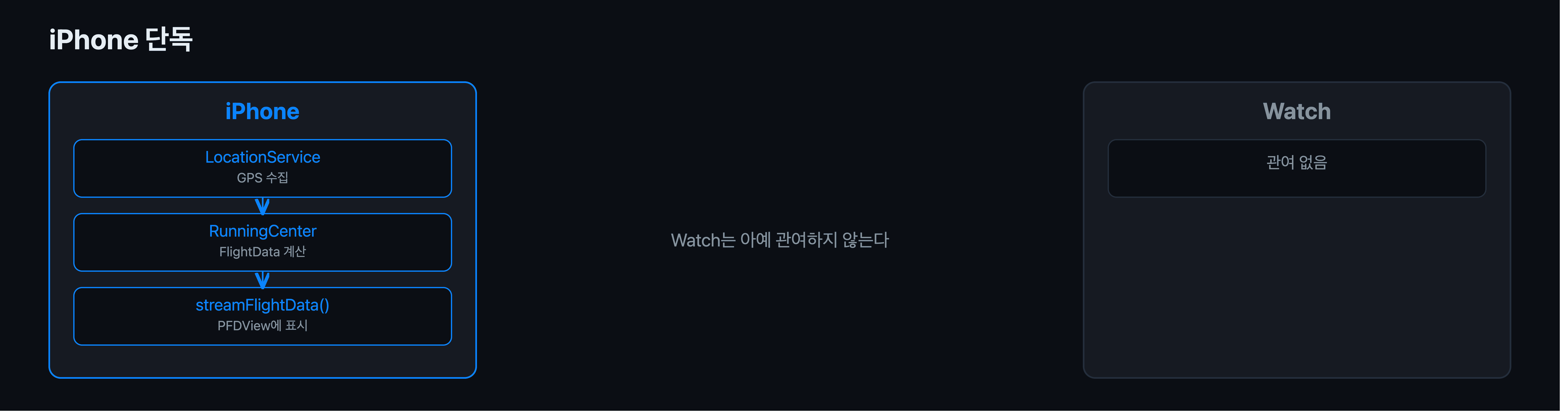
iPhone 단독 러닝은 단순하다. iPhone이 GPS를 직접 수집하고 RunningCenter에서 FlightData를 계산해 PFDView에 표시한다. Watch는 아예 관여하지 않는다.
미러링
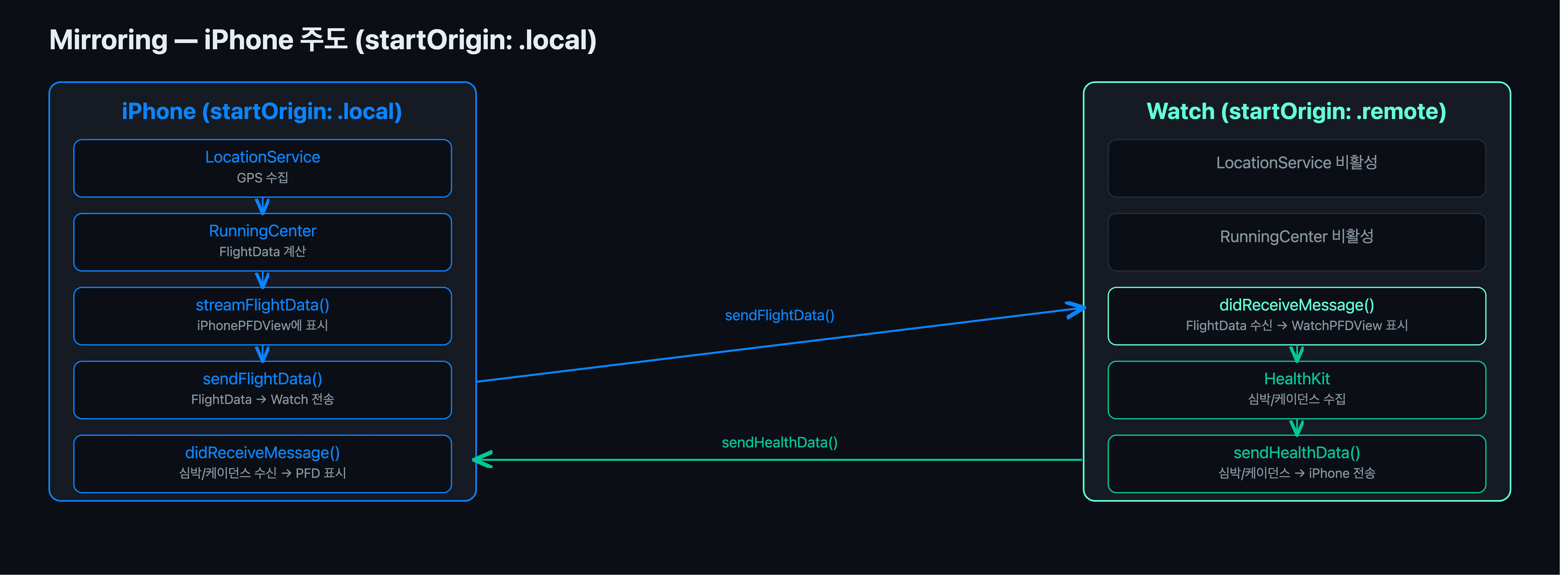
iPhone이 startOrigin: .local이므로 GPS와 RunningCenter를 직접 돌려 FlightData를 계산한다. 계산된 FlightData는 sendFlightData()로 Watch에 전송되고, Watch는 didReceiveMessage()로 받아서 WatchPFDView에 표시만 한다. 심박/케이던스는 Watch가 HealthKit으로 수집해서 sendHealthData()로 iPhone에 보내고, iPhone PFD에 반영된다.
Watch
단독
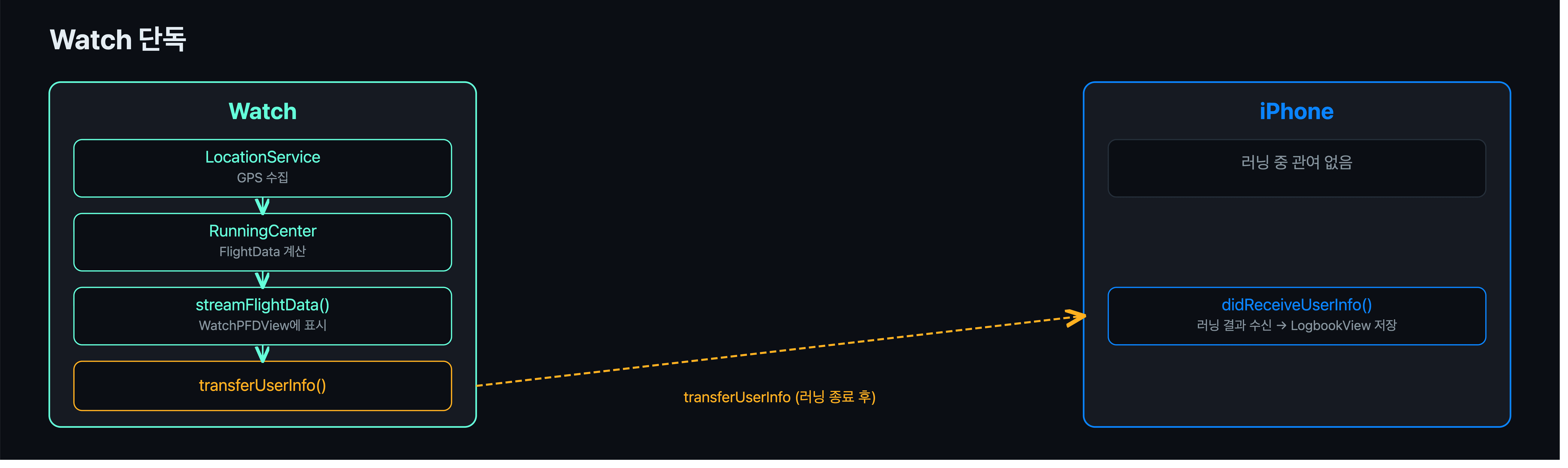
Watch 단독 러닝도 구조는 iPhone과 동일하다. Watch가 GPS를 직접 수집하고 RunningCenter에서 FlightData를 계산해 WatchPFDView에 표시한다. 러닝 중에는 iPhone과 통신하지 않고, 종료 후 transferUserInfo()로 결과를 iPhone에 전달해 LogbookView에 저장한다.
미러링
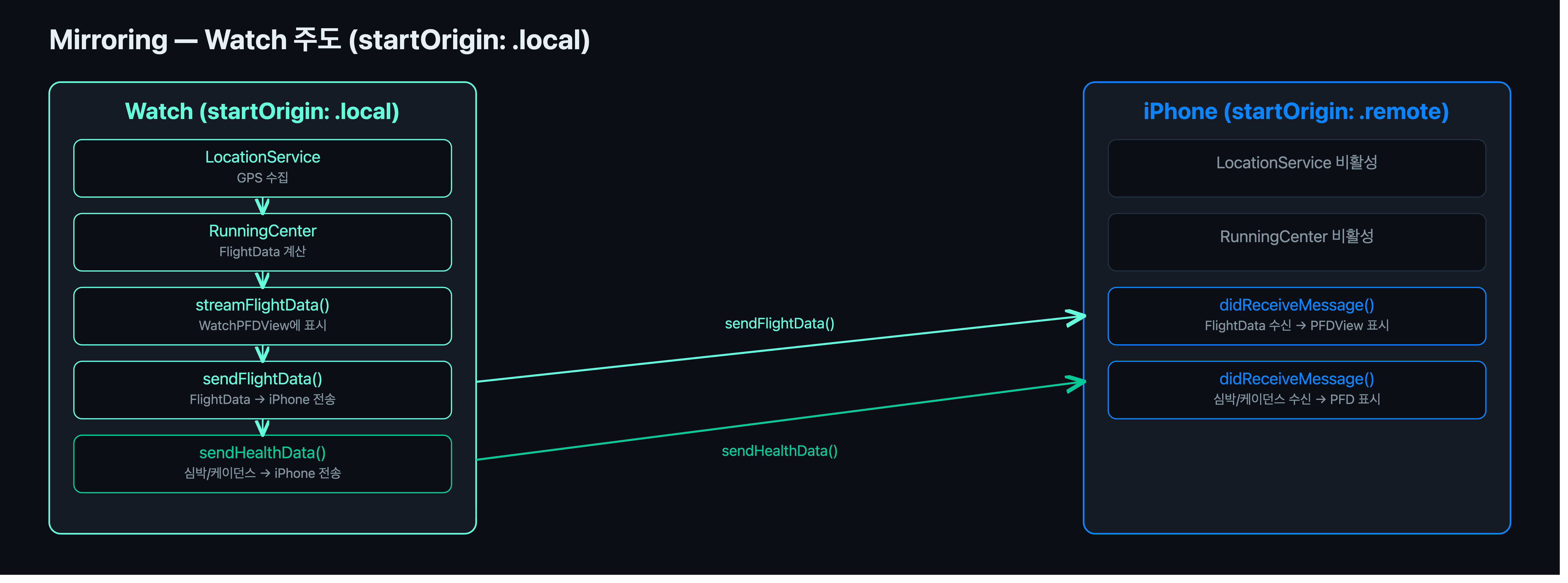
Watch가 startOrigin: .local이므로 GPS와 RunningCenter를 직접 돌려 FlightData를 계산한다. 계산된 FlightData는 sendFlightData()로 iPhone에 전송되고, iPhone은 didReceiveMessage()로 받아서 PFDView에 표시만 한다. 심박/케이던스는 동일하게 Watch → iPhone 방향으로 sendHealthData()를 통해 전달된다.
두 미러링 시나리오 모두 startOrigin이 .local인 기기만 위치 로직을 실행하고, .remote인 기기는 수신과 표시만 담당한다. HealthKit 데이터는 시작 주체와 무관하게 항상 Watch → iPhone 방향을 유지한다.
보완
미러링 중 한 가지 문제가 더 있었다. elapsedTime은 각자 VM의 타이머로 관리하고 있어서, 주도 기기와 미러링 기기가 독립적으로 카운트를 올리게 된다. 네트워크 지연이나 타이밍 차이가 쌓이면 두 기기의 경과 시간이 달라질 수 있다.
해결 방법은 간단하다. 이미 sendFlightData()로 데이터를 보내고 있으니, 딕셔너리에 elapsedTime을 같이 담아 보내고 받는 쪽이 파싱해서 덮어쓰면 된다.
그리고 watchOS 쪽 sendFlightData()에는 throttle이 없었다. iOS 쪽과 동일하게 3초 throttle을 추가하면서 구조도 통일했다.
1
2
3
4
5
6
7
8
9
10
11
12
// sendFlightData - iOS / watchOS 동일하게 적용
func sendFlightData(_ data: FlightData) {
    let now = Date()
    guard now.timeIntervalSince(lastSentTime) >= 3.0 else { return }
    lastSentTime = now

    let message: [String: Any] = [
        // 생략
        "elapsedTime": viewModel?.elapsedTime ?? 0
    ]
    session.sendMessage(message, replyHandler: nil)
}
didReceiveMessage()에서는 다른 값들과 동일하게 먼저 꺼내서 파싱한 후 반영한다. iOS, watchOS 양쪽 동일하게 적용한다.
1
2
3
4
5
6
7
8
9
10
11
12
13
14
if let type = message["type"] as? String, type == "flightData" {
    // 생략
    let elapsedTime = message["elapsedTime"] as? Int ?? 0

    let flightData = FlightData(
        // 생략
    )

    Task { @MainActor in
        vm?.flightData = flightData
        vm?.elapsedTime = elapsedTime
    }
    return
}
이제 주도 기기의 타이머가 기준이 되고, 미러링 기기는 3초마다 동기화되어 두 기기의 경과 시간이 항상 일치한다.