[WWDC21] Meet async/await in Swift
이 글은 WWDC 세션의 transcript 와 영상 화면을 Claude Code 로 정리한 글이고, 실제로 쓴 날은 2026-11-24 다. code 는 세션 page 의 snippet 에 빠진 선언을 채워 Xcode 27.0 (Swift 6.4) 의 iOS 27, watchOS 27 Simulator SDK 로 type check 했다.
세션 정보
- 세션: Meet async/await in Swift
- 길이: 33분 39초
- 공개일: 2021-06-08
- 발표: Nate (Swift team, engineer), Robert
- 코드: 세션 page 의 snippet 11개
한 줄 요약
completion handler 로 쓰던 비동기 code 를 async 와 await 로 쓰면 보통 code 처럼 위에서 아래로 읽히고, 결과를 돌려주지 않는 실수를 compiler 가 막아 준다. 기존 completion handler API 와 delegate API 는 continuation 으로 감싸서 async 함수로 바꿀 수 있다.
세션의 구성
세션은 두 사람이 나누어 진행한다. 앞 절반은 Nate 가 맡아 async/await 가 무엇이고 왜 필요한지를 예제 하나로 설명한다. 뒤 절반은 Robert 가 맡아 기존 앱에 async/await 를 들이는 방법을 다룬다.
| 순서 | 내용 |
|---|---|
| 1 | sync 함수와 async 함수의 차이 |
| 2 | completion handler 로 쓴 thumbnail 받기와 그 문제 |
| 3 | 같은 함수를 async/await 로 다시 쓰기 |
| 4 | async property, async sequence |
| 5 | suspend 와 resume 이 실제로 뜻하는 것 |
| 6 | test, sync 에서 async 로 건너가기, SDK 의 async 대안 |
| 7 | continuation 으로 직접 async 대안 만들기 |
세션은 비동기 code 가 장황하고 복잡하며 틀리기 쉽다는 말로 시작한다. async/await 를 쓰면 비동기 code 를 보통 code 만큼 쉽게 쓸 수 있고, 당시 SDK 에는 await 할 수 있는 method 가 이미 수백 개 들어 있었다.
sync 함수와 async 함수
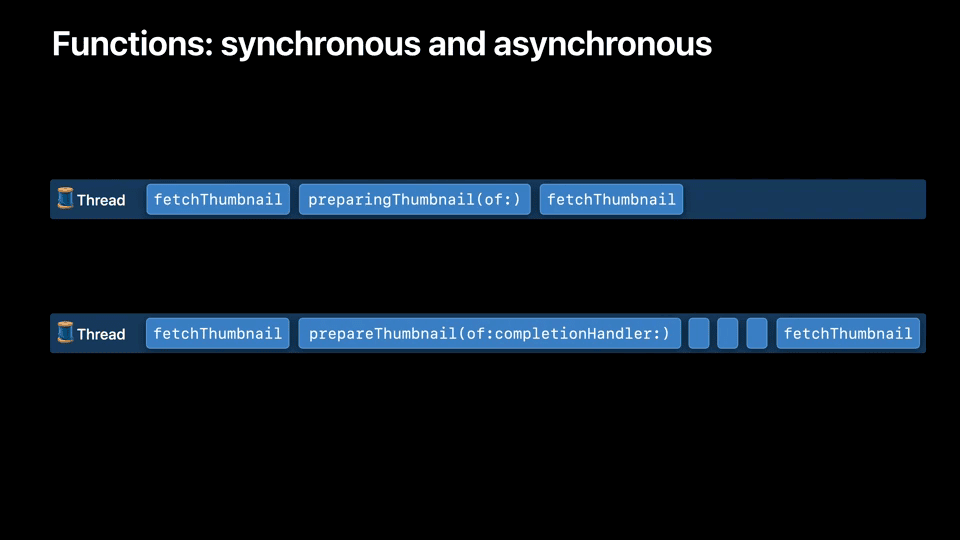
SDK 에는 같은 일을 하는 함수가 sync 와 async 두 형태로 있는 경우가 많다. 세션이 드는 예는 UIKit 의 thumbnail 만들기다. preparingThumbnail(of:) 은 sync 이고 prepareThumbnail(of:completionHandler:) 은 async 다.
 출처: WWDC21 - Meet async/await in Swift
sync 함수를 부르면 그 함수가 끝날 때까지 thread 가 막힌다. 그림의 위쪽 줄처럼 thread 는 thumbnail 이 만들어지는 동안 다른 일을 하지 못한다.
async 함수는 일을 시작해 놓고 thread 를 빨리 풀어 준다. 그림의 아래쪽 줄처럼 thread 는 그 사이에 다른 일을 할 수 있다. 일이 끝났다는 사실은 completion handler, delegate callback, 또는 async 함수의 return 으로 알린다.
completion handler 로 쓴 thumbnail 받기
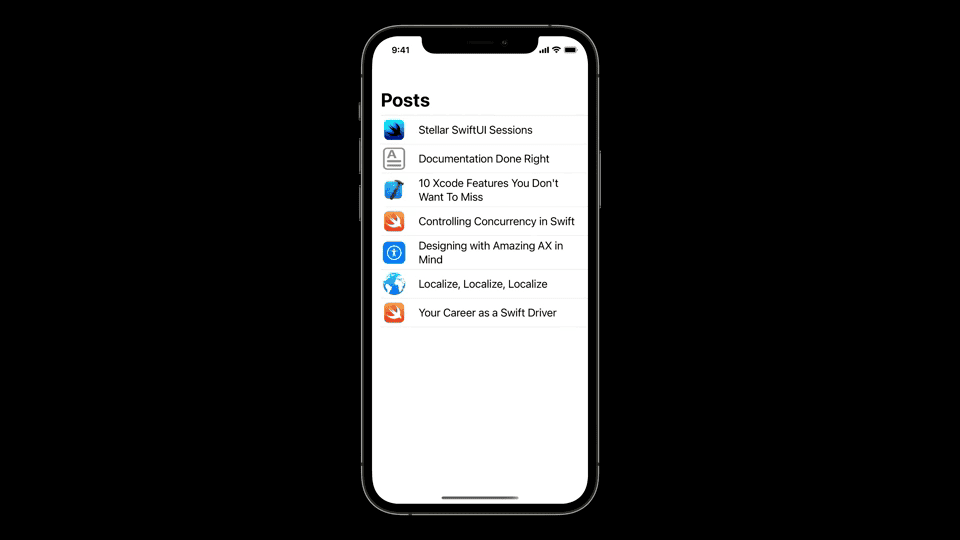
세션 전체가 예제 앱 하나를 따라간다. 목록의 row 마다 server 에 있는 image 의 thumbnail 을 보여 주는 앱이다.
 출처: WWDC21 - Meet async/await in Swift
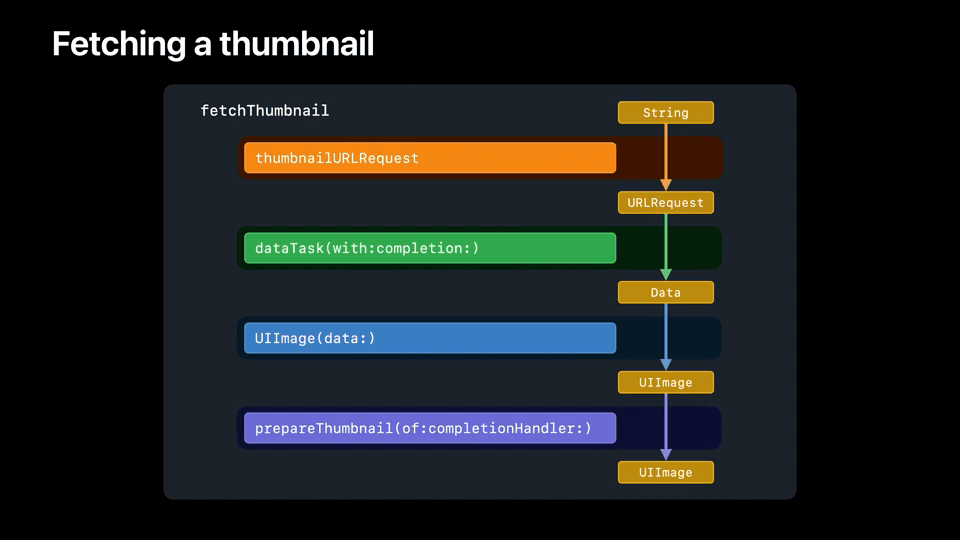
view model 의 fetchThumbnail 이 이 일을 맡는다. image 의 id 인 string 을 받아 UIImage 를 돌려주며, 안에서 네 단계를 거친다.
 출처: WWDC21 - Meet async/await in Swift
| 단계 | 하는 일 | 종류 |
|---|---|---|
thumbnailURLRequest | id 로 URLRequest 를 만든다 | sync |
dataTask | server 에서 data 를 받는다 | async |
UIImage(data:) | data 로 image 를 만든다 | sync |
prepareThumbnail | image 를 thumbnail 크기로 그린다 | async |
각 단계는 앞 단계의 결과가 있어야 하므로 순서대로 실행해야 한다. 금방 끝나는 단계는 sync 로 두고, 오래 걸리는 download 와 thumbnail rendering 은 async 로 한다.
네 단계의 흐름
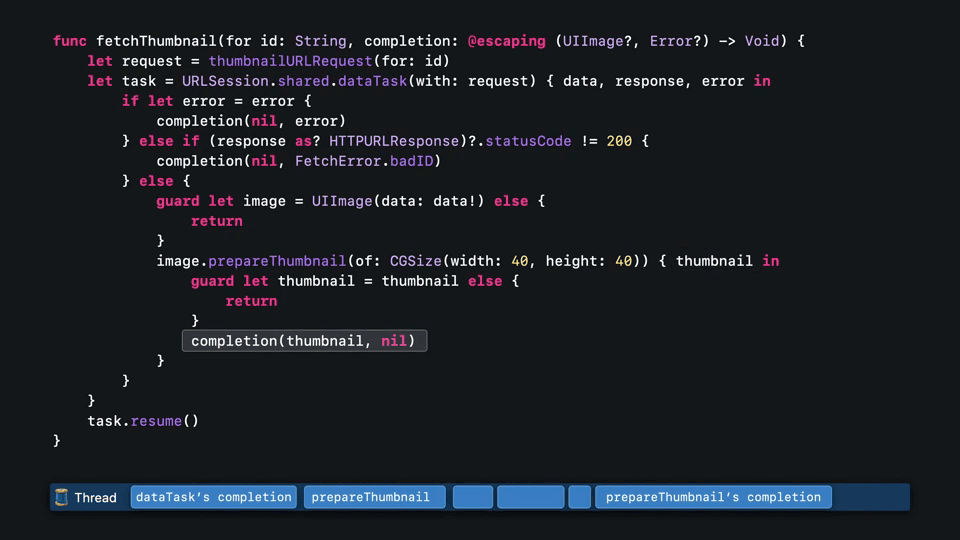
먼저 completion handler 로 쓴 모습이다.
 출처: WWDC21 - Meet async/await in Swift
흐름을 순서대로 적으면 다음과 같다.
thumbnailURLRequest를 부른다. sync 라서 그 자리에서 request 가 나온다.dataTask에 completion handler 를 넘긴다. task 는resume()을 불러야 시작한다. 여기서fetchThumbnail은 return 하고 thread 는 풀려난다.- download 가 끝나면 handler 가 data, response, error 를 optional 로 받는다. error 가 있으면 caller 의 completion 에 error 를 넘긴다.
- error 가 없으면
UIImage(data:)로 image 를 만든다. - image 가 만들어지면
prepareThumbnail에 또 completion handler 를 넘긴다. - thumbnail 이 나오면 caller 의 completion 에 넘긴다.
화면 아래의 thread 그림이 2번과 5번에서 thread 가 풀려나는 모습을 보여 준다.
빠뜨린 completion 호출
이 code 에는 bug 가 있다. 세션은 처음에 일부러 틀린 버전을 보여 준다.
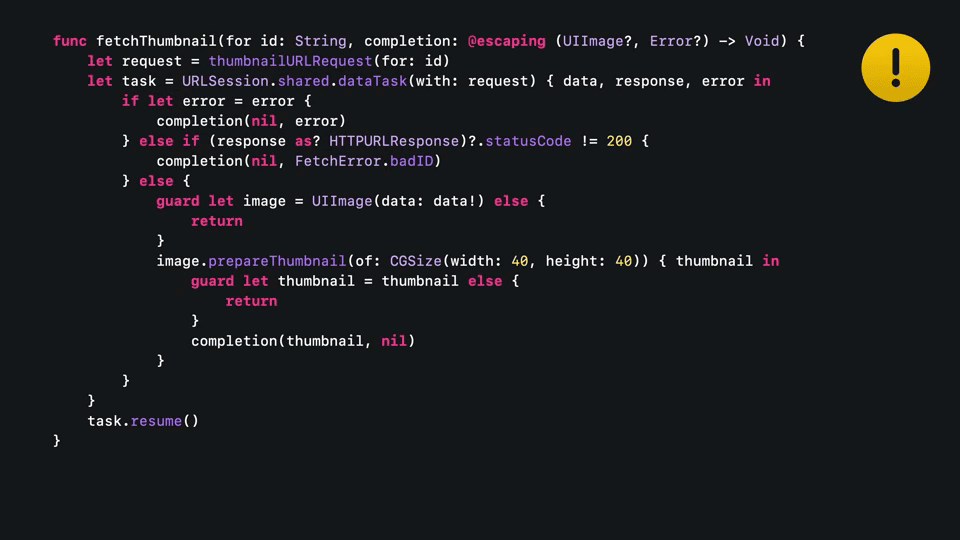 출처: WWDC21 - Meet async/await in Swift
guard 가 실패하는 두 곳에서 completion 을 부르지 않고 return 만 한다. image 를 만들지 못했거나 thumbnail 이 nil 이면 caller 는 영영 통지를 받지 못한다. 앱에서는 그 row 의 spinner 가 끝없이 돈다.
모든 경로에서 caller 에게 결과를 알려야 하는데, 이것을 지키는 일은 전적으로 작성자의 몫이다. 이유는 두 가지다.
- completion handler 안에서는
throw로 error 를 올려보낼 수 없다. - Swift 에는 closure 가 반드시 불리도록 강제하는 방법이 없다. 그래서 compiler 가 빠진 호출을 찾아 주지 못한다.
고친 버전은 다음과 같다. guard 가 실패하는 두 곳에도 completion 호출을 넣었다.
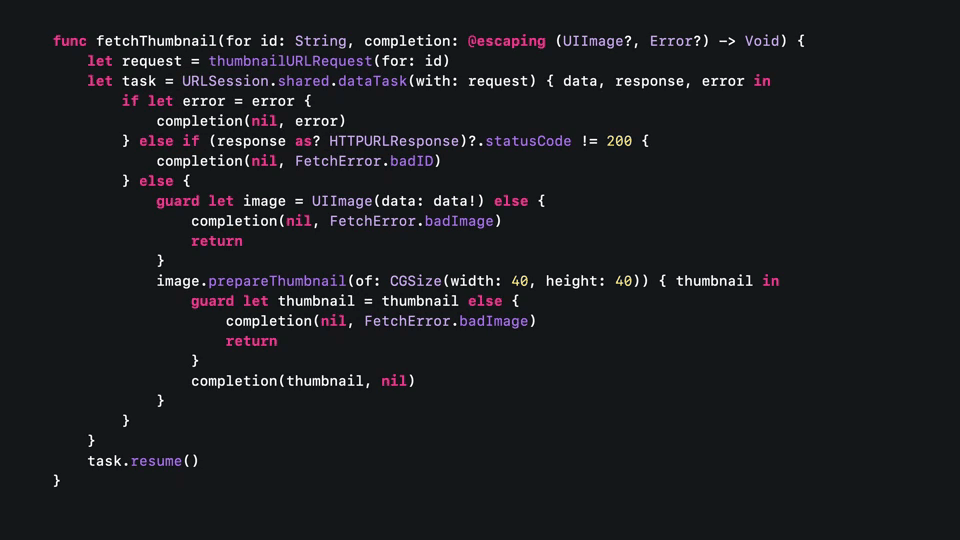 출처: WWDC21 - Meet async/await in Swift
1
2
3
4
5
6
7
8
9
10
11
12
13
14
15
16
17
18
19
20
21
22
23
func fetchThumbnail(for id: String, completion: @escaping (UIImage?, Error?) -> Void) {
    let request = thumbnailURLRequest(for: id)
    let task = URLSession.shared.dataTask(with: request) { data, response, error in
        if let error = error {
            completion(nil, error)
        } else if (response as? HTTPURLResponse)?.statusCode != 200 {
            completion(nil, FetchError.badID)
        } else {
            guard let image = UIImage(data: data!) else {
                completion(nil, FetchError.badImage)
                return
            }
            image.prepareThumbnail(of: CGSize(width: 40, height: 40)) { thumbnail in
                guard let thumbnail = thumbnail else {
                    completion(nil, FetchError.badImage)
                    return
                }
                completion(thumbnail, nil)
            }
        }
    }
    task.resume()
}
dataTask(with:completionHandler:)
dataTask(with:completionHandler:) 는 request 의 내용을 받아 온 뒤 handler 를 부르는 task 를 만드는 URLSession 의 method 다.
세션 page 의 snippet 그대로다. FetchError 와 thumbnailURLRequest(for:) 는 snippet 에 없어서 직접 선언했다. FetchError 는 badID 와 badImage 두 case 를 가진 enum 으로 두었다. Swift 6 language mode 에서는 completion 을 @Sendable closure 가 capture 한다는 warning 이 나오지만 error 는 아니다.
네 가지 일을 순서대로 하려던 것뿐인데 code 는 20줄이 되었고, 세션이 세어 보니 미묘한 bug 가 들어갈 자리가 다섯 곳이다.
Result 로 바꾼 버전
Result 를 쓰면 조금 더 안전해진다. image 와 error 가 둘 다 nil 이거나 둘 다 값이 있는 이상한 상태가 없어지기 때문이다.
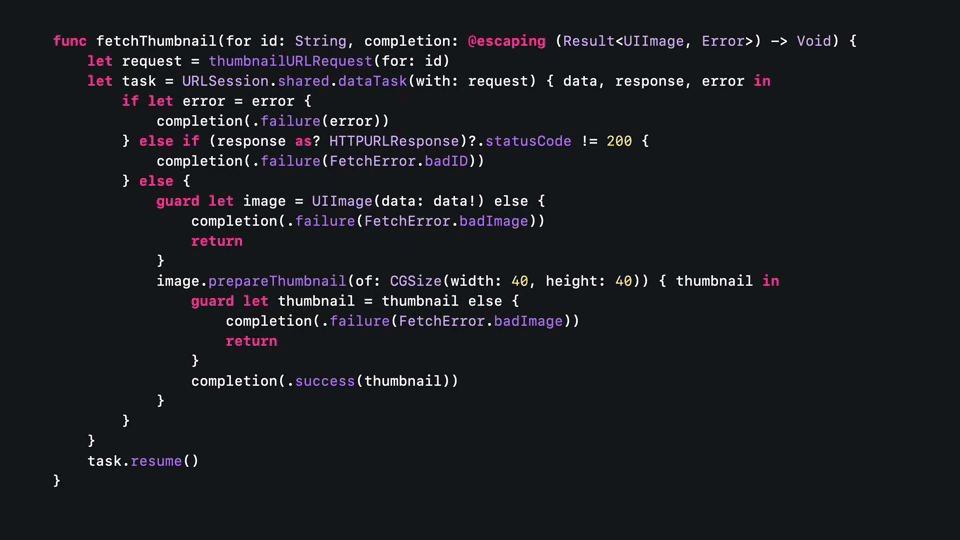 출처: WWDC21 - Meet async/await in Swift
1
2
3
4
5
6
7
8
9
10
11
12
13
14
15
16
17
18
19
20
21
22
23
func fetchThumbnail(for id: String, completion: @escaping (Result<UIImage, Error>) -> Void) {
    let request = thumbnailURLRequest(for: id)
    let task = URLSession.shared.dataTask(with: request) { data, response, error in
        if let error = error {
            completion(.failure(error))
        } else if (response as? HTTPURLResponse)?.statusCode != 200 {
            completion(.failure(FetchError.badID))
        } else {
            guard let image = UIImage(data: data!) else {
                completion(.failure(FetchError.badImage))
                return
            }
            image.prepareThumbnail(of: CGSize(width: 40, height: 40)) { thumbnail in
                guard let thumbnail = thumbnail else {
                    completion(.failure(FetchError.badImage))
                    return
                }
                completion(.success(thumbnail))
            }
        }
    }
    task.resume()
}
Result
Result 는 성공한 값이나 실패한 error 중 하나를 담는 enum 이다.
세션의 평가는 냉정하다. 조금 안전해지는 대신 code 는 더 못생겨지고 조금 더 길어진다. future 같은 기법으로 비동기 code 를 다듬은 사람들도 있었지만, 쉽고 간단하면서 안전한 code 까지 주는 방법은 없었다고 말한다.
async/await 로 다시 쓰기
같은 함수를 async/await 로 쓰면 signature 부터 달라진다.
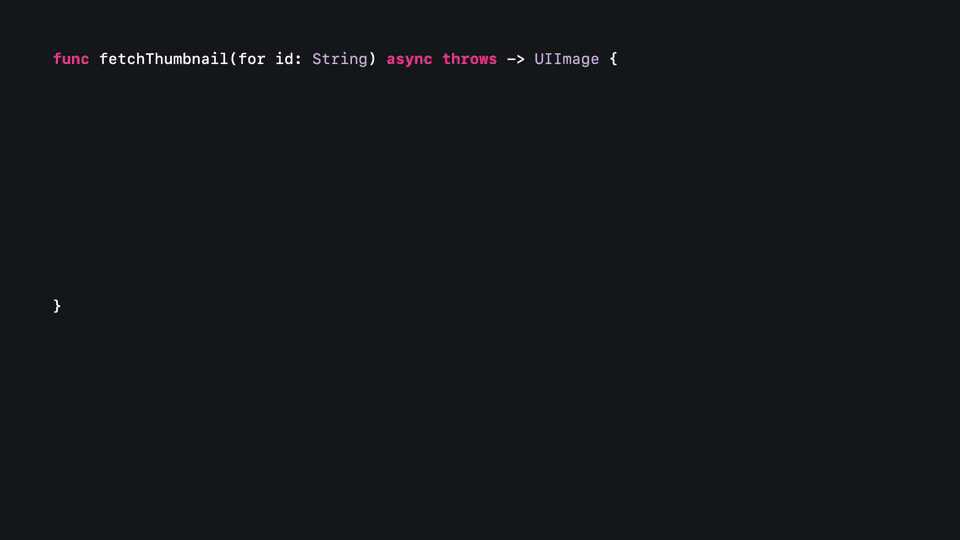 출처: WWDC21 - Meet async/await in Swift
completion parameter 가 사라지고 return type 이 UIImage 가 된다. 성공하면 thumbnail 을 return 하고 실패하면 error 를 throw 한다.
async 와 await 란?
async 는 함수 signature 에 붙이는 keyword 로, 이 함수가 실행 도중에 멈췄다가 나중에 이어질 수 있다는 표시다. 위치는 throws 바로 앞이다. throw 하지 않는 함수라면 화살표 앞에 쓴다.
await 는 호출하는 쪽에 붙이는 keyword 로, 이 자리에서 함수가 멈출 수 있다는 표시다. async 함수를 부를 때는 await 를 붙여야 한다.
throws 와 try 의 관계와 같다고 보면 된다. 함수 쪽에 throws 를 쓰면 부르는 쪽에 try 를 쓰듯이, 함수 쪽에 async 를 쓰면 부르는 쪽에 await 를 쓴다.
한 줄씩 따라가기
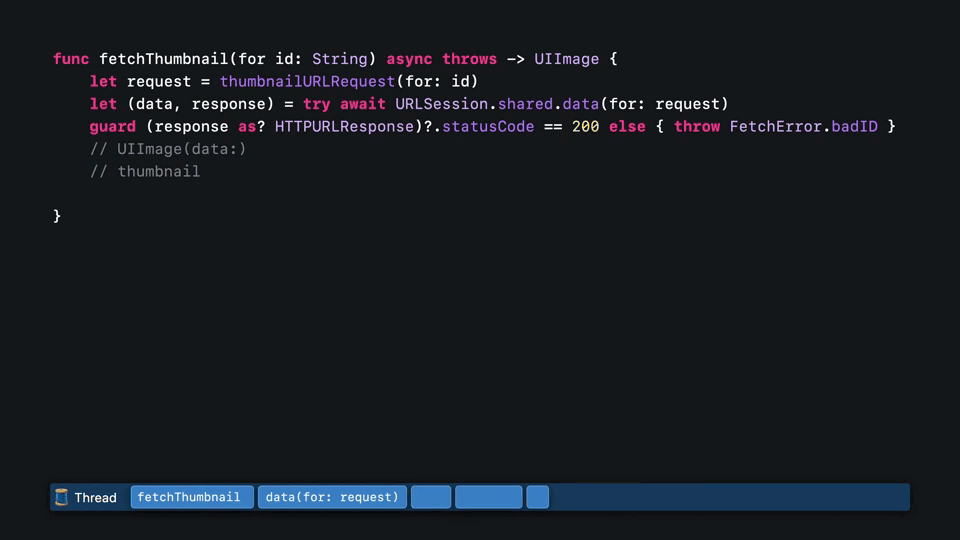
함수의 첫 줄은 전과 같다. thumbnailURLRequest 는 sync 함수라서 일하는 동안 thread 가 막힌다.
둘째 줄에서 download 를 시작한다. 여기서 쓰는 data(for:) 는 dataTask 와 달리 await 할 수 있는 method 다.
 출처: WWDC21 - Meet async/await in Swift
data(for:) 는 불린 뒤 금방 자신을 suspend 해서 thread 를 풀어 준다. 화면 아래의 thread 그림에서 data(for: request) 뒤에 빈 구간이 생긴 것이 그 모습이다. thread 는 그동안 다른 일을 할 수 있다.
 출처: WWDC21 - Meet async/await in Swift
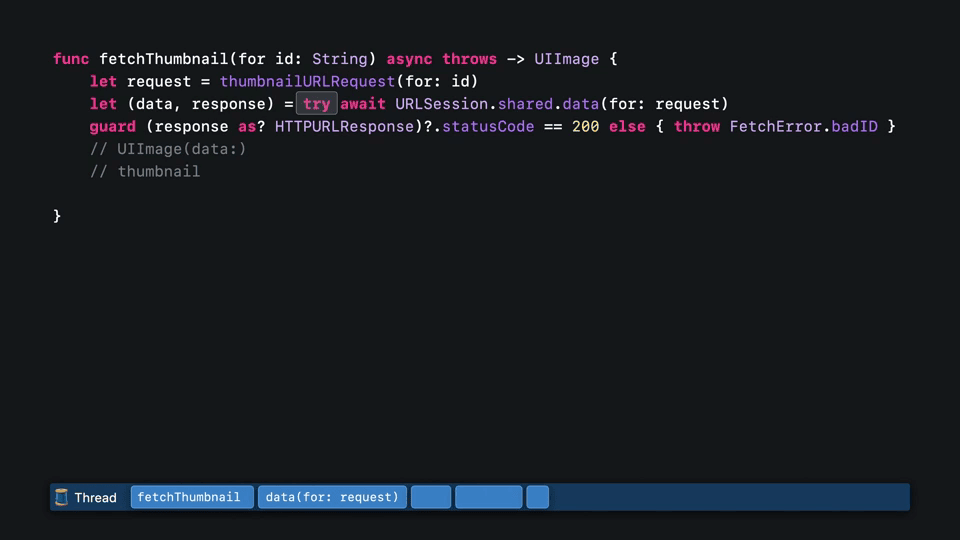
이 줄에는 keyword 가 둘 붙는다.
try는data(for:)가 throws 라서 붙는다.await는data(for:)가 async 라서 붙는다.
한 expression 안에 async 호출이 여러 개 있어도 await 는 한 번만 쓰면 된다. try 가 그런 것과 같다. 둘을 함께 쓸 때 순서는 try await 다.
download 가 끝나면 fetchThumbnail 이 resume 한다. 값이 나왔으면 data 와 response 에 들어가고, error 가 났으면 그 error 가 fetchThumbnail 밖으로 throw 된다. completion handler 버전에서 손으로 하던 error 전달이 try 한 단어로 끝난다.
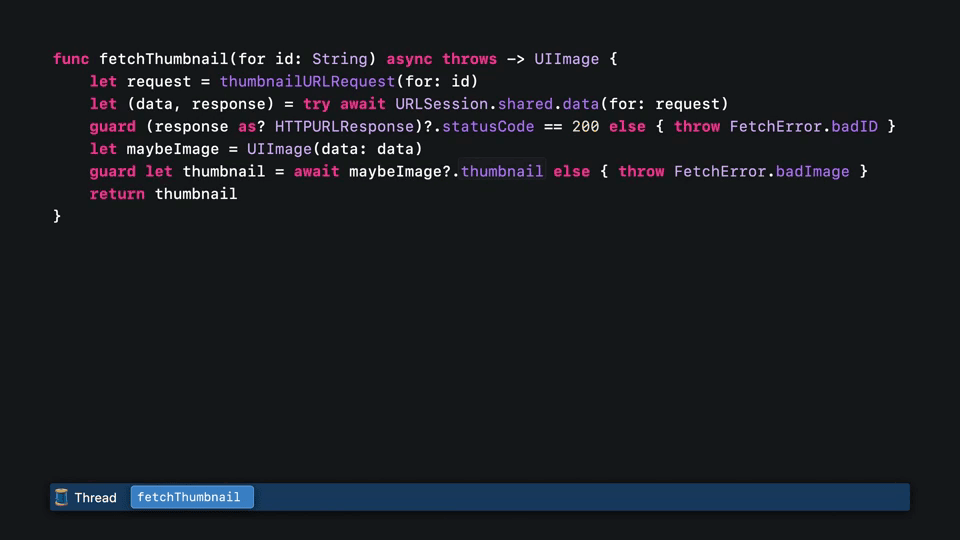
나머지 줄도 같은 식이다. UIImage(data:) 로 image 를 만들고, image 의 thumbnail property 를 await 한다. thumbnail 이 없으면 error 를 throw 한다.
 출처: WWDC21 - Meet async/await in Swift
1
2
3
4
5
6
7
8
func fetchThumbnail(for id: String) async throws -> UIImage {
    let request = thumbnailURLRequest(for: id)
    let (data, response) = try await URLSession.shared.data(for: request)
    guard (response as? HTTPURLResponse)?.statusCode == 200 else { throw FetchError.badID }
    let maybeImage = UIImage(data: data)
    guard let thumbnail = await maybeImage?.thumbnail else { throw FetchError.badImage }
    return thumbnail
}
data(for:delegate:)
data(for:delegate:) 는 request 의 내용을 받아 (Data, URLResponse) 로 돌려주는 URLSession 의 async method 다. delegate 에는 기본값이 있어서 data(for:) 로 부를 수 있다.
세션 page 의 snippet 그대로이고 Swift 6 language mode 에서도 warning 없이 통과한다.
completion handler 버전과 비교하면 차이가 뚜렷하다.
| completion handler | async/await | |
|---|---|---|
| 줄 수 | 약 20줄 | 6줄 |
| 모양 | closure 가 두 겹으로 들어감 | 위에서 아래로 한 줄씩 |
| error 전달 | 경로마다 직접 completion 호출 | try 와 throw |
| 결과를 빠뜨렸을 때 | compiler 가 모름 | compile 이 안 됨 |
마지막 줄이 핵심이다. async throws -> UIImage 로 선언한 함수는 모든 경로에서 값을 return 하거나 error 를 throw 해야 하고, 이것은 Swift 가 원래부터 검사하는 규칙이다. 그래서 조용히 실패하는 경로가 생길 수 없다.
async property 와 async sequence
async 는 함수에만 붙는 것이 아니다. 세션은 property, initializer, for loop 에서도 쓸 수 있다고 짚는다.
async property
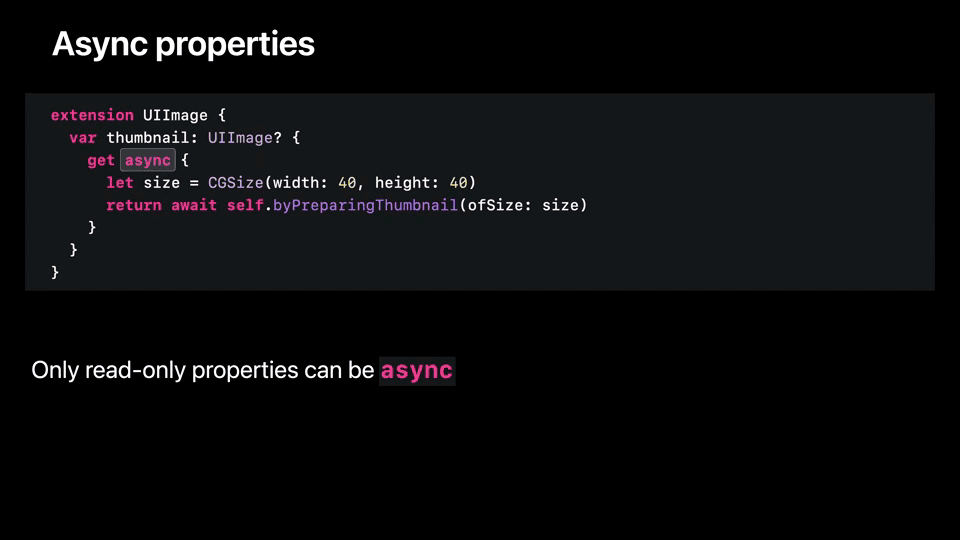
앞의 code 에 나온 thumbnail 은 SDK 에 있는 property 가 아니다. Robert 가 UIImage extension 에 직접 더한 것이다.
 출처: WWDC21 - Meet async/await in Swift
1
2
3
4
5
6
7
8
extension UIImage {
    var thumbnail: UIImage? {
        get async {
            let size = CGSize(width: 40, height: 40)
            return await self.byPreparingThumbnail(ofSize: size)
        }
    }
}
byPreparingThumbnail(ofSize:)
byPreparingThumbnail(ofSize:) 는 앞에서 본 prepareThumbnail(of:completionHandler:) 의 async 형태로, 지정한 크기의 thumbnail 을 return 한다. Apple 문서에서 이 이름으로 된 page 는 찾지 못했다.
세션 page 의 snippet 그대로다. async property 에는 규칙이 둘 있다.
- getter 를 명시해서
get async라고 써야 한다. Swift 5.5 부터는 property getter 도 throw 할 수 있고, 둘 다 붙일 때는 함수처럼async가throws앞에 온다. - setter 가 있으면 안 된다. read-only property 만 async 가 될 수 있다.
initializer 도 async 로 만들 수 있다고 세션은 덧붙인다.
async sequence
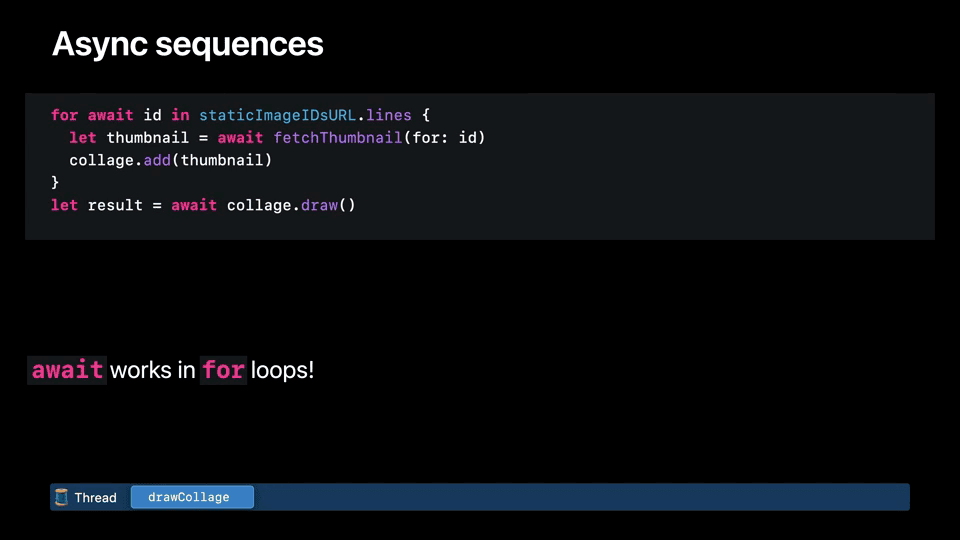
for await 로 async sequence 를 순회할 수 있다.
 출처: WWDC21 - Meet async/await in Swift
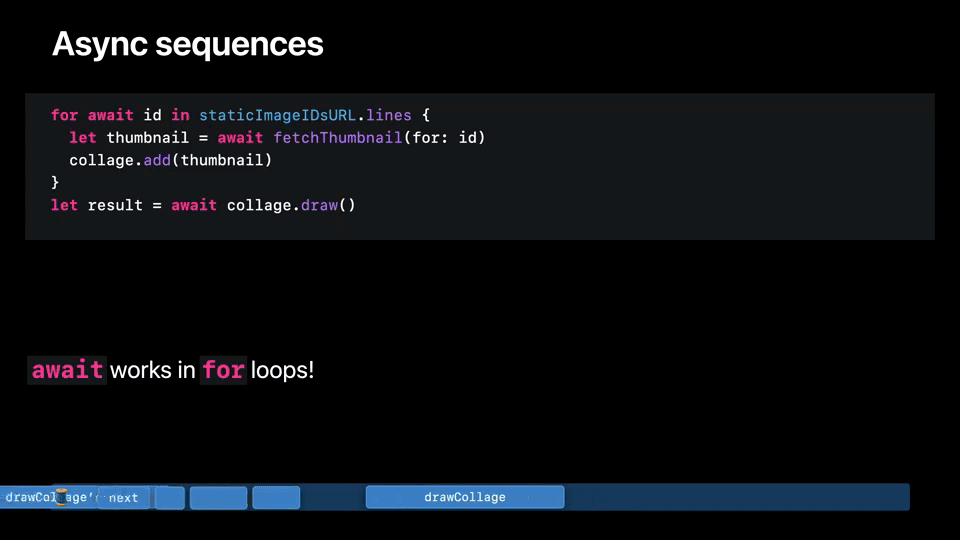
async sequence 는 보통의 sequence 와 같되 element 를 비동기로 내놓는다. 그래서 다음 element 를 기다리는 동안 함수가 suspend 할 수 있다.
 출처: WWDC21 - Meet async/await in Swift
화면 아래의 thread 그림처럼 element 를 기다리는 사이사이에 thread 가 풀려난다. element 가 도착하면 그 element 로 loop body 를 실행하고, 더 이상 element 가 없으면 loop 다음 줄에서 resume 한다.
1
2
3
4
5
6
7
8
9
func drawCollage(staticImageIDsURL: URL) async throws -> UIImage? {
    var collage = Collage()
    for try await id in staticImageIDsURL.lines {
        let thumbnail = try await fetchThumbnail(for: id)
        collage.add(thumbnail)
    }
    let result = await collage.draw()
    return result
}
lines
lines 는 URL 의 내용을 한 줄씩 비동기로 내놓는 AsyncLineSequence 를 돌려주는 URL 의 property 다.
이 code 는 세션 page 의 snippet 과 다르다. snippet 은 for await 와 await fetchThumbnail(for:) 로 쓰여 있는데, 그대로는 “call can throw, but it is not marked with ‘try’” error 가 두 곳에서 난다. lines 의 순회와 fetchThumbnail 이 둘 다 throw 할 수 있기 때문이다. 그래서 두 곳에 try 를 붙였고, 조각을 함수로 감쌌으며, snippet 에 없는 Collage type 은 직접 만들었다.
async sequence 는 Meet AsyncSequence 세션이, 여러 async 작업을 동시에 돌리는 방법은 Explore structured concurrency in Swift 세션이 자세히 다룬다고 세션은 안내한다.
suspend 와 resume
여기까지는 문법이었고, 세션은 이어서 async 함수가 멈춘다는 말이 정확히 무슨 뜻인지를 그림으로 설명한다.
보통 함수의 호출
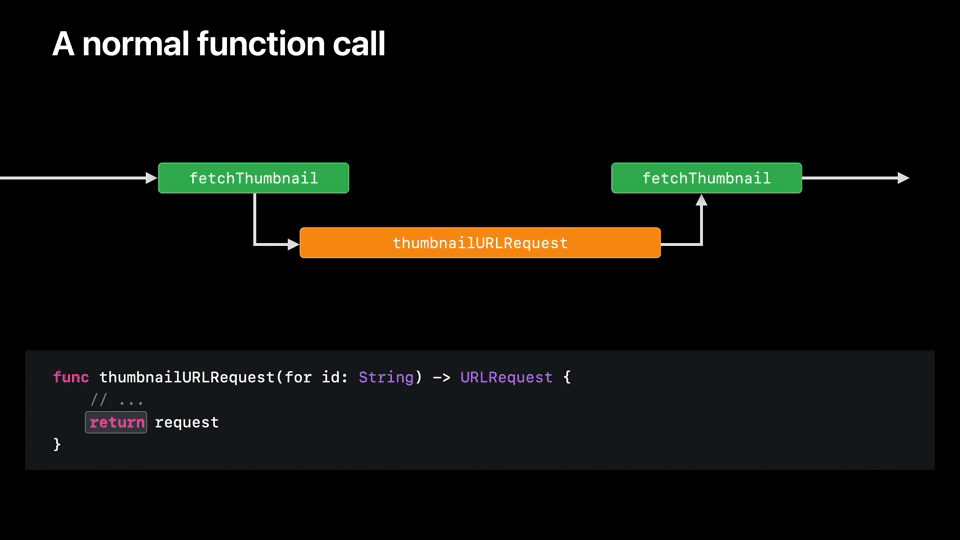
보통 함수를 부르면 caller 는 thread 의 제어를 그 함수에 넘긴다.
 출처: WWDC21 - Meet async/await in Swift
fetchThumbnail 이 thumbnailURLRequest 를 부르면 thread 는 thumbnailURLRequest 의 일만 한다. 이 함수가 제어를 내놓는 방법은 끝나는 것 하나뿐이다. return 하거나 throw 하면 제어가 caller 로 돌아온다.
suspend 란?
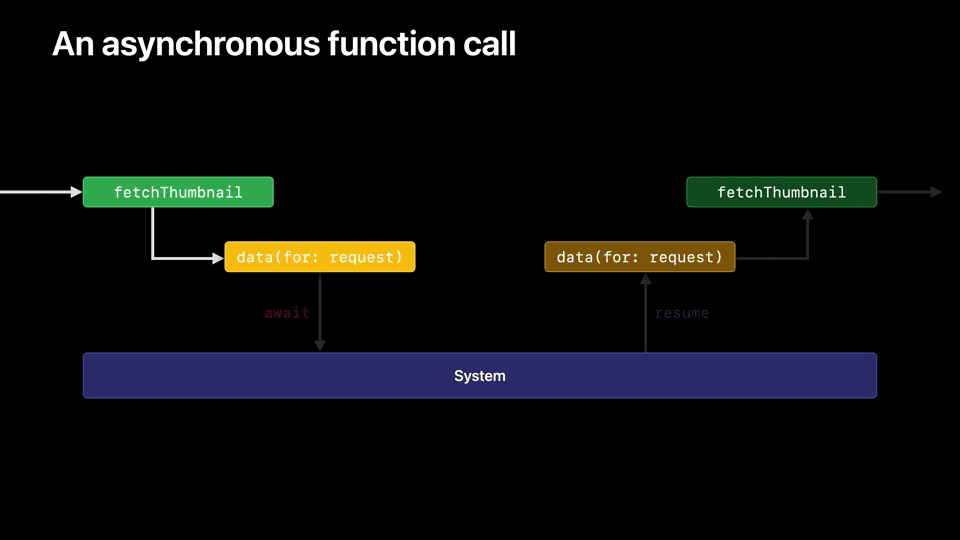
suspend 는 async 함수가 끝나지 않은 채로 thread 를 내놓는 것이다. async 함수는 끝나는 것 말고도 이 방법으로 제어를 넘길 수 있다.
 출처: WWDC21 - Meet async/await in Swift
보통 함수와 다른 점은 제어가 가는 곳이다. suspend 하면 제어는 caller 가 아니라 system 으로 간다. 그리고 그 함수를 await 하던 caller 도 함께 suspend 한다.
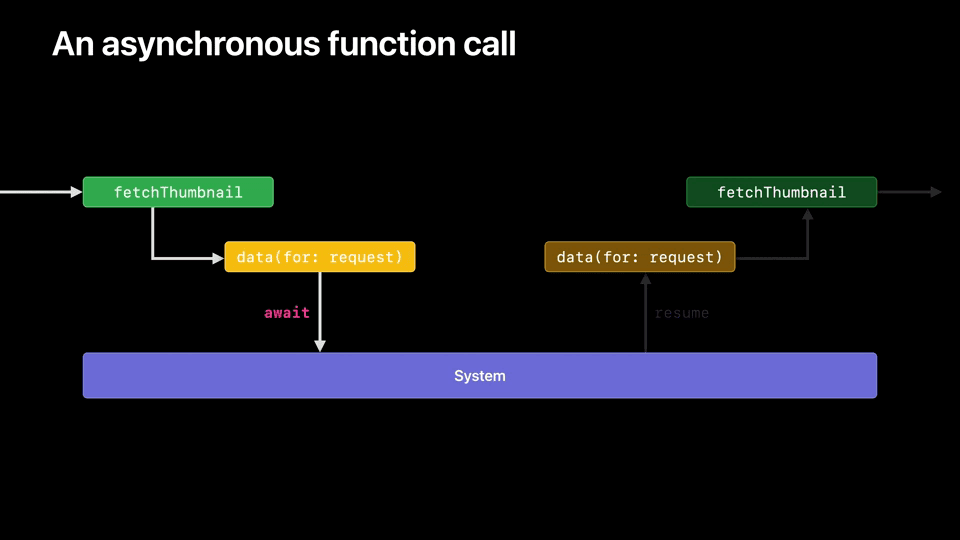 출처: WWDC21 - Meet async/await in Swift
thread 를 넘겨받은 system 은 그 thread 로 다른 일을 한다. 그러다 suspend 한 함수를 이어서 실행하는 것이 가장 중요하다고 판단하는 때에 그 함수를 resume 한다.
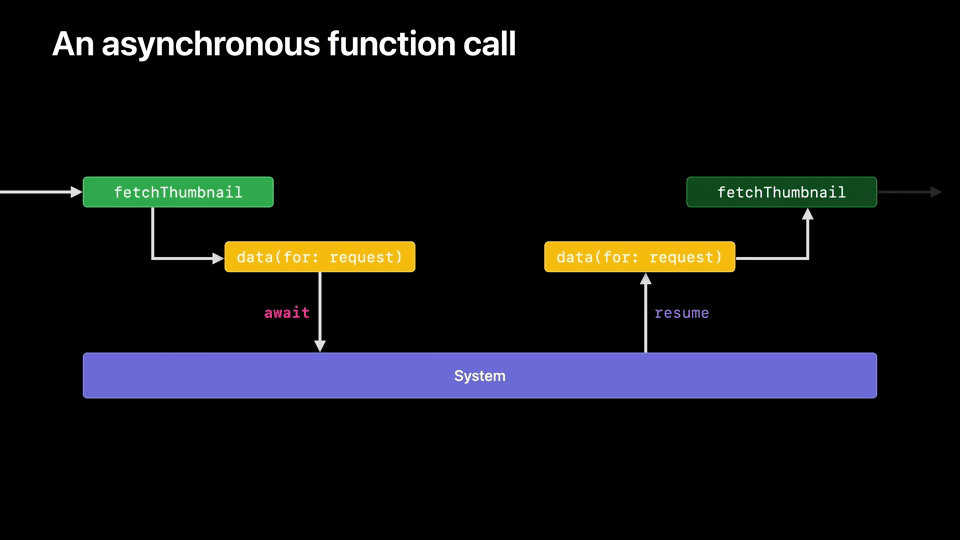 출처: WWDC21 - Meet async/await in Swift
resume 한 함수는 멈춘 자리에서 계속 실행하고, 끝나면 결과가 fetchThumbnail 로 돌아온다.
여기에 세션이 붙이는 주의가 있다. async 함수는 여러 번 suspend 할 수도 있고 한 번도 suspend 하지 않을 수도 있다. async 가 붙었다고 반드시 suspend 하는 것은 아니다. 마찬가지로 await 가 있다고 그 자리에서 반드시 suspend 하는 것도 아니다. await 는 멈출 수 있는 자리라는 뜻이다.
suspend 하는 동안 일어나는 일
data(for:) 가 suspend 하면 system 은 download 를 schedule 한다. 하지만 그 일이 바로 시작된다는 보장은 없다.
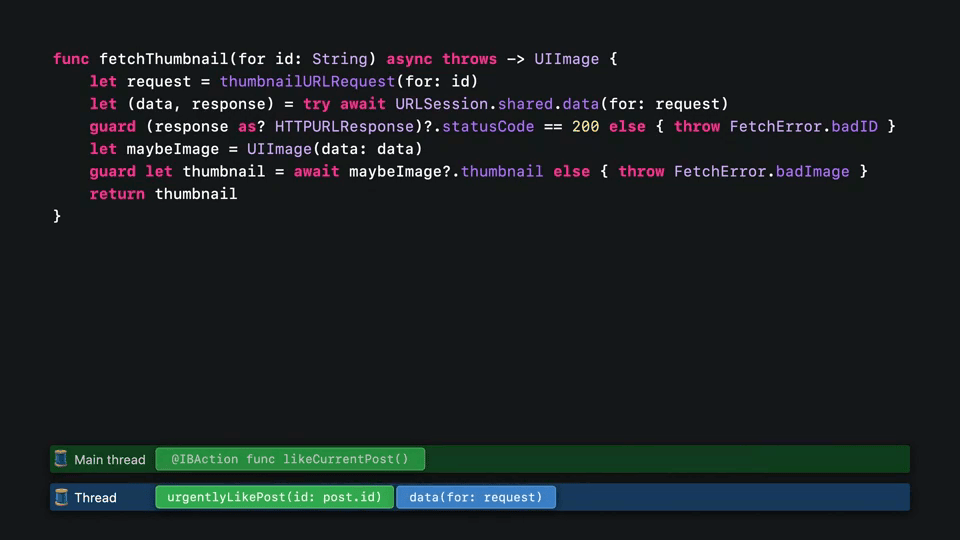 출처: WWDC21 - Meet async/await in Swift
세션의 예는 이렇다. download 를 기다리는 사이에 사용자가 어떤 post 에 reaction 을 달았고, 그 reaction 을 upload 하는 일이 새로 생겼다. system 은 나중에 들어온 이 일을 먼저 실행해도 된다. 화면의 thread 그림에서 upload 가 data(for: request) 보다 앞에 놓인 것이 그 상황이다.
Swift 가 async 호출마다 await 를 쓰게 하는 이유가 여기에 있다.
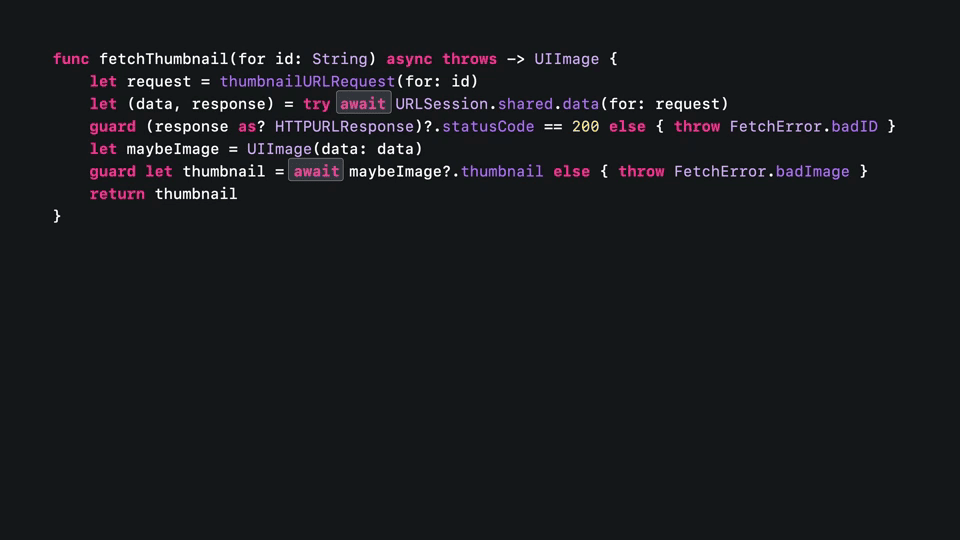 출처: WWDC21 - Meet async/await in Swift
함수가 suspend 한 동안 앱의 state 는 크게 바뀔 수 있다. completion handler 도 사정은 같지만 그쪽은 들여쓰기가 달라지니 눈에 보인다. async/await code 는 한 줄씩 곧게 이어지기 때문에 그런 표지가 없다. 그래서 await 가 표지 역할을 한다. await 가 있는 block 은 하나의 transaction 처럼 한 번에 실행되지 않는다.
하나가 더 있다. 함수는 suspend 하기 전과 전혀 다른 thread 에서 resume 할 수 있다. 이것이 왜 문제가 되고 어떻게 다루는지는 Protect mutable state with Swift actors 세션의 주제다.
네 가지 사실
Nate 는 여기까지를 네 줄로 정리한다.
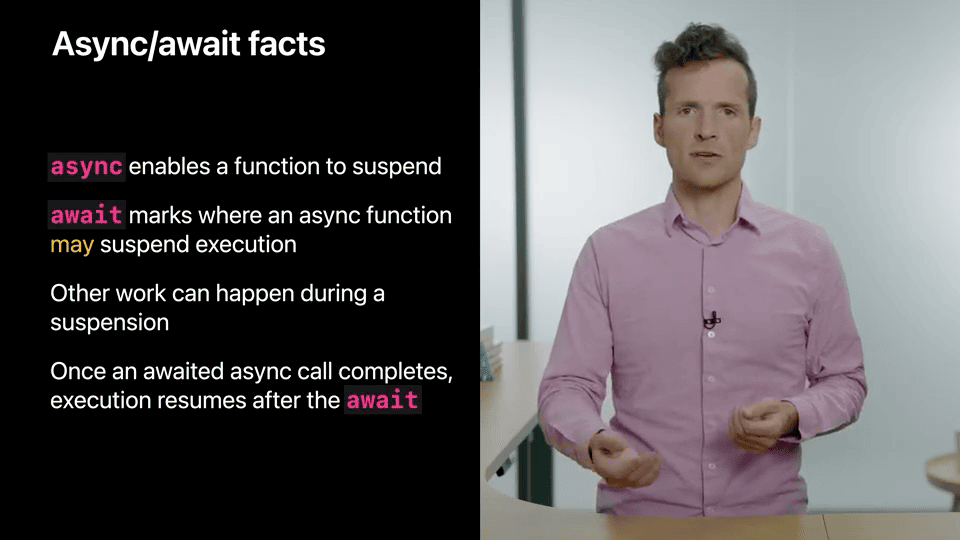 출처: WWDC21 - Meet async/await in Swift
| 사실 | 따라오는 것 | |
|---|---|---|
| 1 | async 는 함수가 suspend 할 수 있게 한다 | 함수가 suspend 하면 caller 도 suspend 하므로 caller 도 async 여야 한다 |
| 2 | await 는 suspend 할 수 있는 자리를 표시한다 | 실제로 멈출지는 실행해 봐야 안다 |
| 3 | suspend 한 동안 thread 는 막히지 않는다 | system 이 다른 일을 실행할 수 있고, 나중에 시작된 일이 먼저 실행될 수도 있다. 그래서 앱의 state 가 바뀔 수 있다 |
| 4 | async 함수가 끝나면 await 한 자리에서 이어진다 | 결과가 원래 함수로 흘러 들어오고 다음 줄부터 계속한다 |
앱에 들이기
여기서부터는 Robert 가 맡는다. 예제 앱을 async/await 로 옮기면서 만나는 일들을 순서대로 다룬다.
async code 의 test
XCTest 는 async 를 바로 지원한다. 먼저 completion handler 버전을 test 하던 방식이다.
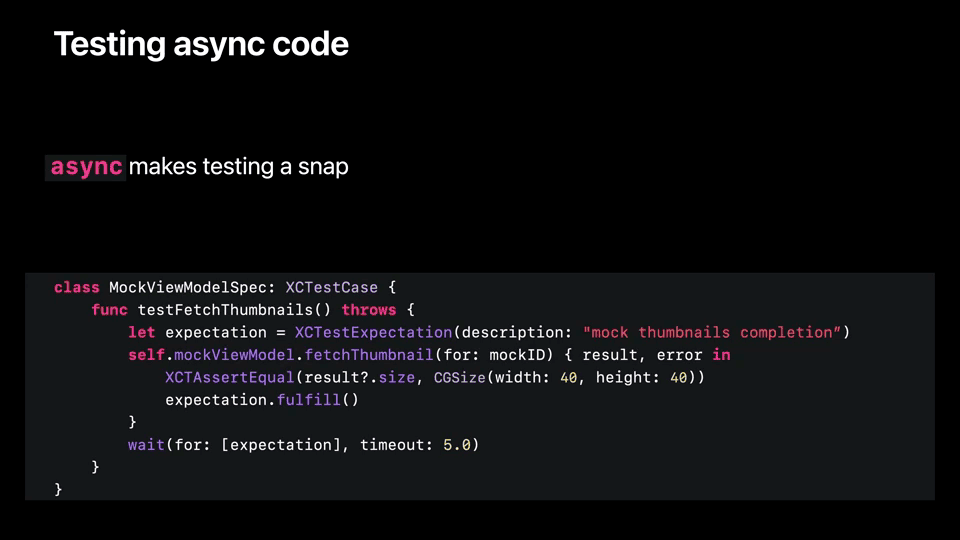 출처: WWDC21 - Meet async/await in Swift
1
2
3
4
5
6
7
8
9
10
11
12
class MockViewModelSpec: XCTestCase {
    let mockViewModel = MockViewModel()

    func testFetchThumbnails() throws {
        let expectation = XCTestExpectation(description: "mock thumbnails completion")
        self.mockViewModel.fetchThumbnail(for: mockID) { result, error in
            XCTAssertNil(error)
            expectation.fulfill()
        }
        wait(for: [expectation], timeout: 5.0)
    }
}
XCTestExpectation
XCTestExpectation 은 비동기 test 에서 기대하는 결과 하나를 나타내는 class 다. fulfill() 로 채우고 wait(for:timeout:) 으로 기다린다.
expectation 을 만들고, completion 안에서 fulfill 하고, 바깥에서 기다리는 세 가지가 필요하다. async 버전은 이것이 다 사라진다.
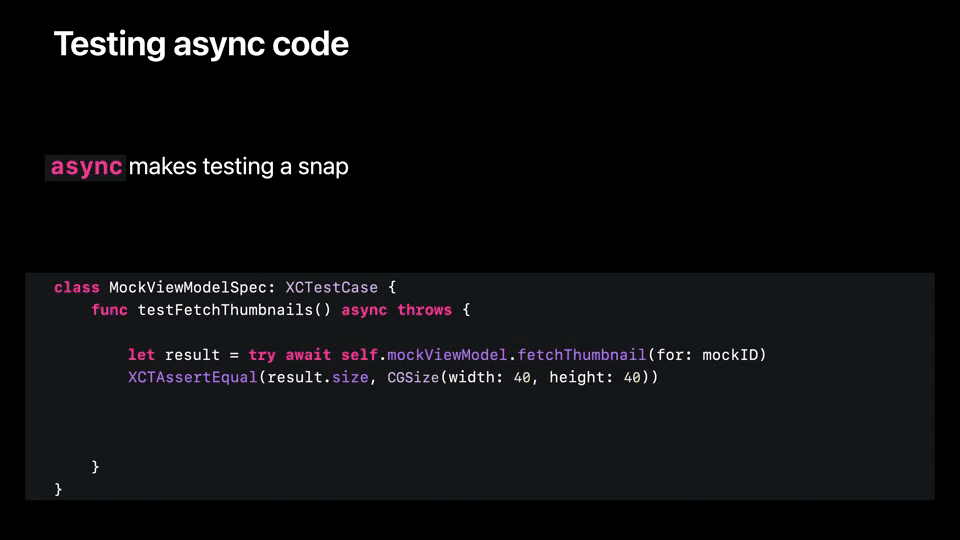 출처: WWDC21 - Meet async/await in Swift
1
2
3
4
5
6
7
8
class MockViewModelSpec: XCTestCase {
    let mockViewModel = MockViewModel()

    func testFetchThumbnails() async throws {
        let result = try await self.mockViewModel.fetchThumbnail(for: mockID)
        XCTAssertEqual(result.size, CGSize(width: 40, height: 40))
    }
}
test 함수에 async 를 붙이고 결과를 await 하면 된다.
두 code 모두 snippet 에 없는 MockViewModel 과 mockID 를 직접 선언했다. async 버전은 세션 page 의 snippet 이 아니라 영상 화면의 code 를 옮긴 것이다. page 의 snippet 은 XCTAssertNoThrow(try await …) 형태인데, 이것은 “‘async’ call in an autoclosure that does not support concurrency” error 로 통과하지 않는다. XCTAssertNoThrow 가 인자를 async 가 아닌 autoclosure 로 받기 때문이다.
sync 에서 async 로 건너가기
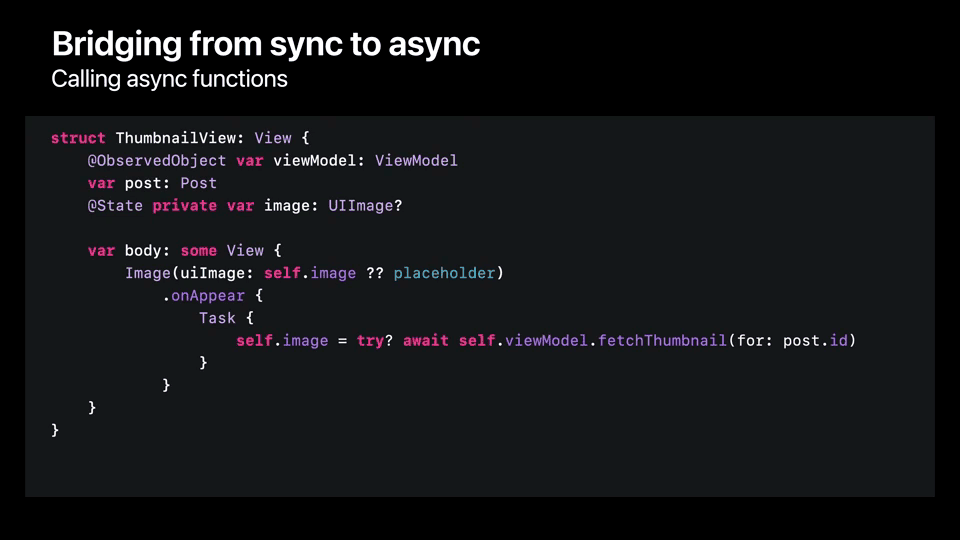
다음은 SwiftUI view 다. onAppear 에서 completion handler 버전을 부르던 code 를 try? await 로 바꾸면 compile 이 되지 않는다.
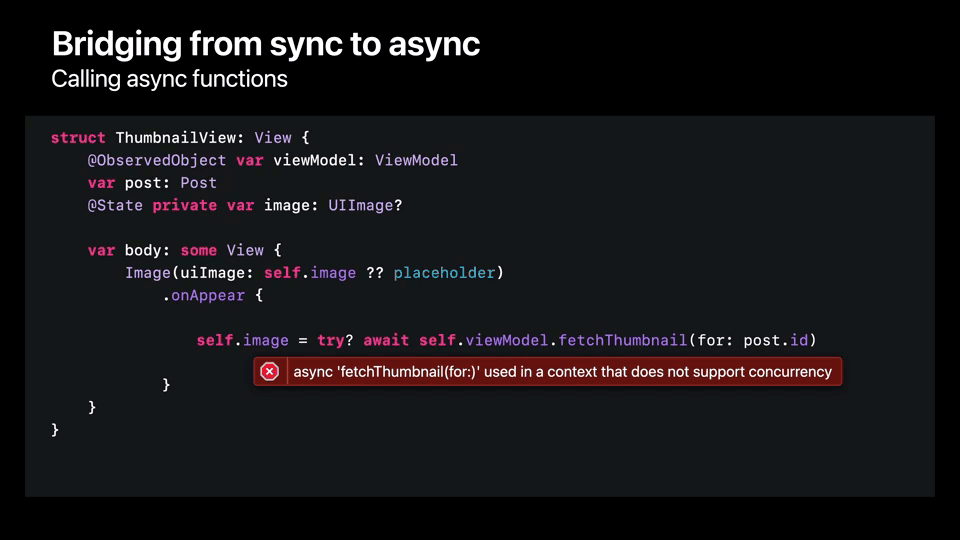 출처: WWDC21 - Meet async/await in Swift
compiler 는 concurrency 를 지원하지 않는 context 에서 async 함수를 썼다고 알린다. onAppear 가 받는 closure 는 async 가 아니기 때문이다. 네 가지 사실의 1번대로, async 함수를 부르려면 부르는 쪽도 async 여야 한다.
해결은 Task 로 감싸는 것이다.
 출처: WWDC21 - Meet async/await in Swift
1
2
3
4
5
6
7
8
9
10
11
12
13
14
struct ThumbnailView: View {
    @ObservedObject var viewModel: ViewModel
    var post: Post
    @State private var image: UIImage?

    var body: some View {
        Image(uiImage: self.image ?? placeholder)
            .onAppear {
                Task {
                    self.image = try? await self.viewModel.fetchThumbnail(for: post.id)
                }
            }
    }
}
Task
Task 는 비동기 작업의 단위다. closure 를 넘겨 만들면 그 closure 가 새 task 로 실행되므로 sync code 안에서 async 함수를 부를 수 있다.
세션 page 의 snippet 그대로이고, ViewModel, Post, placeholder 는 직접 선언했다.
세션의 설명으로는 closure 안의 일을 포장해서 system 에 보내고, system 은 다음에 쓸 수 있는 thread 에서 바로 실행한다. global dispatch queue 의 async 와 비슷하다고 한다.
한 가지 적어 둘 것이 있다. 발표자는 말로는 이것을 “async task function” 이라고 부르는데, 영상 화면과 세션 page 의 snippet 은 Task { } 다. 말과 화면이 다른 이유는 세션에서 설명하지 않는다.
task 를 다루는 더 많은 방법은 Explore structured concurrency in Swift 와 Discover concurrency in SwiftUI 세션에 있다고 안내한다.
SDK 의 async 대안
앱 전체를 한 번에 바꿀 필요는 없다.
 출처: WWDC21 - Meet async/await in Swift
세션이 권하는 순서는 세 가지다.
- Swift concurrency 는 조금씩 들인다.
- completion handler API 에는 async 대안을 함께 제공한다.
- Xcode 의 async refactoring action 을 쓴다.
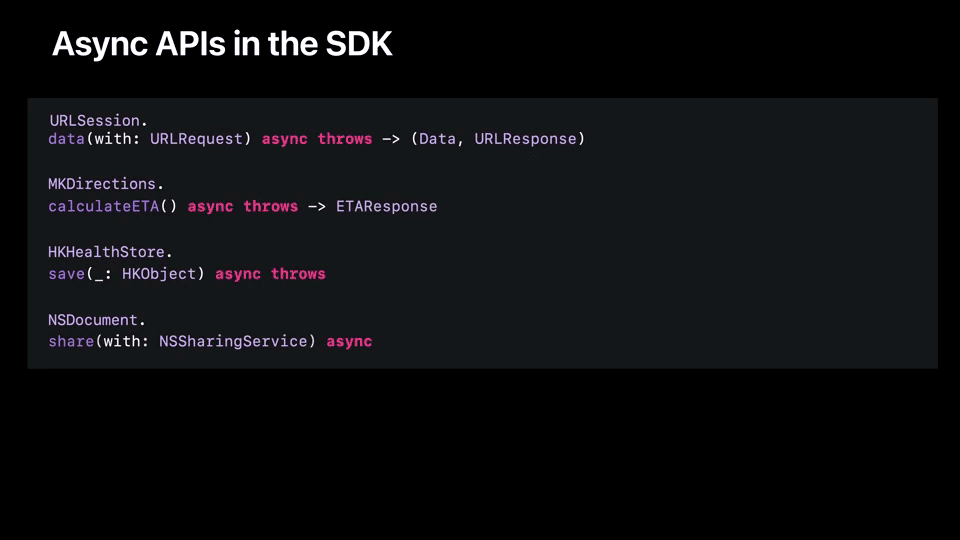
SDK 쪽은 이미 준비되어 있다. completion handler 를 받는 API 수백 개는 모두 같은 약속을 따른다. 부르면 일을 하고, 끝나면 completion 으로 결과를 돌려준다. Swift 5.5 부터 compiler 는 Objective-C 에서 import 한 이런 API 에 async 대안을 자동으로 만들어 준다.
 출처: WWDC21 - Meet async/await in Swift
화면에 나온 예는 URLSession 의 data 받기, MKDirections 의 calculateETA(), HKHealthStore 의 save(_:), NSDocument 의 share(with:) 다. 모두 completion handler parameter 가 사라지고 async 가 붙었으며, 결과는 return 값이 되었다.
delegate method 의 async 대안
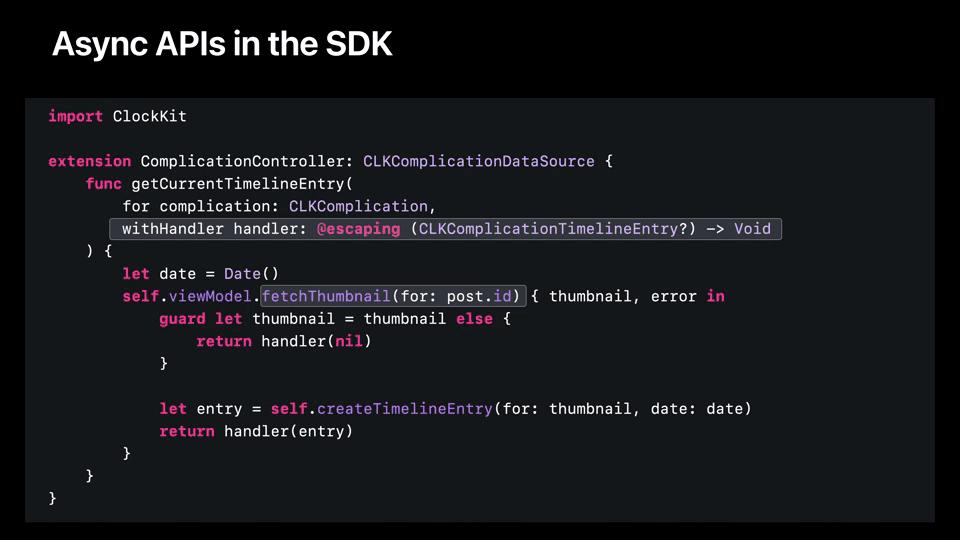
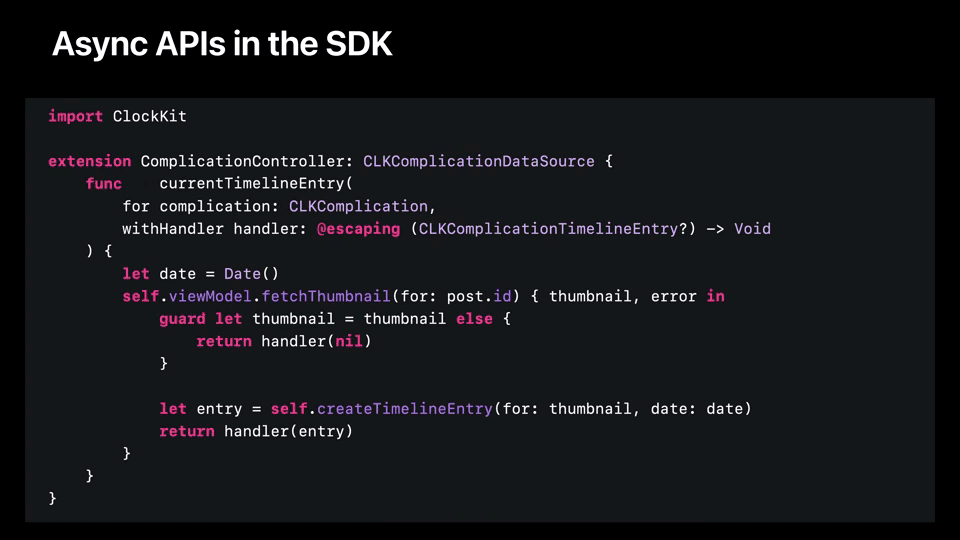
delegate API 도 같다. delegate method 가 completion handler 를 넘겨받는 형태라면 async 대안이 있다. 세션의 예는 ClockKit 의 CLKComplicationDataSource 다.
 출처: WWDC21 - Meet async/await in Swift
원래 method 는 getCurrentTimelineEntry(for:withHandler:) 이고, 준비한 entry 를 handler 로 넘긴다. thumbnail 을 받은 뒤 entry 를 만들어야 하므로 handler 호출이 closure 안으로 들어가 있다.
 출처: WWDC21 - Meet async/await in Swift
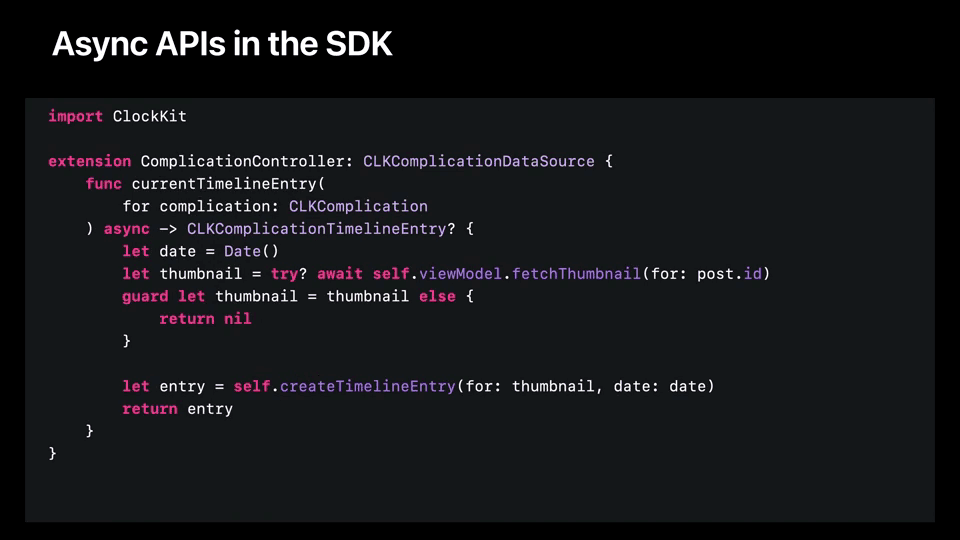
async 대안은 이름이 currentTimelineEntry(for:) 다. 앞의 “get” 이 빠졌다. 세션은 이것을 이름 짓는 권고로 설명한다. async 함수는 결과를 직접 return 하므로 “get” 같은 말은 빼는 편이 좋다는 것이다.
 출처: WWDC21 - Meet async/await in Swift
1
2
3
4
5
6
7
8
9
10
11
12
13
14
import ClockKit

extension ComplicationController: CLKComplicationDataSource {
    func currentTimelineEntry(for complication: CLKComplication) async -> CLKComplicationTimelineEntry? {
        let date = Date()
        let thumbnail = try? await self.viewModel.fetchThumbnail(for: post.id)
        guard let thumbnail = thumbnail else {
            return nil
        }

        let entry = self.createTimelineEntry(for: thumbnail, date: date)
        return entry
    }
}
handler 를 부르던 자리가 모두 return 으로 바뀌었다.
세션 page 의 snippet 그대로다. ClockKit 은 watchOS framework 라서 이 code 만 watchOS 27 Simulator SDK 로 type check 했다. ComplicationController, viewModel, post, createTimelineEntry(for:date:) 는 snippet 에 없어서 직접 채웠다.
SDK 의 async API 를 다루는 세션으로는 Use async/await with URLSession 과 Bring Core Data concurrency to Swift and SwiftUI, 그리고 AVFoundation 과 AppKit 의 새 기능을 다루는 세션을 소개한다.
continuation 으로 만드는 async 대안
compiler 가 대신 만들어 주지 않는 경우에는 async 대안을 직접 만들어야 한다. 내 code 에 있는 completion handler 함수가 그렇다.
막히는 지점
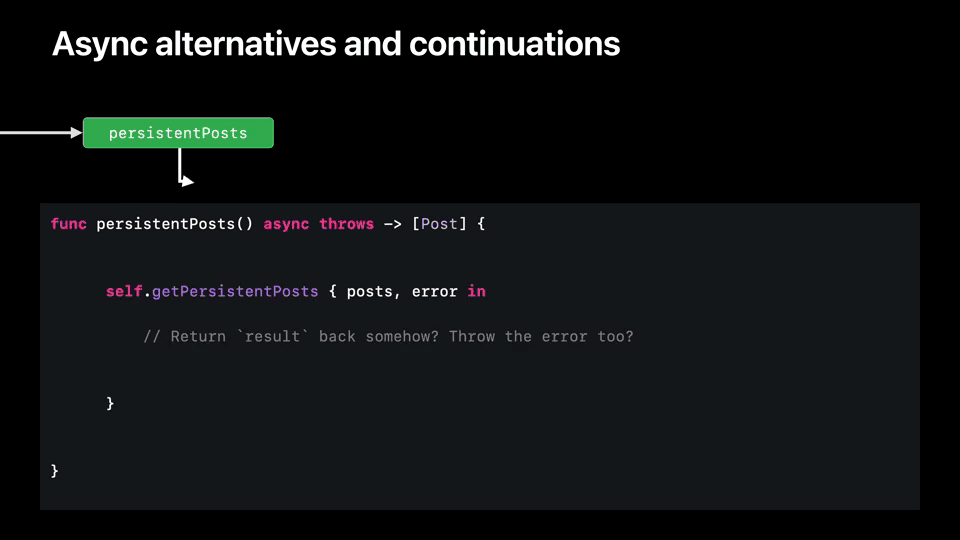
예제 앱에는 Core Data 에서 post 를 읽는 getPersistentPosts(completion:) 이 있다. NSAsynchronousFetchRequest 를 쓰는 함수이고, 부르는 곳이 많아서 한 번에 다 바꾸기 어렵다. 그래서 원래 함수는 두고 async 대안인 persistentPosts() 를 옆에 만든다.
 출처: WWDC21 - Meet async/await in Swift
그런데 안에서 completion 버전을 부르고 나면 막힌다. 결과는 completion closure 안에서 나오는데, 그것을 persistentPosts() 의 return 값으로 내보낼 방법이 없다.
continuation 이란?
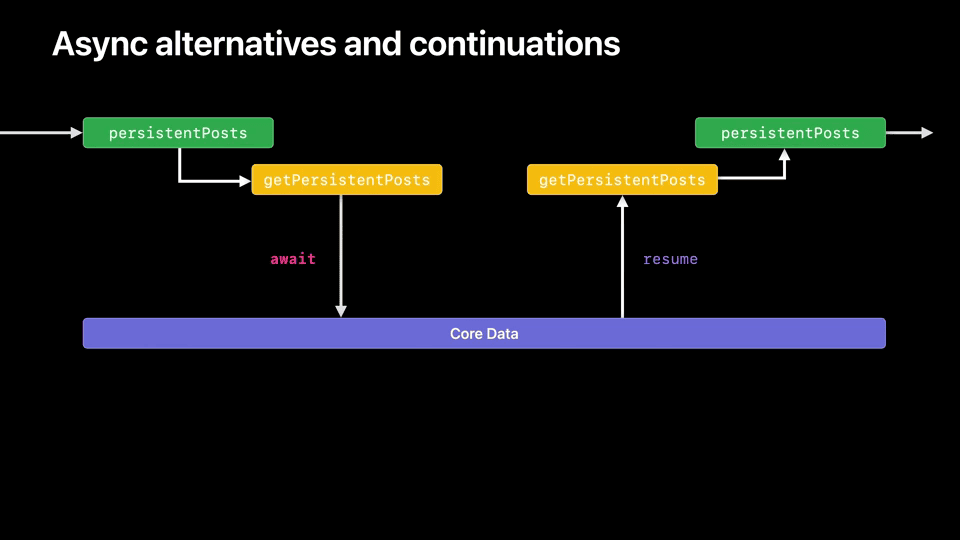
continuation 은 suspend 한 함수를 나중에 이어서 실행하게 해 주는 값이다. suspend 한 자리의 나머지 실행을 값으로 들고 있다가, 결과가 준비되면 그 값으로 함수를 resume 한다.
 출처: WWDC21 - Meet async/await in Swift
persistentPosts() 를 await 한 caller 는 suspend 한 상태다. 필요한 것은 알맞은 때에 알맞은 data 로 그 caller 를 resume 하는 수단이다. 세션은 completion block 을 받는 method 자체가 이 pattern 의 한 예라고 말한다. Swift 는 이것을 직접 다룰 수 있는 함수를 제공한다.
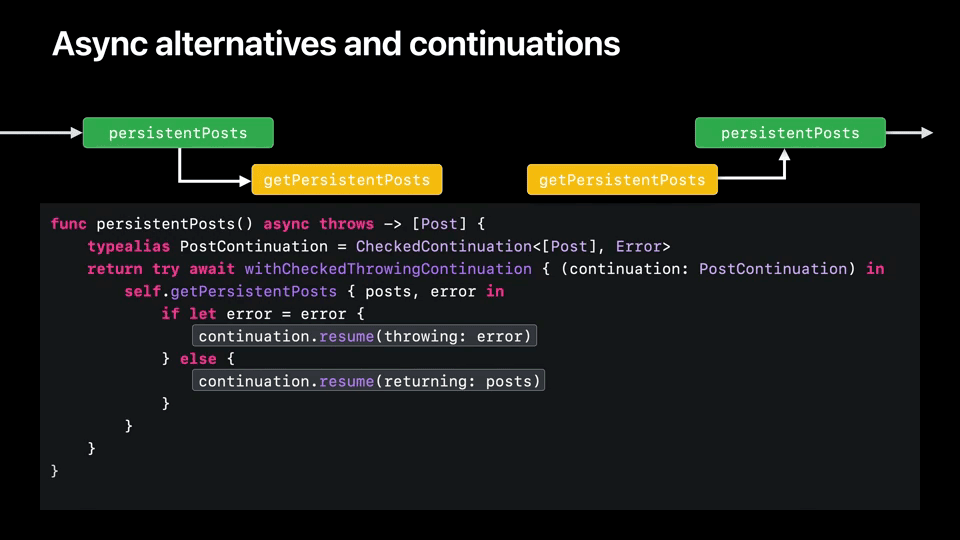 출처: WWDC21 - Meet async/await in Swift
1
2
3
4
5
6
7
8
9
10
11
12
func persistentPosts() async throws -> [Post] {
    typealias PostContinuation = CheckedContinuation<[Post], Error>
    return try await withCheckedThrowingContinuation { (continuation: PostContinuation) in
        self.getPersistentPosts { posts, error in
            if let error = error {
                continuation.resume(throwing: error)
            } else {
                continuation.resume(returning: posts)
            }
        }
    }
}
withCheckedThrowingContinuation
withCheckedThrowingContinuation 은 현재 함수를 suspend 하고 그 continuation 을 closure 에 넘겨주는 함수다. error 를 돌려주지 않는 경우에는 withCheckedContinuation 을 쓴다.
CheckedContinuation
CheckedContinuation 은 closure 가 받는 continuation 의 type 이다. resume(returning:) 으로 값을, resume(throwing:) 으로 error 를 넣으면 기다리던 함수가 그 결과로 resume 한다.
세션 page 의 snippet 그대로다. 함께 실린 getPersistentPosts(completion:) 과 묶어서 managedObjectContext 를 가진 class 안에 넣었고, Post 는 NSManagedObject subclass 로 직접 선언했다. Swift 6 language mode 에서도 통과한다.
checked continuation 의 약속
continuation 에는 지켜야 할 약속이 하나 있다. 모든 경로에서 정확히 한 번 resume 해야 한다.
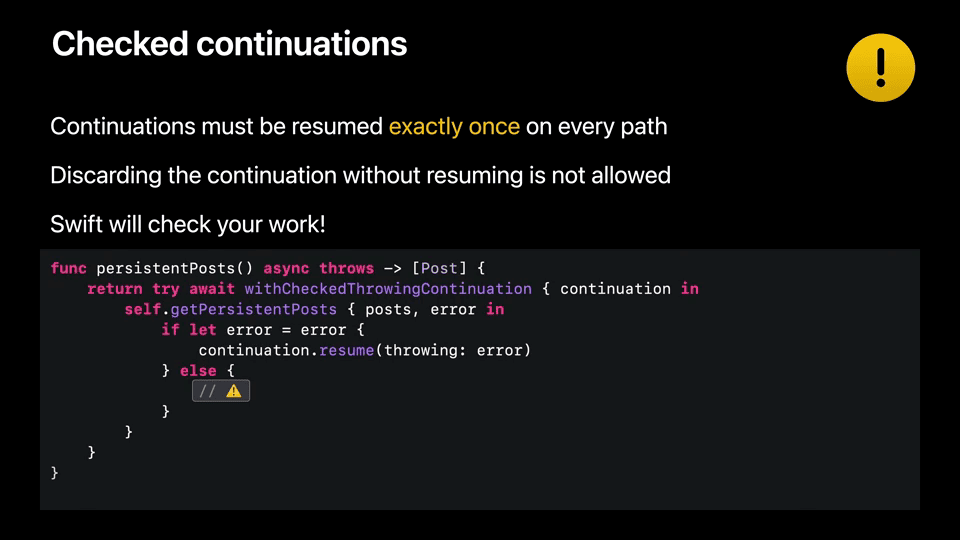 출처: WWDC21 - Meet async/await in Swift
resume 을 빠뜨리면 await 하던 함수는 영영 이어지지 않는다. completion 을 빠뜨린 처음의 bug 와 같은 문제다. 이번에는 Swift 가 살펴본다. continuation 이 resume 되지 않은 채 버려지면 Swift runtime 이 warning 을 log 로 남긴다.
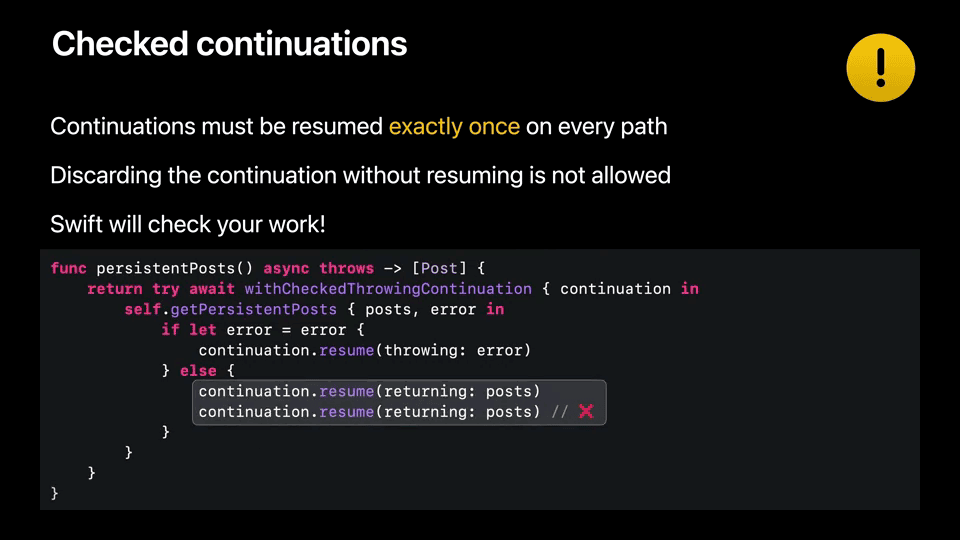 출처: WWDC21 - Meet async/await in Swift
두 번 resume 하는 것은 더 심각하다. 함수의 data 가 망가질 수 있기 때문이다. 이 경우에는 runtime 이 두 번째 resume 에서 fatal error 를 낸다.
| 잘못 | 결과 | runtime 의 반응 |
|---|---|---|
| resume 을 하지 않음 | 함수가 영영 suspend 한 채로 남는다 | warning log |
| resume 을 두 번 함 | data 가 망가질 수 있다 | 두 번째 resume 에서 fatal error |
이름에 붙은 “checked” 가 이 검사를 뜻한다.
delegate 에 continuation 저장
completion handler 가 아니라 delegate 로 결과를 알리는 API 도 있다. 이런 API 는 continuation 을 저장해 두었다가 delegate method 가 불릴 때 resume 한다.
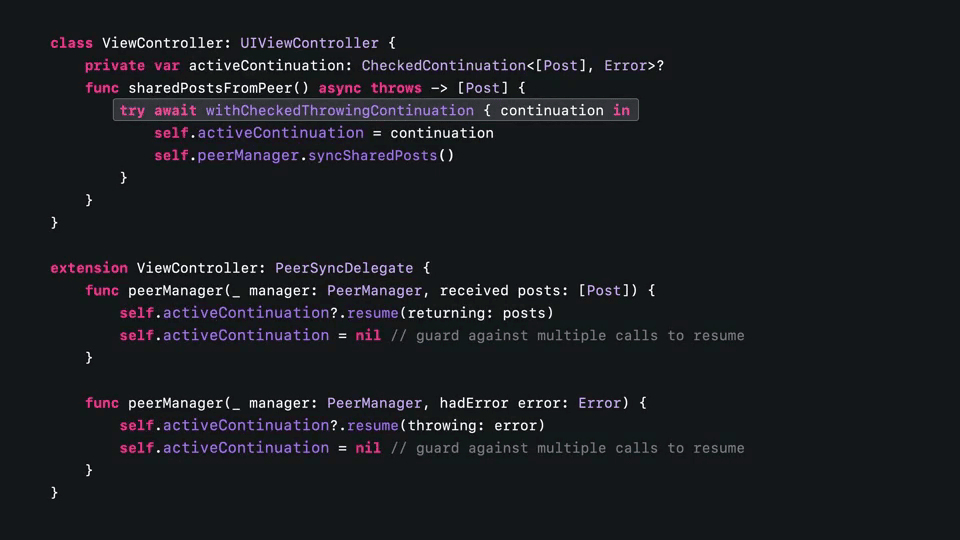 출처: WWDC21 - Meet async/await in Swift
먼저 continuation 을 만들어 property 에 저장하고, 그다음에 일을 시작한다.
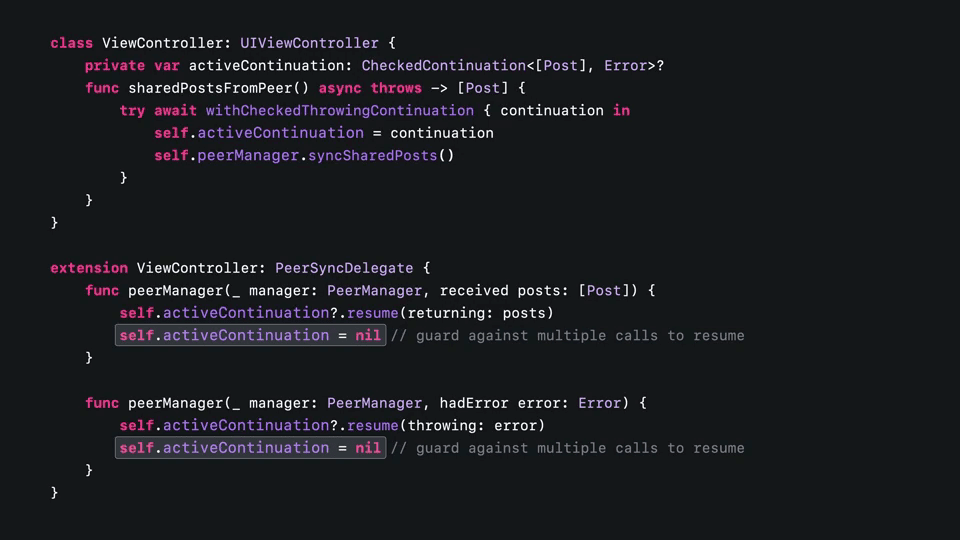 출처: WWDC21 - Meet async/await in Swift
delegate method 에서는 저장해 둔 continuation 을 resume 하고 곧바로 nil 로 비운다. 같은 continuation 을 두 번 resume 하지 않기 위해서다.
1
2
3
4
5
6
7
8
9
10
11
12
13
14
15
16
17
18
19
20
21
22
class ViewController: UIViewController {
    let peerManager = PeerManager()
    private var activeContinuation: CheckedContinuation<[Post], Error>?
    func sharedPostsFromPeer() async throws -> [Post] {
        try await withCheckedThrowingContinuation { continuation in
            self.activeContinuation = continuation
            self.peerManager.syncSharedPosts()
        }
    }
}

extension ViewController: PeerSyncDelegate {
    func peerManager(_ manager: PeerManager, received posts: [Post]) {
        self.activeContinuation?.resume(returning: posts)
        self.activeContinuation = nil // guard against multiple calls to resume
    }

    func peerManager(_ manager: PeerManager, hadError error: Error) {
        self.activeContinuation?.resume(throwing: error)
        self.activeContinuation = nil // guard against multiple calls to resume
    }
}
세션 page 의 snippet 에 peerManager property 한 줄을 더했다. PeerManager 와 PeerSyncDelegate 는 snippet 에 없어서 직접 선언했다.
이 code 는 language mode 에 따라 결과가 갈린다. Swift 5 language mode 에서는 그대로 통과한다. Swift 6 language mode 에서는 ViewController 가 main actor 에 묶여 있어서, 아무 표시 없는 PeerSyncDelegate 를 conform 하는 줄이 data race 가능성 error 가 된다. PeerSyncDelegate protocol 을 @MainActor 로 선언하면 통과한다. 2021년의 세션에는 없는 이야기이고 내가 확인한 결과다.
세션이 강조하는 것은 delegate 의 성질이다. delegate method 는 여러 번 불릴 수도 있고 한 번도 불리지 않을 수도 있다. 그런 API 일수록 살아 있는 continuation 을 정확히 한 번만 resume 하도록 관리하는 일이 중요하다.
continuation 의 더 낮은 수준 이야기는 Swift concurrency: Behind the scenes 세션에 있다고 안내한다.
세션의 마무리
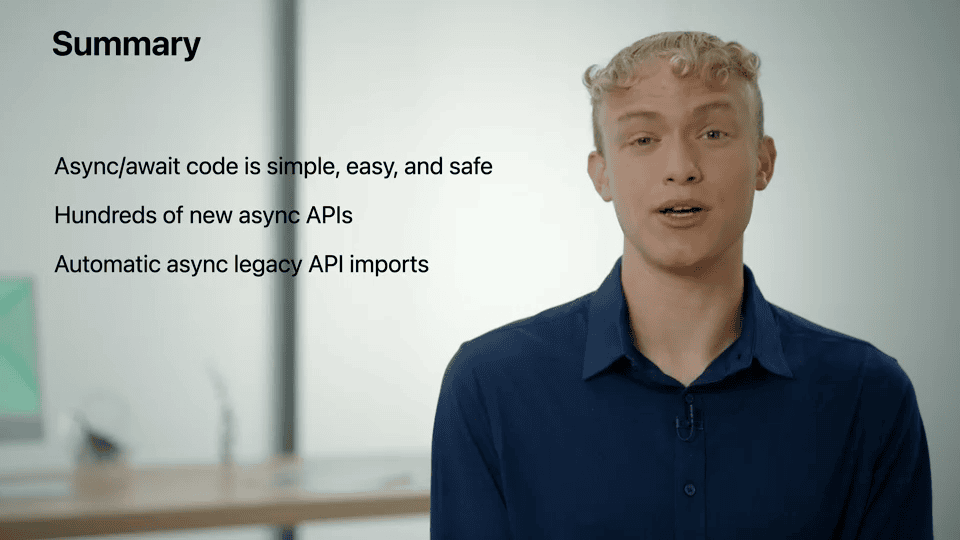
Robert 는 세 줄로 세션을 닫는다.
 출처: WWDC21 - Meet async/await in Swift
- async/await 로 쓴 code 는 간단하고, 쓰기 쉽고, 안전하다.
- SDK 에 새 async API 가 수백 개 있다.
- 기존 Objective-C API 는 async 형태로 자동 import 된다.
그리고 async/await 는 Swift concurrency 의 다른 기능 전부가 올라서는 바닥이라고 덧붙인다.
정리
| 주제 | 핵심 |
|---|---|
| sync 와 async | sync 함수는 끝날 때까지 thread 를 막고, async 함수는 thread 를 풀어 준 채로 일한다 |
| completion handler 의 문제 | 결과를 빠뜨려도 compiler 가 모른다. 20줄에 bug 자리가 다섯 곳 |
async | 함수가 suspend 할 수 있다는 표시. throws 앞에 쓴다 |
await | suspend 할 수 있는 자리의 표시. 반드시 멈춘다는 뜻은 아니다 |
| async property | get async 로 쓰고 read-only 여야 한다 |
| async sequence | for await 로 순회한다 |
| suspend | 제어가 caller 가 아닌 system 으로 간다. 그 사이 다른 일이 실행되고 state 가 바뀔 수 있다 |
| resume | 다른 thread 에서 이어질 수 있다 |
| test | test 함수에 async 를 붙이면 expectation 이 필요 없다 |
Task | sync code 에서 async 함수를 부르는 통로 |
| SDK 의 async 대안 | Objective-C 의 completion handler API 는 async 형태가 자동으로 생긴다 |
| continuation | completion handler 와 delegate API 를 async 함수로 감싼다. 정확히 한 번 resume |
실제 프로젝트에 가져갈 점은 다음과 같다.
- completion handler 를 받는 함수를 새로 쓰고 있다면 async 함수로 쓴다. 모든 경로에서 결과를 돌려주는지를 compiler 가 검사해 준다.
await가 있는 줄 앞뒤로는 state 가 바뀌었을 수 있다고 생각하고 읽는다.await전에 확인한 조건이await뒤에도 참이라고 가정하지 않는다.- 기존 completion handler 함수는 지우지 않고 continuation 으로 감싼 async 대안을 옆에 둔다. 부르는 곳을 하나씩 옮길 수 있다.
- continuation 을 property 에 저장하는 경우에는 resume 한 직후
nil로 비운다. - async 함수 이름에서는 “get” 을 뺀다.
- test 에서 async 호출의 결과를 검사할 때는 먼저
try await로 값을 받고 그 값을 assert 한다.XCTAssertNoThrow같은 autoclosure 안에는await를 쓸 수 없다.
관련 글
- [WWDC26] What’s new in Swift: 5년 뒤의 Swift 가 어디까지 왔는지
- [WWDC26] Migrate to Swift Testing: XCTest 다음의 test framework
참고자료
- SE-0296: Async/await (Swift Evolution)
- SE-0297: Concurrency Interoperability with Objective-C (Swift Evolution)
- SE-0300: Continuations for interfacing async tasks with synchronous code (Swift Evolution)
- SE-0310: Effectful Read-only Properties (Swift Evolution)
- Concurrency (The Swift Programming Language)
- AsyncSequence (Apple Developer Documentation)