[WWDC26] What's new in the Foundation Models framework
이 글은 WWDC 세션의 transcript 와 영상 화면을 Claude Code 로 정리한 글이고, 실제로 쓴 날은 2026-11-25 다. Swift code 는 세션 page 의 snippet 에 빠진 type 을 채워 Xcode 27.0 의 iOS 27 simulator SDK 로 type check 했다.
세션 정보
- 세션: What’s new in the Foundation Models framework
- 길이: 21분 13초
- 공개일: 2026-06-08
- 발표: Erik, Zhen (영상에서 이름만 밝힌다)
- 코드: 세션 page 에 snippet 7개가 있다. Swift 6개, Python 1개다
한 줄 요약
Foundation Models framework 가 on-device model 하나를 부르는 API 에서 LanguageModel protocol 뒤에 on-device, Private Cloud Compute, third-party model 을 갈아 끼우는 층으로 넓어졌고, 그 위에서 instructions, tool, model 을 상태에 따라 바꾸는 DynamicProfile 이 agentic 기능의 기본 단위로 들어왔다.
세션의 구성
세션은 21분이고 두 사람이 나눠서 발표한다. 앞쪽 절반은 Erik 이 model 과 system tool 을 맡고, 뒤쪽 절반은 Zhen 이 dynamic profile, Evaluations, command line 도구, open source 를 맡는다. 주제 하나를 깊게 파는 세션이 아니라 27 release 의 Foundation Models 변경을 한 번에 훑고 각 주제의 세션으로 보내는 안내 세션이다.
| 순서 | 내용 | 발표 |
|---|---|---|
| 0:00 | Introduction | Erik, Zhen |
| 2:34 | New on-device model | Erik |
| 3:21 | Vision: image understanding | Erik |
| 4:20 | Private Cloud Compute | Erik |
| 6:46 | Model abstraction layer | Erik |
| 7:32 | Partner model integrations | Erik |
| 9:40 | System tools: Vision and Spotlight | Erik |
| 10:57 | Dynamic Profiles for agentic apps | Zhen |
| 13:46 | Composing models and configurations | Zhen |
| 15:30 | Evaluations framework | Zhen |
| 16:02 | The fm command line tool | Zhen |
| 17:13 | Foundation Models Python SDK | Zhen |
| 17:55 | Open source and framework utilities | Zhen |
| 19:24 | Next steps | Erik, Zhen |
 출처: WWDC26 - What’s new in the Foundation Models framework
시작 화면이다. 두 발표자가 나란히 서서 이름만 말한다. 화면에 성이나 직함은 나오지 않는다.
도입에서 Erik 은 이번 release 의 방향을 세 가지로 말한다. OS 안팎으로의 통합, 더 다양한 model, agentic 경험을 만드는 새 primitive 다. 그리고 framework 자체가 open source 로 풀린다는 소식을 맨 앞에 둔다.
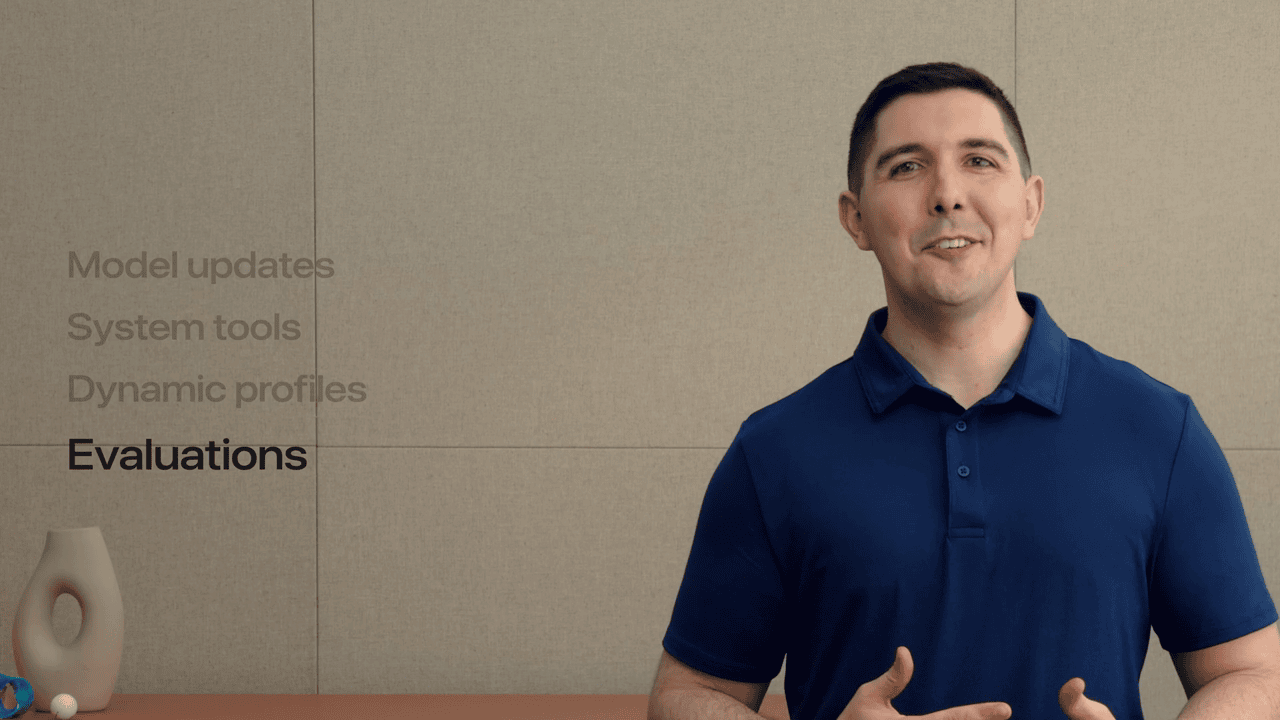 출처: WWDC26 - What’s new in the Foundation Models framework
agenda slide 에는 다섯 줄이 있다. “Model updates”, “System tools”, “Dynamic profiles”, “Evaluations”, “Tooling and open source” 다. 이 글도 같은 순서를 따른다.
새 on-device model
27 release 의 on-device model 은 새로 만든 것이라고 한다. 발표자의 설명은 논리와 tool calling 이 나아졌다는 것까지고, 수치나 benchmark 는 나오지 않는다. 대신 code 로 확인할 수 있는 것은 iOS 26.4 에 먼저 들어온 두 API 다.
1
2
3
4
5
6
7
8
9
import FoundationModels

func inspectContext() async throws {
    let model = SystemLanguageModel()
    print(model.contextSize)

    let count = try await model.tokenCount(for: "What are the Japanese characters for origami?")
    print(count)
}
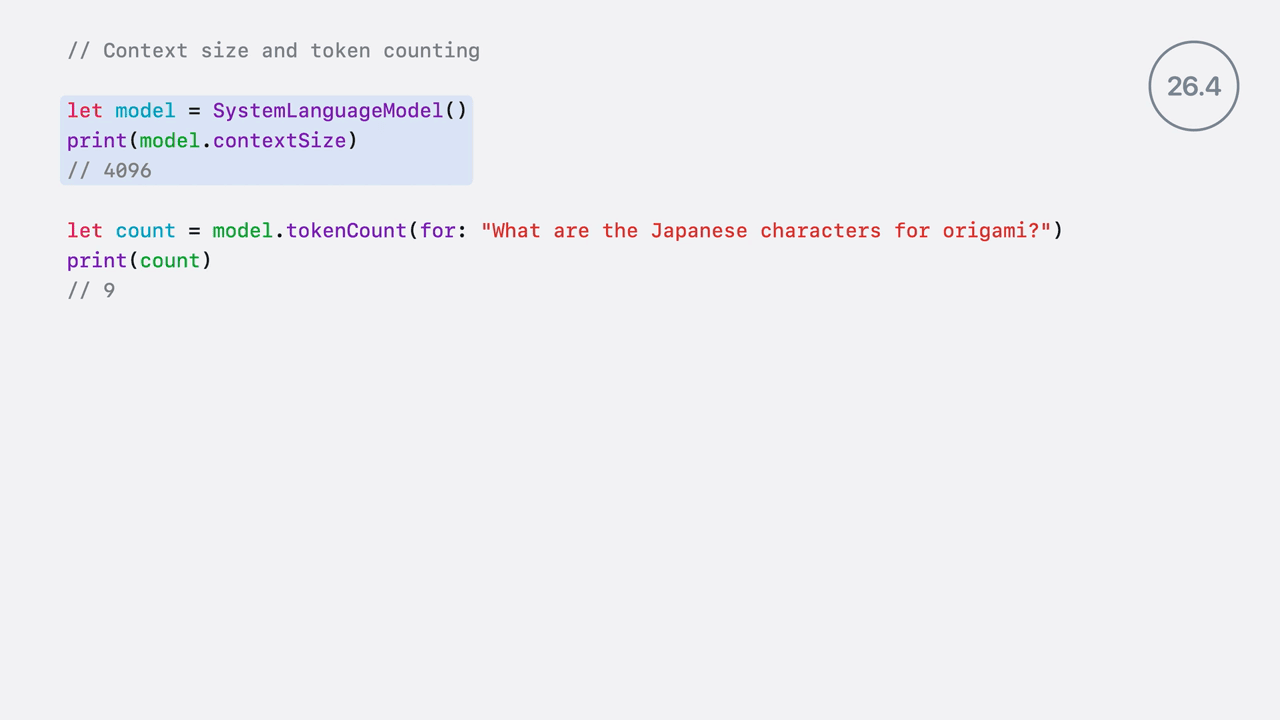 출처: WWDC26 - What’s new in the Foundation Models framework
slide 제목은 “Context size and token counting” 이고 오른쪽 위에 “26.4” badge 가 붙어 있다. print(model.contextSize) 아래 주석은 // 4096, print(count) 아래 주석은 // 9 다. 세션 page 의 snippet 에서는 같은 자리의 주석이 // 8192 로 적혀 있어서 영상과 숫자가 다르다. macOS 27.0.1 의 Apple silicon Mac 에서 직접 읽어 보면 4096 이 나온다. slide 는 tokenCount(for:) 를 try await 없이 부르지만 SDK 의 선언은 async throws 라서 위 code 처럼 써야 한다.
발표자는 이 두 API 를 “앱을 실행 중인 hardware 에 맞추는 데” 쓰라고 한다. context 크기가 기기마다 다를 수 있다는 뜻으로 읽힌다. 그러니 4096 이든 8192 든 숫자를 code 에 박아 두지 말고 contextSize 를 읽어서 prompt 길이를 정해야 한다.
guardrail 도 손봤다고 한다. iOS 26.4 에서 false positive 를 줄였고 iOS 27 에서도 계속 줄이고 있다는 말인데, 화면에는 “Improved guardrails” 한 줄만 나온다.
contextSize
SystemLanguageModel 이 한 session 에서 다룰 수 있는 token 수다. SDK 에는 iOS 26.0 부터 쓸 수 있게 back deploy 되어 있고, PrivateCloudComputeLanguageModel 의 같은 이름 property 는 async throws 다. 문서는 contextSize 에 있다.
tokenCount(for:)
prompt, instructions, tool 목록, generation schema, transcript entry 묶음을 각각 받아 token 수를 돌려주는 method 다섯 개다. iOS 26.4 부터 쓸 수 있고 watchOS 와 tvOS 에서는 쓸 수 없다. 문서는 tokenCount(for:) 에 있다.
Image 입력
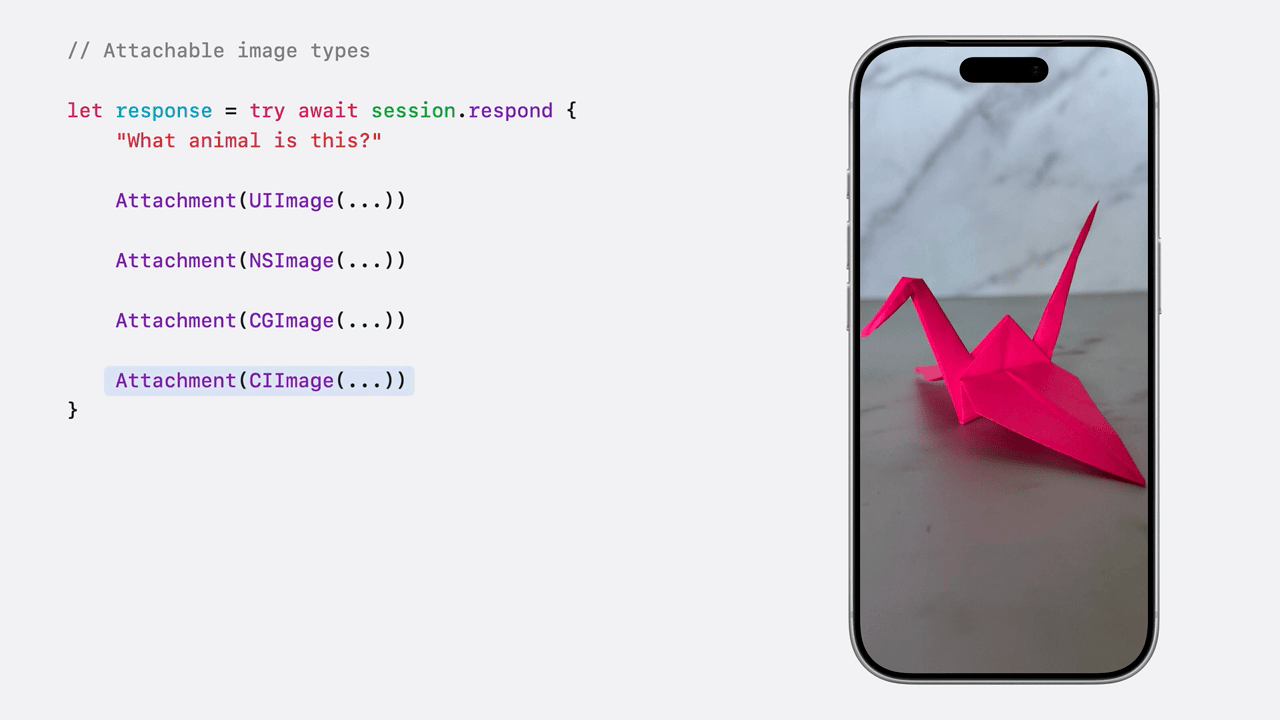
on-device model 이 image 를 입력으로 받게 됐다. API 는 기존 prompt builder 에 한 줄을 더하는 모양이다.
1
2
3
4
5
6
7
8
9
10
11
import FoundationModels
import UIKit

func askAboutImage(_ image: UIImage) async throws -> String {
    let session = LanguageModelSession()
    let response = try await session.respond {
        "What animal is this?"
        Attachment(image)
    }
    return response.content
}
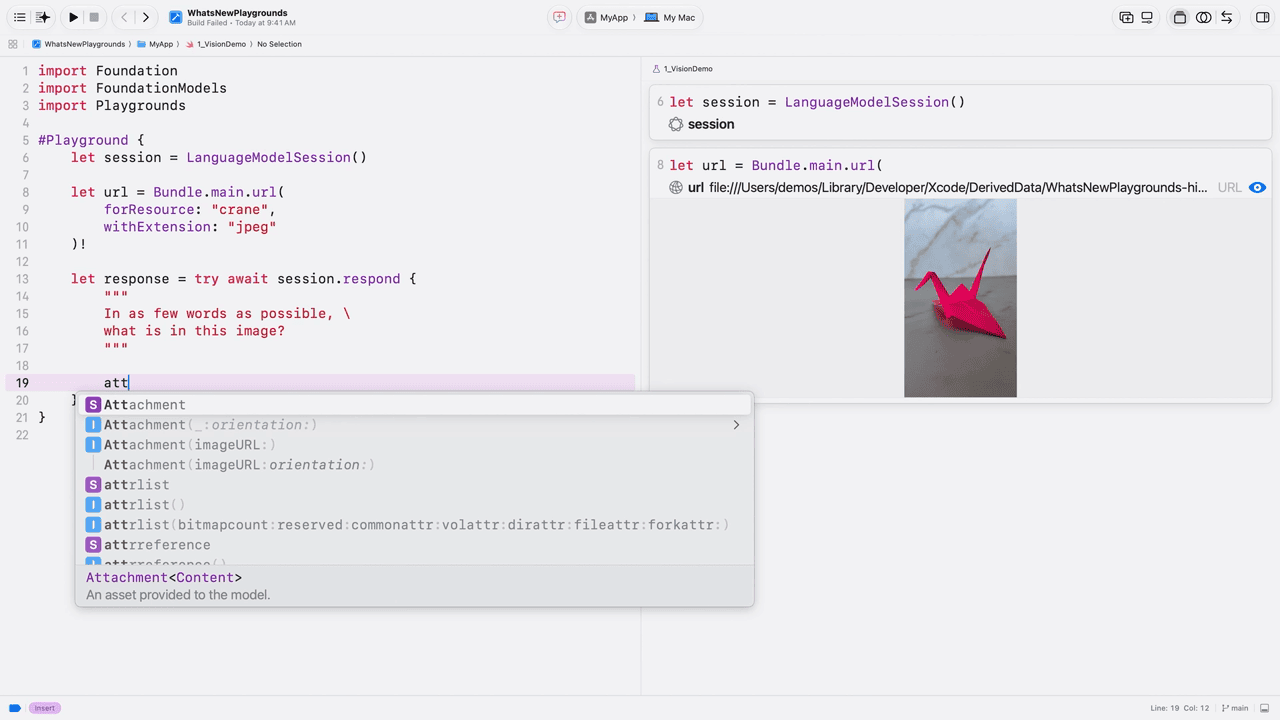 출처: WWDC26 - What’s new in the Foundation Models framework
Xcode 의 #Playground 화면이다. Bundle.main.url(forResource: "crane", withExtension: "jpeg") 로 image 를 가져오고, respond 의 closure 안에 “In as few words as possible, what is in this image?” 라는 글을 쓴 다음 att 까지 입력한 상태다. 자동완성 목록에 Attachment, Attachment(_:orientation:), Attachment(imageURL:) 가 보인다. 오른쪽 canvas 에는 분홍색 종이학 사진이 있다.
 출처: WWDC26 - What’s new in the Foundation Models framework
slide 제목은 “Attachable image types” 다. closure 안에 Attachment(UIImage(...)), Attachment(NSImage(...)), Attachment(CGImage(...)), Attachment(CIImage(...)) 가 차례로 쌓인다. 발표자는 이어서 CoreVideo pixel buffer 와 file URL 도 된다고 말한다.
image 는 크기와 비율에 제한이 없어서 자르거나 여백을 채울 필요가 없다. 다만 큰 image 는 token 을 더 쓰고 응답도 늦어진다. context 가 몇 천 token 인 on-device model 에서는 image 한 장이 차지하는 몫이 크다는 뜻이므로, 사진 원본을 그대로 넘기기 전에 줄여서 넘기는 쪽을 먼저 생각해야 한다. image 입력을 깊게 다루는 세션은 What’s new in image understanding 이다.
Attachment
prompt 에 image 를 끼워 넣는 type 이다. SDK 에는 CGImage, CIImage, CVPixelBuffer, file URL 을 받는 initializer 가 있고, UIImage 를 받는 것은 UIKit 을 함께 import 했을 때 열린다. 문서는 Attachment 에 있다.
Private Cloud Compute model
on-device model 로 모자란 일에는 server 쪽 model 을 쓸 수 있게 됐다. 앱이 직접 server 를 두지 않고 Apple 의 Private Cloud Compute 를 부르는 방식이다.
Private Cloud Compute 란?
Private Cloud Compute 는 Apple 이 Apple Intelligence 용으로 운영하는 server 환경이다. 기기에서 처리하기 어려운 요청을 server 의 큰 model 로 보내되, 요청 내용을 저장하지 않는다는 점을 내세운다. 줄여서 PCC 라고 부른다.
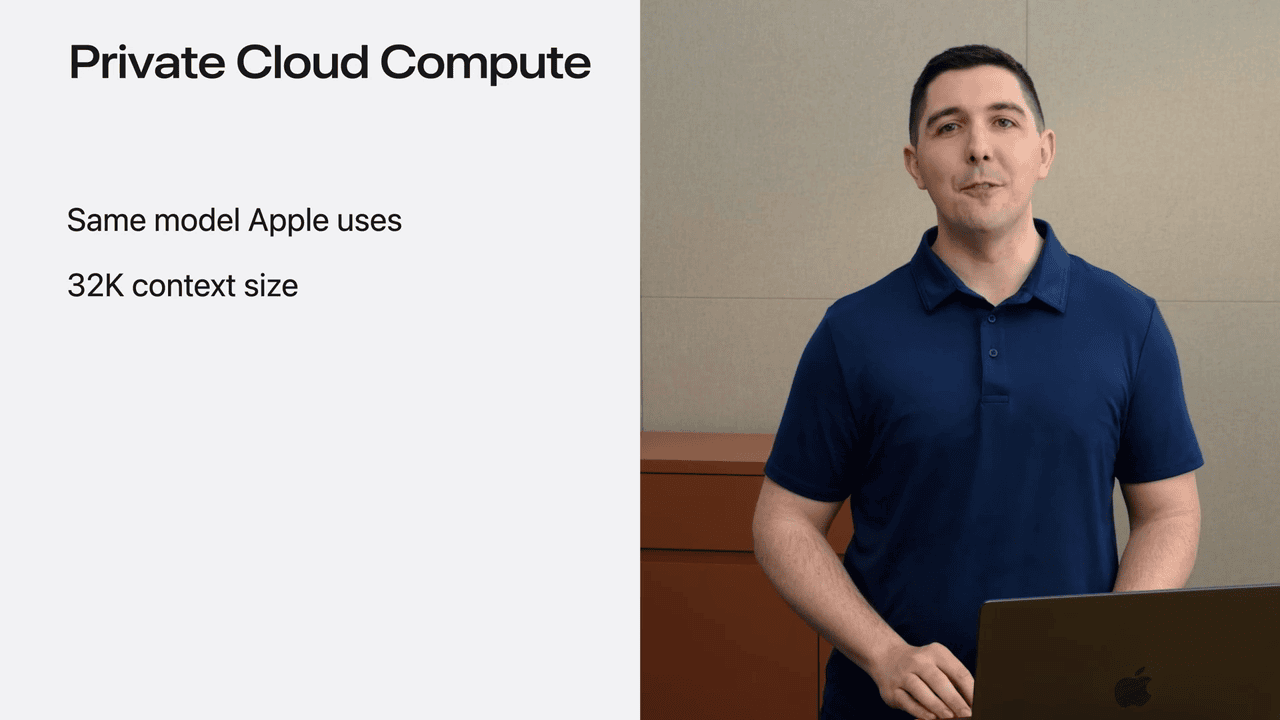
이번에 생긴 PrivateCloudComputeLanguageModel 은 그 환경의 model 을 앱에서 부르는 type 이다. 발표자가 밝힌 특징은 세 가지다.
- Apple Intelligence 기능에 쓰이는 것과 같은 model 이다
- context window 가 32,000 token 이다
- reasoning 을 지원한다. 답을 내기 전에 생각하는 단계를 거치는 방식이다
 출처: WWDC26 - What’s new in the Foundation Models framework
slide 에는 “Private Cloud Compute” 제목 아래 “Same model Apple uses” 와 “32K context size” 두 줄이 있다.
Reasoning level 과 usage
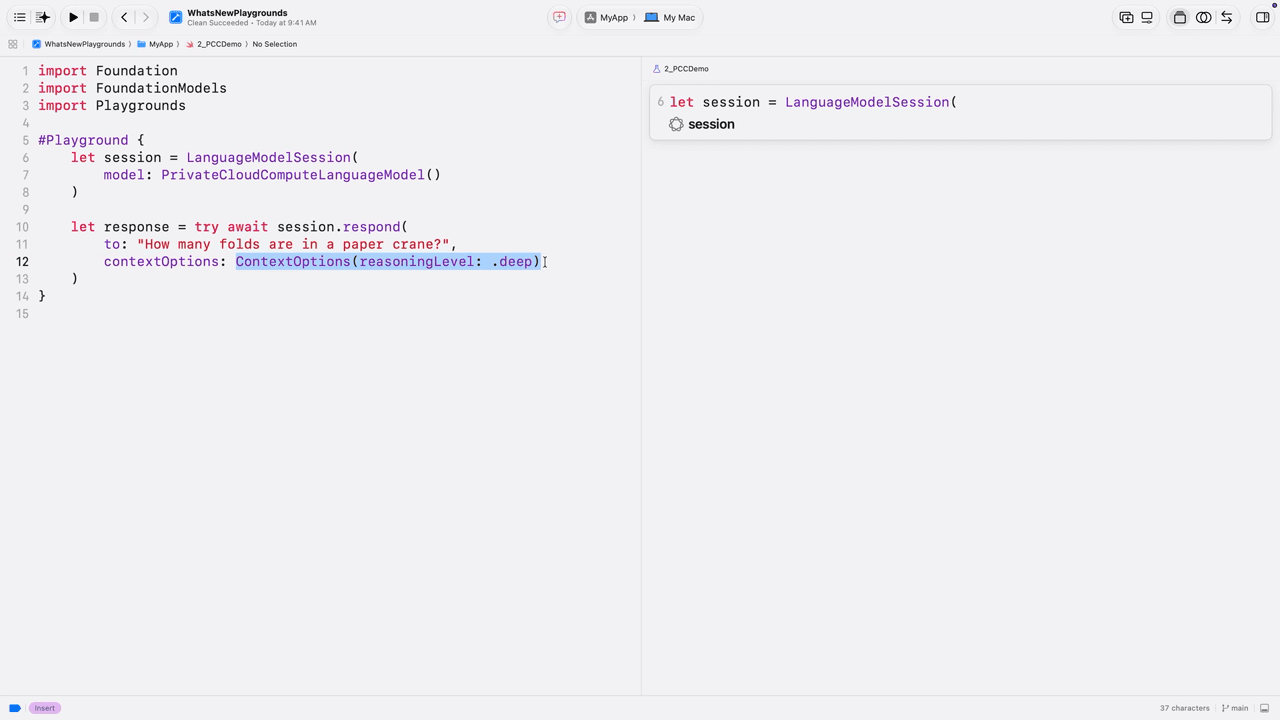
PCC model 은 session 을 만들 때 넘기기만 하면 된다. 응답을 요청할 때는 새로 생긴 contextOptions 인자로 reasoning 의 깊이를 정한다.
1
2
3
4
5
6
7
8
9
10
11
12
13
14
15
16
17
18
19
import FoundationModels

func recommendCraft() async throws {
    let model = PrivateCloudComputeLanguageModel()
    let session = LanguageModelSession(model: model)

    let response = try await session.respond(
        to: "Recommend a craft that doesn't require scissors.",
        contextOptions: ContextOptions(reasoningLevel: .light)
    )

    print(response.usage.input.totalTokenCount)
    print(response.usage.input.cachedTokenCount)

    print(response.usage.output.totalTokenCount)
    print(response.usage.output.reasoningTokenCount)

    print(session.usage.totalTokenCount)
}
 출처: WWDC26 - What’s new in the Foundation Models framework
Playground 화면이다. LanguageModelSession(model: PrivateCloudComputeLanguageModel()) 로 session 을 만들고, “How many folds are in a paper crane?” 을 ContextOptions(reasoningLevel: .deep) 과 함께 보낸다. 위 code 는 page 의 usage snippet 을 따라서 .light 를 썼다.
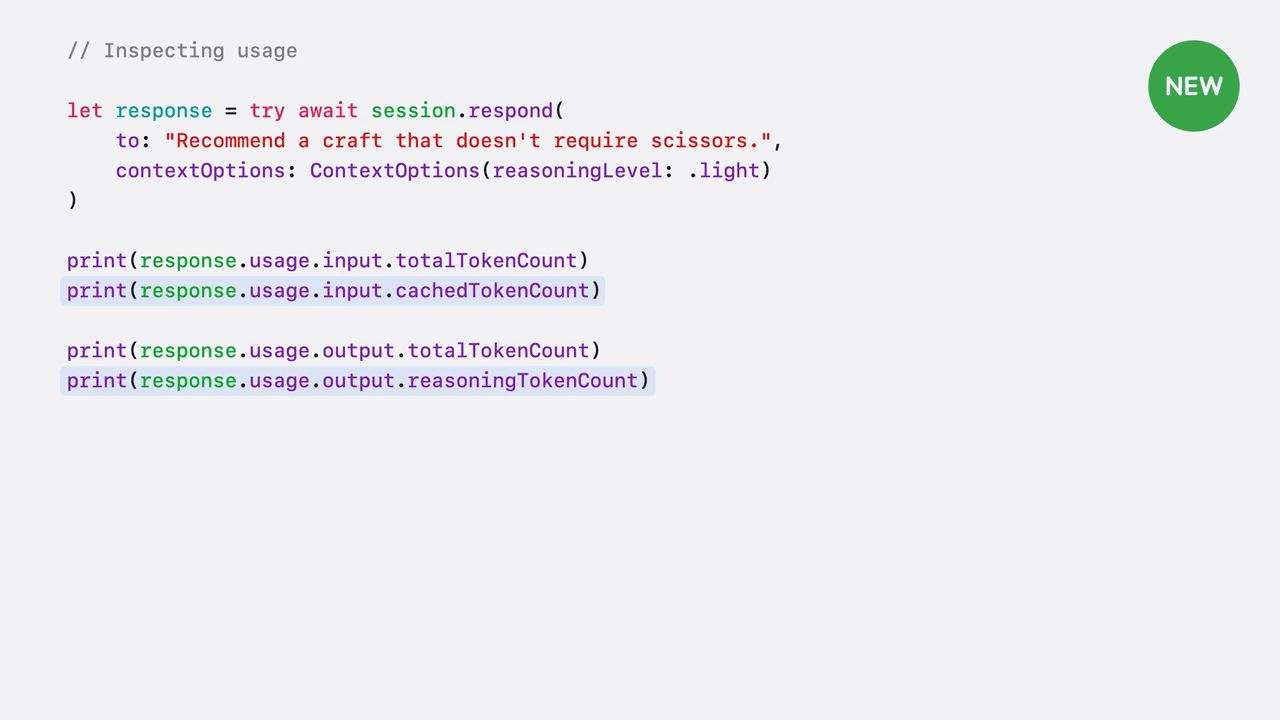
reasoning 을 깊게 하면 답은 좋아지지만 계산을 더 쓴다. 그 계산은 token 으로 잡힌다. usage 의 reasoningTokenCount 가 output token 가운데 reasoning 에 쓰인 몫이고, cachedTokenCount 는 input token 가운데 cache 에서 읽은 몫이다. usage 는 response 마다 있고 session 에도 누적 값으로 있다.
 출처: WWDC26 - What’s new in the Foundation Models framework
slide 제목은 “Inspecting usage” 고 “NEW” badge 가 붙어 있다. 발표자는 이 기능을 third-party model 의 token 과금을 설명하는 자리에서 꺼낸다. PCC 에서는 요금이 아니라 일일 quota 가 걸려 있으므로, 같은 숫자를 quota 를 얼마나 쓰는지 가늠하는 데 쓸 수 있다.
PrivateCloudComputeLanguageModel
Private Cloud Compute 의 model 을 나타내는 type 이다. availability 와 isAvailable 로 쓸 수 있는지 확인하고, quotaUsage 로 한도에 닿았는지 본다. SDK 에는 networkFailure, quotaLimitReached, serviceUnavailable 세 가지 error 가 선언되어 있다. 문서는 PrivateCloudComputeLanguageModel 에 있다.
ContextOptions
응답 한 번에 적용할 설정을 담는 type 이다. reasoningLevel 은 SDK 에 .light, .moderate, .deep, .custom(String) 네 가지로 선언되어 있다. 문서는 ContextOptions 에 있다.
LanguageModelSession.Usage
input 과 output 의 token 수를 나눠 담는 type 이다. 문서는 LanguageModelSession.Usage 에 있다.
계정 없는 접근과 quota
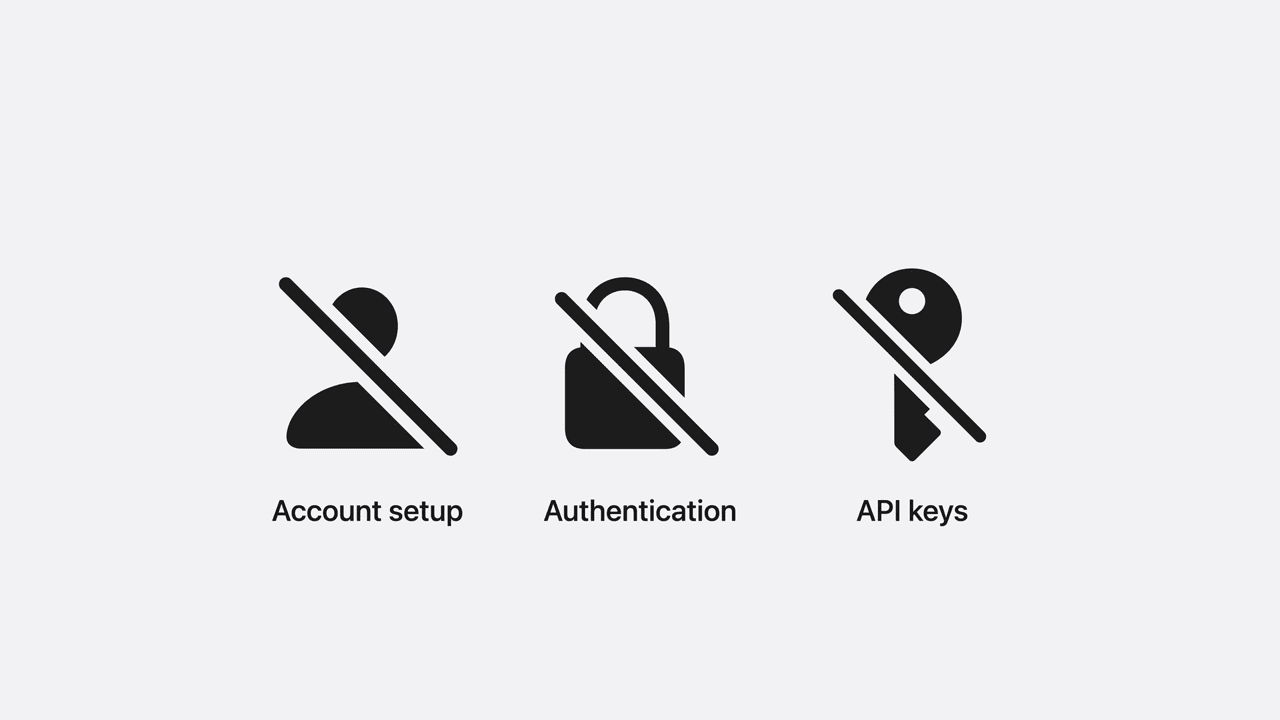
PCC 를 쓰는 데 계정 설정, 인증, API key 가 필요 없다는 점이 이 절의 핵심이다. 대신 entitlement 가 필요하다.
 출처: WWDC26 - What’s new in the Foundation Models framework
icon 세 개에 금지 표시가 겹쳐 있다. 아래 글자는 “Account setup”, “Authentication”, “API keys” 다.
 출처: WWDC26 - What’s new in the Foundation Models framework
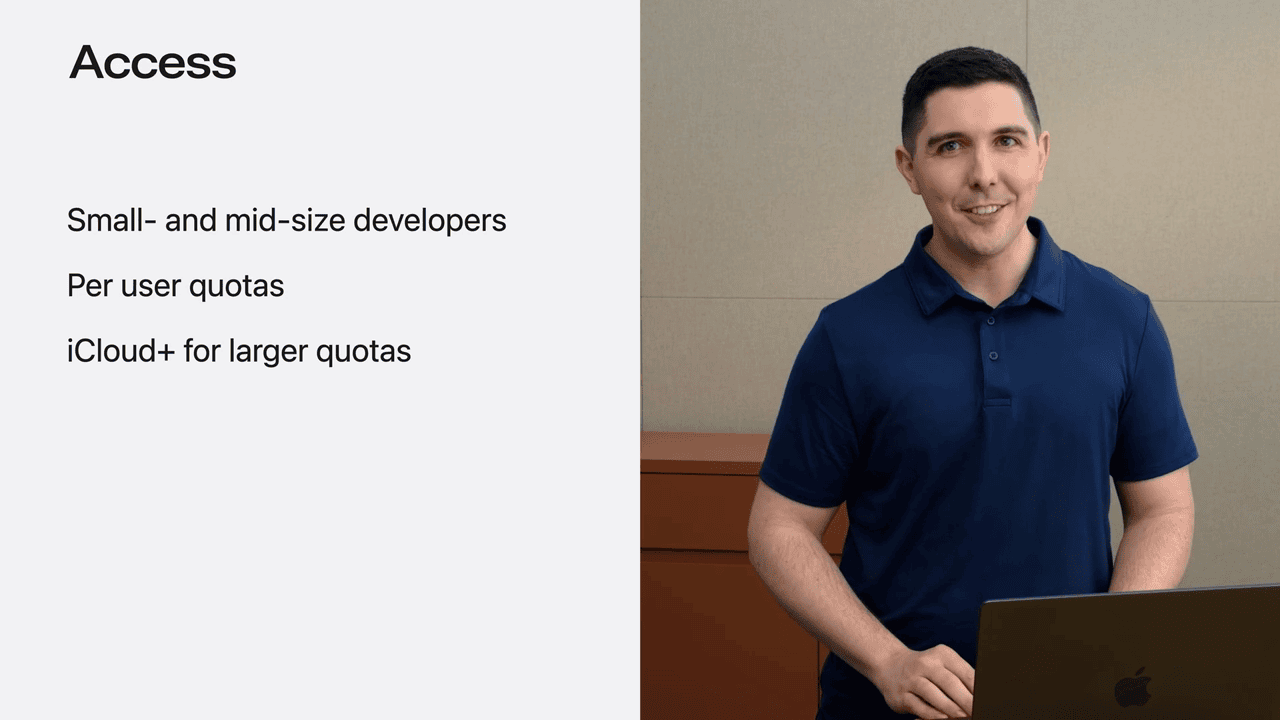
slide 제목은 “Access” 고 세 줄이 있다. “Small- and mid-size developers”, “Per user quotas”, “iCloud+ for larger quotas” 다.
발표자의 말로 풀면 조건은 다음과 같다.
- first-time download 가 200만 미만인 개발자는 cloud API 비용 없이 쓴다
- 사용자마다 매일 쓸 수 있는 양이 정해져 있다
- iCloud+ 를 구독한 사용자는 한도가 더 높다
quota 가 사용자 단위라는 점이 설계에 영향을 준다. 사용자가 다른 앱에서 PCC 를 많이 썼다면 내 앱에서 한도에 닿을 수 있다는 뜻으로 읽히는데, 세션은 quota 가 앱마다 따로인지 전체가 하나인지를 말하지 않는다. 어느 쪽이든 quotaLimitReached 를 받았을 때 on-device model 로 내려가는 길을 준비해 둬야 한다.
watchOS 도 여기서 나온다. PCC 덕분에 watchOS 27 부터 Foundation Models framework 를 쓸 수 있다고 한다. SDK 에서도 PrivateCloudComputeLanguageModel 은 watchOS 27.0 에서 쓸 수 있고 tokenCount(for:) 같은 on-device 쪽 API 는 watchOS 에서 막혀 있다. entitlement 와 세부 사항은 Build with the new Apple Foundation Model on Private Cloud Compute 에서 다룬다고 한다.
Model abstraction layer
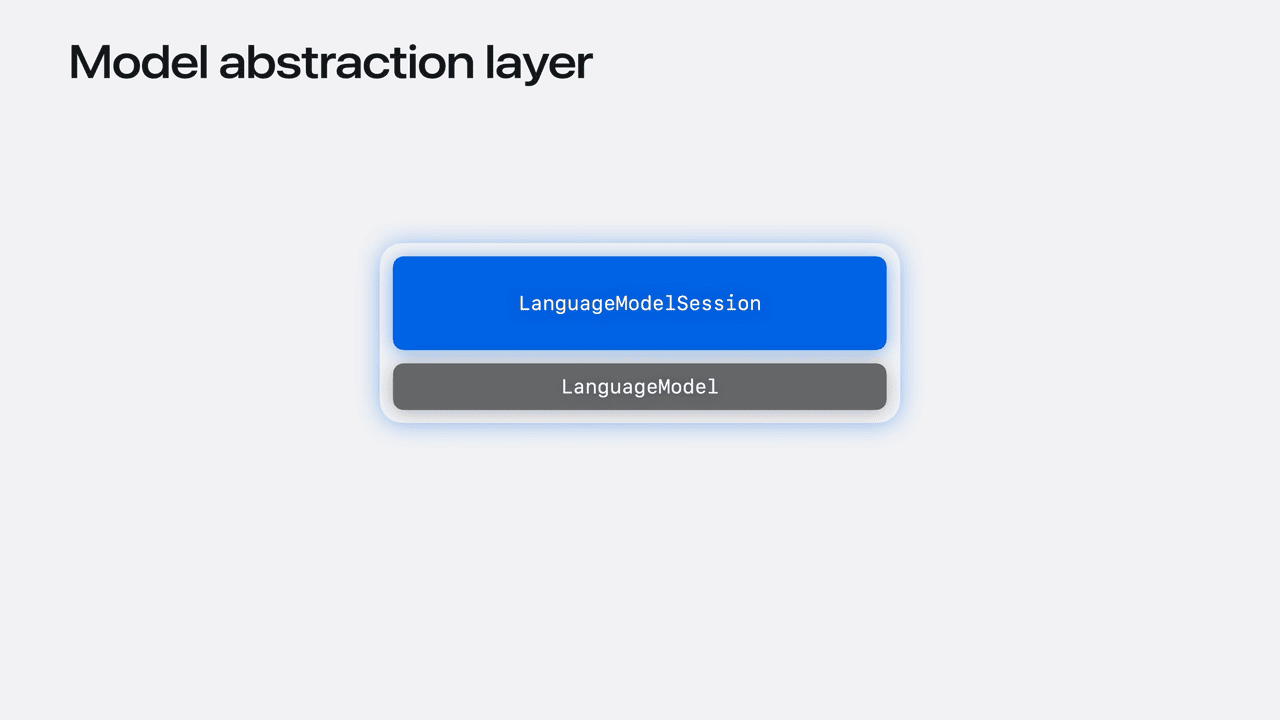
지금까지 LanguageModelSession 은 SystemLanguageModel 만 받았다. 27 release 에서는 그 자리에 LanguageModel 이라는 protocol 이 들어온다.
 출처: WWDC26 - What’s new in the Foundation Models framework
slide 제목은 “Model abstraction layer” 다. LanguageModelSession 상자 아래에 LanguageModel 상자가 놓여 있다. session 이 구체 model 이 아니라 protocol 에 기대는 구조다.
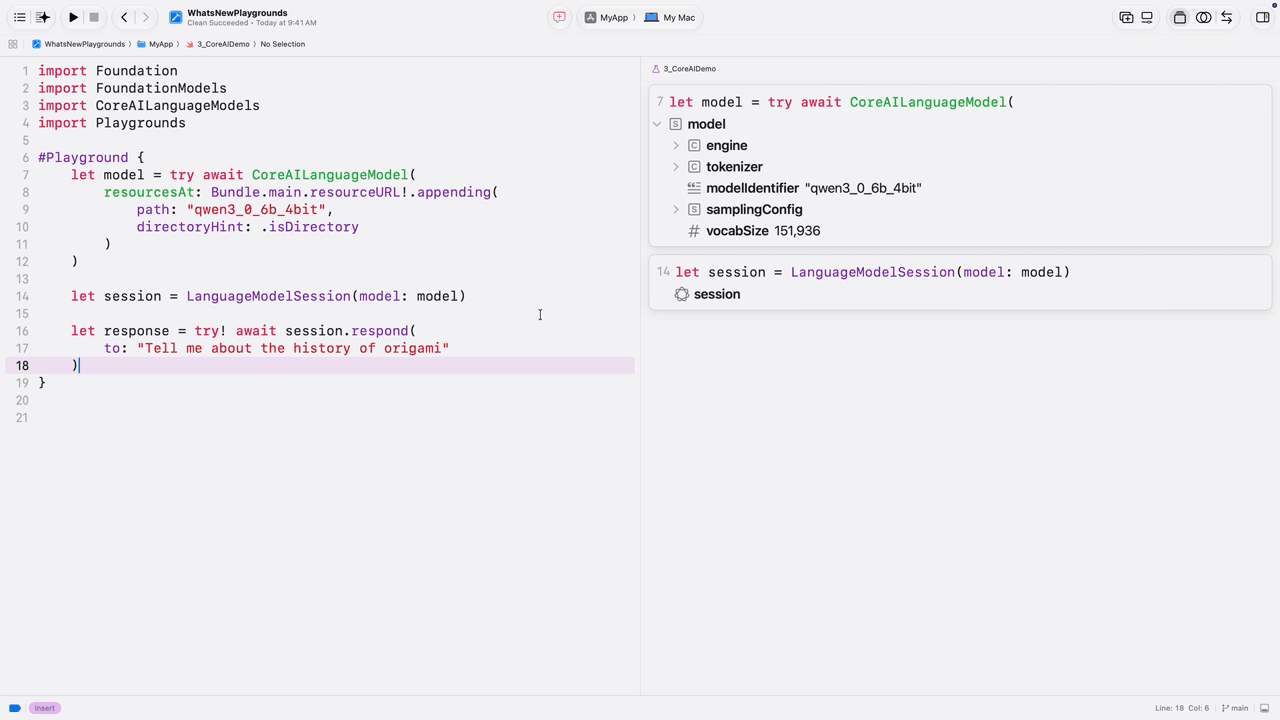
SystemLanguageModel 과 PrivateCloudComputeLanguageModel 은 이미 이 protocol 을 따른다. 여기에 open source 구현 두 개가 더해진다. CoreAILanguageModel 과 MLXLanguageModel 이고, local model 을 Neural Engine 이나 Mac 의 GPU 에서 돌리는 용도다.
 출처: WWDC26 - What’s new in the Foundation Models framework
Playground 화면이다. 맨 위에 import CoreAILanguageModels 가 있고, CoreAILanguageModel(resourcesAt:) 에 bundle 안의 qwen3_0_6b_4bit directory 를 넘겨 model 을 만든다. 그 model 로 LanguageModelSession(model: model) 을 만들고 “Tell me about the history of origami” 를 보낸다. 오른쪽 결과 창에는 modelIdentifier 가 “qwen3_0_6b_4bit”, vocabSize 가 151,936 으로 찍혀 있다.
session 을 만드는 줄에서 model 만 바뀌고 respond 아래쪽은 그대로다. 발표자도 “아래쪽은 전부 그대로” 라고 짚는다. guided generation 이나 tool calling 을 쓰는 기존 code 를 다른 model 로 옮길 때 고칠 곳이 한 줄이라는 뜻이다. 다만 model 마다 할 수 있는 일이 다르다. SDK 의 LanguageModelCapabilities 에는 vision, guidedGeneration, reasoning, toolCalling 네 가지가 선언되어 있어서, model 이 무엇을 지원하는지 물어보고 갈라야 한다.
LanguageModel
session 뒤에 놓일 model 이 따르는 protocol 이다. 직접 구현하는 법은 Bring an LLM provider to the Foundation Models framework 세션이 다룬다. 문서는 LanguageModel 에 있다.
Third-party model 의 인증과 과금
server 쪽 frontier model 도 같은 protocol 로 들어온다. Anthropic 과 Google 이 각자 Swift package 를 낸다고 한다.
 출처: WWDC26 - What’s new in the Foundation Models framework
화면에 Claude 와 Gemini 의 logo 가 나란히 있다. package 이름이나 주소는 나오지 않는다.
쓰는 순서는 Swift Package Manager 로 package 를 가져오고, model 을 만들고, session 에 넘기는 것이다. 여기서 PCC 와 달라지는 점이 인증과 과금이다. 발표자가 당부하는 내용은 세 가지다.
- private key 를 앱 binary 에 넣지 않는다
- access token 은 OAuth 같은 안전한 방법으로 받아 온다
- 받은 token 은 Keychain 에 저장한다
과금은 보통 token 단위다. 앞에서 본 usage 가 이 때문에 들어왔다. cache 에서 읽은 input token 과 reasoning 에 쓰인 output token 을 따로 주는 것도 provider 들이 이 둘을 다른 단가로 매기기 때문일 것이다.
System tool
model 에 쥐여 줄 tool 을 system 이 직접 제공하기 시작했다. 지금까지는 Tool 을 전부 앱이 구현해야 했다.
 출처: WWDC26 - What’s new in the Foundation Models framework
slide 에는 “Vision” 제목 아래 BarcodeReaderTool 과 OCRTool 두 줄이 있다.
BarcodeReaderTool 은 barcode 에서 정보를 읽고, OCRTool 은 image 에서 구조화된 글을 뽑는다. model 이 image 를 직접 보는 것만으로는 정확히 못 하는 일을 Vision framework 에 맡기는 구성이다. 이 둘은 문서에서 Vision framework 아래에 있다. BarcodeReaderTool 과 OCRTool 모두 iOS 27.0 으로 적혀 있다. 선언은 Vision 안이 아니라 _Vision_FoundationModels 라는 module 에 있고, 이 module 은 한 파일에서 import Vision 과 import FoundationModels 를 함께 했을 때만 따라 들어온다. Xcode 27.0 에서는 iOS simulator SDK 에 이 module 이 빠져 있어서 기기나 Mac 을 대상으로 빌드해야 두 이름이 보인다.
다른 하나는 Spotlight 기반 search tool 이다.
RAG 란?
RAG 는 Retrieval-Augmented Generation 의 줄임말이다. model 이 답하기 전에 관련 자료를 검색해서 context 에 넣어 주는 기법이다. model 이 학습하지 않은 최신 정보나 개인 자료, 특정 분야의 지식을 답에 쓰게 하려고 쓴다.
세션은 이것을 Spotlight index 로 구현한다. 앱이 Core Spotlight 에 넣어 둔 항목을 model 이 tool call 로 검색하는 방식이라, 자료가 기기 밖으로 나가지 않는다.
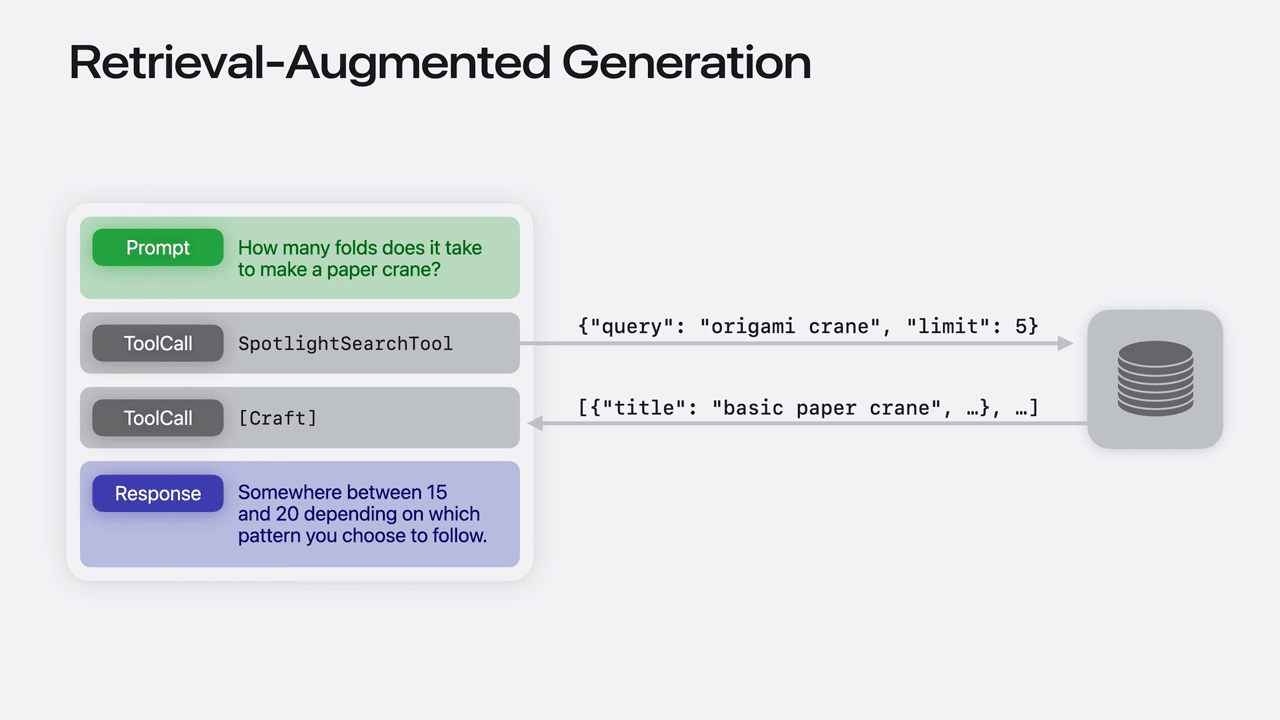 출처: WWDC26 - What’s new in the Foundation Models framework
흐름을 네 단계로 그린 도식이다. Prompt 는 “How many folds does it take to make a paper crane?” 이다. model 이 SpotlightSearchTool 을 {"query": "origami crane", "limit": 5} 로 부른다. tool 은 [Craft] 배열을 돌려주는데 첫 항목의 title 이 “basic paper crane” 이다. 마지막 Response 는 “Somewhere between 15 and 20 depending on which pattern you choose to follow.” 다.
SDK 에서 SpotlightSearchTool 은 Core Spotlight 와 Foundation Models 를 함께 import 했을 때 열린다. iOS, macOS, visionOS 27.0 에서 쓸 수 있고 watchOS 에서는 쓸 수 없다. 설정과 index 준비는 LLM search using Core Spotlight 세션의 몫이다. 문서는 SpotlightSearchTool 에 있다.
Dynamic profile
여기서 발표자가 Zhen 으로 바뀐다. 주제는 한 session 안에서 instructions, tool, model 을 바꿔 가며 일하게 하는 방법이다.
Crafts app 의 두 mode
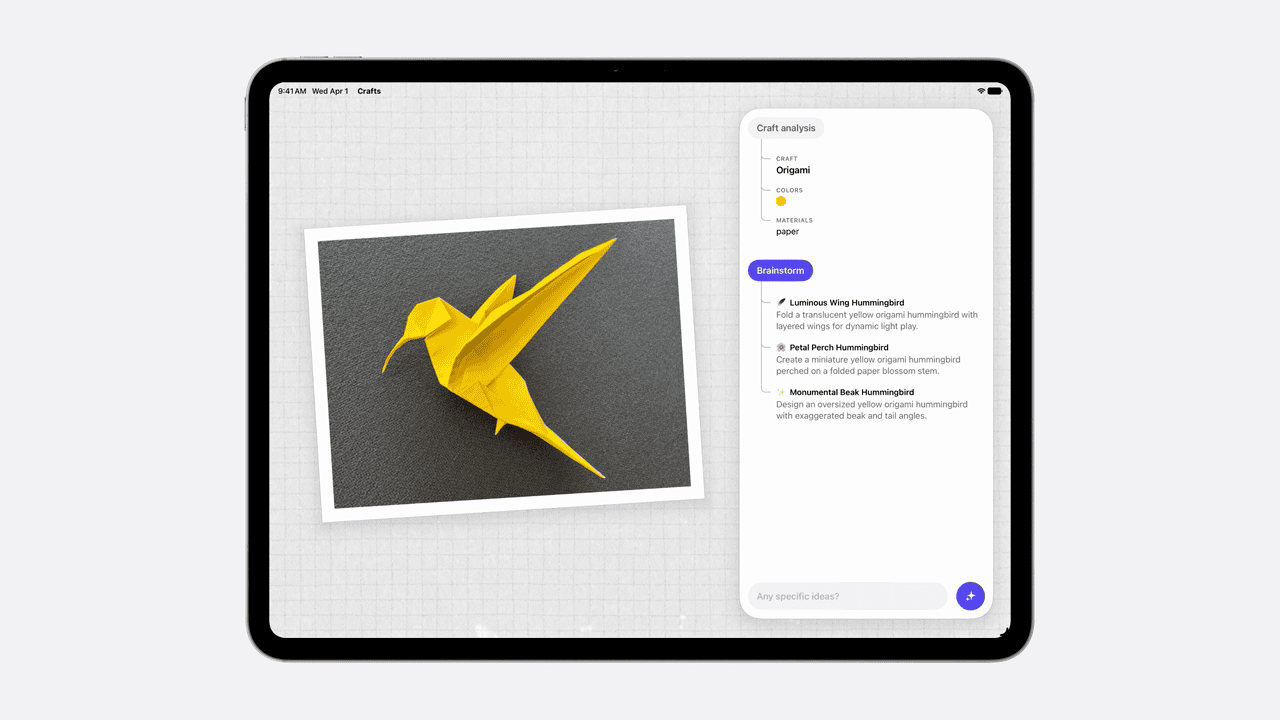
예제는 공예 일지 앱이다. 사진을 넣으면 두 단계로 일한다.
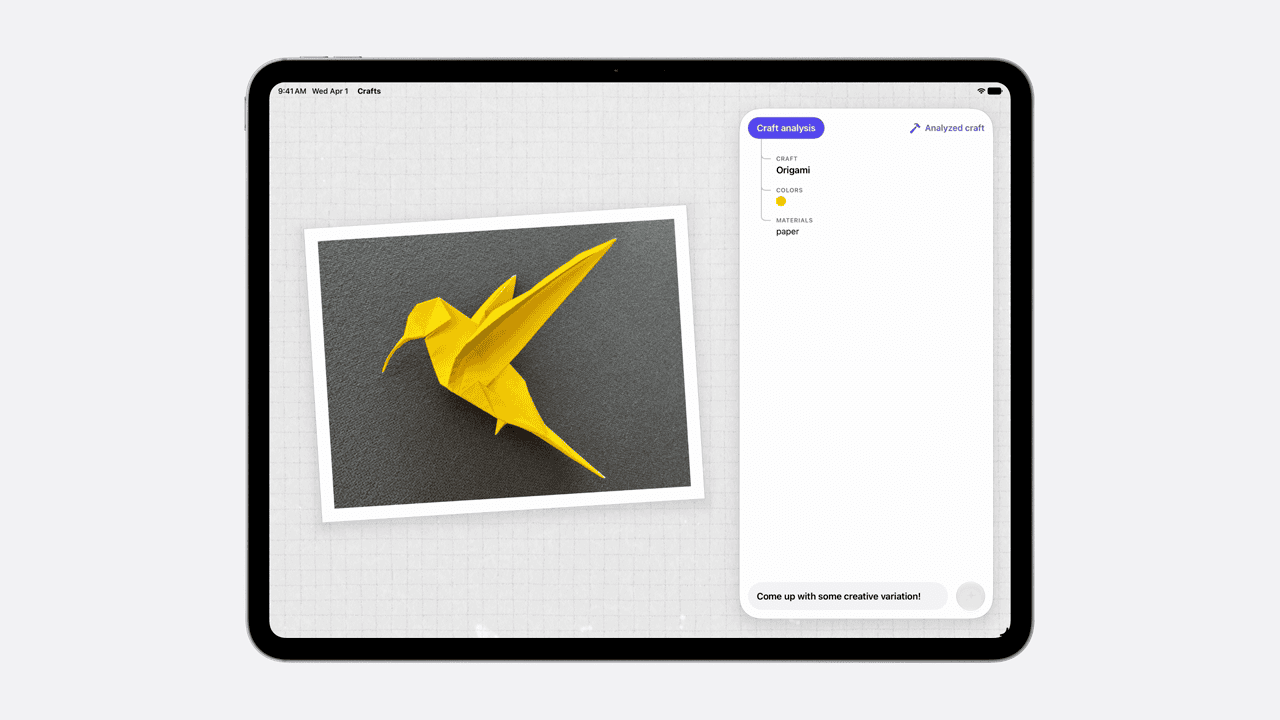 출처: WWDC26 - What’s new in the Foundation Models framework
iPad 화면이다. 왼쪽에 노란 종이로 접은 새 사진이 있고 오른쪽 panel 의 “Craft analysis” 아래에 결과가 채워져 있다. CRAFT 는 “Origami”, COLORS 는 노란 점 하나, MATERIALS 는 “paper” 다.
첫 단계는 craft analysis mode 다. instructions 가 image 를 분석해서 기록하라고 시키고, model 은 craft 종류, 색, 재료를 알아낸 다음 tool call 로 일지에 저장한다.
 출처: WWDC26 - What’s new in the Foundation Models framework
같은 panel 에 “Brainstorm” 단계가 이어진다. 아이디어 세 개가 나온다. “Luminous Wing Hummingbird”, “Petal Perch Hummingbird”, “Monumental Beak Hummingbird” 다. 아래 입력란에는 “Any specific ideas?” 라고 적혀 있다.
둘째 단계는 brainstorm mode 다. 앞에서 알아낸 것을 그대로 들고 PCC 의 reasoning 으로 만들 거리를 제안한다. 두 단계는 instructions 도, tool 도, model 도 다르다. 그런데 대화의 맥락은 이어져야 한다.
명령형 code 의 한계
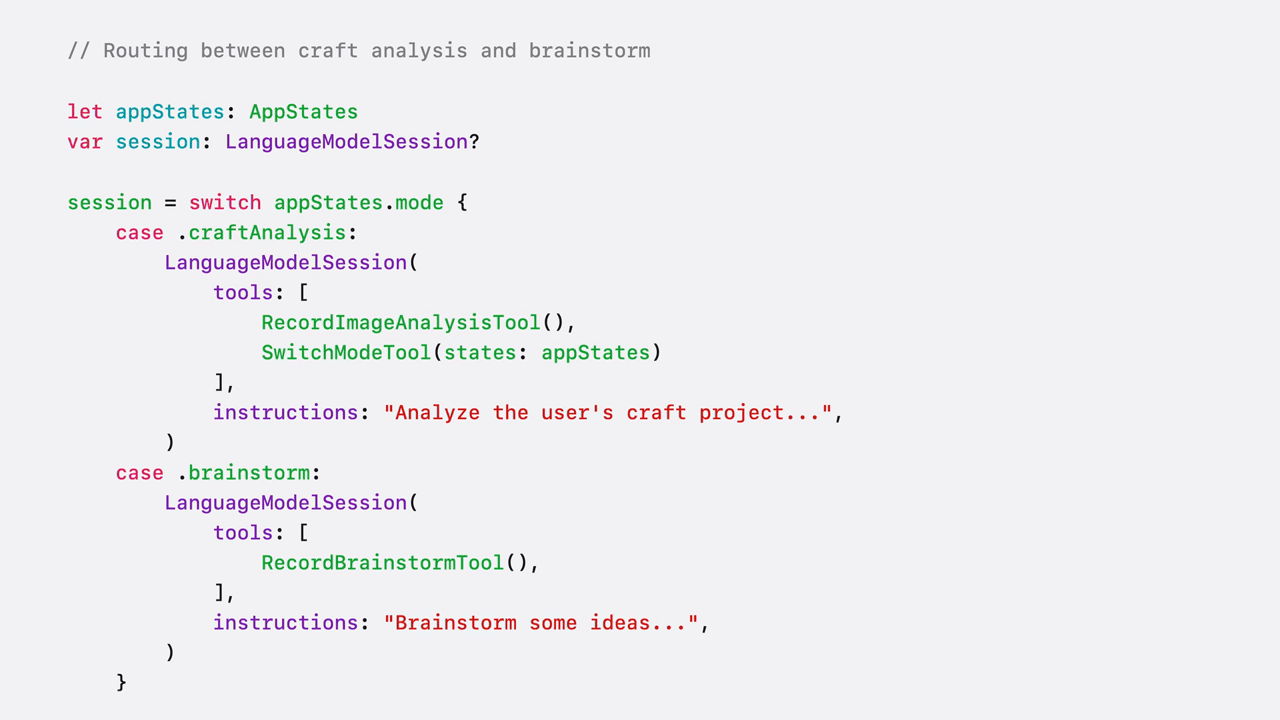
이것을 지금까지의 API 로 만들면 mode 마다 session 을 따로 만들게 된다.
 출처: WWDC26 - What’s new in the Foundation Models framework
slide 제목은 “Routing between craft analysis and brainstorm” 이다. appStates.mode 를 switch 해서 .craftAnalysis 면 RecordImageAnalysisTool 과 SwitchModeTool 을 가진 session 을, .brainstorm 이면 RecordBrainstormTool 을 가진 session 을 만든다.
여기까지는 단순하다. 문제는 model 이 스스로 mode 를 바꾸게 하려 할 때 생긴다. page 의 snippet 에는 그 판이 실려 있는데, 이전 session 의 transcript 에서 instructions 를 떼어 내고, 새 instructions 와 tool 로 session 을 다시 만들고, withObservationTracking 으로 mode 변화를 지켜보다가 다시 만드는 함수를 부른다. 발표자는 이런 식의 context 관리와 orchestration 에 boilerplate 가 많이 든다고 정리한다.
이 snippet 은 Xcode 27.0 SDK 에서 type check 를 통과하지 못했다. Transcript 에 dropFirstInstructions() 가 없고, LanguageModelSession 에 tools, instructions, transcript 를 한꺼번에 받는 initializer 가 없다. 설명용 code 로 보고 글에는 싣지 않았다.
Dynamic profile 이란?
Dynamic profile 은 “지금 이 순간 context 에 무엇이 있어야 하는가” 를 선언하는 API 다. SwiftUI 의 View 가 상태에 따라 body 를 다시 계산하듯, DynamicProfile 은 상태에 따라 body 가 돌려주는 Profile 이 바뀐다. session 은 하나만 두고, 바꾸는 일은 framework 가 한다.
 출처: WWDC26 - What’s new in the Foundation Models framework
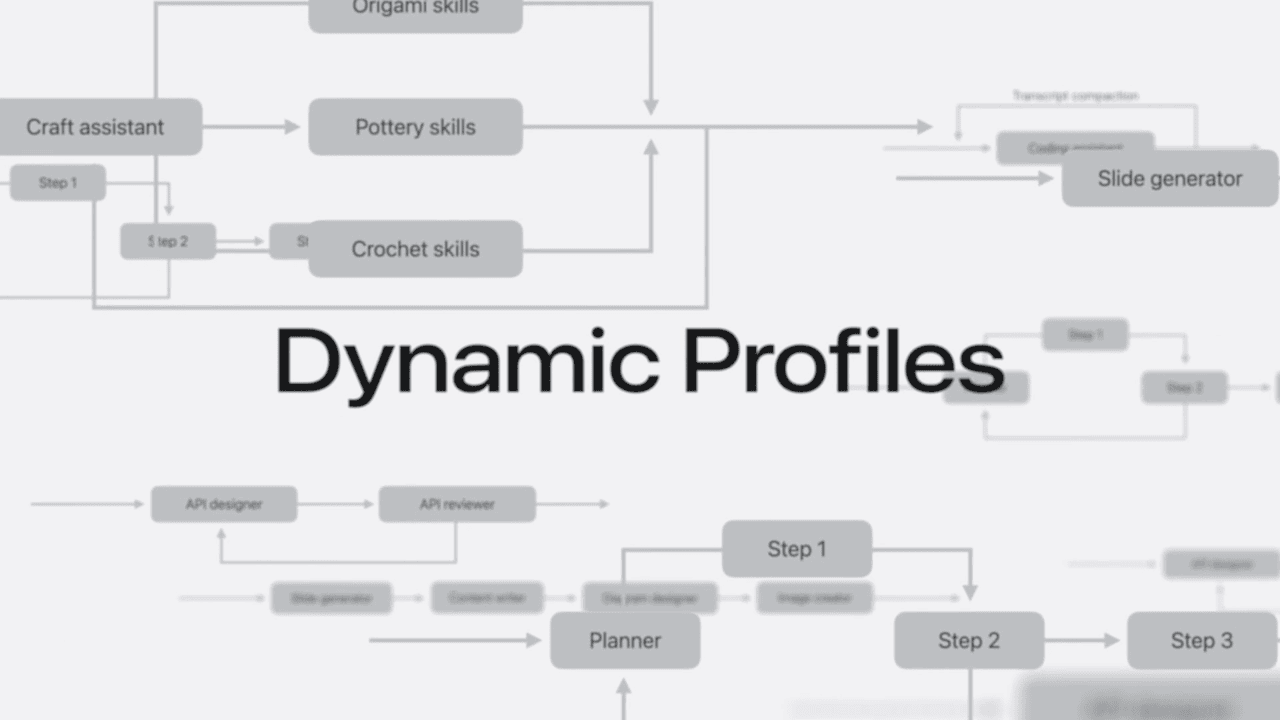
“Dynamic Profiles” 제목 뒤로 agent 의 흐름도가 흐릿하게 깔려 있다. “Craft assistant” 아래로 “Origami”, “Pottery”, “Crochet” skill 과 “Planner”, “Step 1” 에서 “Step 3” 까지의 상자가 보인다. 세션에서 이 그림을 따로 설명하지는 않는다.
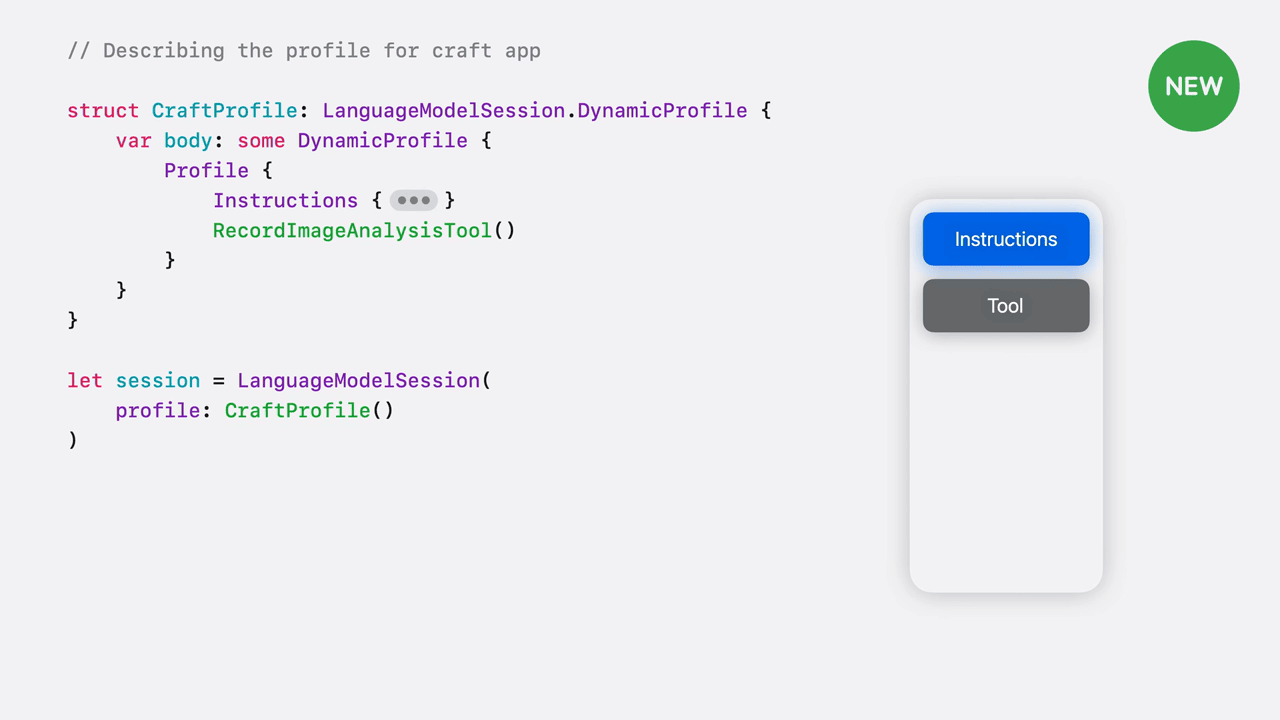
가장 단순한 모양은 instructions 와 tool 을 담은 Profile 하나다.
1
2
3
4
5
6
7
8
9
10
11
12
13
14
15
16
17
18
19
20
21
22
23
24
25
26
27
28
29
30
31
32
33
34
import FoundationModels

struct RecordImageAnalysisTool: Tool {
    let name = "recordImageAnalysis"
    let description = "Record the analysis of a craft project image."

    @Generable
    struct Arguments {
        let craftType: String
        let colors: [String]
        let materials: [String]
    }

    func call(arguments: Arguments) async throws -> String {
        "Recorded."
    }
}

struct SimpleCraftProfile: LanguageModelSession.DynamicProfile {
    var body: some DynamicProfile {
        Profile {
            Instructions {
                """
                You are an expert crafting assistant. \
                Record craft project image analyses \
                using the recordImageAnalysis tool.
                """
            }
            RecordImageAnalysisTool()
        }
    }
}

let session = LanguageModelSession(profile: SimpleCraftProfile())
 출처: WWDC26 - What’s new in the Foundation Models framework
slide 제목은 “Describing the profile for craft app” 이다. 왼쪽 code 는 위와 같은 구조고, 오른쪽에는 파란 “Instructions” 상자와 회색 “Tool” 상자가 세로로 쌓인 기둥이 하나 있다. session 의 context 를 그린 것이다.
RecordImageAnalysisTool 의 내용은 세션에 나오지 않아서 직접 채웠다. 발표에서 model 이 craft 종류, 색, 재료를 기록한다고 했으므로 argument 를 그 세 가지로 잡았다. slide 에서는 struct 이름이 CraftProfile 인데 다음 절의 것과 겹쳐서 여기서는 SimpleCraftProfile 로 바꿨다.
LanguageModelSession.DynamicProfile
body 로 지금 쓸 profile 을 돌려주는 protocol 이다. 문서는 LanguageModelSession.DynamicProfile 에 있다.
LanguageModelSession.Profile
instructions 와 tool 을 builder 로 받아 context 한 벌을 이루는 type 이다. 문서는 LanguageModelSession.Profile 에 있다.
init(profile:history:)
profile 로 session 을 만드는 initializer 다. history 는 생략할 수 있다. 문서는 init(profile:history:) 에 있다.
상태에 따른 profile 전환
mode 가 둘이면 body 안에서 switch 한다. 앱이 이미 갖고 있는 observable object 의 값을 그대로 쓴다.
1
2
3
4
5
6
7
8
9
10
11
12
13
14
15
16
17
18
19
20
21
22
23
24
25
26
27
28
29
30
31
32
33
34
35
36
37
38
39
40
41
42
43
44
45
46
47
48
49
50
51
52
53
54
55
56
57
58
59
60
61
62
63
64
65
66
import FoundationModels
import Observation

@Generable
enum Mode {
    case craftAnalysis
    case brainstorm
}

@Observable
final class CraftProjectStates: @unchecked Sendable {
    var mode: Mode = .craftAnalysis
    let privateCloudCompute = PrivateCloudComputeLanguageModel()
}

struct BrainstormRecordTool: Tool {
    let name = "recordBrainstorm"
    let description = "Record a list of craft project ideas."

    @Generable
    struct Arguments {
        let ideas: [String]
    }

    func call(arguments: Arguments) async throws -> String {
        "Recorded."
    }
}

struct SwitchModeTool: Tool {
    let name = "switchMode"
    let description = "Switch to a different mode."
    let states: CraftProjectStates

    @Generable
    struct Arguments {
        let mode: Mode
    }

    func call(arguments: Arguments) async throws -> String {
        states.mode = arguments.mode
        return "Successfully switched to \(arguments.mode)."
    }
}

struct CraftProfile: LanguageModelSession.DynamicProfile {
    let states: CraftProjectStates

    var body: some DynamicProfile {
        switch states.mode {
        case .craftAnalysis:
            Profile {
                Instructions { "Analyze the user's craft project and record what you find." }
                RecordImageAnalysisTool()
                SwitchModeTool(states: states)
            }
        case .brainstorm:
            Profile {
                Instructions { "Brainstorm some craft project ideas and record them." }
                BrainstormRecordTool()
            }
            .model(states.privateCloudCompute)
            .reasoningLevel(.deep)
        }
    }
}
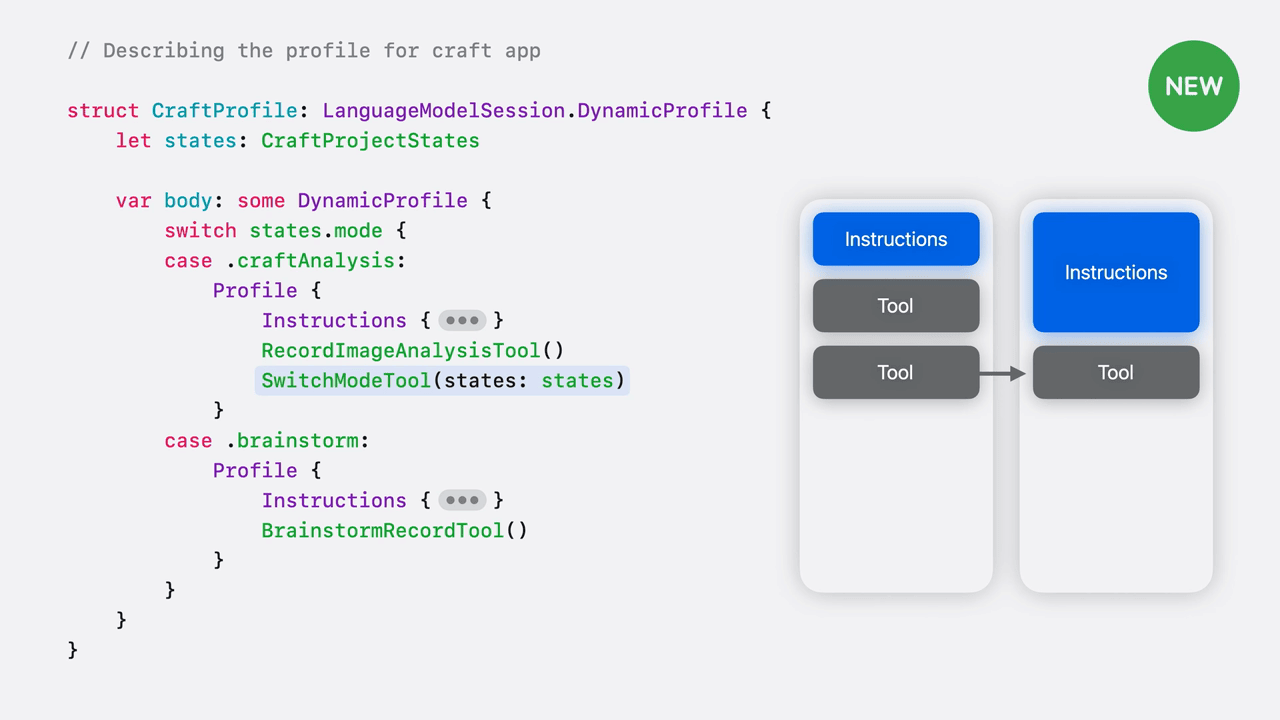 출처: WWDC26 - What’s new in the Foundation Models framework
같은 slide 에서 code 가 자란 모습이다. .craftAnalysis 쪽 Profile 에 SwitchModeTool(states: states) 줄이 강조되어 있다. 오른쪽 그림은 기둥이 둘로 늘었고, 왼쪽 기둥의 둘째 “Tool” 상자에서 오른쪽 기둥으로 화살표가 나간다. tool 하나가 다른 context 로 넘어가는 문이 된다는 그림이다.
SwitchModeTool 이 핵심이다. model 이 이 tool 을 부르면 states.mode 가 바뀌고, body 가 다른 Profile 을 돌려주고, session 의 instructions 와 tool 이 바뀐다. 명령형 code 에서 session 을 다시 만들고 transcript 를 옮기던 일이 사라진다. CraftProjectStates, Mode, 두 tool 의 내용, instructions 의 문장은 세션에 없어서 직접 채웠다. page 의 SwitchModeTool snippet 은 property 를 states 로 선언해 놓고 call 안에서 appStates.mode 를 써서 그대로는 빌드되지 않는다. 위 code 는 states.mode 로 맞춘 것이다.
발표자가 꼭 이해하라고 한 문장이 있다. “a DynamicProfile resolves to a single active Profile at any given time” 이다. 어느 순간이든 활성 profile 은 하나다. SDK 도 이것을 강제한다. body 안에 Profile 두 개를 조건 없이 나란히 쓰는 builder method 는 unavailable 로 표시되어 있고, message 는 “The body of a ‘DynamicProfile’ must evaluate to a single active profile” 이다.
Model 과 설정을 바꾸는 modifier
context 만 바꿔서는 모자랄 때가 있다. 일마다 맞는 model 이 다르기 때문이다.
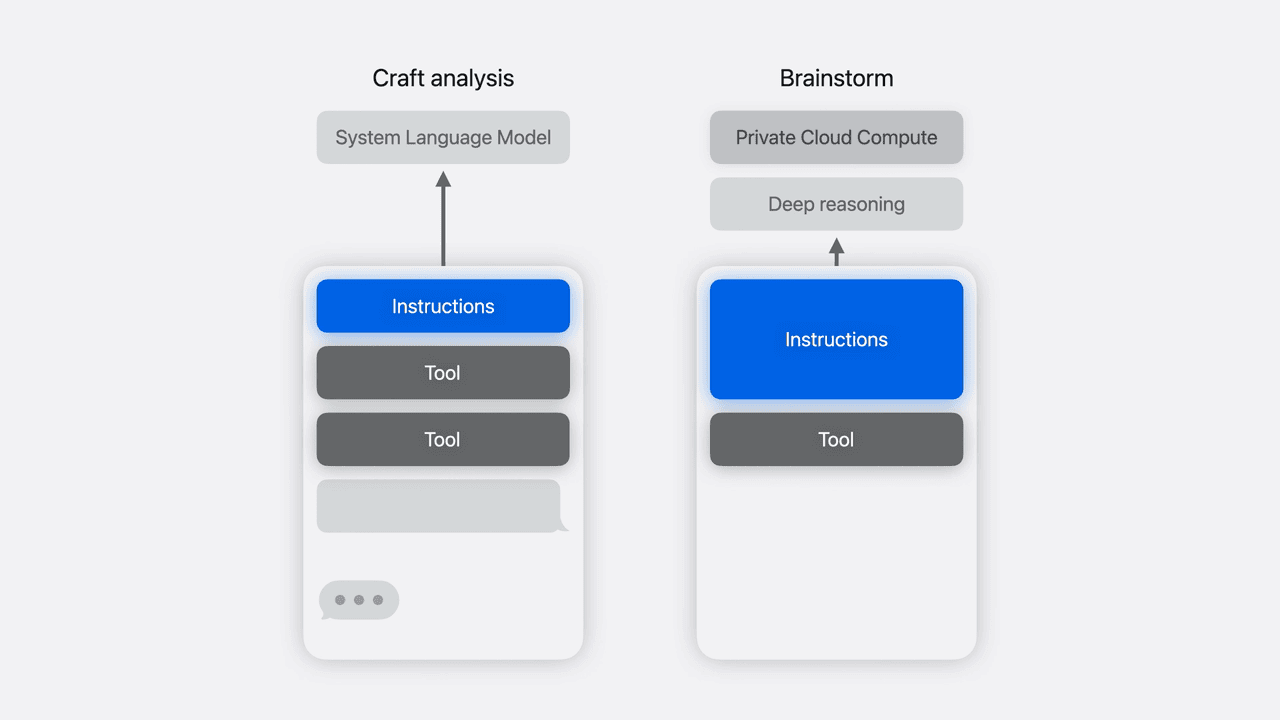 출처: WWDC26 - What’s new in the Foundation Models framework
두 scenario 를 나란히 그린 도식이다. 왼쪽 “Craft analysis” 기둥 위에는 “System Language Model” 이, 오른쪽 “Brainstorm” 기둥 위에는 “Private Cloud Compute” 와 “Deep reasoning” 이 놓여 있다.
사진 한 장을 분석하는 빠른 일은 on-device model 로 충분하고, 아이디어를 내는 일은 PCC 와 깊은 reasoning 이 낫다는 판단이다. 이것을 Profile 에 붙이는 modifier 로 적는다.
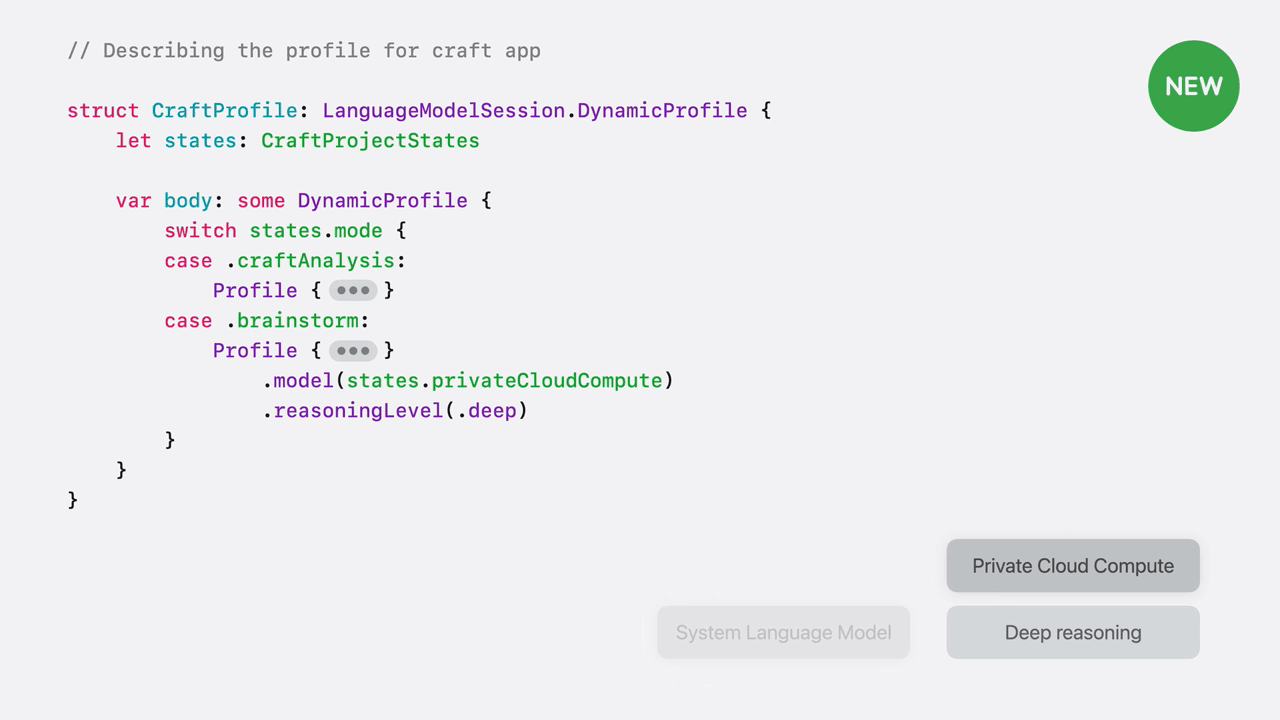 출처: WWDC26 - What’s new in the Foundation Models framework
.brainstorm 쪽 Profile 뒤에 .model(states.privateCloudCompute) 와 .reasoningLevel(.deep) 이 붙어 있다. 아래에는 “System Language Model” 상자가 흐려지고 “Private Cloud Compute”, “Deep reasoning” 상자가 또렷해진 그림이 있다.
앞 절의 code 에 이미 이 두 줄이 들어 있다. modifier 가 없는 .craftAnalysis 쪽은 기본값인 on-device model 을 쓴다. model 이 바뀌어도 대화 기록은 이어진다. demo 에서 Zhen 이 아이디어를 고르자 model 이 PCC 로 넘어가는데, 분석 단계의 context 를 전부 들고 간다고 설명한다.
SDK 에 선언된 modifier 는 이 둘보다 많다. 세션에서 다루지 않은 것까지 묶으면 다음과 같다.
| 종류 | modifier |
|---|---|
| model 선택 | model(_:) |
| 생성 설정 | temperature(_:), samplingMode(_:), maximumResponseTokens(_:), reasoningLevel(_:), toolCallingMode(_:) |
| 기록 다루기 | historyTransform(_:), transcriptErrorHandlingPolicy(_:) |
| lifecycle | onPrompt, onResponse, onReasoning, onToolCall, onToolOutput, onActivate, onDeactivate |
model(_:)
이 profile 이 활성일 때 쓸 model 을 정하는 modifier 다. 문서는 [model(:)](https://developer.apple.com/documentation/foundationmodels/languagemodelsession/dynamicprofile/model%28:%29){:target=”_blank”} 에 있다.
Profile 을 나눌 때의 기준
Zhen 은 이 API 를 쓸 때 따져 볼 것을 짧게 말하고 넘어간다.
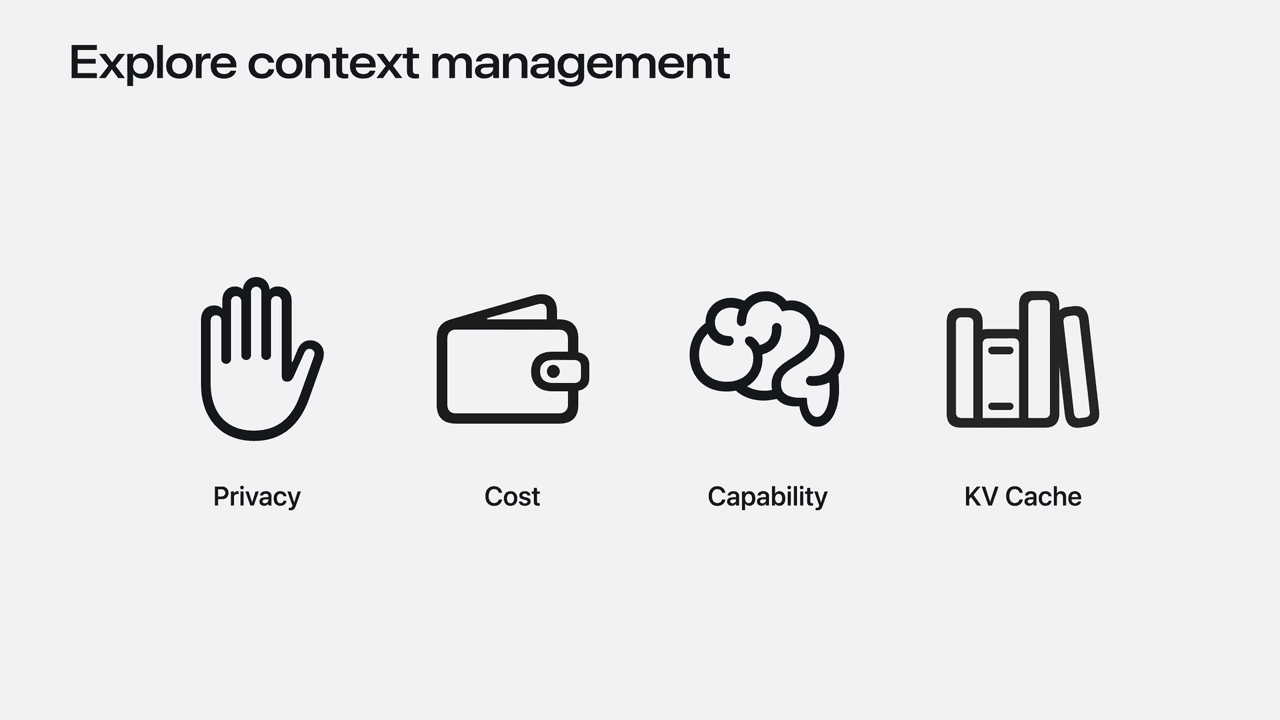 출처: WWDC26 - What’s new in the Foundation Models framework
slide 제목은 “Explore context management” 다. icon 네 개 아래에 “Privacy”, “Cost”, “Capability”, “KV Cache” 가 적혀 있다. 발표자가 말로 짚는 것은 privacy boundaries, model capabilities, cost 세 가지고 KV cache 는 화면에만 나온다.
세션이 풀어 주지 않아서 내 해석을 적는다. privacy 는 profile 이 바뀌면서 on-device 에서 쌓인 대화가 server model 로 넘어간다는 점이다. 기기 안에서만 다뤄야 하는 내용이 있다면 profile 경계가 곧 data 가 나가는 경계가 된다. capability 는 model 마다 지원하는 기능이 다르다는 점이고, cost 는 quota 나 token 요금이다. KV cache 는 model 이 앞부분 계산을 재사용하는 장치를 가리키는 말이므로, instructions 가 자주 바뀌면 재사용이 깨져 느려질 수 있다는 뜻으로 짐작한다. 자세한 내용은 Build agentic app experiences with the Foundation Models framework 에서 다룬다고 한다.
Evaluations framework
language model 은 같은 입력에 다른 답을 낼 수 있어서 동작을 예측하기 어렵다. prompt 를 고쳤을 때 나아졌는지 나빠졌는지를 감으로 판단하게 되는 이유다. Evaluations 는 이것을 숫자로 재는 새 Swift framework 다.
 출처: WWDC26 - What’s new in the Foundation Models framework
slide 제목은 “Prompt hill climbing” 이고 관련 세션 세 개가 나열되어 있다. “Improve your prompts by hill-climbing with Evaluations”, “Create robust evaluations for agentic apps”, “Meet the Evaluations framework” 다. 바로 앞 화면에는 Xcode 에서 “BookTaggingEvaluation” 이라는 평가 결과를 보는 모습이 잠깐 나온다.
이 세션에서 Evaluations 에 쓰는 시간은 30초 남짓이다. prompt 를 조정하면서 정확도를 수치로 보고, 변경의 통계적 영향을 이해하라는 말이 전부다. Xcode 27.0 에서 Evaluations.framework 는 SDK 의 일반 framework 자리가 아니라 각 platform 의 Developer/Library/Frameworks 아래에 들어 있다. XCTest 와 같은 자리다. 앱에 넣는 framework 가 아니라 test 쪽에서 쓰는 framework 라는 뜻이다.
세 세션의 주소는 Meet the Evaluations framework, Create robust evaluations for agentic apps, Improve your prompts by hill-climbing with Evaluations 다.
Command line 과 Python
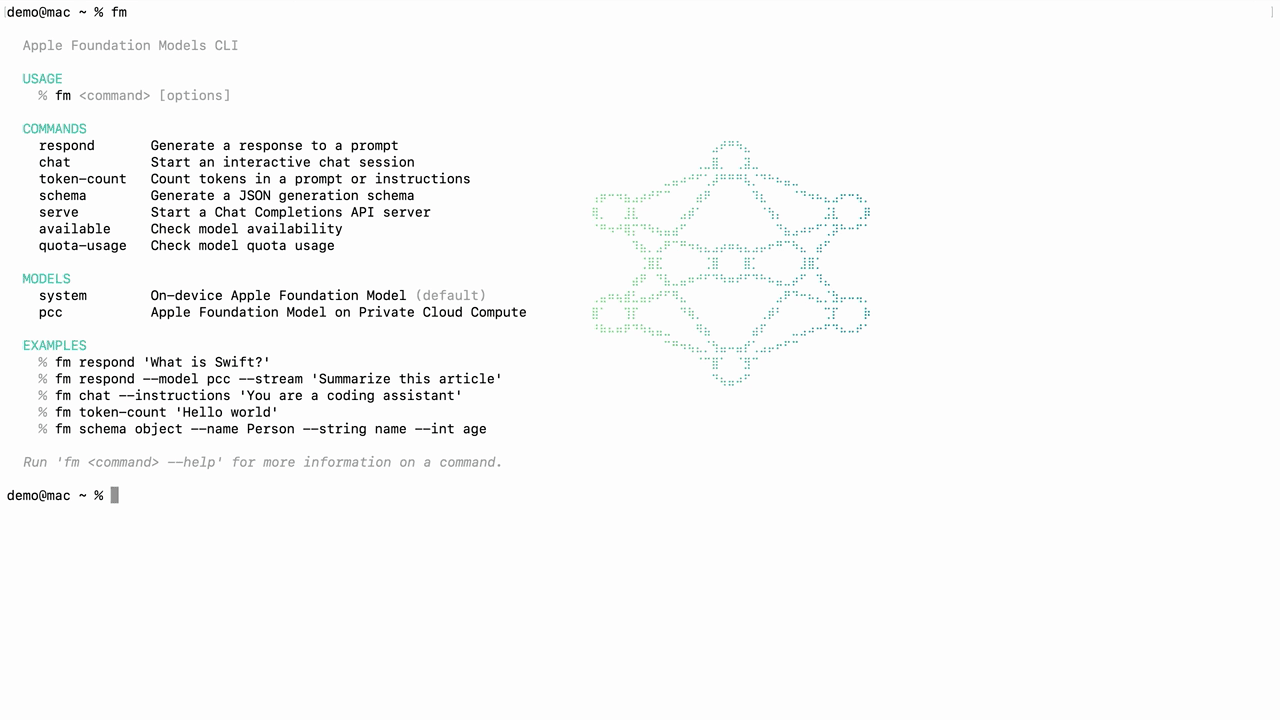
macOS 27 에는 model 을 terminal 에서 부르는 fm 이라는 명령이 들어온다. on-device model 과 PCC 를 둘 다 쓸 수 있다.
 출처: WWDC26 - What’s new in the Foundation Models framework
terminal 에서 fm 만 입력한 화면이다. “Apple Foundation Models CLI” 라는 제목 아래 COMMANDS 에 respond, chat, token-count, schema, serve, available, quota-usage 가 있다. MODELS 에는 system 이 “On-device Apple Foundation Model (default)”, pcc 가 “Apple Foundation Model on Private Cloud Compute” 로 적혀 있다. serve 의 설명은 “Start a Chat Completions API server” 다.
 출처: WWDC26 - What’s new in the Foundation Models framework
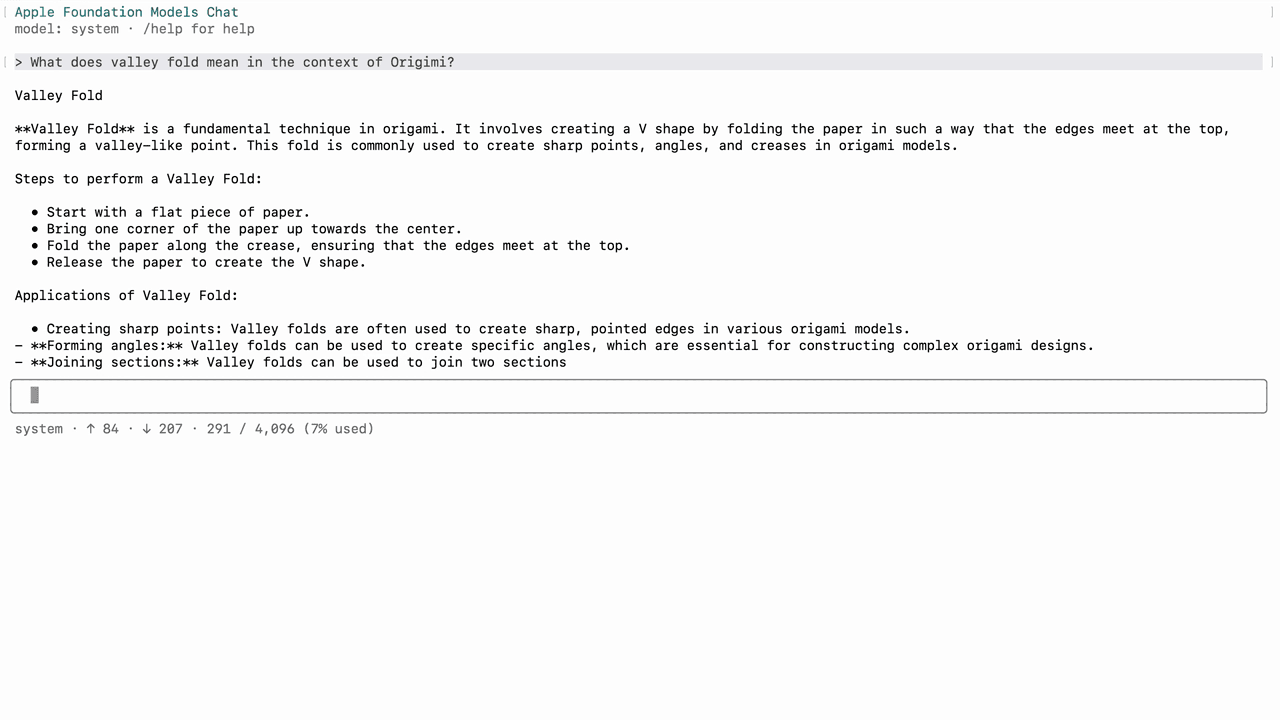
fm chat 화면이다. “What does valley fold mean in the context of Origimi?” 라고 묻자 valley fold 의 뜻과 접는 순서를 답한다. 맨 아래 상태 줄에는 “system”, 위 화살표 84, 아래 화살표 207, 그리고 “291 / 4,096 (7% used)” 가 보인다. demo 에 쓰인 Mac 의 on-device model 은 context 가 4,096 token 이다.
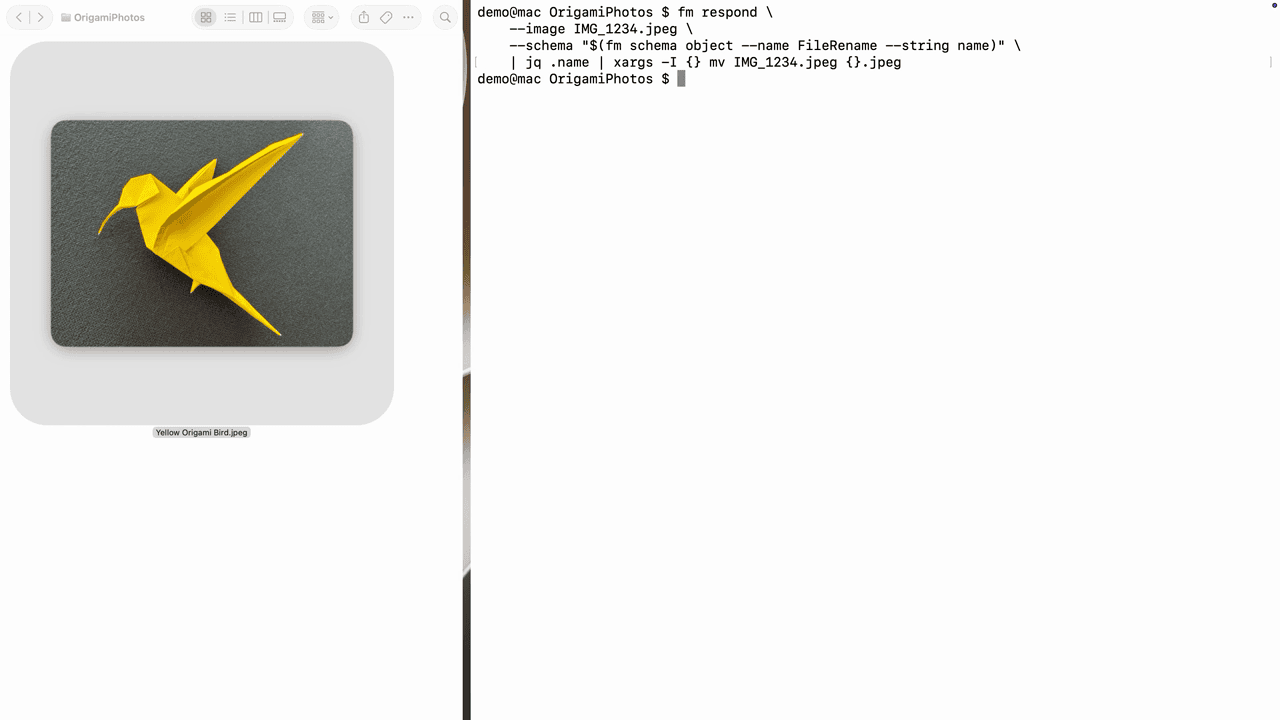
Zhen 은 앱 기능에 쓸 prompt 를 fm chat 으로 먼저 시험해 본다고 한다. shell script 에 끼워 쓰는 예도 보여 준다.
 출처: WWDC26 - What’s new in the Foundation Models framework
왼쪽 Finder 에는 노란 종이 새 사진이 있고 file 이름이 “Yellow Origami Bird.jpeg” 로 바뀌어 있다. 오른쪽 terminal 의 명령은 fm respond 에 --image IMG_1234.jpeg 와 --schema 를 주고, schema 는 fm schema object --name FileRename --string name 으로 만들어 넣은 다음, 결과에서 jq .name 으로 이름을 뽑아 mv 로 넘기는 한 줄이다.
image 입력과 guided generation 이 CLI 에서도 된다는 것을 한 줄로 보여 주는 예다. /usr/bin/fm 은 macOS 27.0.1 에 들어 있다. 다만 처음 쓰려면 sudo fm license 로 약관에 동의해야 하고, 동의하기 전에는 --help 도 나오지 않는다.
macOS 27.0.1 의 fm 은 세션 화면과 조금 다르다. COMMANDS 는 available, chat, count-tokens, license, respond, schema, serve 일곱 개다. 화면의 token-count 는 count-tokens 로 이름이 바뀌었고 quota-usage 는 없다. MODELS 에도 system 하나만 있어서 fm respond --model pcc 는 “The value ‘pcc’ is invalid for ‘–model
1
2
3
4
5
6
7
8
9
fm available
# System model available

fm count-tokens 'Hello world'
# 3

fm schema object --name FileRename --string name > rename.json
fm respond --image photo.png --schema rename.json 'Suggest a descriptive file name for this image'
# {"name": "iPhone 17 Pro with Ultra-thin Watch paired, flight tracking"}
fm schema 는 title, properties, required, x-order, additionalProperties 가 든 JSON schema 를 출력하고, fm respond --schema 는 그 file 의 경로를 받아 schema 에 맞는 JSON 만 돌려준다. 위의 마지막 줄은 블로그 screenshot 한 장을 넣고 받은 결과다. fm respond 에는 이 밖에 --instructions, --tool (barcode, ocr), --label, --save-transcript, --resume, --use-case (general, content-tagging), --guardrails 가 있고, fm chat 의 session 은 ~/.fm/sessions/ 에 저장되어 --resume <name> 이나 --continue 로 이어 간다.
fm serve --port 1976 은 127.0.0.1:1976 에서 GET /health, GET /v1/models, POST /v1/chat/completions 세 endpoint 를 연다. /v1/models 는 system 하나를 돌려주고, /v1/chat/completions 에 {"model":"system","messages":[...]} 를 보내면 stream 을 주지 않아도 chat.completion.chunk 가 data: 줄로 흘러나오다 data: [DONE] 으로 끝난다. server log 에는 요청마다 입력 61 token, 출력 9 token, 685ms 처럼 token 수와 걸린 시간이 찍힌다. TCP 대신 --socket <path> 로 Unix domain socket 에 열 수도 있다.
Python 쪽도 있다.
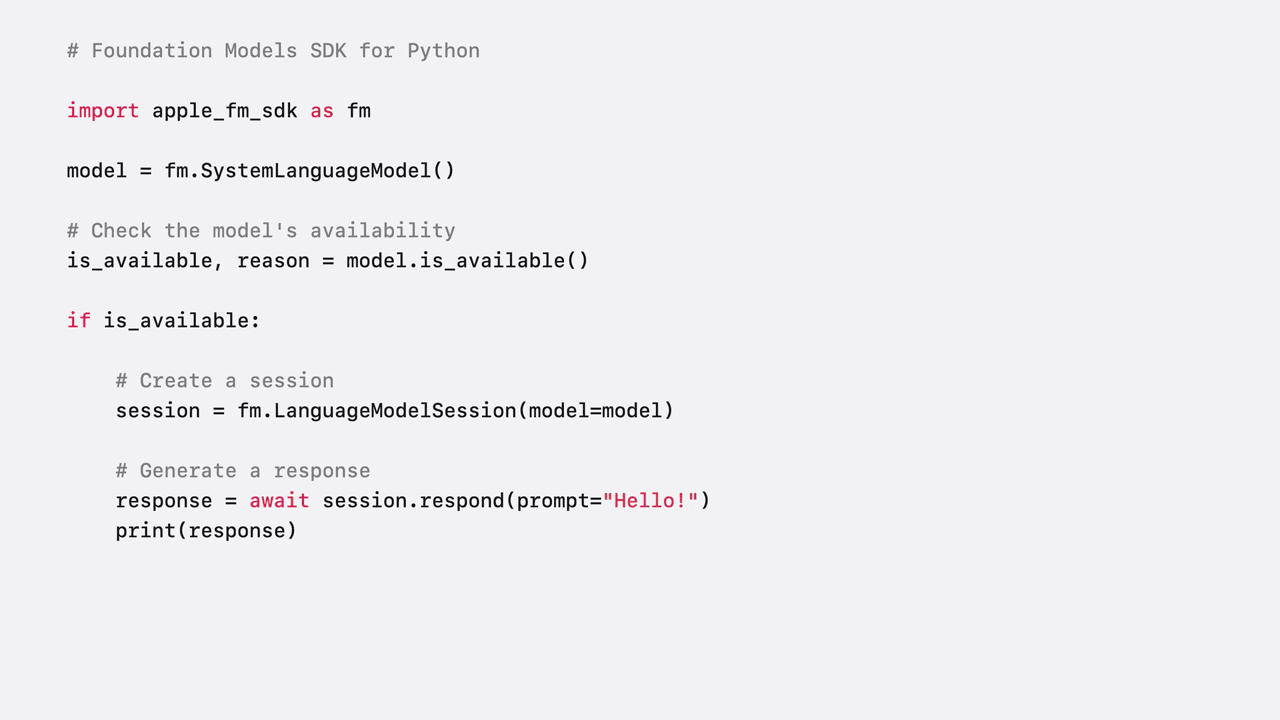 출처: WWDC26 - What’s new in the Foundation Models framework
slide 제목은 “Foundation Models SDK for Python” 이다. import apple_fm_sdk as fm 으로 가져오고, fm.SystemLanguageModel() 을 만들어 model.is_available() 로 확인한 다음, fm.LanguageModelSession(model=model) 로 session 을 만들어 await session.respond(prompt="Hello!") 를 부른다. 바로 앞 화면에는 GitHub 의 apple/python-apple-fm-sdk repository 가 나온다.
Swift framework 와 같은 on-device model 을 쓰고, 핵심 기능을 갖췄다고 한다. data 를 다루는 사람이 notebook 에서 prompt 를 시험하는 용도로 소개한다. 두 도구를 다루는 세션은 Build AI-powered scripts with the fm CLI and Python SDK 다.
Open source 와 utilities package
마지막 주제는 open source 다. 두 덩어리가 나온다.
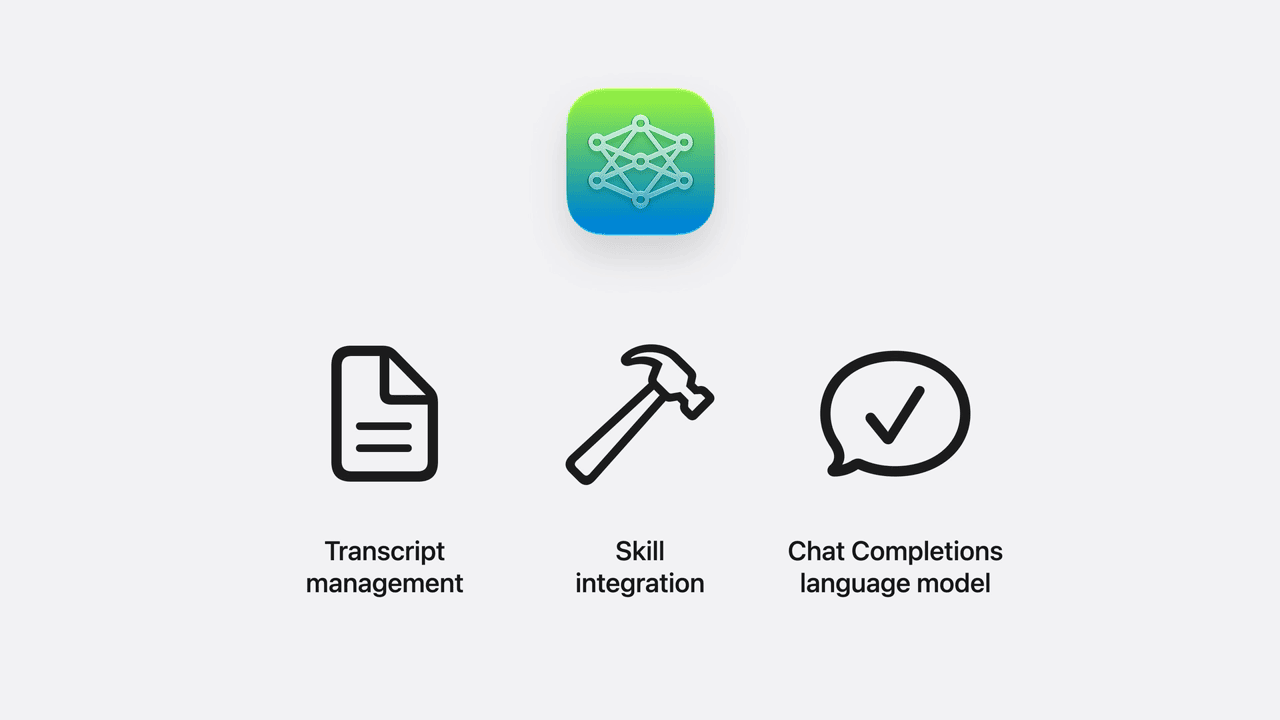 출처: WWDC26 - What’s new in the Foundation Models framework
Foundation Models icon 아래에 세 항목이 있다. “Transcript management”, “Skill integration”, “Chat Completions language model” 이다.
첫째는 Foundation Models framework utilities 라는 package 다. OS release 사이에도 갱신되면서 아직 굳지 않은 building block 을 담는 곳이다. 세션이 든 내용물은 세 가지다.
- transcript 를 관리하는 profile modifier
- 절차 지식을 필요할 때 불러오는 skill API
- Chat Completions 표준을 쓰는 server 와 통신하는 language model
OS 에 들어간 API 는 1년에 한 번 바뀌는데 LLM 을 다루는 방식은 그보다 빨리 바뀐다. 그 간격을 package 로 메우겠다는 구상이다. 뒤집어 보면 여기 있는 API 는 바뀔 수 있다는 뜻이기도 하다.
 출처: WWDC26 - What’s new in the Foundation Models framework
위에 Claude 와 Gemini 의 logo 가 있고 아래에 icon 세 개가 있다. “MLX”, “Foundation Models”, “Core AI” 다.
둘째는 framework 의 core 자체다. open source 가 되면 Swift 가 도는 곳이면 어디서든 쓸 수 있고, 발표자는 Linux server 를 예로 든다. 앱과 server 가 같은 session code 를 쓰고 model 만 바꾸는 구성이 가능해진다는 뜻이다. Zhen 은 Anthropic, Google 의 package 와 Core AI, MLX 통합을 묶어서 “어떤 model 이든 어디서든” 돌릴 수 있다고 맺는다.
세션의 마무리
Erik 이 다시 나와서 둘이 함께 마무리한다. 이 세션은 겉만 훑었으니 주제별 세션을 보라고 하고, 다음 단계로 두 가지를 권한다. sample app 을 받아 dynamic profile 을 익히는 것과 Evaluations framework 에 익숙해지는 것이다.
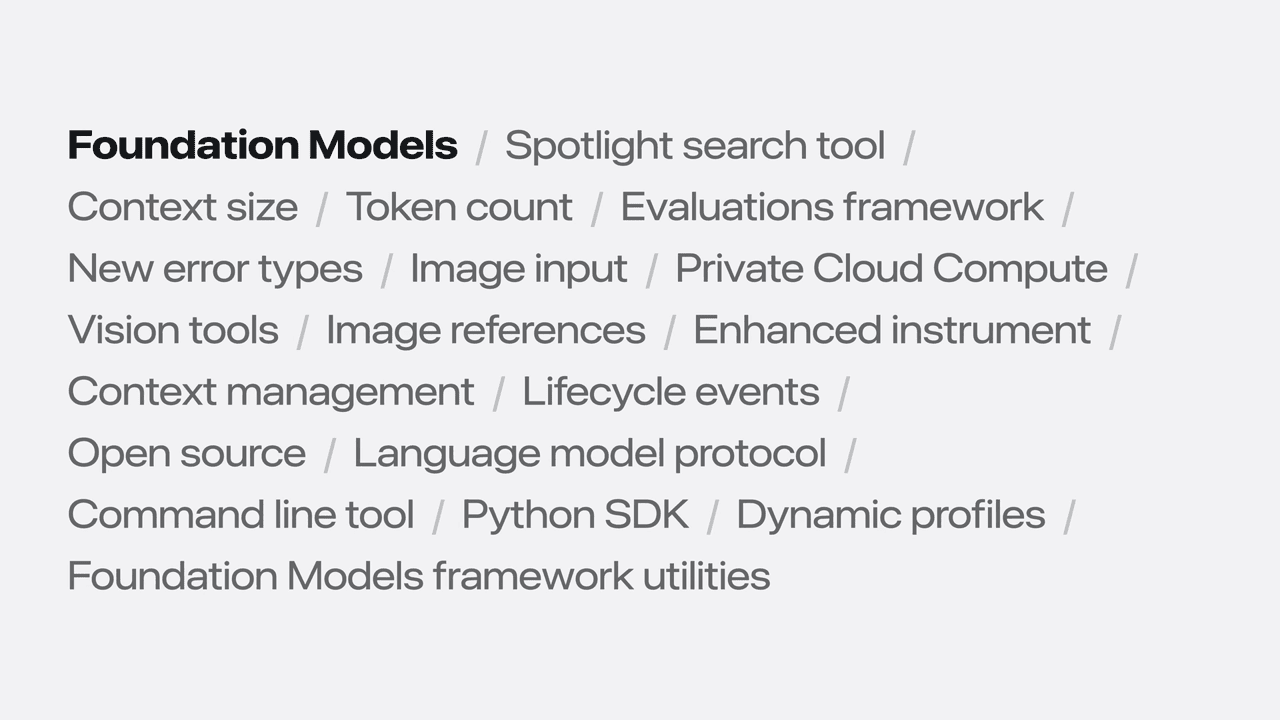 출처: WWDC26 - What’s new in the Foundation Models framework
이번 release 에 들어온 것을 한 화면에 모은 slide 다. “Foundation Models” 뒤로 Spotlight search tool, Context size, Token count, Evaluations framework, New error types, Image input, Private Cloud Compute, Vision tools, Image references, Enhanced instrument, Context management, Lifecycle events, Open source, Language model protocol, Command line tool, Python SDK, Dynamic profiles, Foundation Models framework utilities 가 이어진다.
이 가운데 “New error types”, “Image references”, “Lifecycle events” 는 세션에서 말로 다루지 않았다. “Enhanced instrument” 는 마무리에서 이름만 나오는데 Debug and profile agentic app experiences with Instruments 세션의 내용이다.
정리
세션에 나온 API 가 어느 OS 부터 쓸 수 있는지를 Xcode 27.0 의 SDK 에서 확인해 표로 모았다.
| API | 쓸 수 있는 OS | 비고 |
|---|---|---|
SystemLanguageModel.contextSize | iOS 26.0, macOS 26.0, visionOS 26.0 | 26.4 에 공개되고 26.0 까지 back deploy. watchOS 불가 |
SystemLanguageModel.tokenCount(for:) | iOS 26.4, macOS 26.4, visionOS 26.4 | watchOS 불가 |
Attachment | iOS 27.0, macOS 27.0, visionOS 27.0, watchOS 27.0 | UIImage initializer 는 UIKit 과 함께 import 할 때 |
PrivateCloudComputeLanguageModel | iOS 27.0, macOS 27.0, visionOS 27.0, watchOS 27.0 | tvOS 불가. entitlement 필요 |
LanguageModel protocol | iOS 27.0, macOS 27.0, visionOS 27.0, watchOS 27.0 | |
ContextOptions.reasoningLevel | iOS 27.0 계열 | .light, .moderate, .deep, .custom |
LanguageModelSession.Usage | iOS 27.0 계열 | response 와 session 양쪽에 있음 |
LanguageModelSession.DynamicProfile | iOS 27.0 계열 | |
SpotlightSearchTool | iOS 27.0, macOS 27.0, visionOS 27.0 | watchOS 불가 |
BarcodeReaderTool, OCRTool | iOS 27.0, macOS 27.0, visionOS 27.0 | Vision 과 Foundation Models 를 함께 import 해야 보임. Xcode 27.0 의 iOS simulator SDK 에는 없음. OCRTool 은 watchOS 불가 |
fm CLI | macOS 27 | 약관 동의 후 사용, 27.0.1 에서는 on-device model 만 |
세션 page 의 snippet 과 Xcode 27.0 SDK 가 어긋나는 곳도 모아 둔다.
| 위치 | snippet | SDK 에서 확인한 것 |
|---|---|---|
| 2:46 | contextSize 주석이 // 8192 | 영상 slide 는 // 4096. macOS 27.0.1 의 Apple silicon Mac 에서 읽은 값도 4096 |
| 3:52 | Attachment(UIImage(...)) 앞뒤로 “Insert c”, “ode snippet.” 이 섞여 있음 | page 편집 중에 남은 글자. code 는 Attachment(image) 로 충분 |
| 11:55 | session?.transcript.dropFirstInstructions() | Transcript 에 그런 method 가 없음 |
| 11:55 | LanguageModelSession(tools:instructions:transcript:) | instructions 와 transcript 를 함께 받는 initializer 가 없음 |
| 11:55 | SwitchModeTool 이 states 를 선언하고 appStates.mode 를 씀 | 이름이 맞지 않아 빌드 안 됨 |
| 11:55, 14:36 | RecordBrainstormTool 과 BrainstormRecordTool | 같은 tool 을 두 이름으로 부름 |
실제 프로젝트에 가져갈 점은 다음과 같다.
- context 크기는 상수로 두지 않는다.
contextSize와tokenCount(for:)로 읽어서 prompt 를 자르거나 요약할 시점을 정한다 - image 는 token 을 많이 쓴다. on-device model 에 넘길 때는 크기를 줄여서 넘긴다
- PCC 는 key 관리가 필요 없는 대신 사용자 단위 quota 가 있다.
quotaLimitReached에서 on-device 로 내려가는 경로를 같이 만든다 - model 을 바꿔 끼울 수 있게 됐으므로 session 을 만드는 곳을 한군데로 모아 둔다. guided generation 이나 tool calling 처럼 model 에 따라 안 될 수 있는 기능은 capability 를 확인하고 쓴다
- third-party model 을 쓸 때는 key 를 binary 에 넣지 않고,
usage를 기록해서 비용을 추적한다 - mode 마다 session 을 따로 만들어 transcript 를 옮기던 code 는
DynamicProfile하나로 바꿀 수 있다. mode 전환은 observable 상태를 바꾸는 tool 로 model 에 맡긴다 - profile 이 on-device 에서 server model 로 넘어가는 지점은 대화 내용이 기기를 떠나는 지점이다. 넘어가면 안 되는 내용이 있는지 먼저 따진다
참고자료
- Expanding generation with tool calling (Apple Developer Documentation)
- Analyzing images with multimodal prompting (Apple Developer Documentation)
- Composing dynamic sessions with instructions and profiles (Apple Developer Documentation)
- Adding server-side intelligence with Private Cloud Compute (Apple Developer Documentation)
- Meet Core AI (WWDC26)