[WWDC26] Build agentic app experiences with the Foundation Models framework
이 글은 WWDC 세션의 transcript 와 영상 화면을 Claude Code 로 정리한 글이고, 실제로 쓴 날은 2026-11-25 다. Swift code 는 세션 page 의 snippet 에 빠진 type 을 채우고 SDK 와 맞지 않는 곳을 고쳐 Xcode 27.0 의 iOS 27 simulator SDK 로 type check 했고, final answer tool 과 transcript error 처리는 macOS 27 에서 실행했다.
세션 정보
- 세션: Build agentic app experiences with the Foundation Models framework
- 길이: 21분 43초
- 공개일: 2026-06-08
- 발표: Erik Hornberger (Swift AI Frameworks), Oliver O’Neill (Apple Intelligence Platform)
- 코드: 세션 page 에 snippet 17개가 있다. 전부 Swift 다
한 줄 요약
agent 는 instructions, tool, model 설정을 묶은 profile 하나이고, 앱 상태에 따라 profile 을 바꾸면서 transcript 를 어디까지 넘기고 tool 을 언제 부르게 할지를 modifier 로 정하는 것이 Foundation Models framework 로 agentic 기능을 만드는 방법이다.
세션의 구성
세션은 What’s new in the Foundation Models framework 에서 3분쯤 소개한 dynamic profile 을 20분 동안 깊게 다룬다. 그 세션을 정리한 글은 [WWDC26] What’s new in the Foundation Models framework 에 있다. 앞쪽 절반은 Oliver 가 profile 을 선언하고 다듬는 법을, 뒤쪽 절반은 Erik 이 agent 여럿을 엮는 pattern 과 성능을 맡는다.
| 순서 | 내용 | 발표 |
|---|---|---|
| 0:00 | Introduction | Erik |
| 2:47 | The example app and agents | Oliver |
| 3:47 | Declaring a dynamic profile | Oliver |
| 4:45 | Dynamic instructions | Oliver |
| 5:36 | Configuring models per phase | Oliver |
| 7:21 | Transcript management and history transforms | Oliver |
| 8:50 | Custom modifiers | Oliver |
| 9:39 | Lifecycle modifiers and session properties | Oliver |
| 12:52 | Orchestration: baton-pass | Erik |
| 14:06 | Orchestration: phone-a-friend and skills | Erik |
| 15:18 | Tool calling mode | Erik |
| 17:12 | Transcript error handling | Erik |
| 18:27 | Performance, accuracy, and evaluations | Erik |
| 21:24 | Next steps | Erik |
 출처: WWDC26 - Build agentic app experiences with the Foundation Models framework
Erik 은 dynamic profile 이 푸는 문제를 두 가지로 든다. 하나는 context 관리다. model 이 한 번에 볼 수 있는 양이 정해져 있으니 무엇을 남기고 무엇을 뺄지 정해야 한다. 다른 하나는 model 의 경계다. model 마다 능력과 비용이 달라서 일에 맞는 model 로 보내야 한다. framework 는 이 두 가지를 다루는 primitive 를 주고, 그 위에 올리는 편의 기능은 “Foundation Models framework utilities” 라는 open source Swift package 로 따로 낸다고 한다. OS release 사이에도 갱신하려는 것이다.
 출처: WWDC26 - Build agentic app experiences with the Foundation Models framework
agenda 는 Dynamic profiles, Orchestration patterns, Performance and accuracy 세 가지다.
예제 앱과 agent
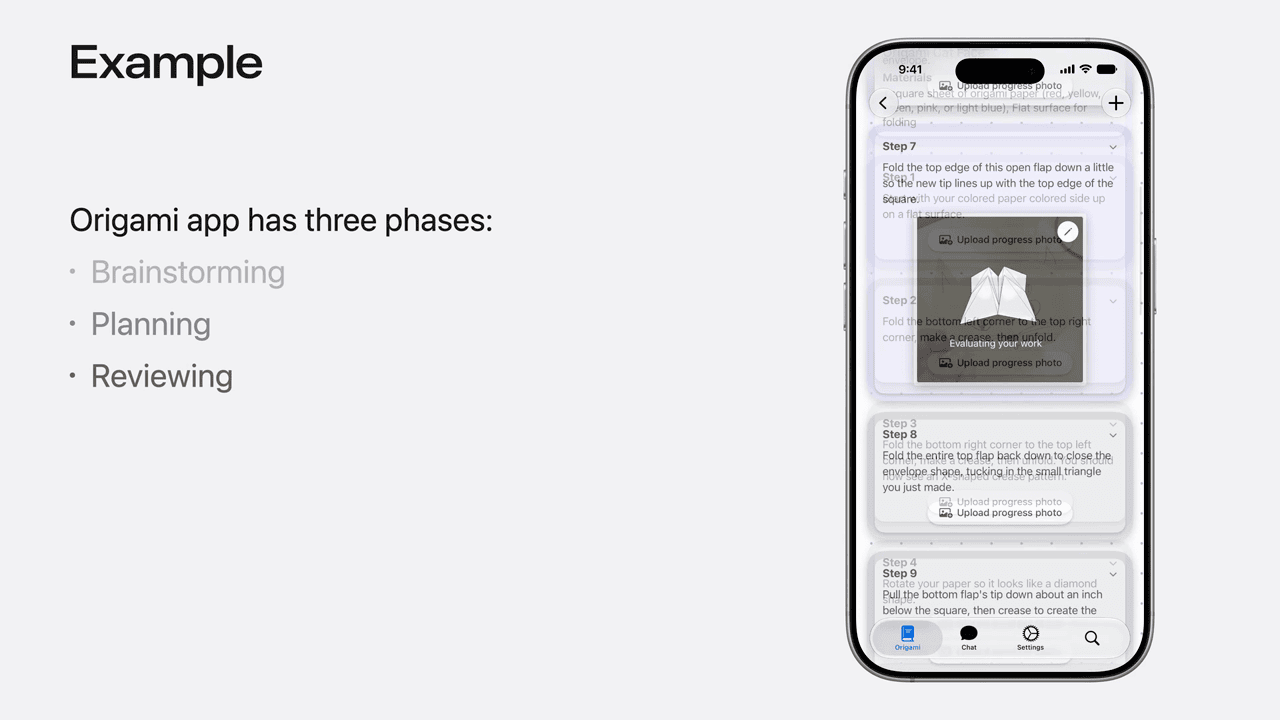
세션 전체가 Origami 라는 예제 앱 하나로 진행된다. origami 와 crochet 을 가르치는 앱이고, 사용자가 사진을 올리면 무엇을 만들지 같이 정하고, 만드는 법을 써 주고, 중간에 찍은 사진을 보고 조언한다.
 출처: WWDC26 - Build agentic app experiences with the Foundation Models framework
화면에는 “Origami app has three phases” 아래에 Brainstorming, Planning, Reviewing 이 적혀 있고, 오른쪽 iPhone 에는 tutorial 의 step 과 진행 사진이 보인다.
 출처: WWDC26 - Build agentic app experiences with the Foundation Models framework
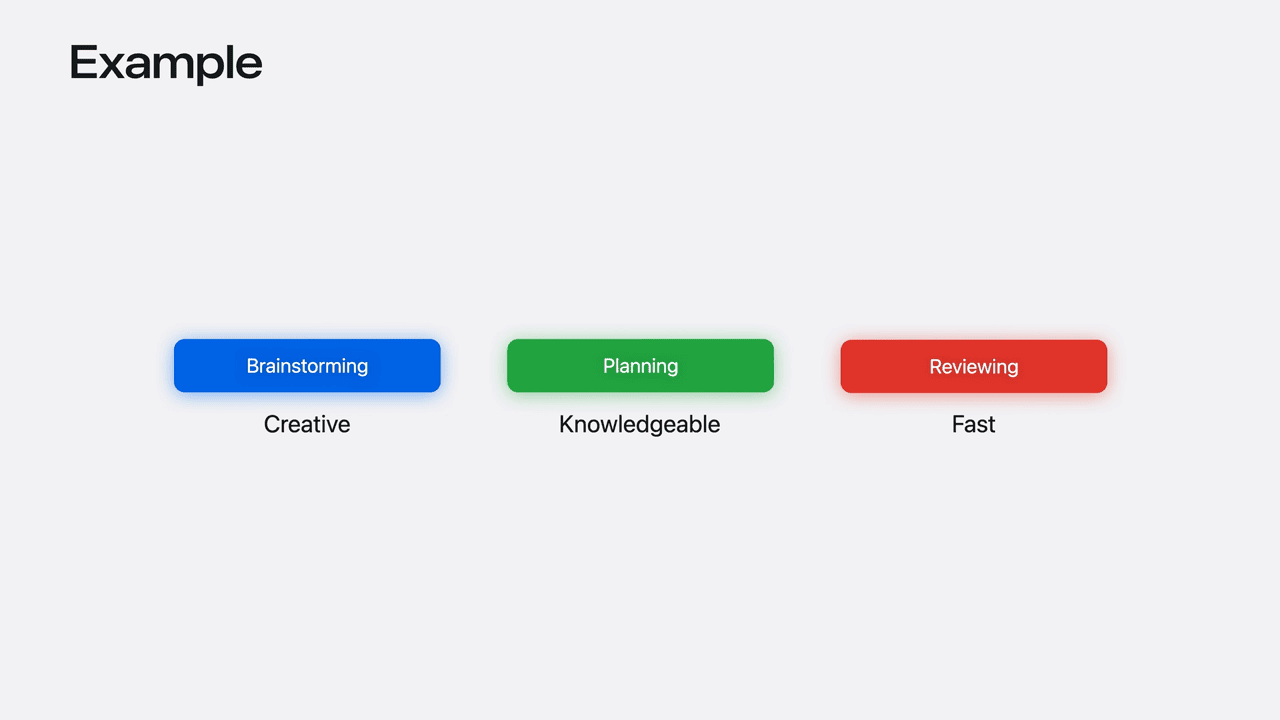
세 phase 가 model 에 바라는 성격이 다르다. Brainstorming 은 Creative, Planning 은 Knowledgeable, Reviewing 은 Fast 다. 한 model 과 한 설정으로 셋을 다 맞추기 어렵다는 것이 dynamic profile 을 쓰는 이유다.
Agent 란?
이 세션에서 agent 는 거창한 것이 아니다. Oliver 는 agent 를 profile 하나로 정의한다. profile 은 instructions, tool 목록, 그리고 model 과 그 설정을 정하는 modifier 를 묶은 것이다.
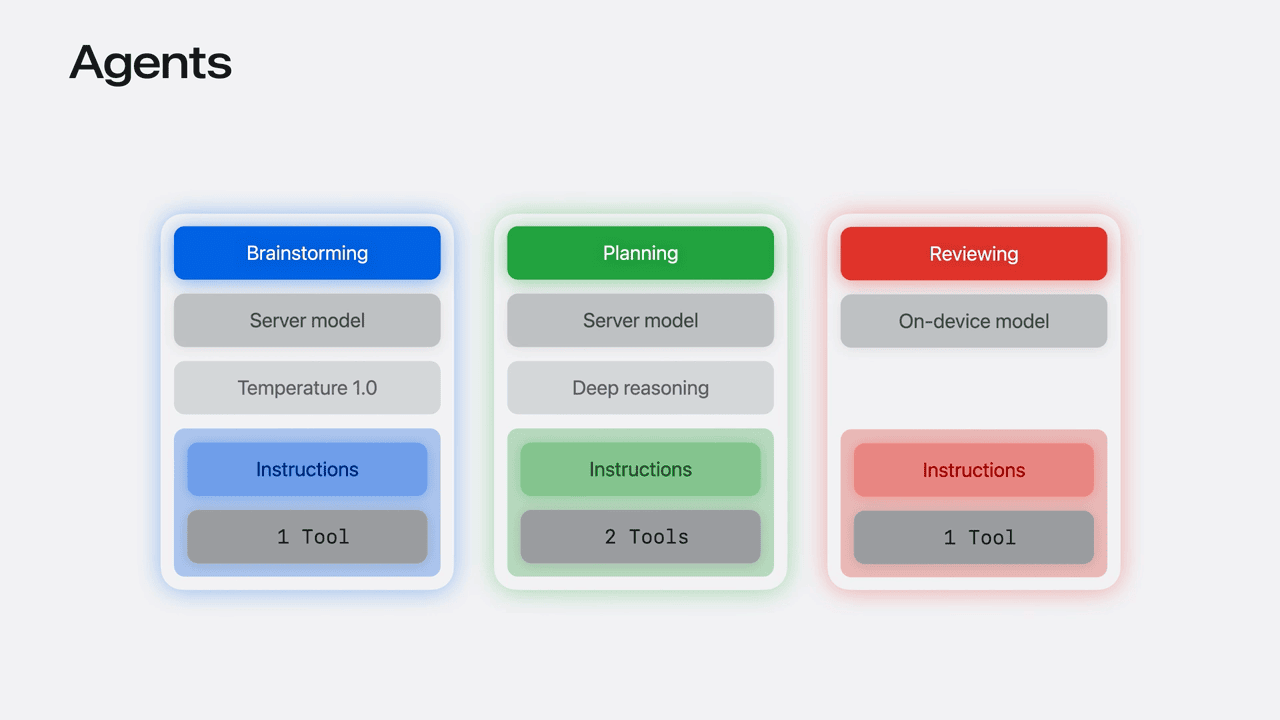 출처: WWDC26 - Build agentic app experiences with the Foundation Models framework
도식에는 agent 가 세 개 있다.
| agent | model | 설정 | 구성 |
|---|---|---|---|
| Brainstorming | Server model | Temperature 1.0 | Instructions, tool 1개 |
| Planning | Server model | Deep reasoning | Instructions, tool 2개 |
| Reviewing | On-device model | 없음 | Instructions, tool 1개 |
session 은 하나이고, 앱 상태에 따라 그 session 에 걸린 profile 이 바뀐다. 세션은 이것을 모자를 바꿔 쓰는 것에 견준다. 대화는 이어지는데 model 이 맡은 역할만 바뀐다.
Dynamic profile 선언
profile 을 고르는 기준이 되는 상태부터 만든다. 세션은 CraftOrchestrator 라는 observable class 에 현재 phase 와 model 두 개를 둔다.
1
2
3
4
5
6
7
8
9
10
11
12
13
14
15
16
17
18
19
20
21
import FoundationModels
import Observation

enum Technique: Hashable {
    case origami
    case crochet
}

enum CraftMode {
    case brainstorming
    case planning
    case reviewing
}

@Observable
final class CraftOrchestrator: @unchecked Sendable {
    var mode: CraftMode = .brainstorming
    var techniques: Set<Technique> = [.origami]
    let pccLanguageModel = PrivateCloudComputeLanguageModel()
    let systemLanguageModel = SystemLanguageModel.default
}
Technique 과 CraftMode 의 case, @unchecked Sendable 은 직접 채운 것이다. 세션 page 의 snippet 에는 CraftOrchestrator 의 정의가 없다.
Dynamic instructions 란?
instructions 와 tool 을 한 덩어리로 묶어 이름을 붙이고 여러 profile 에서 다시 쓰게 해 주는 것이 DynamicInstructions 다. SwiftUI 의 View 처럼 body 를 가진 protocol 이고, body 안에 instructions, tool, 다른 DynamicInstructions 를 늘어놓는다. 조건문도 쓸 수 있다.
1
2
3
4
5
6
7
8
9
10
11
12
13
14
15
16
17
18
19
20
21
22
23
24
25
26
27
28
29
30
31
32
33
34
35
36
37
38
39
40
41
42
43
44
45
46
47
48
49
50
51
52
53
54
55
56
57
58
59
60
61
62
63
64
65
66
67
68
69
70
71
struct GenerateProjectTitle: Tool {
    let name = "generateProjectTitle"
    let description = "Generate a creative title for a craft project."

    @Generable
    struct Arguments {
        let idea: String
    }

    func call(arguments: Arguments) async throws -> String {
        "Title for \(arguments.idea)"
    }
}

struct OrigamiFoldLookup: Tool {
    let name = "lookUpOrigamiFold"
    let description = "Look up how a specific origami fold is made."

    @Generable
    struct Arguments {
        let fold: String
    }

    func call(arguments: Arguments) async throws -> String {
        "Valley fold: fold the paper toward you."
    }
}

struct OrigamiExpert: DynamicInstructions {
    var body: some DynamicInstructions {
        Instructions {
            "You know origami folds in depth. Name each fold you use."
        }
        OrigamiFoldLookup()
    }
}

struct BrainstormFacilitator: DynamicInstructions {
    var orchestrator: CraftOrchestrator
    var body: some DynamicInstructions {
        Instructions {
            "You are a warm and friendly expert crafting brainstorm facilitator."
        }
        // Tools
        GenerateProjectTitle()
        // Conditionally include Origami knowledge
        if orchestrator.techniques.contains(.origami) {
            OrigamiExpert()
        }
    }
}

struct TutorialAuthor: DynamicInstructions {
    var orchestrator: CraftOrchestrator
    var body: some DynamicInstructions {
        Instructions {
            "Write step by step directions for the craft project the user picked."
        }
        if orchestrator.techniques.contains(.origami) {
            OrigamiExpert()
        }
    }
}

struct CraftCoach: DynamicInstructions {
    var body: some DynamicInstructions {
        Instructions {
            "Look at the user's progress and give short, kind advice on technique."
        }
    }
}
BrainstormFacilitator 가 세션 page 에 있는 snippet 이고 나머지는 직접 채웠다. 영상의 OrigamiExpert 는 instructions 가 훨씬 길고 tool 이 OrigamiDimensionCalculator() 와 EstimateOrigamiPaperWeight() 두 개다. DynamicInstructions 를 중첩하면 안쪽의 instructions 와 tool 이 바깥 것에 이어 붙는다. 그래서 BrainstormFacilitator 는 사용자가 origami 를 골랐을 때만 origami 지식과 그 tool 을 갖는다.
DynamicInstructions
instructions 와 tool 을 묶는 protocol 이다. SDK 에서는 iOS 27.0, macOS 27.0, visionOS 27.0, watchOS 27.0 부터 쓸 수 있고, Instructions 자신도 이 protocol 을 따른다. profile 없이 LanguageModelSession(model:dynamicInstructions:history:) 로 session 에 바로 넘기는 initializer 도 선언되어 있다. 문서는 DynamicInstructions 에 있다.
Phase 별 model 설정
이제 phase 마다 profile 을 하나씩 두고 model 을 정한다.
1
2
3
4
5
6
7
8
9
10
11
12
13
14
15
16
17
18
19
20
21
22
struct CraftProfile: LanguageModelSession.DynamicProfile {
    var orchestrator: CraftOrchestrator
    var body: some DynamicProfile {
        switch orchestrator.mode {
        case .brainstorming:
            Profile { BrainstormFacilitator(orchestrator: orchestrator) }
                .model(orchestrator.pccLanguageModel)
                .temperature(1)
        case .planning:
            Profile { TutorialAuthor(orchestrator: orchestrator) }
                .model(orchestrator.pccLanguageModel)
                .reasoningLevel(.deep)
        case .reviewing:
            Profile { CraftCoach() }
                .model(orchestrator.systemLanguageModel)
        }
    }
}

func makeSession(orchestrator: CraftOrchestrator) -> LanguageModelSession {
    LanguageModelSession(profile: CraftProfile(orchestrator: orchestrator))
}
brainstorming 은 아이디어가 다양하게 나와야 하므로 Private Cloud Compute 의 model 에 temperature 를 1 로 준다. planning 은 정확한 순서가 필요하므로 같은 model 에 reasoningLevel(.deep) 을 건다. Oliver 는 reasoning level 을 대부분의 server model 이 지원한다고 말한다. reviewing 은 짧은 조언을 빨리 내면 되므로 on-device 의 SystemLanguageModel 로 보내 server 호출을 아낀다.
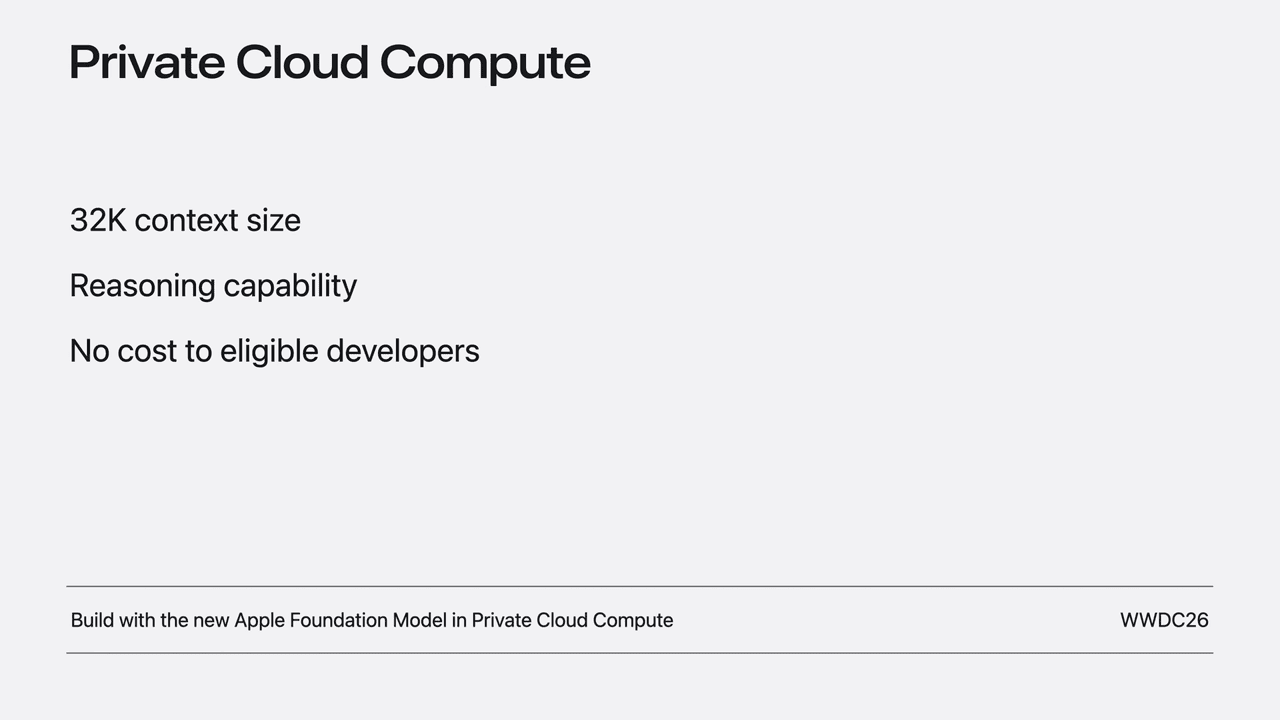 출처: WWDC26 - Build agentic app experiences with the Foundation Models framework
slide 에는 Private Cloud Compute 의 특징으로 “32K context size”, “Reasoning capability”, “No cost to eligible developers” 가 적혀 있고, 아래에 Build with the new Apple Foundation Model in Private Cloud Compute 세션이 걸려 있다.
body 는 prompt 를 보낼 때마다 다시 평가된다. orchestrator.mode 를 바꾸고 다음 prompt 를 보내면 그 prompt 는 새 profile 로 처리된다. session 을 새로 만들 필요가 없다.
LanguageModelSession.DynamicProfile
session 의 instructions, tool, model 설정을 상태에 따라 정하는 protocol 이다. model(_:), temperature(_:), reasoningLevel(_:) 같은 modifier 를 Profile 뒤에 붙인다. 문서는 LanguageModelSession.DynamicProfile 에 있다.
Transcript 관리
profile 이 바뀌어도 session 은 하나라서 transcript 가 계속 쌓인다. 그런데 model 마다 context 크기가 다르다. server model 에서 길게 이어 온 대화를 on-device model 로 그대로 넘기면 넘칠 수 있다.
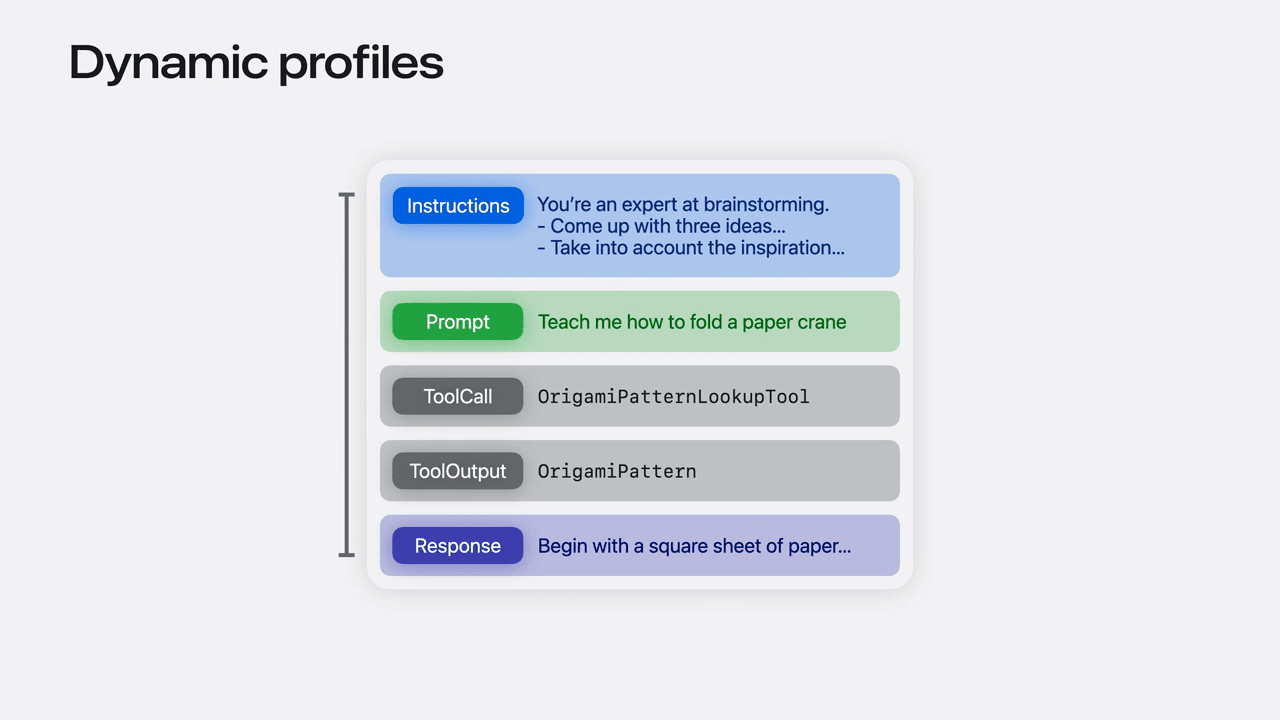 출처: WWDC26 - Build agentic app experiences with the Foundation Models framework
도식은 transcript 를 entry 의 줄로 그린다. 위에서부터 Instructions, Prompt “Teach me how to fold a paper crane”, ToolCall OrigamiPatternLookupTool, ToolOutput OrigamiPattern, Response “Begin with a square sheet of paper…” 다.
세션이 드는 transcript 를 줄이는 이유는 세 가지다.
- context 크기 한도를 넘지 않게 한다
- model 이 지금 일에 집중하게 한다. 끝난 tool 호출의 긴 출력은 다음 답에 방해가 된다
- 덜 private 한 model 로 넘어갈 때 넘기면 안 되는 내용을 지운다
History 란?
transcript 의 맨 앞 instructions entry 를 뺀 나머지를 세션은 history 라고 부른다. DynamicInstructions 가 바꾸는 것은 instructions entry 이고, history 는 따로 다룬다.
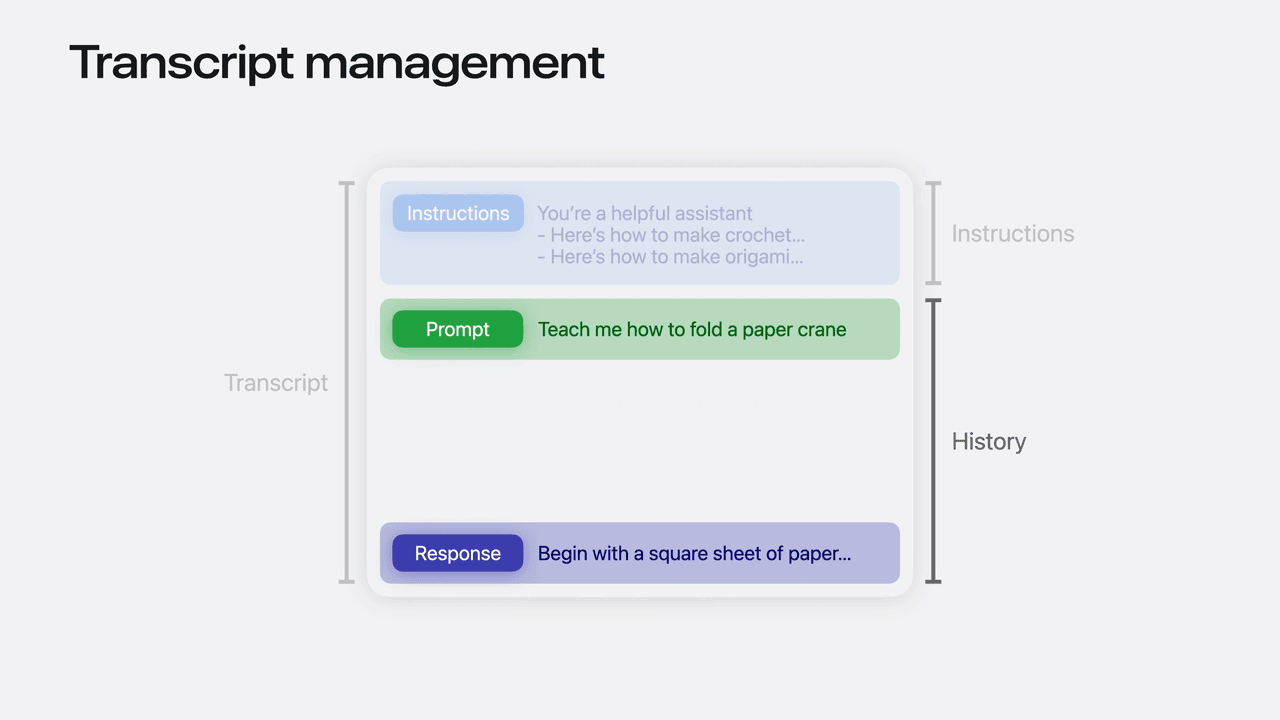 출처: WWDC26 - Build agentic app experiences with the Foundation Models framework
도식 오른쪽에 구간 두 개가 표시되어 있다. 흐리게 처리된 맨 위 entry 가 Instructions 이고, 그 아래 Prompt 부터 Response 까지가 History 다. 가운데 있던 ToolCall 과 ToolOutput 이 빠져 있다. history transform 을 거친 뒤의 모습이다.
History transform
historyTransform 은 prompt 를 model 에 보내기 직전에 history 를 바꾸는 modifier 다. 중요한 점은 이 변환이 그 profile 이 model 에 보내는 내용에만 적용되고 session 의 transcript 는 그대로 둔다는 것이다. 세션은 이것을 lossless 라고 부른다. 다른 profile 로 넘어가면 원래 history 가 그대로 보인다.
1
2
3
4
5
6
7
8
9
10
11
12
13
14
15
16
17
18
19
20
21
22
23
24
25
26
27
28
29
30
31
// History helpers
func lastResponseEntryIndex(_ history: [Transcript.Entry]) -> Int? {
    history.lastIndex { entry in
        if case .response = entry { return true }
        return false
    }
}

func isToolCallsOrToolOutput(_ entry: Transcript.Entry) -> Bool {
    switch entry {
    case .toolCalls, .toolOutput: true
    default: false
    }
}

struct ReviewingProfile: LanguageModelSession.DynamicProfile {
    var orchestrator: CraftOrchestrator
    var body: some DynamicProfile {
        Profile { CraftCoach() }
            .model(orchestrator.systemLanguageModel)
            .historyTransform { history in
                guard let latestResponseIndex = lastResponseEntryIndex(history) else {
                    return history
                }
                let filteredHistory = history[0..<latestResponseIndex].filter { entry in
                    !isToolCallsOrToolOutput(entry)
                }
                return filteredHistory + history[latestResponseIndex...]
            }
    }
}
마지막 response 보다 앞에 있는 tool call 과 tool output 을 걸러 낸다. 마지막 response 뒤는 지금 진행 중인 turn 이라 손대지 않는다. 진행 중인 turn 의 tool call 을 지우면 model 이 방금 부른 tool 의 결과를 못 본다.
세션 page 의 snippet 과 영상 화면은 filter 안이 isToolCallsOrToolOutput(entry) 로 되어 있다. filter 는 true 인 것을 남기므로 그대로 쓰면 tool call 만 남는다. 설명과 반대라서 ! 를 붙였다. helper 두 개의 본문은 직접 채웠다.
historyTransform(_:)
[Transcript.Entry] 를 받아 [Transcript.Entry] 를 돌려주는 closure 를 받는다. 문서는 [historyTransform(:)](https://developer.apple.com/documentation/foundationmodels/languagemodelsession/dynamicprofile/historytransform%28:%29){:target=”_blank”} 에 있다.
Custom modifier
같은 변환을 여러 profile 에 쓰려면 modifier 로 뽑는다. SwiftUI 의 ViewModifier 와 같은 모양이다.
1
2
3
4
5
6
7
8
9
10
11
12
13
14
15
16
17
18
19
20
21
22
23
24
25
26
27
28
29
struct DroppingToolCallsProfileModifier: LanguageModelSession.DynamicProfileModifier {
    func body(content: Content) -> some DynamicProfile {
        content
            .historyTransform { history in
                guard let latestResponseIndex = lastResponseEntryIndex(history) else {
                    return history
                }
                let filteredHistory = history[0..<latestResponseIndex].filter { entry in
                    !isToolCallsOrToolOutput(entry)
                }
                return filteredHistory + history[latestResponseIndex...]
            }
    }
}

extension LanguageModelSession.DynamicProfile {
    func droppingCompletedToolCalls() -> some LanguageModelSession.DynamicProfile {
        self.modifier(DroppingToolCallsProfileModifier())
    }
}

struct TidyReviewingProfile: LanguageModelSession.DynamicProfile {
    var orchestrator: CraftOrchestrator
    var body: some DynamicProfile {
        Profile { CraftCoach() }
            .model(orchestrator.systemLanguageModel)
            .droppingCompletedToolCalls()
    }
}
Oliver 는 utilities package 에 이런 modifier 가 여러 개 들어 있다고 한다. snippet 에는 import FoundationModelsUtilities 뒤에 .rollingWindow(size: .entries(10)) 을 붙인 예가 있다. 최근 entry 10개만 남기는 modifier 로 보인다. package 를 받아 보지 않아서 code 블록으로 싣지 않는다.
LanguageModelSession.DynamicProfileModifier
body(content:) 하나를 요구하는 protocol 이다. DynamicProfile 의 modifier(_:) 로 붙인다. 문서는 LanguageModelSession.DynamicProfileModifier 에 있다.
Lifecycle modifier 와 session property
history transform 은 보내는 내용만 바꾼다. session 의 history 자체를 바꾸거나, 응답이 진행되는 시점에 맞춰 앱 쪽 일을 하려면 lifecycle modifier 를 쓴다.
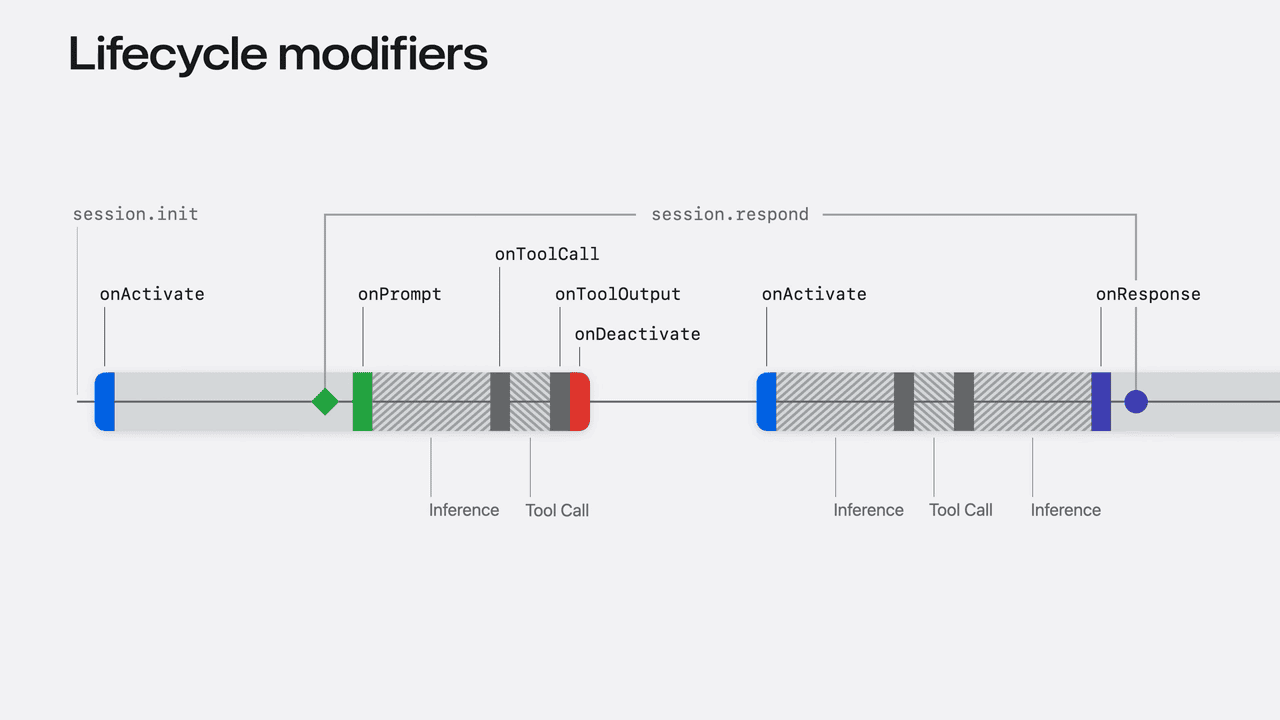 출처: WWDC26 - Build agentic app experiences with the Foundation Models framework
timeline 은 session.init 과 session.respond 두 구간으로 나뉜다. session 을 만들 때 onActivate 가 불리고, respond 안에서 onPrompt, onToolCall, onToolOutput 이 순서대로 불린다. 도중에 profile 이 바뀌면 onDeactivate 뒤에 새 profile 의 onActivate 가 오고, 맨 끝에 onResponse 가 온다. 아래 줄에는 그 사이에 일어나는 Inference 와 Tool Call 이 표시되어 있다.
macOS 27.0.1 에서 hook 일곱 개를 모두 건 profile 로 돌려 보면 순서가 그림과 같다. LanguageModelSession(profile:) 직후 onActivate 가 한 번 불리고, tool 을 쓰는 respond 에서는 onPrompt, onToolCall, tool 의 call(arguments:), onToolOutput, onResponse 순이다. tool 을 쓰지 않는 respond 에서는 onPrompt 와 onResponse 만 불린다. on-device model 에 reasoning level 을 주지 않으면 onReasoning 은 불리지 않고, session 을 놓아 버리는 것만으로는 onDeactivate 가 불리지 않는다. 정리 작업을 onDeactivate 에만 두면 실행되지 않을 수 있다. profile 전환도 돌려 봤다. body 가 switch 로 고르는 값을 바꿔도 그 순간에는 아무 hook 도 불리지 않는다. 다음 respond 가 시작될 때 이전 profile 의 onDeactivate, 새 profile 의 onActivate, 새 profile 의 onPrompt 가 차례로 불린다. 값을 바꾼 직후 기다리지 않고 respond 를 불러도 순서는 같다.
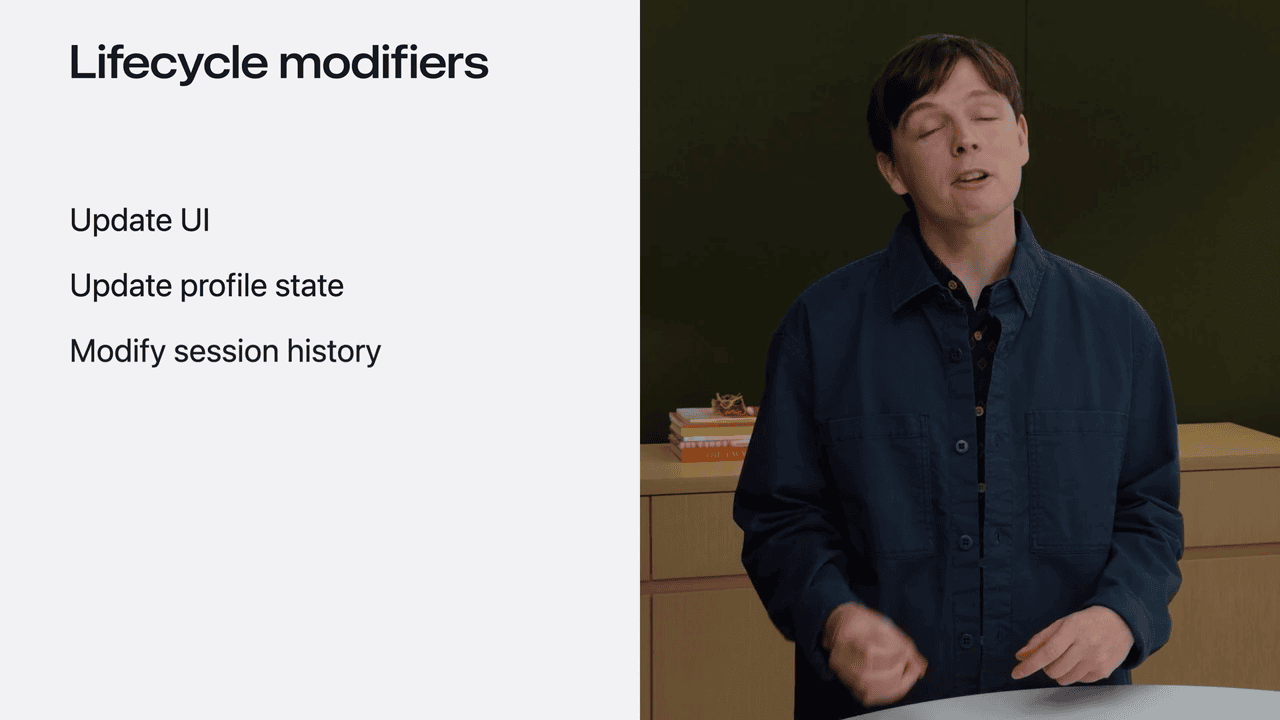 출처: WWDC26 - Build agentic app experiences with the Foundation Models framework
쓰임새는 세 가지다. UI 를 갱신하고, profile 을 고르는 상태를 바꾸고, session history 를 고친다.
Session property 란?
session 에 붙어 있는 값을 profile, tool, instructions 어디서든 읽고 쓰게 해 주는 것이 session property 다. SwiftUI 의 @Environment 와 비슷한데 쓰기도 된다.
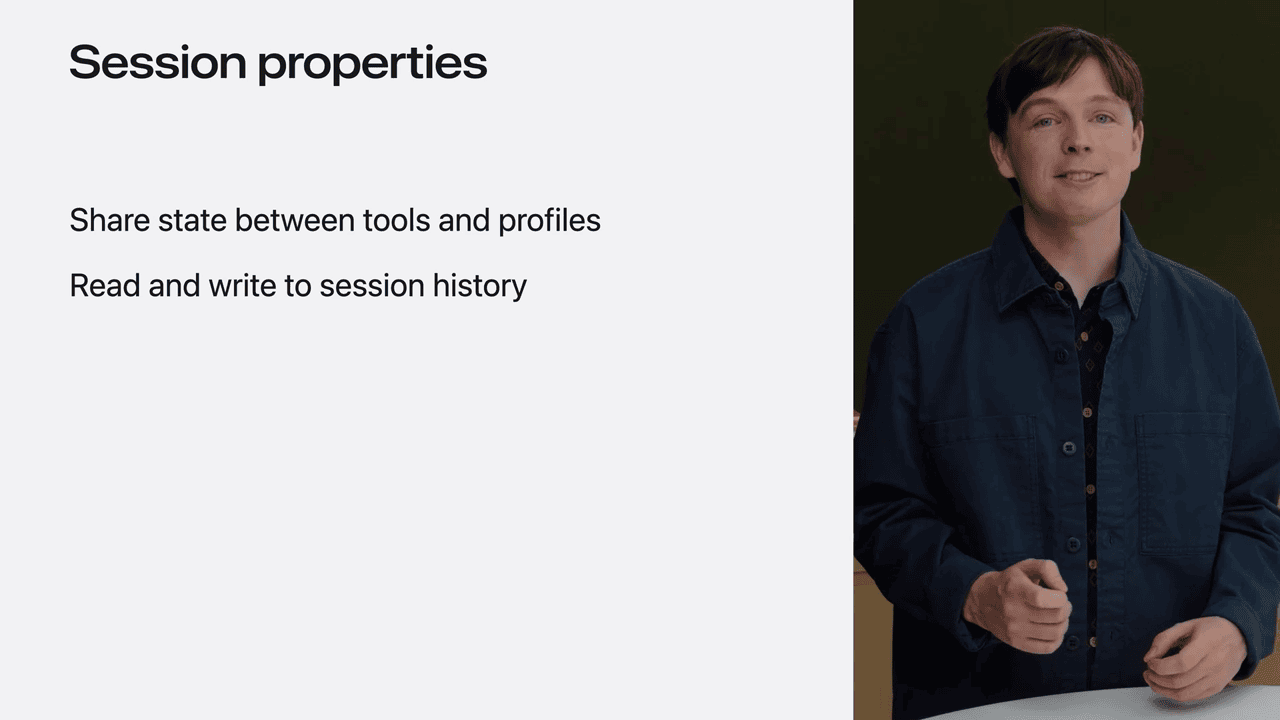 출처: WWDC26 - Build agentic app experiences with the Foundation Models framework
slide 는 “Share state between tools and profiles” 와 “Read and write to session history” 두 줄이다. framework 가 미리 넣어 둔 property 가 history 이고, 이것으로 session 의 history 를 직접 고친다.
1
2
3
4
5
6
7
8
9
10
11
12
13
14
15
16
17
18
19
20
21
22
func lastResponseIndex(_ history: Transcript.HistoryView) -> Transcript.HistoryView.Index? {
    history.lastIndex { entry in
        if case .response = entry { return true }
        return false
    }
}

struct TrimmingPlanningProfile: LanguageModelSession.DynamicProfile {
    @SessionProperty(\.history) var history
    var orchestrator: CraftOrchestrator
    var body: some DynamicProfile {
        Profile { TutorialAuthor(orchestrator: orchestrator) }
            .model(orchestrator.pccLanguageModel)
            .reasoningLevel(.deep)
            .onResponse {
                // Update history
                if history.count > 50, let responseIndex = lastResponseIndex(history) {
                    history = history[responseIndex...]
                }
            }
    }
}
응답이 끝날 때마다 history 가 50 entry 를 넘는지 보고, 넘으면 마지막 response 부터만 남긴다. historyTransform 과 달리 이쪽은 lossy 다. 지운 entry 는 session 에서 사라지고 그 뒤 모든 profile 이 줄어든 history 를 본다.
history 의 type 은 Transcript.HistoryView 다. Array 가 아니고 index 도 Int 가 아니다. 그래서 helper 가 Transcript.HistoryView.Index 를 돌려주게 썼다.
onResponse(perform:)
response 가 끝난 뒤 불리는 closure 를 건다. SDK 에는 인자 없는 closure 와 response entry 를 받는 closure 두 가지가 있고 둘 다 async throws 다. 문서는 onResponse(perform:) 에 있다.
LanguageModelSession.SessionProperty
SessionPropertyValues 의 key path 를 받는 property wrapper 다. DynamicProfile, DynamicProfileModifier, DynamicInstructions, Tool 안에서 @SessionProperty 로 줄여 쓸 수 있다. 문서는 LanguageModelSession.SessionProperty 에 있다.
Transcript.HistoryView
transcript 에서 instructions 를 뺀 부분을 보여 주는 collection 이다. 넣고 빼고 바꿀 수 있고, 잘라 낸 조각도 같은 type 이다. 문서는 Transcript.HistoryView 에 있다.
History 요약
그냥 잘라 내면 앞의 맥락이 사라진다. 세션은 지우기 전에 요약을 만들어 instructions 에 넣는 방법을 보여 준다.
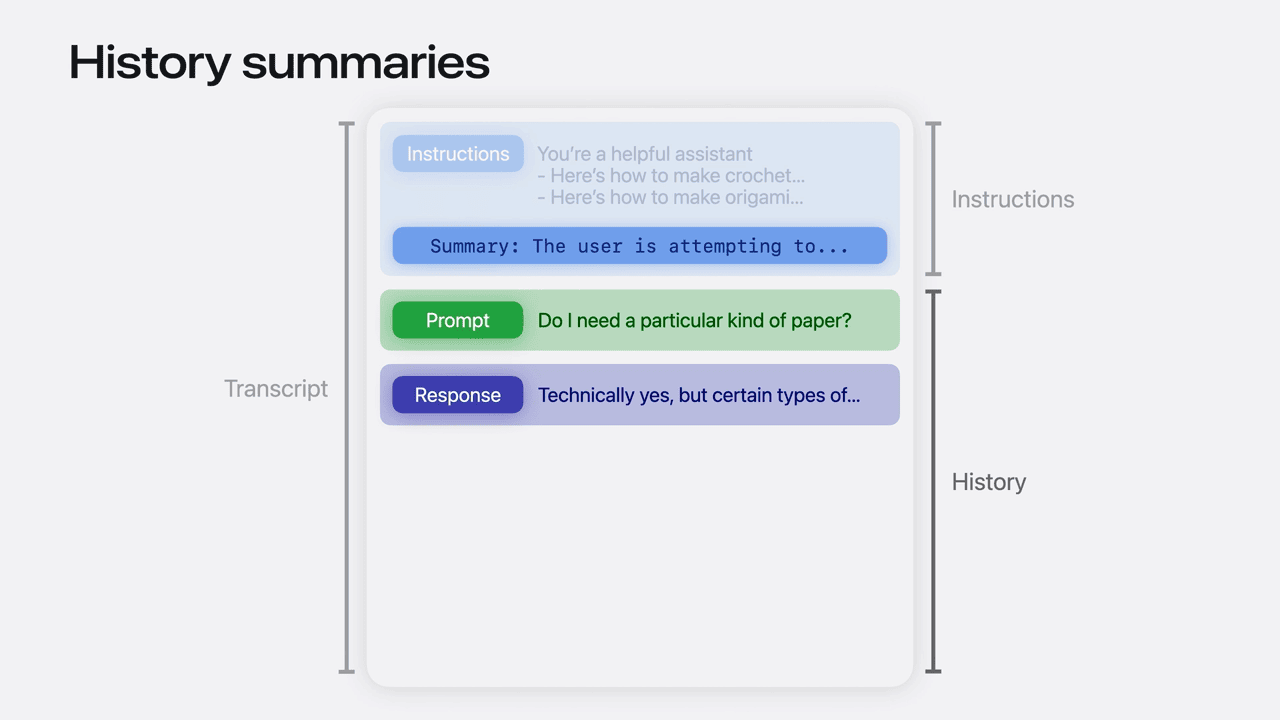 출처: WWDC26 - Build agentic app experiences with the Foundation Models framework
“History summaries” 도식에서 Instructions 구간 안에 “Summary: The user is attempting to…” 줄이 들어가 있다. History 구간에는 Prompt “Do I need a particular kind of paper?” 와 Response “Technically yes, but certain types of…” 만 남았다.
요약을 담아 둘 자리가 필요하므로 session property 를 직접 하나 만든다.
1
2
3
4
5
6
7
8
9
10
11
12
13
14
15
16
17
18
19
20
21
22
23
24
25
26
27
28
29
30
31
extension SessionPropertyValues {
    @SessionPropertyEntry var summary: String?
}

func summarize(_ entries: Transcript.HistoryView) async throws -> String {
    let session = LanguageModelSession(
        instructions: "Summarize the conversation in three sentences."
    )
    let text = entries.map { String(describing: $0) }.joined(separator: "\n")
    return try await session.respond(to: text).content
}

struct SummarizingPlanningProfile: LanguageModelSession.DynamicProfile {
    @SessionProperty(\.history) var history
    @SessionProperty(\.summary) var summary
    var orchestrator: CraftOrchestrator
    var body: some DynamicProfile {
        Profile {
            TutorialAuthor(orchestrator: orchestrator)
            if let summary {
                Instructions { "Summary: \(summary)" }
            }
        }
        .onResponse {
            if history.count > 50, let responseIndex = lastResponseIndex(history.prefix(40)) {
                summary = try await summarize(history[..<responseIndex])
                history = history[responseIndex...]
            }
        }
    }
}
history 가 50 entry 를 넘으면 앞 40개 안에서 마지막 response 를 찾고, 그 앞을 요약해 summary 에 넣은 다음 history 에서 잘라 낸다. summary 가 있으면 body 가 다음 prompt 때 instructions 에 요약을 붙인다. Oliver 는 직접 만든 session property 가 전부 mutable 이고 초기값이 있어야 한다고 설명한다. optional 은 nil 이 초기값이다.
snippet 은 summarize(history[0..<responseIndex]) 로 되어 있는데 Xcode 27.0 SDK 에서는 Int 를 Transcript.HistoryView.Index 로 바꿀 수 없다는 error 가 난다. history[..<responseIndex] 로 고쳤다. summarize 는 snippet 에 본문이 없어서 별도 session 으로 요약하게 직접 채웠다.
SessionPropertyEntry()
SessionPropertyValues 의 extension 안에서 property 에 붙이는 macro 다. 문서는 SessionPropertyEntry() 에 있다.
SessionPropertyValues
session property 를 담는 class 다. SDK 에는 Observable 로 선언되어 있고 session.properties 로 꺼낸다. 문서는 SessionPropertyValues 에 있다.
Orchestration pattern
여기서 Erik 으로 넘어간다. agent 가 여럿일 때 서로 일을 넘기는 방식을 두 가지로 정리한다.
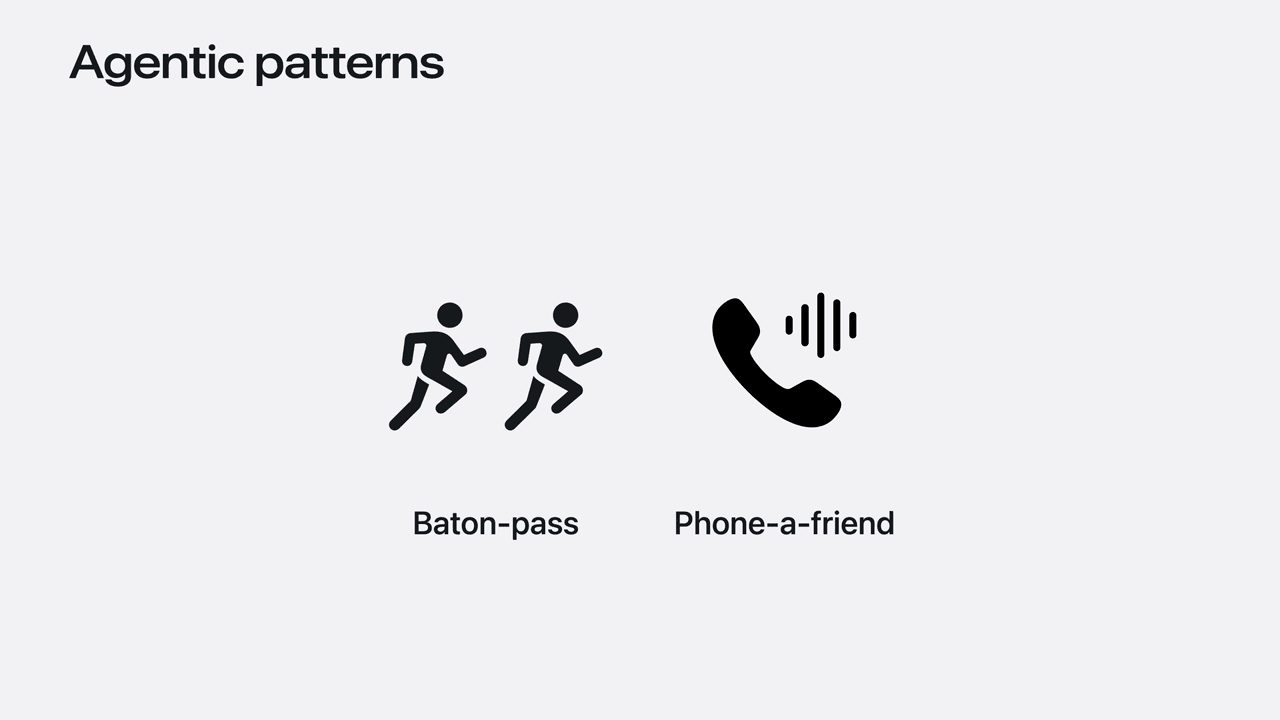 출처: WWDC26 - Build agentic app experiences with the Foundation Models framework
Baton-pass 는 달리는 사람 둘, Phone-a-friend 는 전화기 아이콘으로 그려져 있다. Erik 은 앞의 것을 collaboration, 뒤의 것을 consultation 이라고 부른다.
Baton-pass
한 agent 가 일을 통째로 다른 agent 에 넘긴다. 필요한 것은 세 가지다. profile 둘 이상, 어느 profile 이 활성인지 정하는 변수, 그 변수를 바꾸는 tool 이다.
1
2
3
4
5
6
7
8
9
10
11
12
13
14
15
16
17
18
19
20
21
22
23
24
25
26
27
28
29
30
31
32
33
34
35
struct BatonPassTool: Tool {
    let name = "passBaton"
    let description = "Hand the conversation over to the other craft agent."

    @Generable
    struct Arguments {
        let reason: String
    }

    func call(arguments: Arguments) async throws -> String {
        "Handoff complete."
    }
}

struct BatonPassProfile: LanguageModelSession.DynamicProfile {
    var orchestrator: CraftOrchestrator
    var body: some DynamicProfile {
        switch orchestrator.mode {
        case .brainstorming:
            Profile {
                BrainstormFacilitator(orchestrator: orchestrator)
                BatonPassTool()
            }
            .onToolCall { orchestrator.mode = .planning }
            .model(orchestrator.pccLanguageModel)
        case .planning, .reviewing:
            Profile {
                TutorialAuthor(orchestrator: orchestrator)
                BatonPassTool()
            }
            .onToolCall { orchestrator.mode = .brainstorming }
            .model(orchestrator.systemLanguageModel)
        }
    }
}
model 이 BatonPassTool 을 부르면 onToolCall 이 mode 를 바꾼다. tool output 이 transcript 에 들어간 뒤 다음 추론은 바뀐 profile 로 진행된다. 세션 page 의 snippet 은 mode 이름이 .brainstorm 과 .tutorial, model 이름이 serverModel 과 systemModel 이라서 앞의 snippet 과 맞지 않는다. 앞에서 쓴 이름으로 맞췄다. BatonPassTool 의 본문은 직접 채웠다.
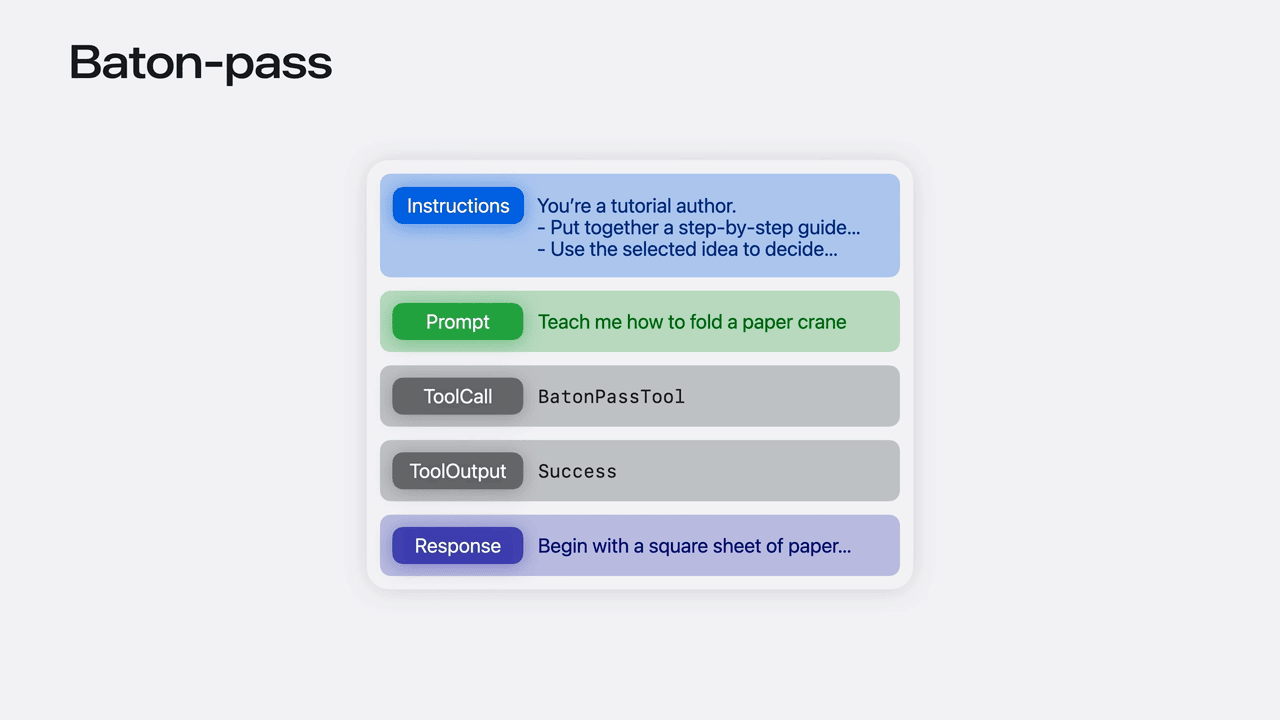 출처: WWDC26 - Build agentic app experiences with the Foundation Models framework
transcript 도식의 Instructions 는 이미 “You’re a tutorial author.” 로 바뀌어 있다. 그 아래로 Prompt “Teach me how to fold a paper crane”, ToolCall BatonPassTool, ToolOutput Success, Response “Begin with a square sheet of paper…” 가 한 transcript 에 이어진다.
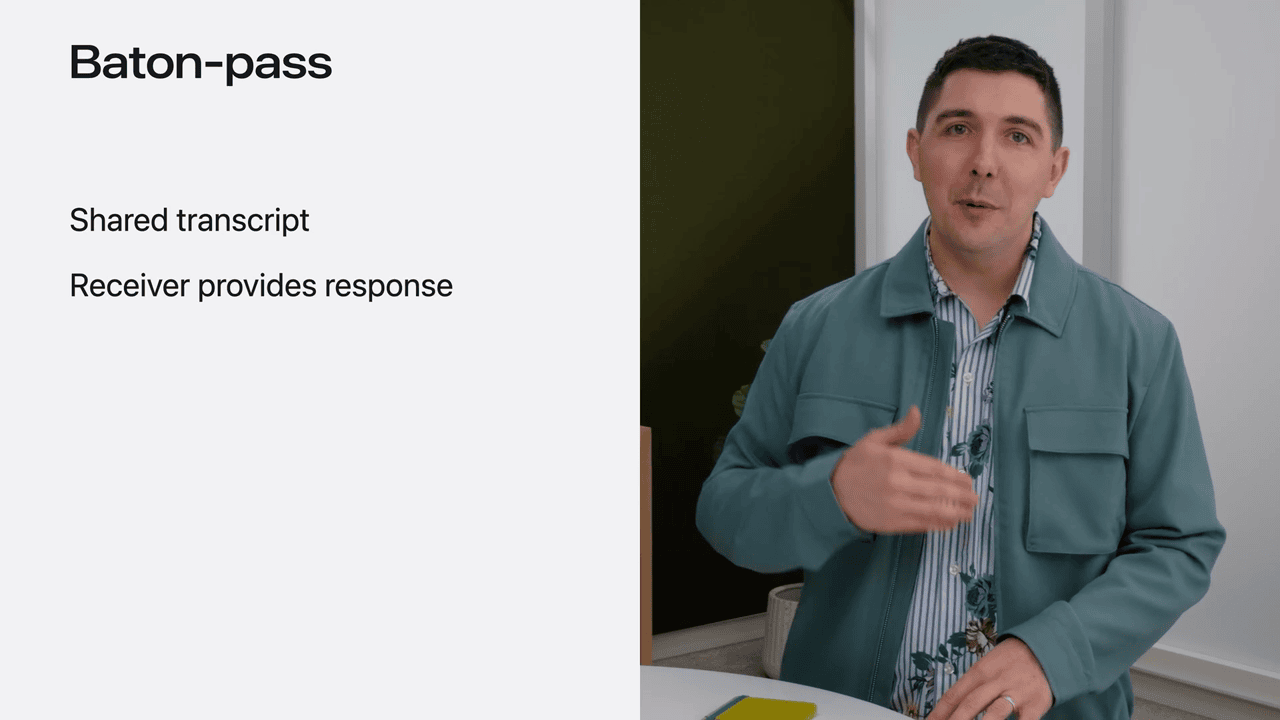 출처: WWDC26 - Build agentic app experiences with the Foundation Models framework
특징은 “Shared transcript” 와 “Receiver provides response” 다. 넘겨받은 agent 가 앞의 대화를 전부 보고, 사용자에게 가는 최종 응답도 넘겨받은 쪽이 쓴다.
onToolCall(perform:)
model 이 tool 을 부를 때 불리는 closure 를 건다. 인자 없는 closure 와 Transcript.ToolCall 을 받는 closure 두 가지가 있다. 문서는 onToolCall(perform:) 에 있다.
Phone-a-friend
일을 넘기지 않고 다른 agent 에 물어보기만 한다. tool 안에서 session 을 하나 새로 만들어 질문을 보내고, 그 응답을 tool output 으로 돌려준다.
1
2
3
4
5
6
7
8
9
10
11
12
13
14
15
16
17
18
19
20
21
22
23
24
25
26
27
28
29
30
31
32
33
34
35
36
37
38
39
struct TitleProfile: LanguageModelSession.DynamicProfile {
    var body: some DynamicProfile {
        Profile {
            Instructions { "Write one short, playful title for the craft project." }
        }
        .temperature(1)
    }
}

struct PhoneFriendTool<P: LanguageModelSession.DynamicProfile & Sendable>: Tool {
    let name: String
    let description: String
    let profile: @Sendable () -> P

    @Generable
    struct Arguments {
        let request: String
    }

    func call(arguments: Arguments) async throws -> String {
        let session = LanguageModelSession(profile: profile())
        let response = try await session.respond(to: arguments.request)
        return response.content
    }
}

struct ConsultingProfile: LanguageModelSession.DynamicProfile {
    var orchestrator: CraftOrchestrator
    var body: some DynamicProfile {
        Profile {
            BrainstormFacilitator(orchestrator: orchestrator)
            PhoneFriendTool(
                name: "generate_title",
                description: "Generate a creative project title",
                profile: { TitleProfile() }
            )
        }
    }
}
snippet 의 PhoneFriendTool 은 session.respond(to: arguments) 로 GeneratedContent 를 그대로 넘기는데, SDK 에서는 Prompt 로 바꿀 수 없다는 error 가 난다. Arguments 를 @Generable struct 로 두고 request 문자열을 넘기게 고쳤다. profile 저장 속성의 선언도 snippet 에 빠져 있어서 채웠고, Swift 6 에서 Tool 이 Sendable 이어야 하므로 P 에 Sendable 을 붙였다.
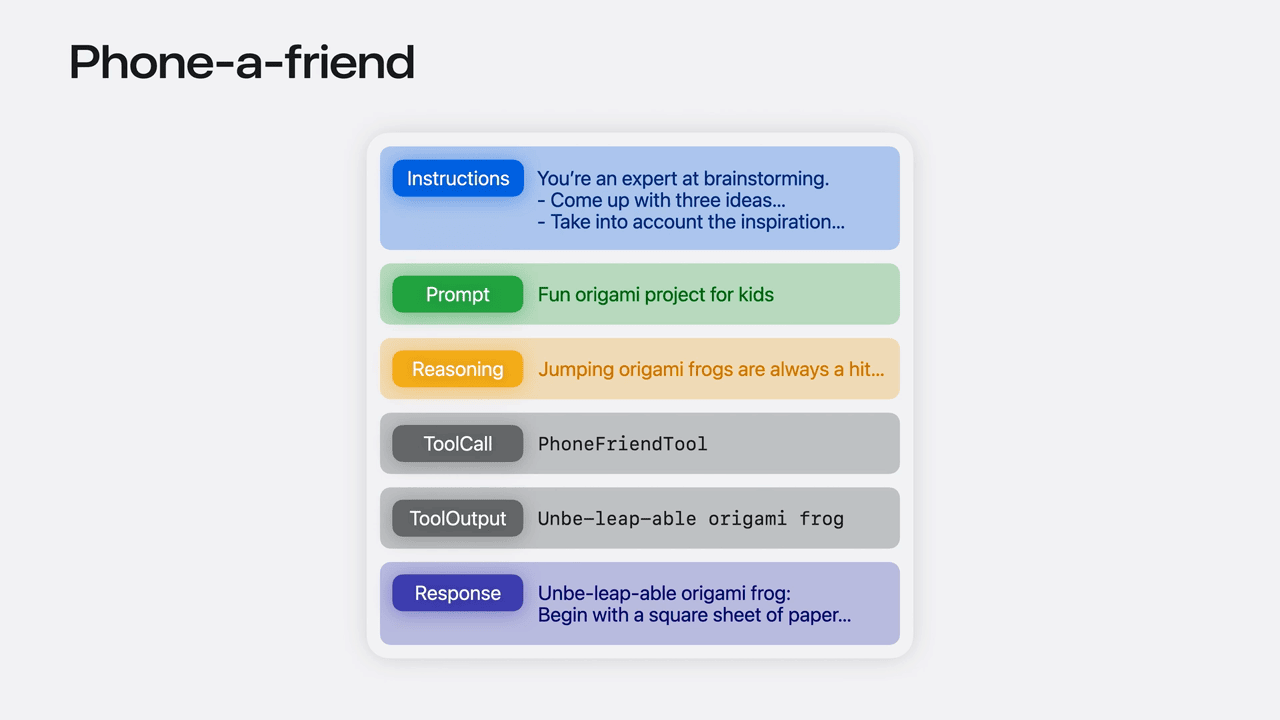
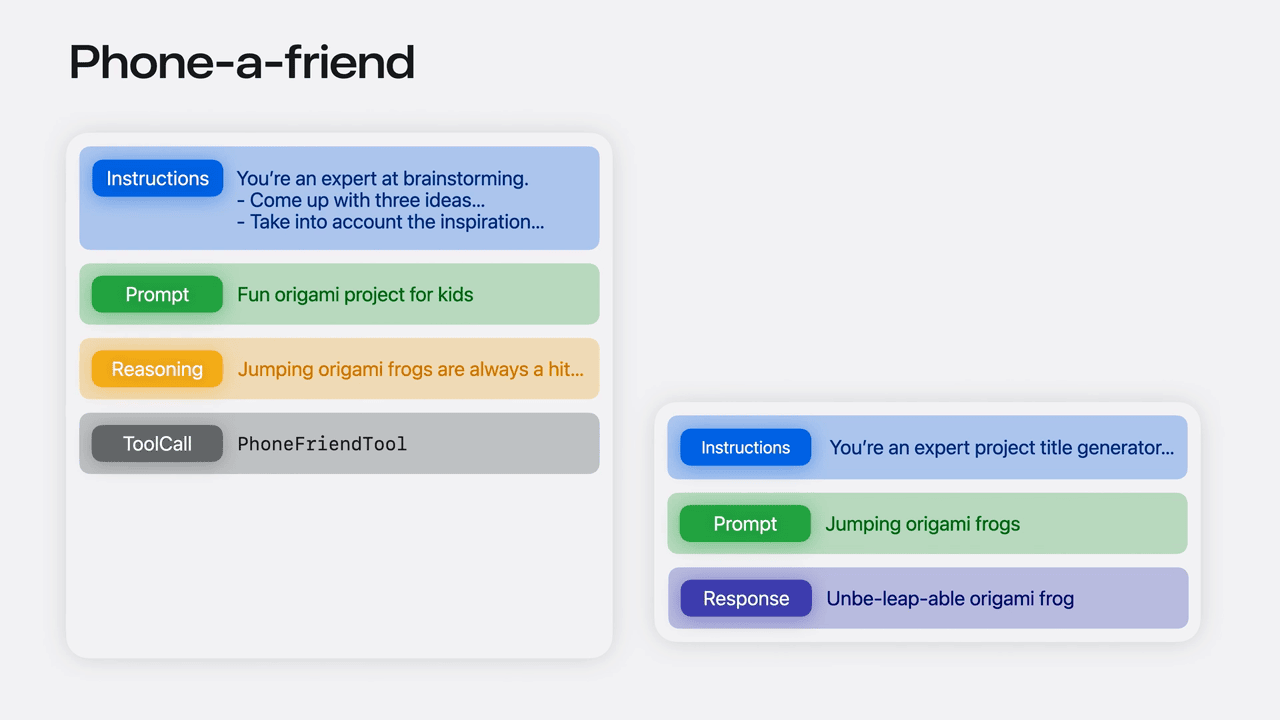 출처: WWDC26 - Build agentic app experiences with the Foundation Models framework
왼쪽이 부모 session 이다. Instructions “You’re an expert at brainstorming.”, Prompt “Fun origami project for kids”, Reasoning “Jumping origami frogs are always a hit…”, ToolCall PhoneFriendTool 까지 왔다. 오른쪽 작은 transcript 가 tool 안에서 만든 자식 session 이다. Instructions “You’re an expert project title generator…”, Prompt “Jumping origami frogs”, Response “Unbe-leap-able origami frog” 다.
 출처: WWDC26 - Build agentic app experiences with the Foundation Models framework
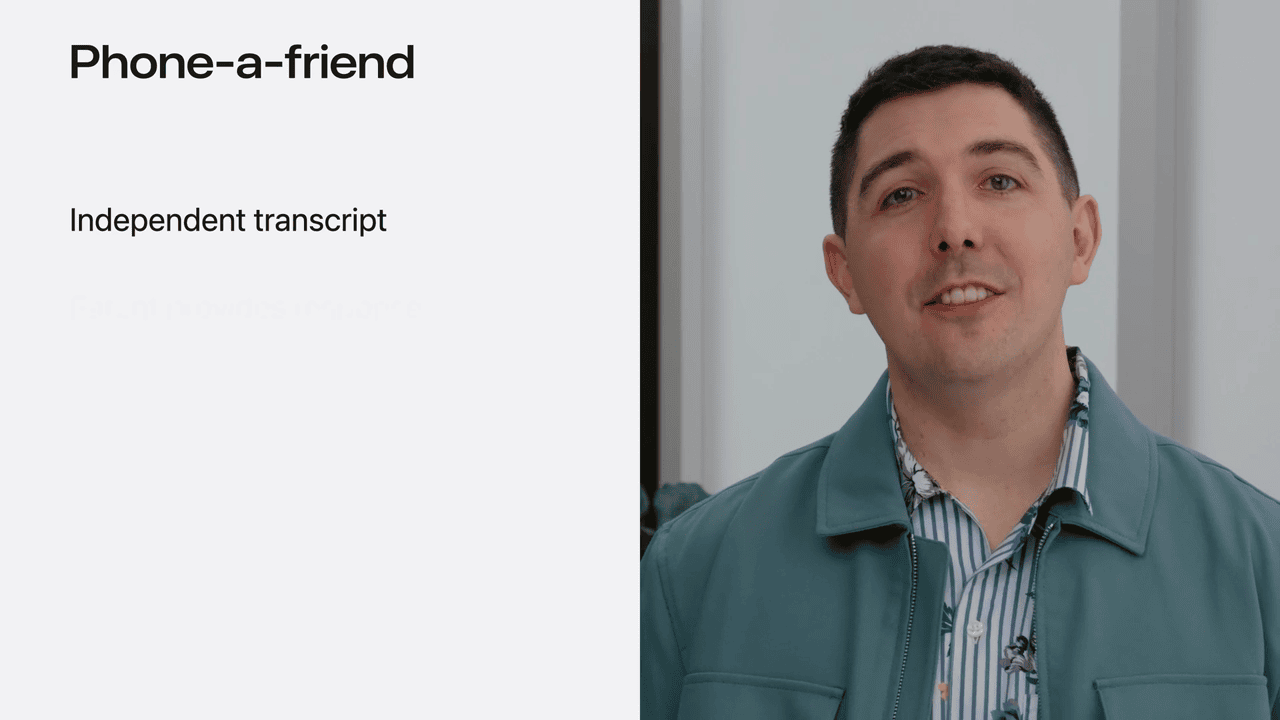
자식 session 은 사라지고 그 응답만 부모의 ToolOutput 에 “Unbe-leap-able origami frog” 로 남는다. 부모가 그것을 받아 최종 Response 를 쓴다.
 출처: WWDC26 - Build agentic app experiences with the Foundation Models framework
특징은 “Independent transcript” 다. 자식은 부모의 대화를 보지 못하고 tool 인자로 받은 것만 안다. 부모의 context 는 자식이 일하면서 쓴 token 으로 불어나지 않는다. 두 pattern 을 나란히 놓으면 다음과 같다.
| Baton-pass | Phone-a-friend | |
|---|---|---|
| 성격 | collaboration | consultation |
| transcript | 공유 | 격리 |
| 최종 응답 | 넘겨받은 agent | 물어본 agent |
| 구현 | 상태 변수를 바꾸는 tool | tool 안의 짧게 사는 session |
Skill
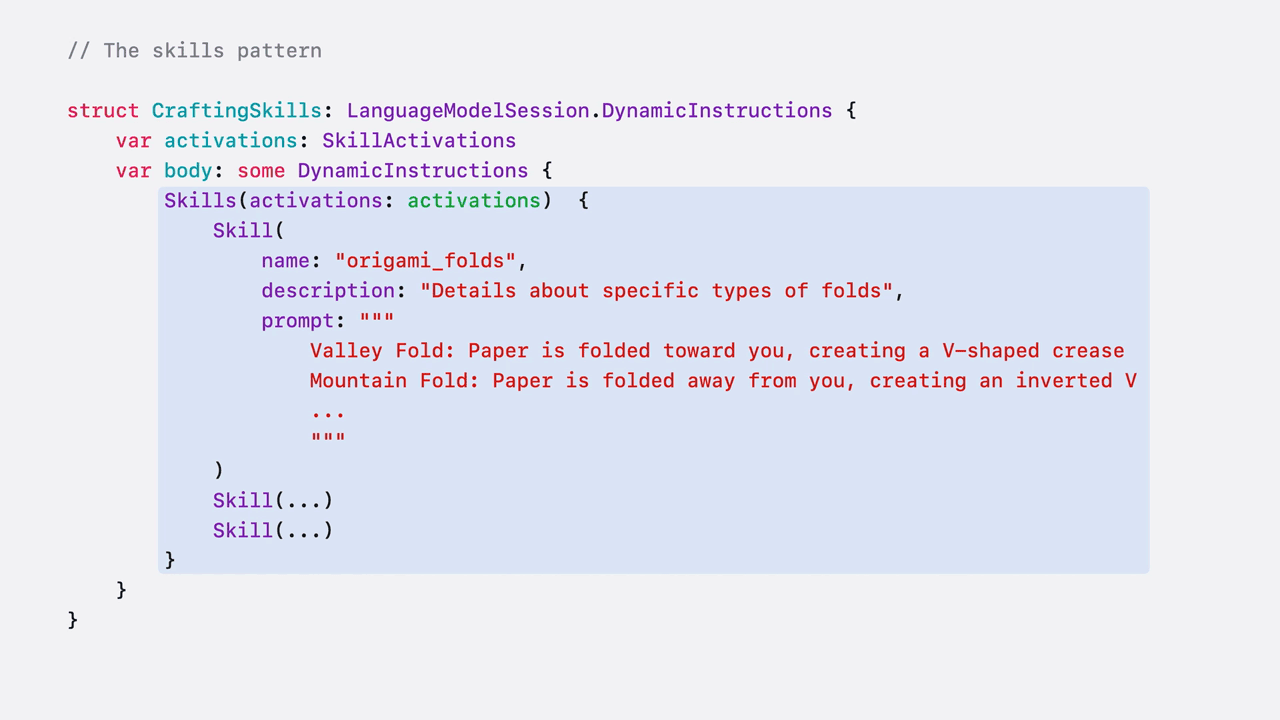
세 번째로 잠깐 나오는 것이 skill 이다. 필요할 때만 불러들이는 절차 지식이고, Erik 은 procedural context loading 이라고 부른다. framework 가 아니라 utilities package 에 들어 있다.
 출처: WWDC26 - Build agentic app experiences with the Foundation Models framework
화면의 code 는 CraftingSkills 라는 DynamicInstructions 다. SkillActivations 를 받아 Skills(activations:) 안에 Skill(name: "origami_folds", description: "Details about specific types of folds", prompt: ...) 를 늘어놓는다. prompt 에는 Valley Fold 와 Mountain Fold 의 설명이 들어 있다. model 은 평소에 skill 의 이름과 설명만 보고, 필요하다고 판단하면 그 skill 을 활성화해 prompt 본문을 context 로 불러온다. package 를 받아 보지 않아서 code 블록으로 싣지 않는다.
Tool calling mode
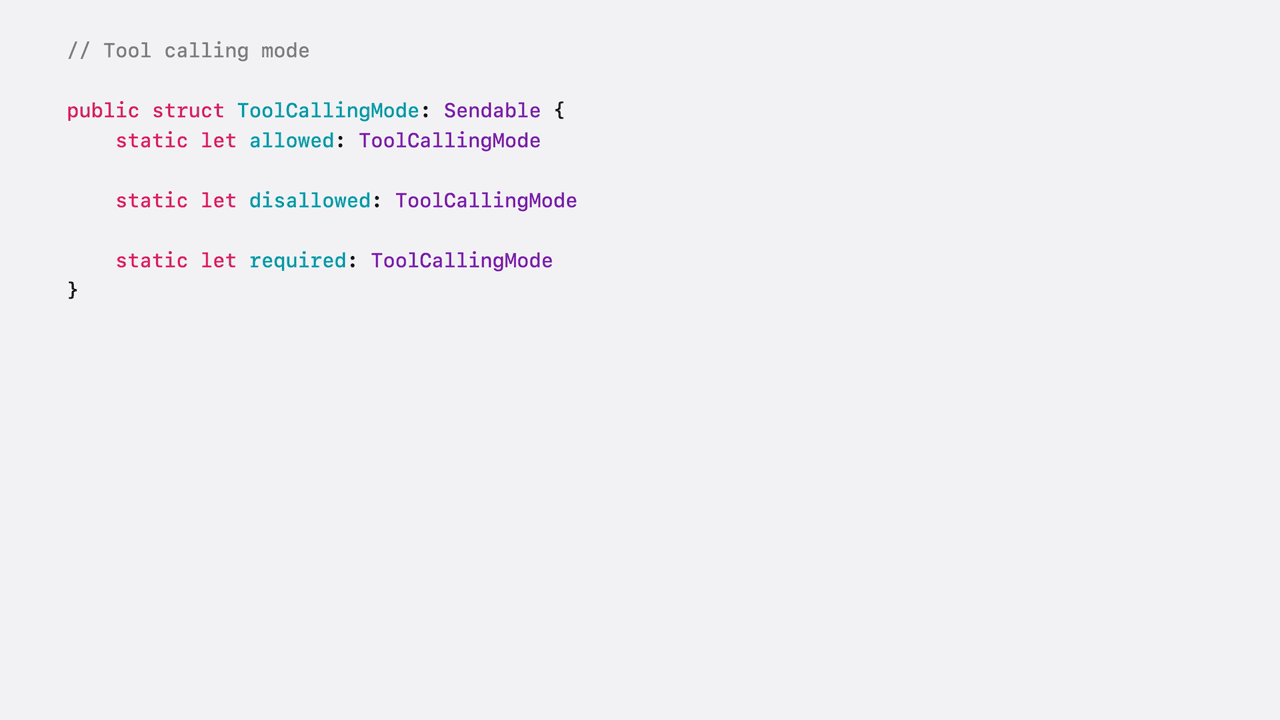
model 이 tool 을 부를지 말지는 기본적으로 model 이 정한다. tool calling mode 는 이것을 앱이 정하게 해 준다.
 출처: WWDC26 - Build agentic app experiences with the Foundation Models framework
slide 에는 public struct ToolCallingMode: Sendable 아래에 allowed, disallowed, required 세 static property 가 있다. Xcode 27.0 SDK 에서는 이 type 이 GenerationOptions 안에 들어 있어서 전체 이름이 GenerationOptions.ToolCallingMode 다.
| mode | 동작 |
|---|---|
.allowed | 기본값. model 이 tool 을 부를지 답을 쓸지 고른다 |
.disallowed | tool 을 부르지 못한다 |
.required | 반드시 tool 을 부른다. 글로 된 답을 내지 못한다 |
profile 에 거는 방법과 respond 한 번에 거는 방법이 있다.
1
2
3
4
5
6
7
8
9
10
11
12
13
14
15
16
17
18
19
20
21
22
23
24
25
26
27
28
29
30
31
32
33
34
35
36
37
38
39
40
41
42
43
44
45
46
struct QueryOrigamiDatabaseTool: Tool {
    let name = "queryOrigamiDatabase"
    let description = "Look up folding directions in the origami database."

    @Generable
    struct Arguments {
        let model: String
    }

    func call(arguments: Arguments) async throws -> String {
        "1. Start with a square base."
    }
}

struct ShowDirectionsTool: Tool {
    let name = "showDirections"
    let description = "Show folding directions to the user."

    @Generable
    struct Arguments {
        let steps: [String]
    }

    func call(arguments: Arguments) async throws -> String {
        "Shown."
    }
}

struct RequiredToolsProfile: LanguageModelSession.DynamicProfile {
    var body: some LanguageModelSession.DynamicProfile {
        Profile {
            Instructions("You are an origami expert")
            QueryOrigamiDatabaseTool()
            ShowDirectionsTool()
        }
        .toolCallingMode(.required)
    }
}

func askWithRequiredTools(_ session: LanguageModelSession) async throws -> String {
    let response = try await session.respond(
        to: "Write out the instructions for folding a paper crane.",
        options: GenerationOptions(toolCallingMode: .required)
    )
    return response.content
}
tool 두 개의 본문은 직접 채웠다.
GenerationOptions.ToolCallingMode
tool 호출을 허용, 금지, 강제하는 값이다. 문서는 GenerationOptions.ToolCallingMode 에 있다.
toolCallingMode(_:)
profile 에 tool calling mode 를 거는 modifier 다. nil 을 넘기면 정하지 않은 것이 된다. 문서는 [toolCallingMode(:)](https://developer.apple.com/documentation/foundationmodels/languagemodelsession/dynamicprofile/toolcallingmode%28:%29){:target=”_blank”} 에 있다.
Loop 탈출
.required 는 조심해서 써야 한다. model 은 tool 을 부르고, output 을 받고, 또 tool 을 불러야 한다. 답을 쓸 수 없으니 끝나지 않는다. Erik 은 이것이 조건 없는 while loop 과 같다고 말한다. 빠져나갈 조건을 직접 만들어야 하고, 세션은 방법 두 가지를 보여 준다.
첫째는 mode 를 상태에 따라 바꾸는 것이다.
1
2
3
4
5
6
7
8
9
10
11
12
13
14
15
16
17
@Observable
final class OrigamiAppState: @unchecked Sendable {
    var queriedDatabase = false
}

struct QueryOnceProfile: LanguageModelSession.DynamicProfile {
    let state: OrigamiAppState

    var body: some LanguageModelSession.DynamicProfile {
        Profile {
            Instructions("Answer questions about how to fold origami")
            QueryOrigamiDatabaseTool()
        }
        .toolCallingMode(state.queriedDatabase ? .disallowed : .required)
        .onToolCall { state.queriedDatabase = true }
    }
}
처음에는 .required 라서 model 이 database 를 반드시 조회한다. tool 이 불리면 onToolCall 이 flag 를 세우고, 다음 추론에서는 .disallowed 가 되어 model 이 답을 쓴다. database 를 보지 않고 지어내는 답을 막으면서 loop 은 한 바퀴로 끝난다.
둘째는 error 를 던지는 tool 을 두는 것이다.
1
2
3
4
5
6
7
8
9
10
11
12
13
14
actor FinalAnswerTool: Tool {
    let name = "give_final_answer"
    let description = "Provide a final answer after all work is complete"
    var output: String?

    @Generable struct Arguments {
        var answer: String
    }

    func call(arguments: Arguments) async throws -> Never {
        output = arguments.answer
        throw CancellationError()
    }
}
model 은 일이 끝났다고 판단하면 이 tool 을 부른다. tool 은 답을 output 에 담고 error 를 던져서 respond 를 끝낸다. 앱은 error 를 잡은 뒤 tool 의 output 을 읽는다. 세션 page 의 snippet 은 선언 첫 줄이 잘려 있어서 영상 화면대로 actor 로 썼다. struct 로 쓰면 output 에 값을 넣는 줄에서 self 가 immutable 이라는 error 가 난다.
앱이 catch 에서 받는 것은 CancellationError 가 아니다. macOS 27 에서 돌려 보면 respond 는 LanguageModelSession.ToolCallError 를 던지고, tool 이 던진 CancellationError 는 그 안의 underlyingError 에 들어 있다. 어느 tool 이었는지는 tool property 로 알 수 있다. catch 뒤에 읽은 output 에는 model 이 넘긴 답이 들어 있었다.
Transcript error 처리
tool 이 error 를 던지거나 응답이 취소되면 transcript 는 어떻게 될까. 기본 동작은 그 respond 가 시작되기 전으로 되돌리는 것이다. 방금 본 FinalAnswerTool 처럼 error 로 loop 을 끝내는 경우에는 그동안 쌓인 tool call 과 output 이 다 사라진다.
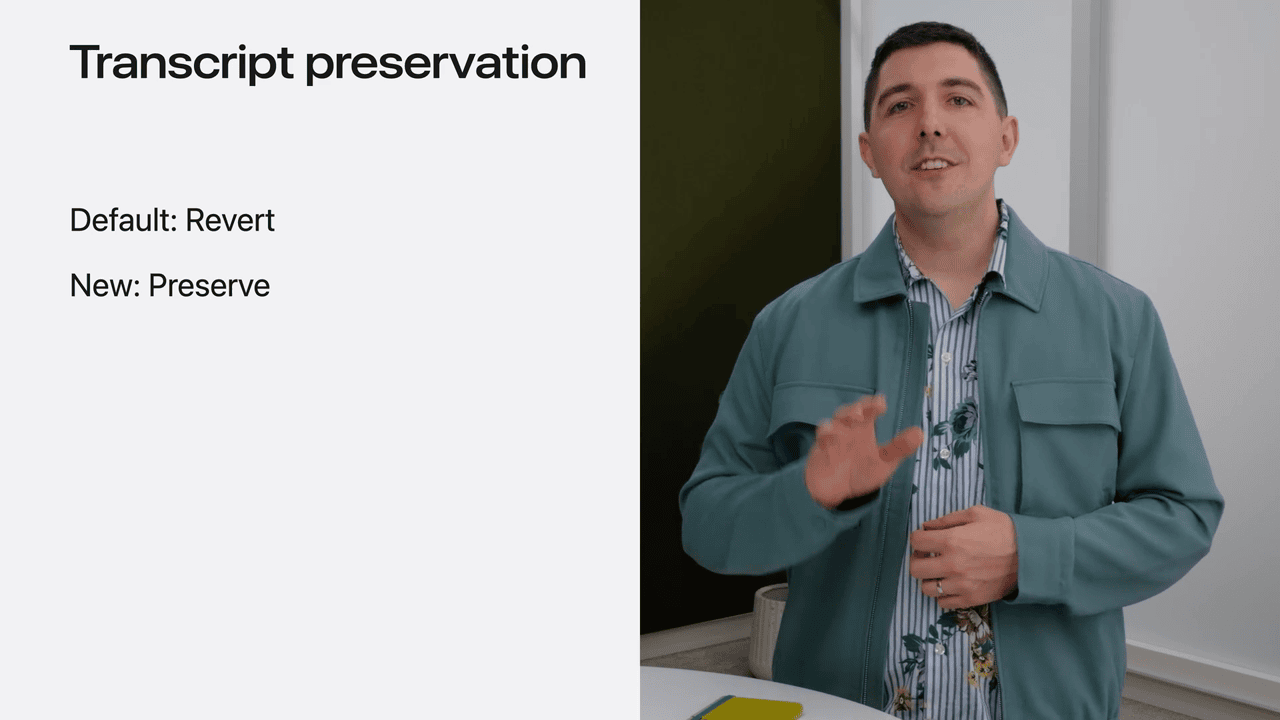 출처: WWDC26 - Build agentic app experiences with the Foundation Models framework
slide 는 “Default: Revert” 와 “New: Preserve” 두 줄이다. 27 에서 남겨 두는 선택지가 생겼다.
1
2
3
4
5
6
7
8
9
struct PreservingProfile: LanguageModelSession.DynamicProfile {
    var body: some LanguageModelSession.DynamicProfile {
        Profile {
            Instructions("Answer questions about how to fold origami")
            QueryOrigamiDatabaseTool()
        }
        .transcriptErrorHandlingPolicy(.preserveTranscript)
    }
}
남겨 두면 transcript 가 어중간한 상태일 수 있다. tool call 은 있는데 그 output 이 없는 식이다. 다음 prompt 를 보내기 전에 정상 상태로 되돌리는 것은 앱의 몫이다. 그래서 27 부터 session 의 transcript 를 고칠 수 있게 됐다.
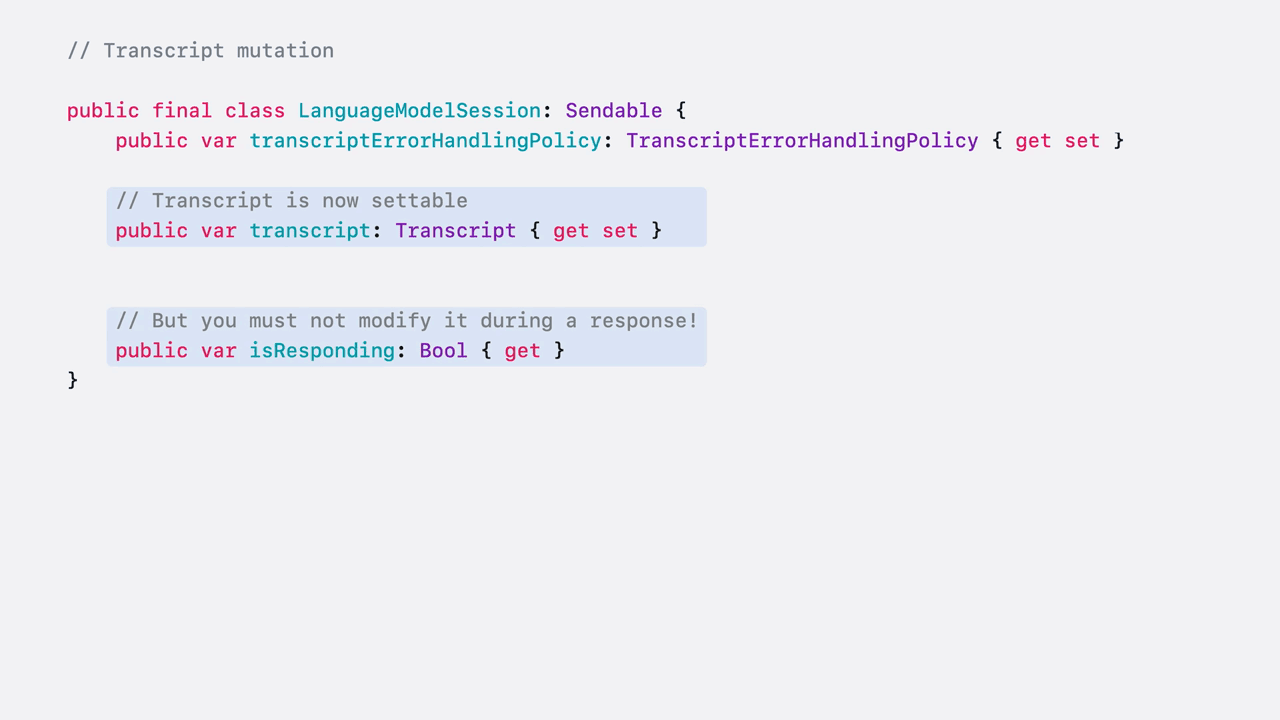 출처: WWDC26 - Build agentic app experiences with the Foundation Models framework
slide 의 code 에는 transcriptErrorHandlingPolicy 아래에 주석 두 개가 달려 있다. transcript 는 “Transcript is now settable” 이고, isResponding 은 “But you must not modify it during a response!” 다. Erik 은 응답 중에 transcript 를 고치는 것이 programmer error 라고 말한다.
세션은 되돌리는 code 를 보여 주지 않는다. 아래는 직접 만든 예다.
1
2
3
4
5
6
7
8
9
10
11
12
13
14
func askAndRepair(_ prompt: String) async -> LanguageModelSession {
    let session = LanguageModelSession()
    session.transcriptErrorHandlingPolicy = .preserveTranscript

    do {
        _ = try await session.respond(to: prompt)
    } catch {
        if !session.isResponding, let last = session.transcript.history.last,
           case .toolCalls = last {
            session.transcript.history.removeLast()
        }
    }
    return session
}
error 가 난 뒤 응답 중이 아닌 것을 확인하고, history 의 마지막이 output 없는 tool call 이면 지운다.
앞의 FinalAnswerTool 을 붙인 session 으로 두 정책을 비교해 보면 transcript 가 이렇게 남는다.
| 정책 | error 뒤의 transcript |
|---|---|
지정하지 않음 (nil) 또는 .revertTranscript | instructions |
.preserveTranscript | instructions, prompt, toolCalls |
되돌리는 쪽은 prompt 까지 사라져서 respond 를 부르기 전과 같다. 남기는 쪽은 prompt 와 tool call 이 남고 tool output 은 없다. 위 예처럼 마지막 tool call 을 지우면 prompt 가 답 없이 남으니, 그 prompt 까지 지우거나 tool output 을 직접 채워 넣는다.
TranscriptErrorHandlingPolicy
.revertTranscript 와 .preserveTranscript 두 값을 가진 type 이다. slide 는 LanguageModelSession 의 extension 안에 선언하는데 Xcode 27.0 SDK 에서는 top-level type 이다. session 의 같은 이름 property 는 optional 이다. 문서는 TranscriptErrorHandlingPolicy 에 있다.
transcriptErrorHandlingPolicy(_:)
profile 단위로 정책을 거는 modifier 다. 문서는 [transcriptErrorHandlingPolicy(:)](https://developer.apple.com/documentation/foundationmodels/languagemodelsession/dynamicprofile/transcripterrorhandlingpolicy%28:%29){:target=”_blank”} 에 있다.
isResponding
session 이 응답을 만들고 있는지 알려 주는 property 다. 문서는 isResponding 에 있다.
성능과 정확도
지금까지 본 기능은 전부 transcript 를 바꾼다. 마지막 부분은 그 대가를 다룬다.
KV cache 란?
model 은 입력을 처리하면서 만든 중간 계산을 key-value cache 에 넣어 둔다. 다음 요청의 앞부분이 지난번과 같으면 그 부분은 다시 계산하지 않는다. 대화가 길어져도 첫 token 이 빨리 나오는 이유다.
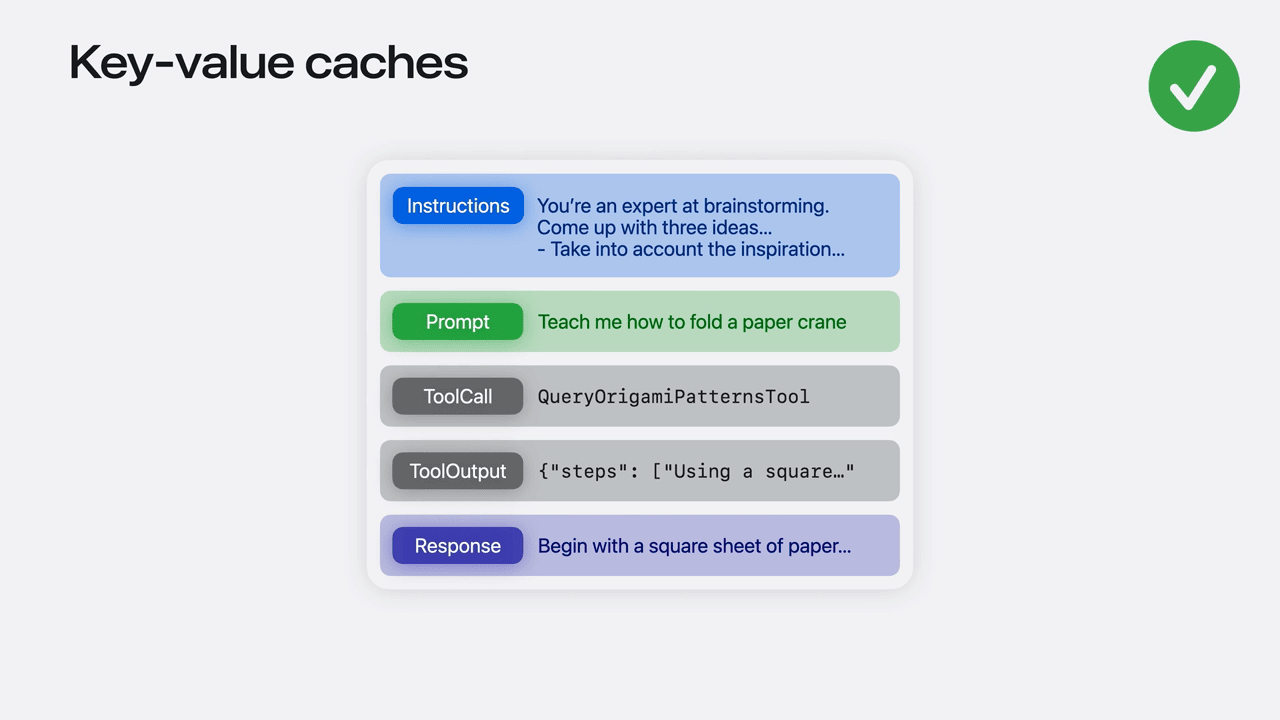 출처: WWDC26 - Build agentic app experiences with the Foundation Models framework
초록 체크가 붙은 transcript 다. Instructions, Prompt, ToolCall QueryOrigamiPatternsTool, ToolOutput, Response 가 차례로 뒤에 붙었다. 뒤에 붙이기만 하면 앞부분의 cache 가 그대로 쓰인다.
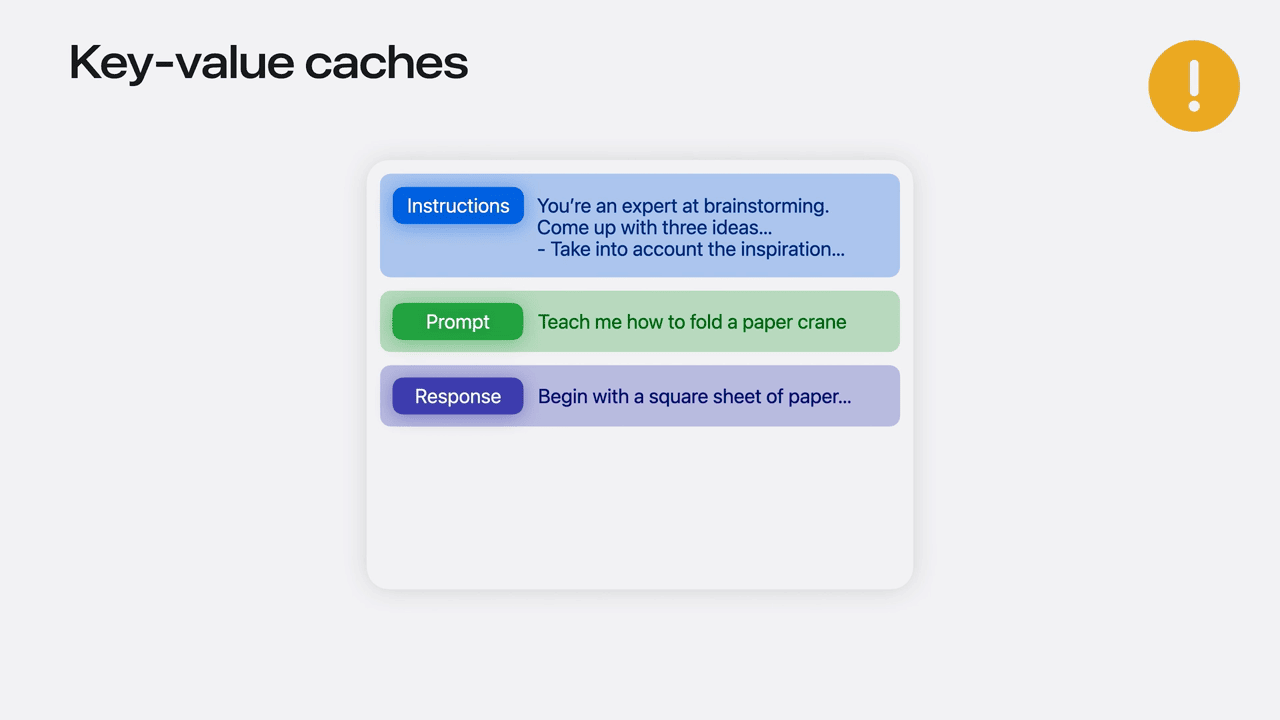 출처: WWDC26 - Build agentic app experiences with the Foundation Models framework
노란 경고가 붙은 transcript 다. 가운데 ToolCall 과 ToolOutput 이 빠졌다. 바뀐 자리부터 뒤는 cache 를 쓸 수 없어 다시 계산한다. cache 를 깨는 변경을 정리하면 다음과 같다.
| 변경 | cache |
|---|---|
| entry 를 뒤에 붙임 | 유지 |
| 중간 entry 를 지움 | 지운 자리부터 다시 계산 |
| tool 을 넣거나 뺌 | 다시 계산 |
| instructions 를 고침 | 처음부터 다시 계산 |
Erik 은 작년의 API 가 일부러 append 만 되게 만들어졌다고 말한다. 27 에서 푼 대신 비용을 따지는 것은 앱의 일이 됐다. profile 을 바꾸면 instructions 와 tool 이 바뀌므로 cache 가 깨진다. history transform 도 마찬가지다. model 마다 caching 방식이 다르므로 짐작하지 말고 재 보라고 한다.
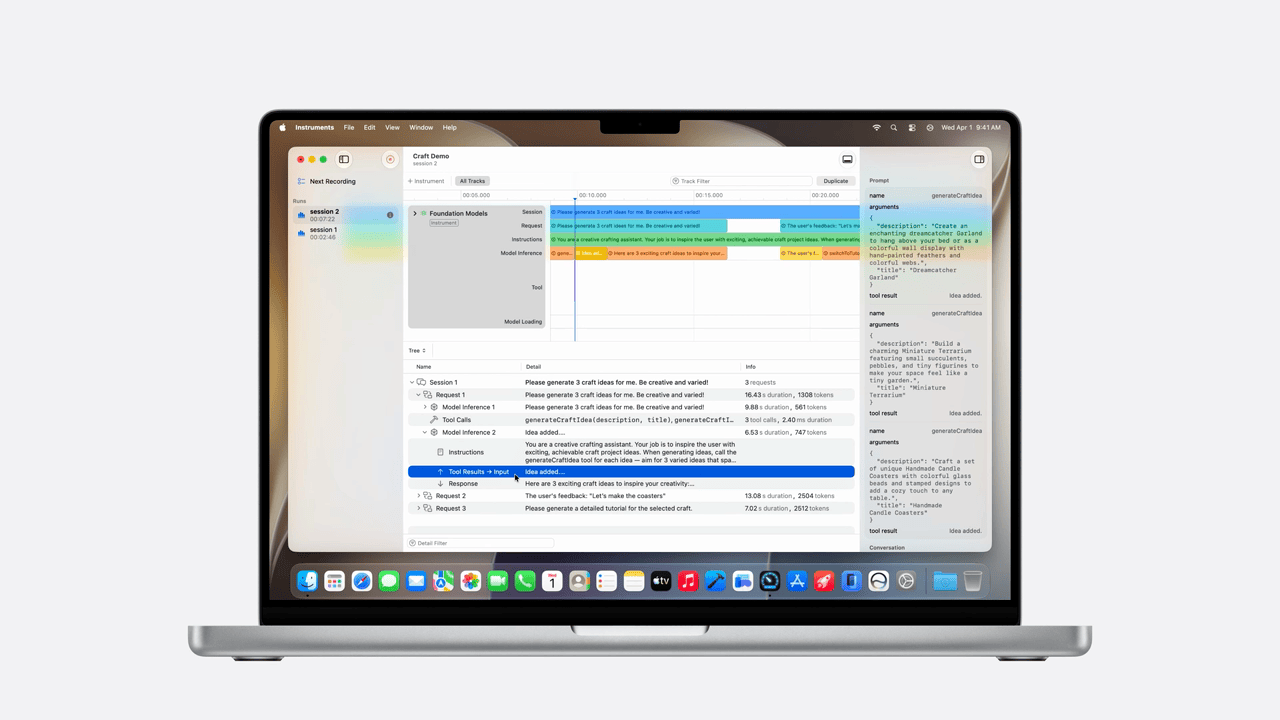 출처: WWDC26 - Build agentic app experiences with the Foundation Models framework
MacBook 화면에 Instruments 의 Foundation Models instrument 가 떠 있다. 측정하는 법은 Debug and profile agentic app experiences with Instruments 세션이 다룬다.
History 가 정확도에 주는 영향
history 를 그대로 두는 것도 문제가 될 수 있다. model 은 history 에 있는 pattern 을 따라 한다.
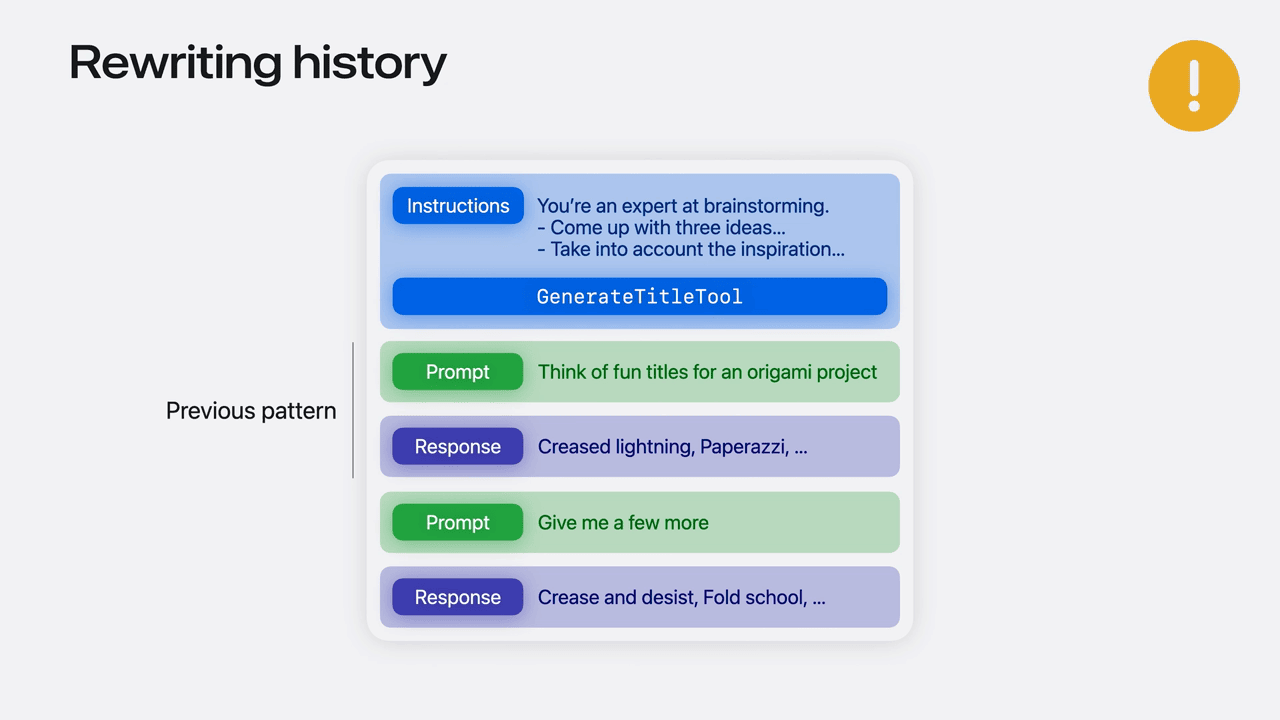 출처: WWDC26 - Build agentic app experiences with the Foundation Models framework
“Rewriting history” 도식이다. Instructions 에 GenerateTitleTool 이 새로 들어갔다. 그런데 history 에는 tool 없이 title 을 지어낸 기록이 있다. Prompt “Think of fun titles for an origami project” 에 Response “Creased lightning, Paperazzi, …” 로 답한 것이다. 왼쪽에 “Previous pattern” 이라고 표시되어 있다. 이어서 “Give me a few more” 를 받으면 model 은 tool 을 부르지 않고 앞에서 한 대로 “Crease and desist, Fold school, …” 을 직접 쓴다.
profile 을 바꿔 tool 을 추가했는데 model 이 쓰지 않는다면 history 를 의심해 볼 만하다. 앞의 turn 을 지우거나 요약으로 바꾸면 pattern 이 끊긴다. 대신 cache 가 깨진다. 성능과 정확도가 서로 당기는 자리다.
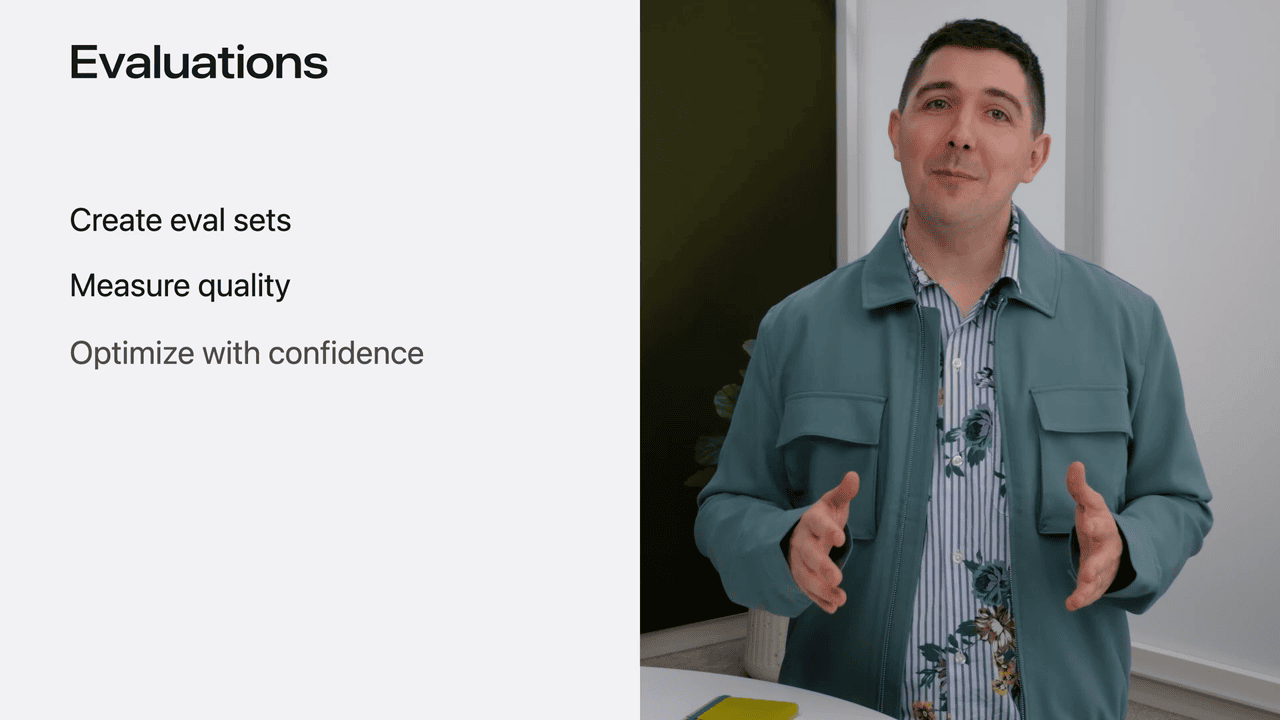 출처: WWDC26 - Build agentic app experiences with the Foundation Models framework
어느 쪽이 나은지는 재 봐야 안다. slide 는 Evaluations framework 로 할 일을 “Create eval sets”, “Measure quality”, “Optimize with confidence” 로 적는다. framework 소개는 Meet the Evaluations framework 세션에 있다.
세션의 마무리
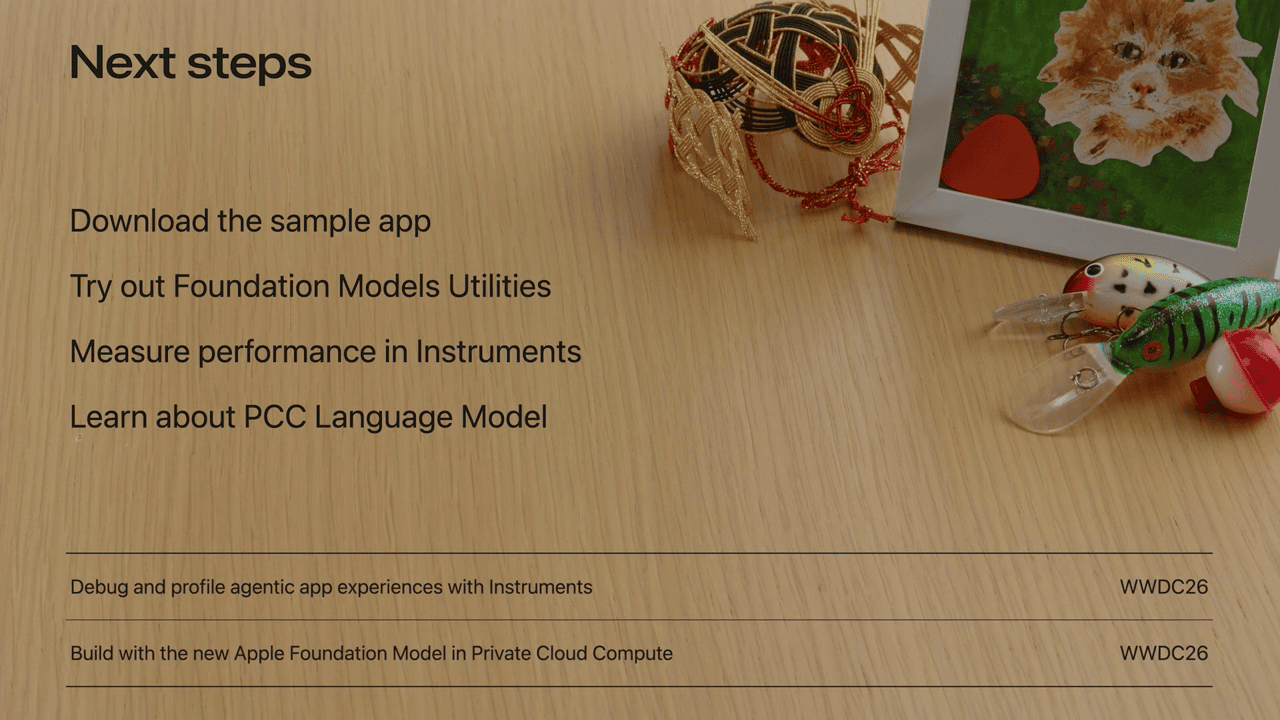 출처: WWDC26 - Build agentic app experiences with the Foundation Models framework
Next steps 는 네 줄이다. sample app 을 받아 보고, Foundation Models Utilities 를 써 보고, Instruments 로 성능을 재고, PCC 의 language model 을 알아보라는 것이다. 아래에 Instruments 세션과 Private Cloud Compute 세션이 걸려 있다.
정리
세션에 나온 API 가 어느 OS 부터 쓸 수 있는지를 Xcode 27.0 의 SDK 에서 확인해 표로 모았다.
| API | 쓸 수 있는 OS | 비고 |
|---|---|---|
DynamicInstructions | iOS 27.0, macOS 27.0, visionOS 27.0, watchOS 27.0 | tvOS 불가 |
LanguageModelSession.DynamicProfileModifier | iOS 27.0 계열 | modifier(_:) 로 붙임 |
historyTransform(_:) | iOS 27.0 계열 | session 의 transcript 는 바꾸지 않음 |
onPrompt, onReasoning, onToolCall, onToolOutput, onResponse | iOS 27.0 계열 | closure 는 async throws |
onActivate, onDeactivate | iOS 27.0 계열 | closure 는 async 이고 throw 하지 못함 |
@SessionProperty, @SessionPropertyEntry | iOS 27.0 계열 | 내장 property 는 history |
Transcript.HistoryView | iOS 27.0 계열 | index 가 Int 가 아님 |
GenerationOptions.ToolCallingMode | iOS 27.0 계열 | .allowed, .required, .disallowed |
TranscriptErrorHandlingPolicy | iOS 27.0 계열 | .revertTranscript, .preserveTranscript |
session.transcript 수정 | iOS 27.0 계열 | isResponding 이 false 일 때만 |
세션 page 의 snippet 과 Xcode 27.0 SDK 가 어긋나는 곳도 모아 둔다.
| 위치 | snippet | SDK 에서 확인한 것 |
|---|---|---|
| 7:21 | history transform 의 filter 가 isToolCallsOrToolOutput(entry) 를 그대로 반환 | tool call 만 남게 됨. ! 가 필요. 영상 화면도 같음 |
| 9:39 | summarize(history[0..<responseIndex]) | Int 를 Transcript.HistoryView.Index 로 바꿀 수 없음. history[..<responseIndex] |
| 9:39 | helper 이름이 lastResponseIndex 와 lastResponse 로 섞임 | 하나로 맞춰야 빌드됨 |
| 12:52 | mode 가 .brainstorm, .tutorial, model 이 serverModel, systemModel | 앞 snippet 은 .brainstorming, .planning, pccLanguageModel, systemLanguageModel |
| 14:06 | PhoneFriendTool 이 session.respond(to: arguments) | GeneratedContent 를 Prompt 로 바꿀 수 없음. profile 속성 선언도 빠짐 |
| 15:18 | slide 의 ToolCallingMode 가 top-level | GenerationOptions.ToolCallingMode |
| 15:18 | final answer tool 의 선언 첫 줄이 잘림 | 영상은 actor FinalAnswerTool: Tool. struct 로는 빌드 안 됨 |
| 17:12 | slide 의 TranscriptErrorHandlingPolicy 가 LanguageModelSession 의 extension 안 | top-level type. session 의 property 는 optional |
실제 프로젝트에 가져갈 점은 다음과 같다.
- agent 를 따로 된 무언가로 설계하지 않는다. instructions, tool, model 설정의 묶음에 이름을 붙이고 상태 변수 하나로 고른다
- 여러 profile 이 같이 쓰는 지식과 tool 은
DynamicInstructions로 뽑는다. 조건문으로 필요할 때만 붙이면 context 를 아낀다 - 일의 성격에 따라 model 을 나눈다. 다양한 답이 필요하면 temperature, 정확한 답이 필요하면 reasoning level, 빠른 답이 필요하면 on-device 다
- history 를 줄일 때 되돌릴 수 있어야 하면
historyTransform, 영구히 줄여도 되면@SessionProperty(\.history)다. 둘의 차이는 다른 profile 이 원본을 보느냐다 - 진행 중인 turn 의 tool call 은 지우지 않는다. 마지막 response 앞까지만 손댄다
- 넘겨받은 쪽이 대화 전체를 알아야 하면 baton-pass, 한 가지만 물어보면 되면 phone-a-friend 다. 뒤쪽은 부모의 context 를 아낀다
.required를 쓸 때는 빠져나갈 조건을 같이 만든다. 상태로 mode 를 바꾸거나 error 를 던지는 tool 을 둔다- error 로 loop 을 끝낼 때 그동안의 tool 기록이 필요하면
.preserveTranscript로 두고, 다음 prompt 전에 transcript 를 직접 정리한다 - transcript 를 고치는 code 는 전부 cache 비용을 낸다. profile 전환 횟수와 history 정리 주기를 Instruments 로 재고 정한다
- tool 을 새로 붙였는데 model 이 쓰지 않으면 history 에 tool 없이 답한 기록이 있는지 본다