[WWDC26] What's new in Apple In-App Purchase
이 글은 WWDC 세션의 transcript 와 영상 화면을 Claude Code 로 정리한 글이고, 실제로 쓴 날은 2026-11-25 다. Swift code 는 세션 page 의 snippet 에 빈 case 를 채워 Xcode 27.0 의 iOS 27 simulator SDK 로 type check 했다.
세션 정보
- 세션: What’s new in Apple In-App Purchase
- 길이: 13분 26초
- 공개일: 2026-06-08
- 발표: Sam Blum (StoreKit Engineer)
- 코드: 세션 page 의 snippet 6개 (Swift 4개, JSON 2개), 그리고 sample project SKDemo
한 줄 요약
1년짜리 auto-renewable subscription 에 “매달 내되 12개월을 약정하는” billing plan 을 붙일 수 있게 됐고, StoreKit 과 server API 에는 그 plan 을 구분하는 field 가 생겼다. 여기에 결과로 transaction 을 돌려주는 offer code redemption API, 그리고 In-App Purchase 여러 개를 한 번에 심사에 올리는 App Store Connect 의 제출 방식이 더해졌다.
세션의 구성
세션은 발표자 한 사람이 SKDemo 라는 sample 앱을 예로 들어 App Store Connect 화면, slide, Xcode 화면을 번갈아 보여 준다. 분량의 3분의 2 가 구독 가격 이야기다.
| 순서 | 내용 | 발표 |
|---|---|---|
| 1 | 12개월 약정 월간 구독의 개요 | Sam Blum |
| 2 | App Store Connect 에서 billing plan 설정 | Sam Blum |
| 3 | StoreKit 으로 판매, 구매, 조회, 테스트 | Sam Blum |
| 4 | App Store Server API 의 새 field | Sam Blum |
| 5 | Bundles 와 Suites | Sam Blum |
| 6 | Offer code redemption API | Sam Blum |
| 7 | In-App Purchase 제출 방식 | Sam Blum |
12개월 약정 월간 구독
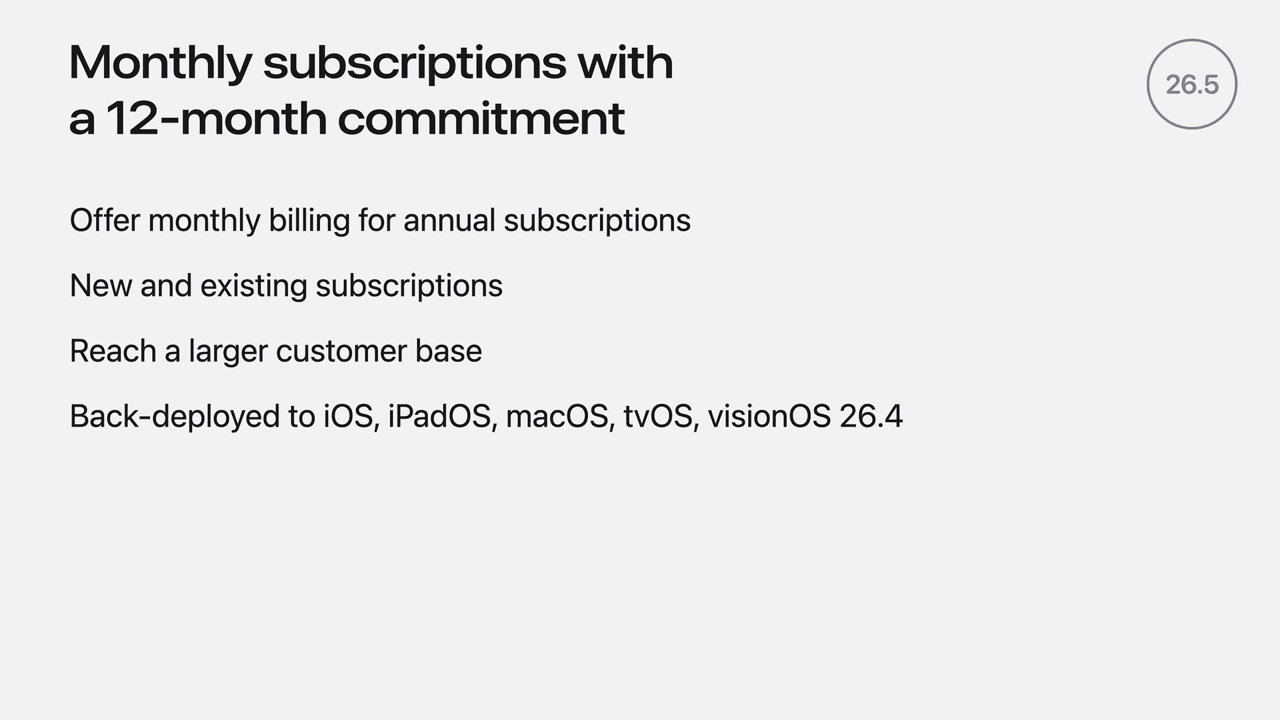
iOS 26.5 와 함께 들어온 기능이다. 세션의 표현은 “monthly subscriptions with a 12-month commitment” 이고, Apple 문서는 줄여서 commitment plan 이라고 부른다. 이 글에서는 약정 plan 이라고 쓴다.
 출처: WWDC26 - What’s new in Apple In-App Purchase
slide 의 오른쪽 위에는 26.5 라는 badge 가 있고 네 줄이 적혀 있다. 연간 구독에 월 단위 결제를 제공한다는 것, 새 구독과 기존 구독 모두에 붙일 수 있다는 것, 더 넓은 고객층에 닿는다는 것, 그리고 iOS, iPadOS, macOS, tvOS, visionOS 26.4 까지 back-deploy 된다는 것이다.
12개월 약정 월간 구독이란?
1년짜리 구독을 한 번에 내지 않고 열두 번에 나눠 내는 billing plan 이다. 고객은 매달 결제하지만 1년을 채우기로 약속한 상태이므로, 중간에 취소해도 남은 달의 결제는 계속된다. 취소가 멈추는 것은 약정이 끝난 뒤의 갱신이다.
새 product type 이 아니라는 점이 중요하다. Supporting monthly subscriptions with a 12-month commitment 문서에 따르면 product ID 와 subscription group 은 그대로이고, 기존 1년 구독 product 에 billing plan 이 하나 더 생긴다. 그래서 billing plan 은 두 가지가 된다.
| billing plan | StoreKit 의 값 | server 의 값 | 결제 방식 |
|---|---|---|---|
| 선불 | .upFront | BILLED_UPFRONT | 기간 전체를 한 번에 결제. 모든 구독의 기본값 |
| 약정 plan | .monthly | MONTHLY | 매달 결제, 12개월 약정 |
앱 입장에서 각 달은 보통의 월간 구독처럼 움직인다. 같은 문서의 설명으로는 billing period 마다 독립된 transaction 이 생기고 한 달 치 접근 권한을 준다.
App Store Connect 설정
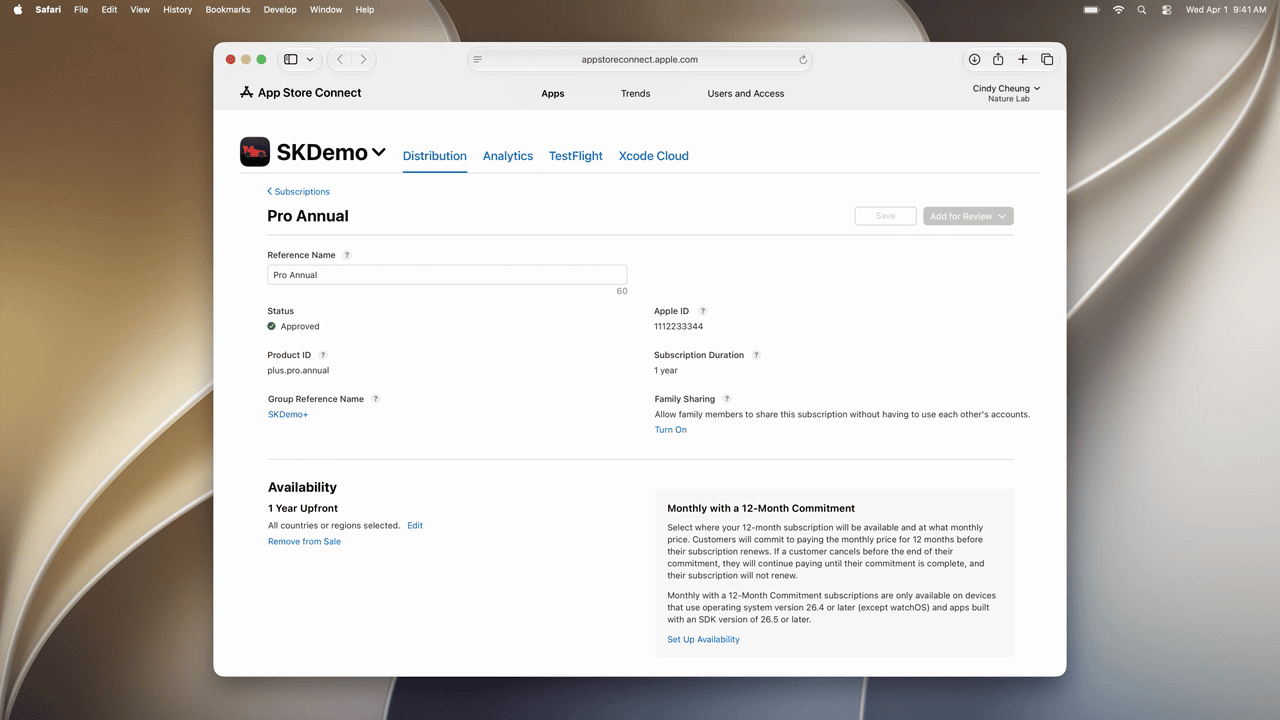
시연은 App Store Connect 의 Subscriptions 화면에서 시작한다. SKDemo+ group 안에 Pro, Premium, Standard 가 각각 1개월과 1년, 그리고 Family Sharing 용으로 나뉘어 있고, 발표자는 그중 1년짜리인 Pro Annual (plus.pro.annual) 을 고른다.
 출처: WWDC26 - What’s new in Apple In-App Purchase
Pro Annual 의 상세 화면이다. Availability 영역의 왼쪽에는 “1 Year Upfront” 가 있고, 오른쪽에는 “Monthly with a 12-Month Commitment” 라는 회색 상자와 Set Up Availability 링크가 있다. 상자 안의 안내문은 두 문단이다. 첫 문단은 어느 지역에 얼마의 월 가격으로 팔지 고르라는 것과, 고객이 약정이 끝나기 전에 취소해도 약정을 채울 때까지 결제가 이어지고 그 뒤 갱신되지 않는다는 내용이다. 둘째 문단은 지원 범위로, 운영체제 26.4 이상의 기기(watchOS 제외)와 26.5 이상의 SDK 로 빌드한 앱에서만 쓸 수 있다고 적혀 있다.
설정을 마치면 Availability 의 오른쪽 칸이 “All countries or regions selected” 와 Edit, 그리고 Remove Monthly Billing 링크로 바뀐다.
 출처: WWDC26 - What’s new in Apple In-App Purchase
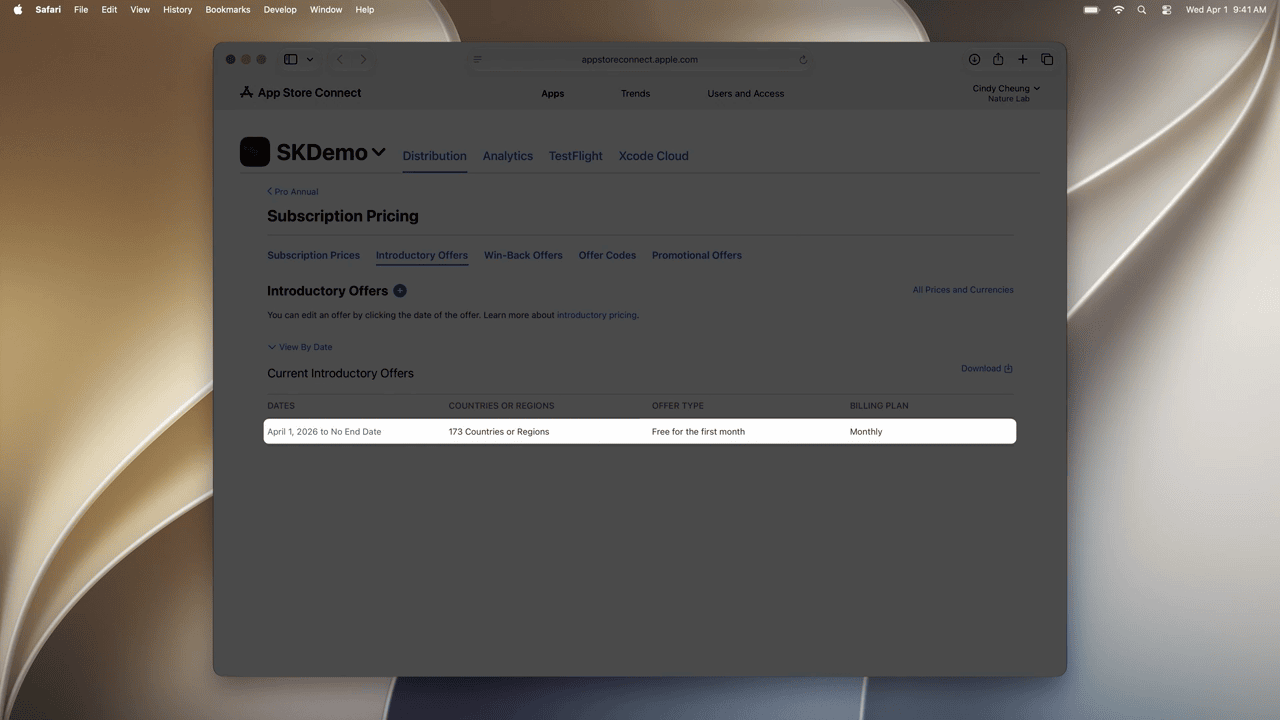
Subscription Pricing 의 Introductory Offers tab 이다. 강조된 행에는 기간 “April 1, 2026 to No End Date”, 지역 “173 Countries or Regions”, offer type “Free for the first month” 가 있고, 마지막 열 BILLING PLAN 의 값이 Monthly 다. offer 는 billing plan 마다 따로 만든다는 뜻이고, 발표자는 약정 plan 으로 가입하는 고객에게만 무료 체험을 주는 예를 들었다.
지원 범위
세션, App Store Connect 화면, 문서에 흩어져 있는 조건을 모으면 다음과 같다.
| 항목 | 조건 | 근거 |
|---|---|---|
| 빌드 | Xcode 26.5 SDK 이상 | 세션, 문서 |
| 기기 | iOS, iPadOS, macOS, tvOS, visionOS 26.4 이상 | 세션 |
| watchOS | 제외 | App Store Connect 안내문 |
| 대상 product | 1년짜리 auto-renewable subscription | 세션 |
| 지역 | 미국과 싱가포르를 뺀 전 세계 | 문서 (2026-11-25 확인) |
세션은 지역을 “available markets” 라고만 말한다. 미국과 싱가포르가 빠진다는 것은 문서에만 있는 내용이고, 이 목록은 바뀔 수 있다.
watchOS 는 조금 애매하다. SDK 의 interface 에는 pricingTerms 가 watchOS 26.4 에서도 쓸 수 있다고 표시되어 있는데, App Store Connect 의 안내문은 watchOS 를 뺀다. API 는 있어도 약정 plan 의 항목이 내려오지 않을 것으로 짐작하지만 확인하지는 못했다.
StoreKit 으로 판매하기
앱에서 할 일은 네 가지다. 약정 plan 의 가격을 보여 주고, 그 plan 을 지정해 구매하고, 구매된 transaction 에서 약정 정보를 읽고, Xcode 에서 테스트한다. 새 API 는 모두 26.4 부터 쓸 수 있다.
PricingTerms 의 구조
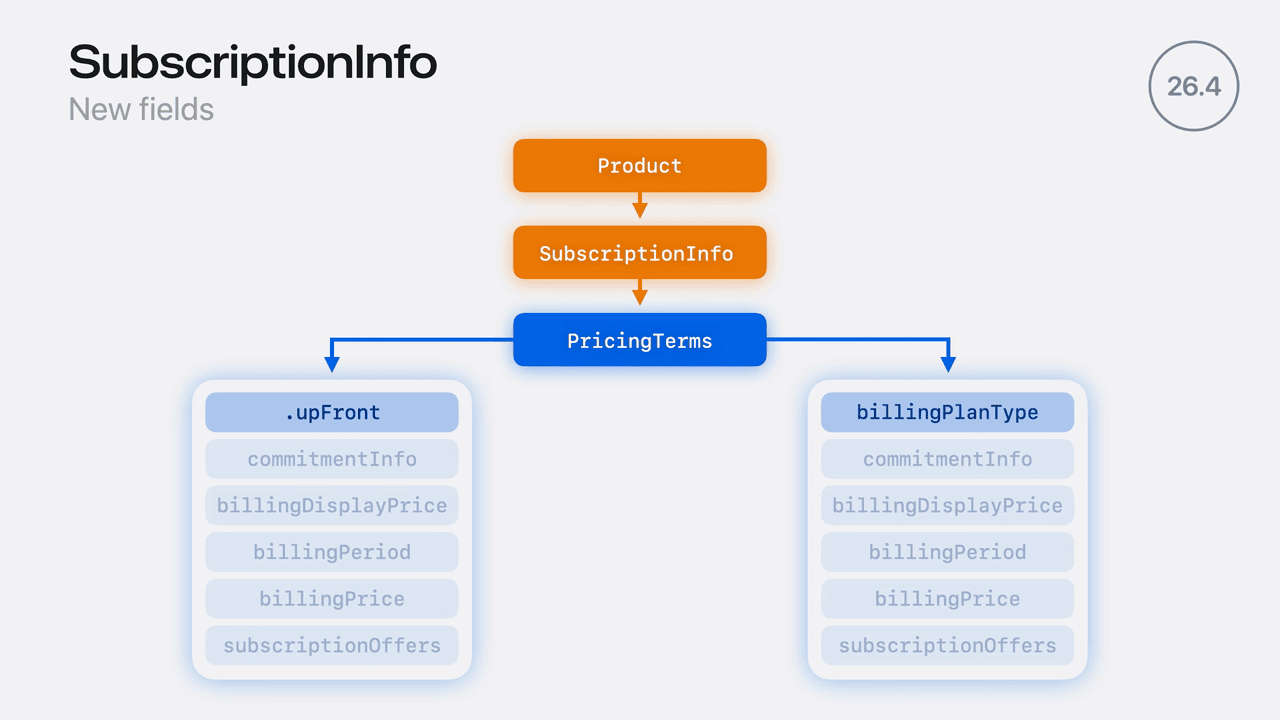
Product.SubscriptionInfo 에 pricingTerms 라는 배열이 생겼다. product 하나가 가진 billing plan 이 항목 하나씩으로 들어 있다.
 출처: WWDC26 - What’s new in Apple In-App Purchase
slide 는 Product, SubscriptionInfo, PricingTerms 가 위에서 아래로 이어지고, PricingTerms 에서 두 갈래가 나온다. 왼쪽 묶음의 맨 위는 .upFront 이고, 오른쪽 묶음은 billingPlanType 을 맨 위에 두고 commitmentInfo, billingDisplayPrice, billingPeriod, billingPrice, subscriptionOffers 를 나열한다. 양쪽이 같은 field 를 가진다는 그림이다.
모든 auto-renewable subscription 은 .upFront 항목 하나를 가진다. 약정 plan 을 설정한 product 는 .monthly 항목이 하나 더 온다. SDK 의 interface 로 확인한 field 는 다음과 같다.
| field | type | 내용 |
|---|---|---|
billingPlanType | BillingPlanType | .upFront 또는 .monthly |
billingPrice | Decimal | 한 번 결제하는 금액 |
billingDisplayPrice | String | 화면에 쓸 수 있게 format 된 금액 |
billingPeriod | SubscriptionPeriod | 결제 주기 |
commitmentInfo | CommitmentInfo | 약정 전체의 price, displayPrice, period |
subscriptionOffers | offer 배열 | 이 billing plan 에 해당하는 offer 만 |
commitmentInfo 는 optional 이 아니다. 그리고 offer 가 billing plan 별로 나뉘므로, 약정 plan 의 무료 체험을 보여 주려면 .monthly 항목의 subscriptionOffers 를 읽어야 한다.
SubscriptionStoreView 에 적용
StoreKit view 를 쓰고 있다면 modifier 하나로 끝난다.
1
2
3
4
5
6
7
8
9
10
11
12
13
14
15
import StoreKit
import SwiftUI

struct SubscriptionStore: View {
    var body: some View {
        SubscriptionStoreView(groupID: "3F19ED53") {
            Text("Custom marketing content")
        }
        .preferredSubscriptionPricingTerms { _, subscriptionInfo in
            subscriptionInfo.pricingTerms.first {
                $0.billingPlanType == .monthly
            }
        }
    }
}
세션 snippet 은 marketing content 자리에 주석만 두었고, 여기서는 Text 를 넣었다.
preferredSubscriptionPricingTerms(_:)
SubscriptionStoreView 가 각 product 를 어떤 pricing terms 로 보여 줄지 정하는 modifier 다. closure 는 Product 와 SubscriptionInfo 를 받아 PricingTerms? 를 돌려준다. nil 을 돌려주면, 곧 .monthly 항목이 없는 product 라면 어떻게 보이는지는 세션에서 다루지 않았다. 문서는 [preferredSubscriptionPricingTerms(:)](https://developer.apple.com/documentation/swiftui/view/preferredsubscriptionpricingterms%28:%29){:target=”_blank”} 에 있다.
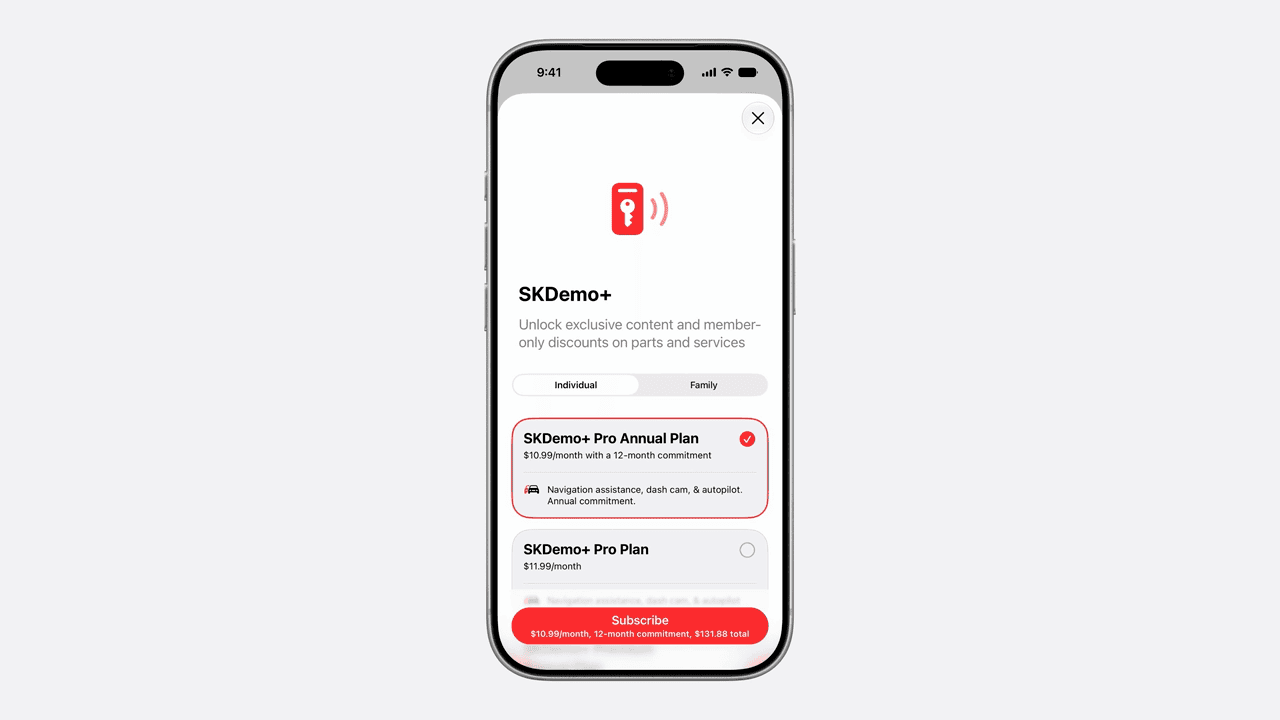 출처: WWDC26 - What’s new in Apple In-App Purchase
modifier 를 붙인 뒤의 화면이다. Individual 과 Family 를 고르는 picker 아래에 “SKDemo+ Pro Annual Plan” 이 선택되어 있고 가격 줄이 “$10.99/month with a 12-month commitment” 다. 그 아래 “SKDemo+ Pro Plan” 은 “$11.99/month” 다. 맨 아래 Subscribe button 에는 “$10.99/month, 12-month commitment, $131.88 total” 이 함께 적혀 있다. 월 금액과 약정 총액을 view 가 알아서 같이 보여 준다.
view 의 모양을 더 바꾸는 방법은 Meet StoreKit for SwiftUI 에 있다.
직접 만든 UI 에서 구매
store 화면을 직접 그린다면 pricingTerms 에서 .monthly 항목을 찾아 가격을 꺼내고, 구매할 때 billing plan 을 지정한다.
1
2
3
4
5
6
7
8
9
10
11
12
13
14
15
16
17
18
19
20
21
22
23
24
25
26
27
28
29
import StoreKit

func merchandiseAndPurchase(product: Product?) async {
    let pricingTerms = product?.subscription?.pricingTerms
        .first(where: { $0.billingPlanType == .monthly })
    if let pricingTerms {
        let monthlyPrice = pricingTerms.billingDisplayPrice
        let totalCommitmentPrice = pricingTerms.commitmentInfo.displayPrice
        print(monthlyPrice, totalCommitmentPrice)
    }

    let result = try? await product?.purchase(options: [.billingPlanType(.monthly)])
    switch result {
    case .success(let verificationResult):
        switch verificationResult {
        case .verified(let transaction):
            // 구매한 content 를 열어 준 뒤 finish 한다
            await transaction.finish()
        case .unverified:
            break
        }
    case .userCancelled, .pending:
        break
    case .none:
        break
    @unknown default:
        break
    }
}
세션 snippet 과 다른 곳은 세 군데다. top-level code 였던 것을 함수로 감쌌고, 비어 있던 switch result 에 case 를 채웠고, 약정 총액을 Decimal 인 price 대신 displayPrice 로 읽었다. result 는 try? 와 optional chaining 때문에 optional 이므로 .none 도 처리해야 한다.
pricingTerms
product 가 가진 billing plan 의 목록이다. 약정 plan 이 고객의 storefront 에서 제공되지 않으면 .monthly 항목은 오지 않는다. 그래서 first(where:) 의 결과가 nil 인 경우를 정상 흐름으로 다뤄야 한다. 문서는 pricingTerms 에 있다.
billingPlanType(_:)
어느 billing plan 으로 살지 StoreKit 에 알리는 purchase option 이다. 약정 plan 구매에서 기존 purchase(options:) 호출에 더할 것은 이것 하나다. 문서는 [billingPlanType(:)](https://developer.apple.com/documentation/storekit/product/purchaseoption/billingplantype%28:%29){:target=”_blank”} 에 있다.
가격 표시에는 규칙이 있다. 앞의 문서는 구매를 시작하기 전에 월 결제 금액과 약정 총액을 둘 다 고객에게 보여 줘야 한다고 적는다. 선택 사항이 아니다.
첫 가입 안내와 관리 화면
고객이 약정 plan 에 처음 가입할 때는 App Store 가 안내 sheet 를 먼저 띄운다. 앱이 할 일은 없고, Apple Account 마다 한 번만 나온다.
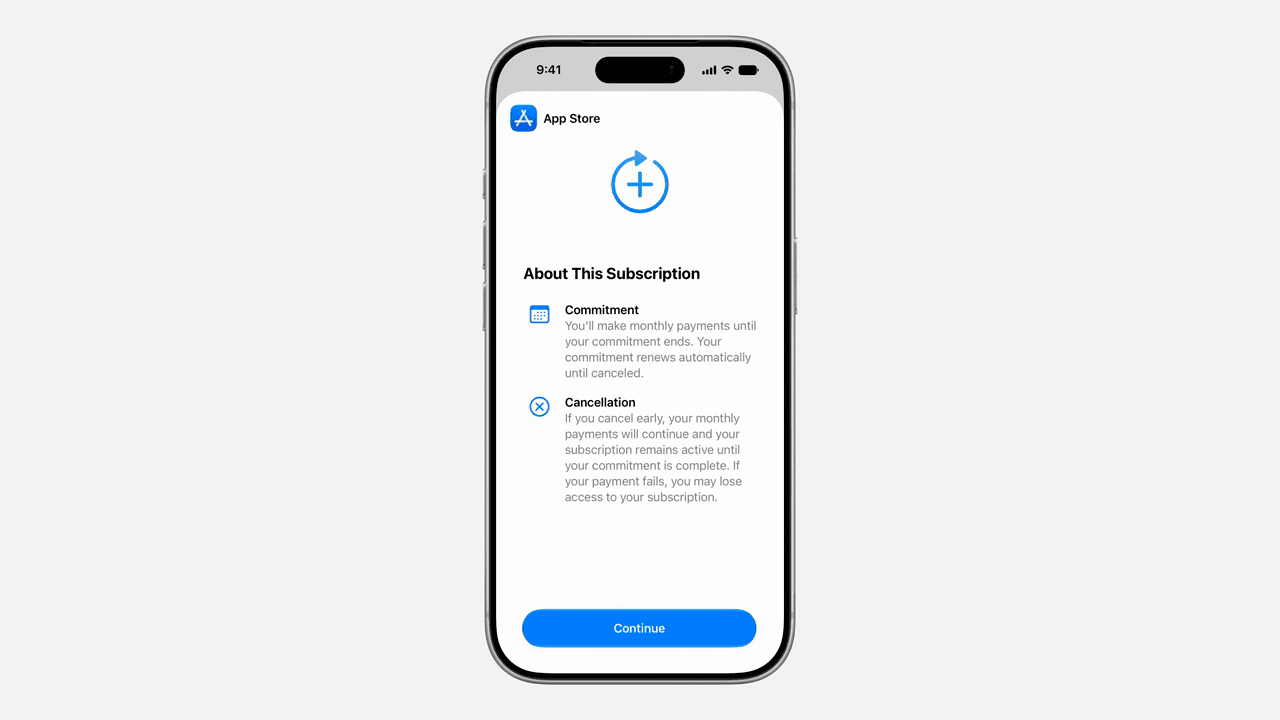 출처: WWDC26 - What’s new in Apple In-App Purchase
“About This Subscription” 이라는 제목 아래 두 항목이 있다. Commitment 는 약정이 끝날 때까지 매달 결제하고 취소하지 않으면 약정이 자동으로 갱신된다는 내용이다. Cancellation 은 일찍 취소해도 약정을 채울 때까지 결제와 구독이 이어지고, 결제에 실패하면 접근 권한을 잃을 수 있다는 내용이다.
가입한 뒤의 관리 화면도 App Store 가 제공한다.
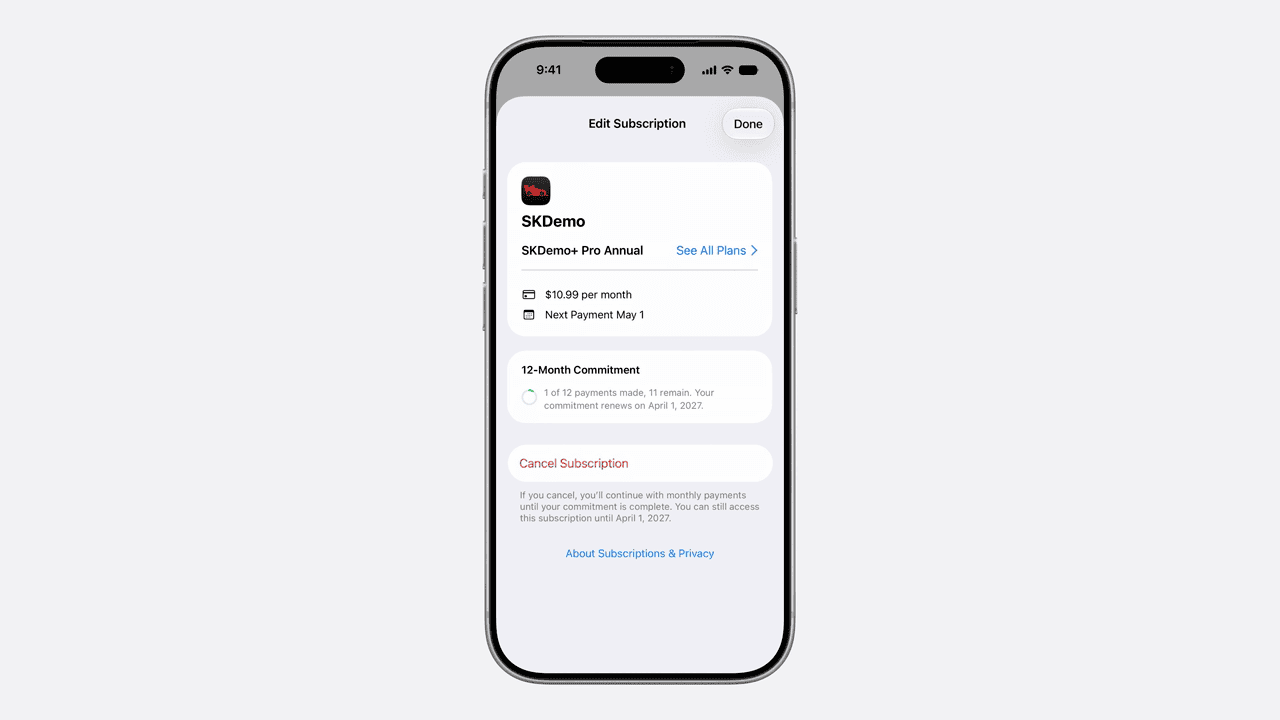 출처: WWDC26 - What’s new in Apple In-App Purchase
Edit Subscription sheet 다. 위쪽 card 에 SKDemo+ Pro Annual, “$10.99 per month”, “Next Payment May 1” 이 있고 See All Plans 로 다른 plan 을 볼 수 있다. 가운데 “12-Month Commitment” card 는 “1 of 12 payments made, 11 remain. Your commitment renews on April 1, 2027.” 이라고 진행 상황을 알려 준다. Cancel Subscription 아래에는 취소해도 약정이 끝날 때까지 매달 결제가 이어지고 2027년 4월 1일까지는 구독을 쓸 수 있다는 설명이 붙어 있다.
이 sheet 를 앱 안에서 띄우는 code 는 다음과 같다.
1
2
3
4
5
6
7
8
9
10
11
12
13
14
15
16
17
import StoreKit
import SwiftUI

struct ManageSubscriptionsButton: View {
    let subscriptionGroupID: String
    @State var presentingManageSubscriptionsSheet: Bool = false

    var body: some View {
        Button("Manage Subscriptions") {
            presentingManageSubscriptionsSheet = true
        }
        .manageSubscriptionsSheet(
            isPresented: $presentingManageSubscriptionsSheet,
            subscriptionGroupID: subscriptionGroupID
        )
    }
}
manageSubscriptionsSheet(isPresented:subscriptionGroupID:)
특정 subscription group 의 관리 화면을 sheet 로 띄운다. 새 API 가 아니라 iOS 17 부터 있던 것이고, 약정 정보는 system 이 알아서 채운다. macOS, tvOS, watchOS 에서는 쓸 수 없어서, 같은 code 를 macOS 27 SDK 로 type check 하면 unavailable 오류가 난다. UIKit 에서는 showManageSubscriptions(in:subscriptionGroupID:) 를 쓴다. 문서는 manageSubscriptionsSheet(isPresented:subscriptionGroupID:) 에 있다.
Transaction 과 RenewalInfo 의 새 field
구매가 끝난 뒤 약정 상태를 읽는 곳은 두 군데다. Transaction 은 이번 달 결제가 약정의 어디쯤인지를, RenewalInfo 는 약정이 끝난 뒤 어떻게 갱신될지를 알려 준다.
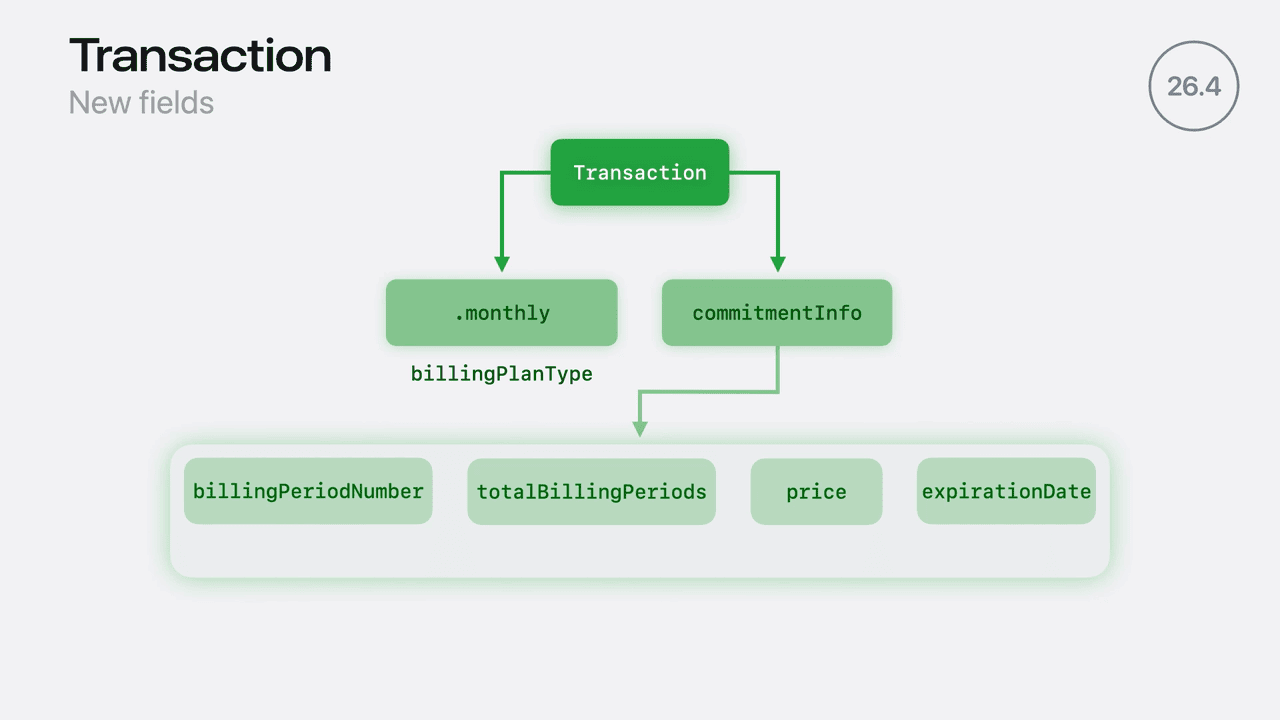 출처: WWDC26 - What’s new in Apple In-App Purchase
Transaction 에서 두 갈래가 나온다. 왼쪽은 billingPlanType 이고 값으로 .monthly 가 적혀 있다. 오른쪽 commitmentInfo 아래에는 billingPeriodNumber, totalBillingPeriods, price, expirationDate 네 개가 있다. .upFront 인 transaction 에서는 commitmentInfo 가 nil 이다.
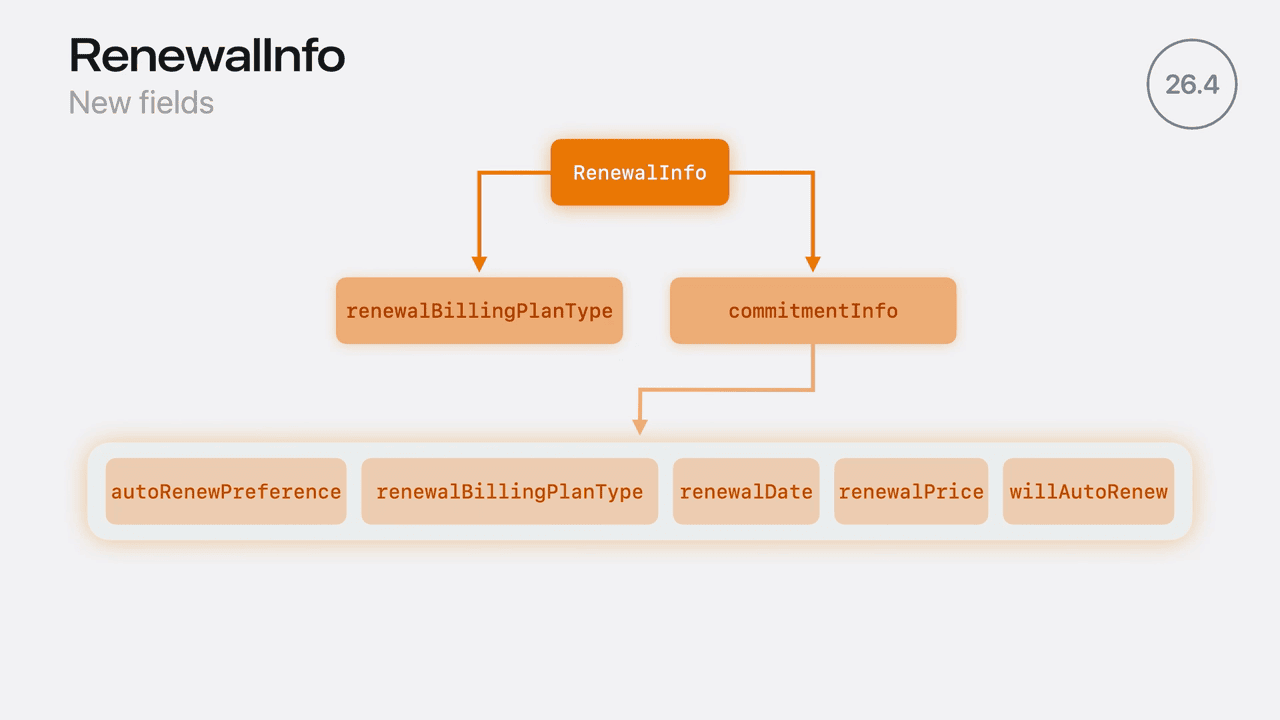 출처: WWDC26 - What’s new in Apple In-App Purchase
RenewalInfo 쪽은 renewalBillingPlanType 과 commitmentInfo 다. commitmentInfo 아래에는 autoRenewPreference, renewalBillingPlanType, renewalDate, renewalPrice, willAutoRenew 가 있다.
두 곳의 commitmentInfo 는 이름만 같고 type 이 다르다. SDK 의 interface 로 확인한 내용을 표로 옮긴다.
| 위치 | field | type |
|---|---|---|
Transaction | billingPlanType | BillingPlanType? |
Transaction.CommitmentInfo | billingPeriodNumber | UInt64 |
Transaction.CommitmentInfo | totalBillingPeriods | UInt64 |
Transaction.CommitmentInfo | price | Decimal |
Transaction.CommitmentInfo | expirationDate | Date |
RenewalInfo | renewalBillingPlanType | BillingPlanType? |
RenewalInfo.CommitmentInfo | autoRenewPreference | String |
RenewalInfo.CommitmentInfo | renewalBillingPlanType | BillingPlanType |
RenewalInfo.CommitmentInfo | renewalDate | Date |
RenewalInfo.CommitmentInfo | renewalPrice | Decimal |
RenewalInfo.CommitmentInfo | willAutoRenew | Bool |
세션에는 이 field 를 읽는 code 가 없다. 아래는 표의 이름과 type 이 맞는지 보려고 직접 써서 type check 한 것이다.
1
2
3
4
5
6
7
8
9
10
11
12
13
14
import StoreKit

func inspectCommitment(_ transaction: Transaction) {
    guard transaction.billingPlanType == .monthly,
          let commitment = transaction.commitmentInfo else { return }
    print("\(commitment.billingPeriodNumber) / \(commitment.totalBillingPeriods)")
    print(commitment.price, commitment.expirationDate)
}

func inspectRenewal(_ renewalInfo: Product.SubscriptionInfo.RenewalInfo) {
    guard let commitment = renewalInfo.commitmentInfo else { return }
    print(commitment.autoRenewPreference, commitment.renewalBillingPlanType)
    print(commitment.renewalDate, commitment.renewalPrice, commitment.willAutoRenew)
}
Transaction.commitmentInfo
약정 plan 의 transaction 에만 값이 있다. 진행 상황 UI 를 직접 만들 때 billingPeriodNumber 와 totalBillingPeriods 를 쓴다. 문서는 commitmentInfo 에 있다.
RenewalInfo.commitmentInfo
약정이 끝난 뒤의 갱신 계획이다. 발표자는 server payload 를 설명하면서 이 정보가 구독이 약정 중일 때만 들어 있다고 말했다. 문서는 commitmentInfo 에 있다.
만료일 두 가지
약정 plan 의 transaction 에는 만료일이 두 개 있고, 쓰임이 다르다.
| field | 뜻 | 쓰는 곳 |
|---|---|---|
Transaction.expirationDate | 이번 달 billing period 의 끝 | 접근 권한 판단 |
Transaction.CommitmentInfo.expirationDate | 12개월 약정의 끝 | 진행 상황 표시 |
접근 권한은 기존 구독과 같은 방식으로 판단한다. Transaction.currentEntitlements 를 쓰거나, transaction 의 expirationDate 가 미래이고 revocationDate 가 없고 isUpgraded 가 false 인지 본다. 이미 구독을 처리하는 code 가 있다면 그대로 쓸 수 있다.
발표자는 정확한 만료일을 얻으려면 항상 가장 최근 transaction 을 보라고 했다. 이유는 문서에 있다. 결제 문제가 약정 후반에 뒤늦게 복구되면 약정의 끝 날짜가 뒤로 밀릴 수 있기 때문이다.
StoreKit Testing
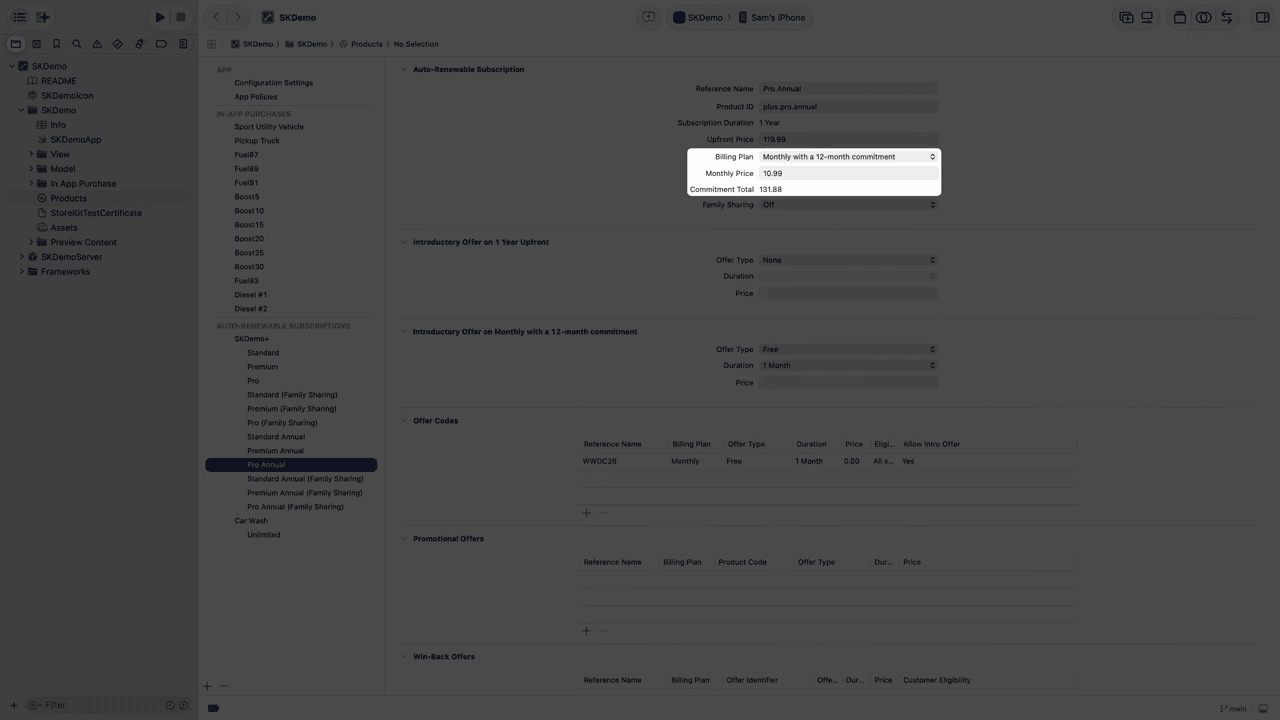
Xcode 26.5 부터 StoreKit configuration file 에서 약정 plan 을 만들 수 있다.
 출처: WWDC26 - What’s new in Apple In-App Purchase
SKDemo 의 configuration file 에서 Pro Annual 을 고른 화면이다. 강조된 곳에 Billing Plan 이라는 picker 가 있고 값이 “Monthly with a 12-month commitment” 다. 이 값을 고르자 그 아래에 Monthly Price (10.99) 와 Commitment Total (131.88) 이 생겼다.
 출처: WWDC26 - What’s new in Apple In-App Purchase
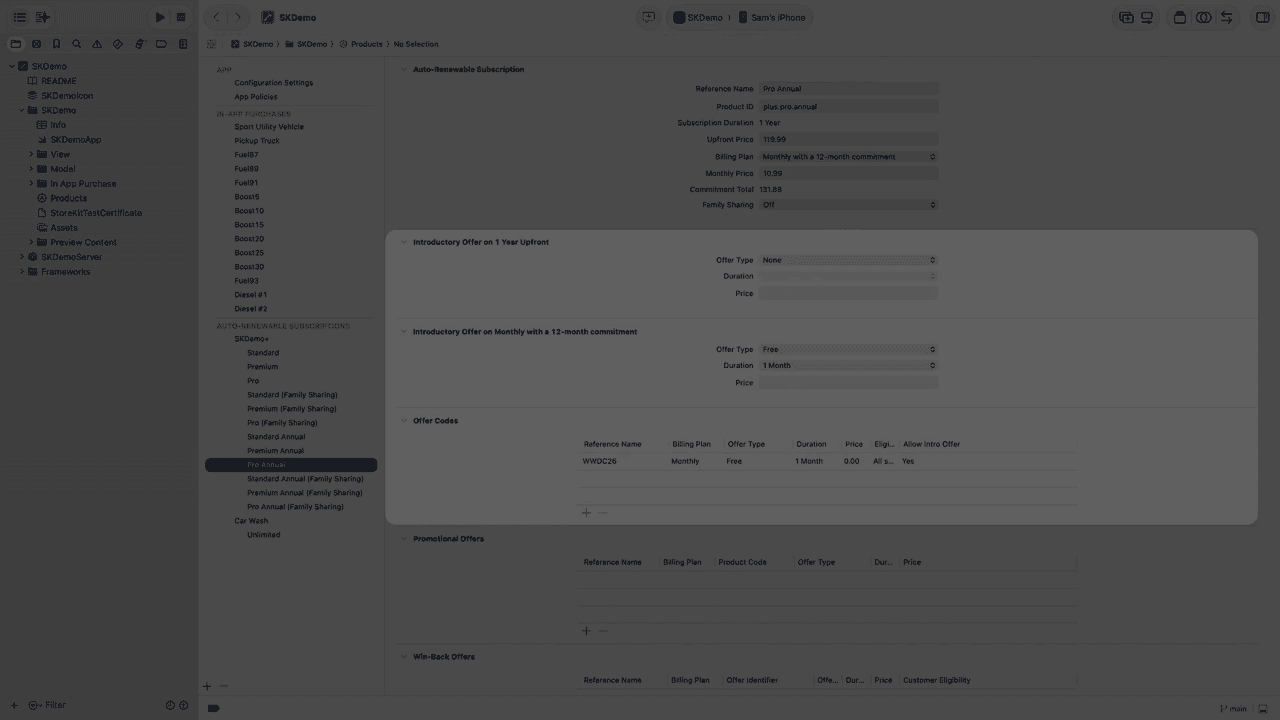
같은 화면의 아래쪽이다. introductory offer 영역이 “Introductory Offer on 1 Year Upfront” 와 “Introductory Offer on Monthly with a 12-month commitment” 둘로 나뉘어 있고, 앞의 것은 None, 뒤의 것은 Free 에 1 Month 다. Offer Codes 표에도 Billing Plan 열이 있어서 WWDC26 이라는 code 가 Monthly 에 묶여 있다. App Store Connect 에서 본 것과 같은 구성이다.
 출처: WWDC26 - What’s new in Apple In-App Purchase
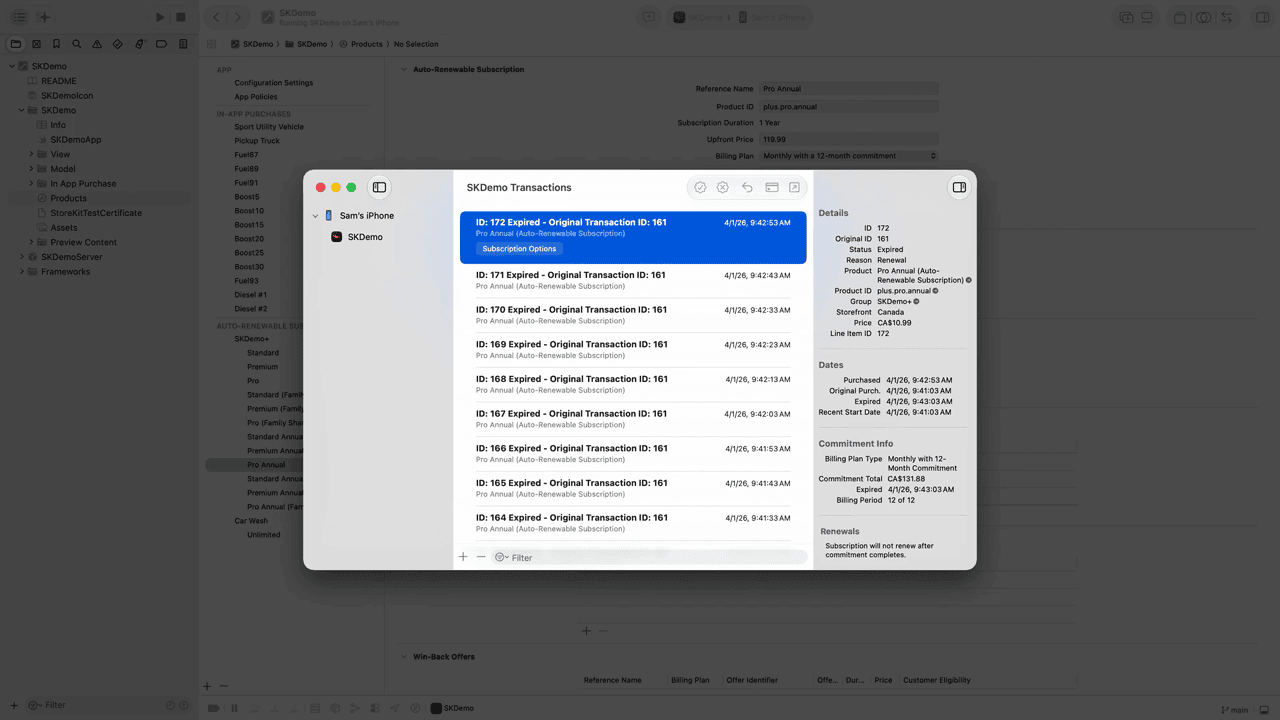
transaction manager 다. 왼쪽 목록에는 Original Transaction ID 가 161 인 Pro Annual 의 transaction 이 10초 간격으로 쌓여 있다. 오른쪽 inspector 의 Commitment Info 에는 Billing Plan Type 이 “Monthly with 12-Month Commitment”, Commitment Total 이 CA$131.88, Billing Period 가 “12 of 12” 로 나온다. 맨 아래 Renewals 에는 “Subscription will not renew after commitment completes.” 가 적혀 있다. 열두 번째 결제까지 끝나고 갱신하지 않는 상태를 보여 주는 화면이다.
Managing the life cycle of monthly subscriptions with a 12-month commitment 문서는 여기서 해 볼 것을 나열한다. 월 금액과 약정 총액이 둘 다 보이는지, .billingPlanType(.monthly) 로 산 transaction 에 commitmentInfo 가 있는지, transaction manager 에서 구독을 취소해도 남은 billing period 동안 접근 권한이 유지되는지다. sandbox 에서는 12개월 약정 전체를 빠른 속도로 돌려 볼 수 있다고 한다.
StoreKit Testing 의 기본은 What’s new in StoreKit 2 and StoreKit Testing in Xcode 에 있다.
server 쪽 변화
App Store Server API 나 App Store Server Notifications V2 를 쓰는 server 에도 같은 정보가 온다.
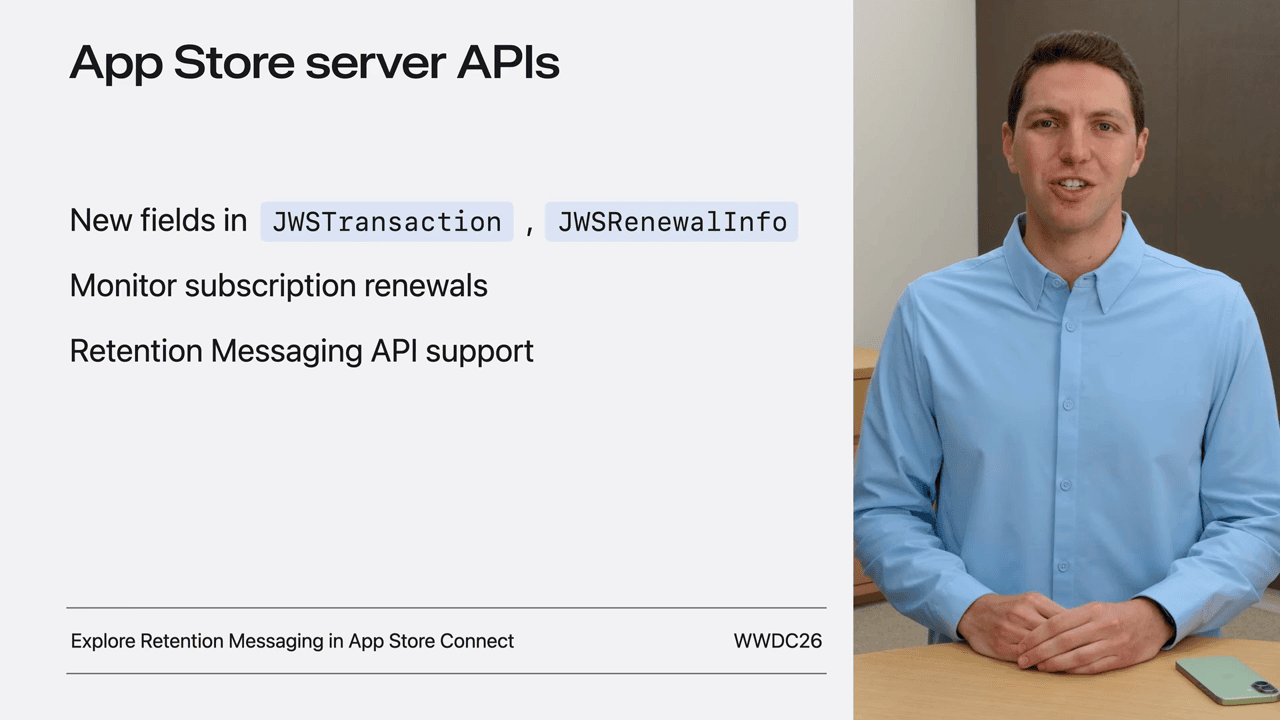 출처: WWDC26 - What’s new in Apple In-App Purchase
slide 는 세 줄이다. JWSTransaction 과 JWSRenewalInfo 의 새 field, 구독 갱신 추적, Retention Messaging API 지원이다. 마지막 것은 Explore Retention Messaging in App Store Connect 세션이 다룬다.
signed payload 의 새 field
약정의 billing period 하나를 결제했을 때의 decoded JWSTransaction 이다. 세션 snippet 에서 주석과 끝에 남은 쉼표를 빼서 유효한 JSON 으로 만들었고, 생략 표시된 다른 field 는 넣지 않았다.
1
2
3
4
5
6
7
8
9
10
11
12
13
14
{
    "expiresDate": 1783503660000,
    "price": 10990,
    "productId": "plus.pro.annual",
    "purchaseDate": 1780911660000,
    "type": "Auto-Renewable Subscription",
    "billingPlanType": "MONTHLY",
    "commitmentInfo": {
        "billingPeriodNumber": 1,
        "totalBillingPeriods": 12,
        "commitmentExpiresDate": 1812447660000,
        "commitmentPrice": 131880
    }
}
바깥의 expiresDate 와 price 는 이번 billing period 의 것이다. purchaseDate 에서 expiresDate 까지가 30일이고 commitmentExpiresDate 까지가 365일이다. 금액은 1000 을 곱한 값이라 10990 이 10.99, 131880 이 131.88 이다. field 전체는 JWSTransactionDecodedPayload 에 있다.
같은 구독의 decoded JWSRenewalInfo 다. 세션 snippet 은 commitmentAutoRenewProductId 의 값이 둥근 따옴표로 감싸져 있어서 곧은 따옴표로 바꿨다.
1
2
3
4
5
6
7
8
9
10
{
    "renewalBillingPlanType": "MONTHLY",
    "commitmentInfo": {
        "commitmentAutoRenewProductId": "plus.standard.annual",
        "commitmentAutoRenewStatus": 0,
        "commitmentRenewalDate": 1812447660000,
        "commitmentRenewalPrice": 10990,
        "commitmentRenewalBillingPlanType": "BILLED_UPFRONT"
    }
}
발표자의 설명으로는 고객이 약정이 끝나면 다른 BILLED_UPFRONT plan 으로 갱신되게 바꿔 둔 예다. product ID 가 plus.standard.annual 로 다른 것이 그 때문이다. 다만 commitmentAutoRenewStatus 가 0 인 것은 그 설명과 잘 맞지 않는다. 문서는 이 값이 0 이면 약정이 갱신되지 않는다고 설명하기 때문이다. 예시 값이 대충 채워진 것으로 보이지만 확실하지 않다. field 전체는 JWSRenewalInfoDecodedPayload 에 있다.
약정 중의 notification
세션은 notification 이 12개월 동안 매달 갱신 같은 lifecycle 을 계속 알려 준다고만 말하고 자세한 것은 문서로 넘긴다. 문서에서 기존 구독과 달라지는 부분만 추리면 다음과 같다.
| 상황 | 오는 것 | server 가 할 일 |
|---|---|---|
| 매달 갱신 | DID_RENEW | 기존 구독과 같이 처리 |
| 약정 중 취소 | DID_CHANGE_RENEWAL_STATUS 와 subtype AUTO_RENEW_DISABLED | 접근 권한을 끊지 않는다. 남은 달의 DID_RENEW 가 계속 온다 |
| 열두 번째 기간 종료 후 갱신 안 함 | EXPIRED | 여기서 접근 권한 종료 |
| 결제 실패 | DID_FAIL_TO_RENEW | 바로 접근 권한 회수 |
| 결제 복구 | DID_RENEW 와 subtype BILLING_RECOVERY | 권한 복구, 최신 commitmentExpiresDate 다시 읽기 |
취소를 받았을 때는 billing plan 부터 확인하라는 것이 문서의 안내다. MONTHLY 면 commitmentAutoRenewStatus 로 약정이 갱신되지 않는다는 것만 확인하고 권한은 유지한다. BILLED_UPFRONT 면 기존 취소 처리를 그대로 탄다. 기존 code 가 AUTO_RENEW_DISABLED 를 “이번 기간이 끝나면 만료” 로 해석하고 있다면 약정 plan 에서는 틀린 판단이 된다.
Billing Grace Period 는 약정 plan 에 적용되지 않는다는 것도 문서에 있다. grace period 를 켜 둔 앱이라도 약정 plan 은 DID_FAIL_TO_RENEW 를 받는 즉시 권한을 회수해야 하고, 90일 안에 복구되지 않으면 약정이 끝난다.
Bundles 와 Suites
구독을 묶어 파는 두 가지 방식이 예고됐다. 세션에서 가장 짧은 부분이고 API 는 나오지 않는다.
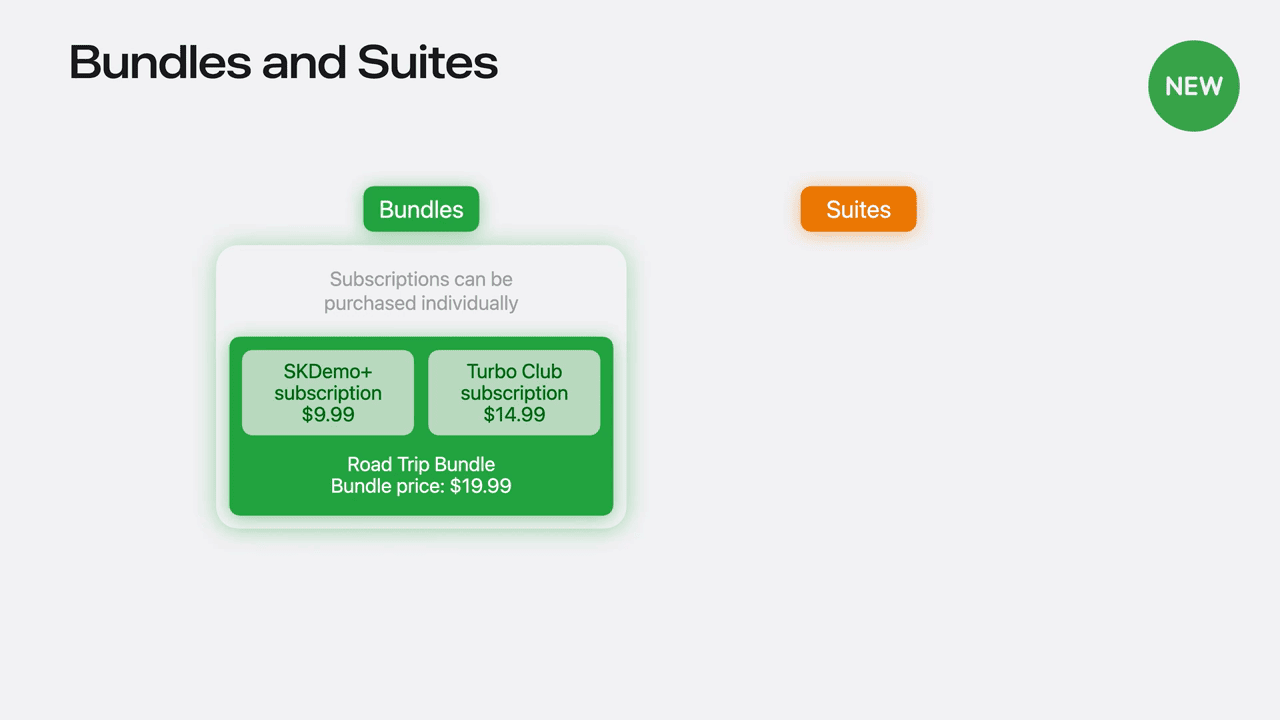 출처: WWDC26 - What’s new in Apple In-App Purchase
slide 는 둘을 나란히 놓는다. 왼쪽 Bundles 의 설명은 “Subscriptions can be purchased individually” 이고, $9.99 의 SKDemo+ subscription 과 $14.99 의 Turbo Club subscription 을 묶은 Road Trip Bundle 이 $19.99 다. 오른쪽 Suites 의 설명은 “Subscriptions only available in the suite” 이고, Navigation app 과 Premium radio app 을 묶은 Infotainment Suite 가 $19.99 인데 개별 가격은 없다.
| Bundle | Suite | |
|---|---|---|
| 구성하는 구독 | 따로도 살 수 있음 | suite 안에서만 존재 |
| 가격 | 각각 사는 것보다 싸게 | suite 가격 하나 |
| 쓰임 | 여러 구독을 한 번의 구매로 | 관련된 앱 여러 개에 서비스 제공 |
Xcode 27 에서 API 를 테스트할 수 있고, program 의 세부 사항은 2026년 후반에 나온다고 했다. 어떤 API 인지 세션은 말하지 않았다.
Offer code redemption
offer code 는 정해진 기간 동안 In-App Purchase 를 무료나 할인가로 주는 code 다. App Store Connect 에서 만드는 방법은 Implement App Store Offers 에 있고, 이 세션은 앱 안에서 code 를 입력받는 API 가 바뀐 것을 다룬다.
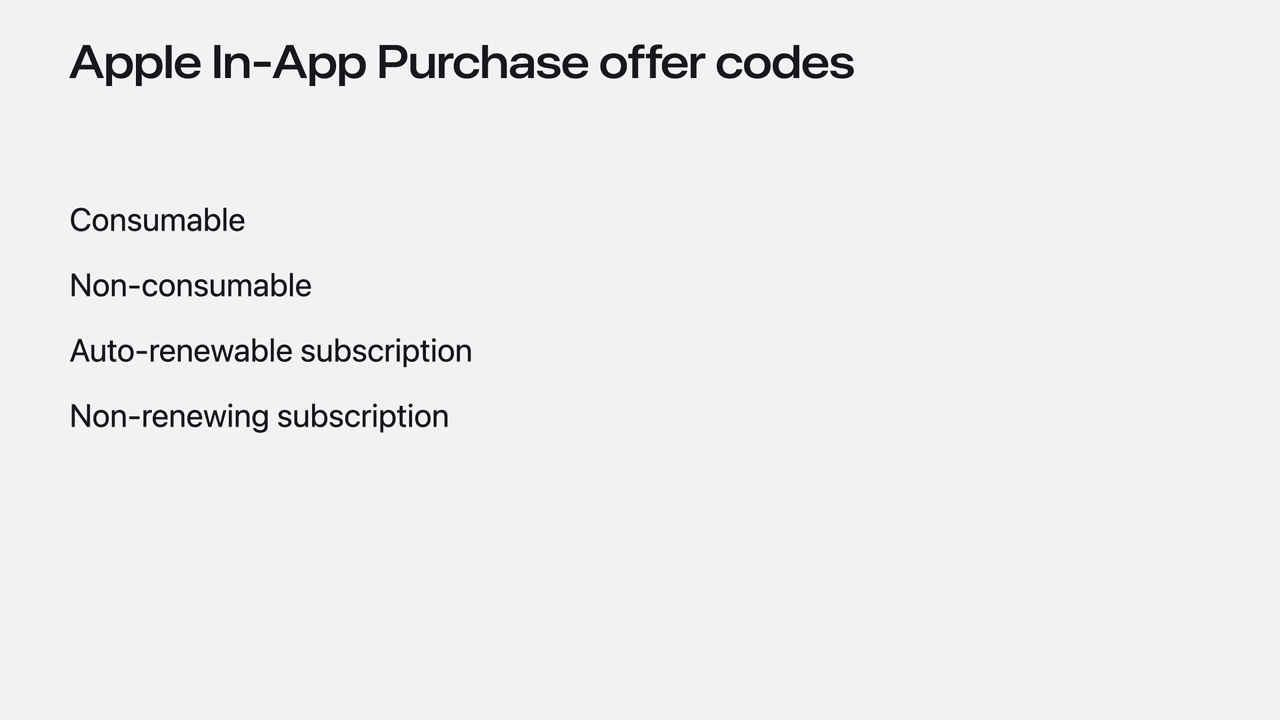 출처: WWDC26 - What’s new in Apple In-App Purchase
offer code 를 붙일 수 있는 product type 네 가지를 icon 으로 보여 준다. Consumable, Non-consumable, Auto-renewable subscription, Non-renewing subscription 이다.
결과를 돌려주는 redemption API
기존 offerCodeRedemption(isPresented:onCompletion:) 은 sheet 가 성공했는지 실패했는지만 알려 줬다. 새 API 는 구매와 마찬가지로 VerificationResult<Transaction> 을 돌려준다.
1
2
3
4
5
6
7
8
9
10
11
12
13
14
15
16
17
18
19
20
21
22
23
24
25
26
import StoreKit
import SwiftUI

struct OfferCodeRedemption: View {
    @State var presentingOfferCodeSheet: Bool = false

    var body: some View {
        Button("Redeem Offer Code") {
            presentingOfferCodeSheet = true
        }
        .offerCodeRedemption(options: [], isPresented: $presentingOfferCodeSheet) { result in
            switch result {
            case .success(let verificationResult):
                switch verificationResult {
                case .verified(let transaction):
                    // 구매한 content 를 열어 준 뒤 finish 한다
                    Task { await transaction.finish() }
                case .unverified:
                    break
                }
            case .failure(let error):
                print(error)
            }
        }
    }
}
세션 snippet 은 안쪽 switch verificationResult 가 비어 있고 case .failure 에 주석만 있어서 컴파일 오류가 두 개 난다. 위 code 는 그 자리를 채운 것이다. completion 이 async 가 아니라서 finish() 는 Task 안에서 호출했다.
offerCodeRedemption(options:isPresented:onCompletion:)
iOS, macOS, Mac Catalyst, visionOS 27.0 부터 쓸 수 있다. completion 은 @MainActor 에서 불리고 Result<VerificationResult<Transaction>, any Error> 를 받는다. 실패하면 이유를 설명하는 error 가 온다. 같은 SDK 에서 기존 offerCodeRedemption(isPresented:onCompletion:) 은 27.0 기준 deprecated 로 표시되어 있다. 문서는 offerCodeRedemption(options:isPresented:onCompletion:) 에 있다.
RedeemOption
redemption 을 설정하는 값이고 Set 으로 넘긴다. 그런데 Xcode 27.0 SDK 의 interface 에는 이 struct 의 공개된 값이 하나도 없다. RedeemOption 문서에도 개요 한 줄뿐이다. 지금 넘길 수 있는 것은 세션 snippet 처럼 빈 set 뿐이다.
UIKit 에서는 AppStore.presentOfferCodeRedeemSheet(from:options:) 를 쓴다. SDK 의 선언을 보면 UIViewController 를 받는 async throws 함수이고 VerificationResult<Transaction> 을 돌려준다. UIWindowScene 을 받던 기존 presentOfferCodeRedeemSheet(in:) 은 deprecated 가 됐다.
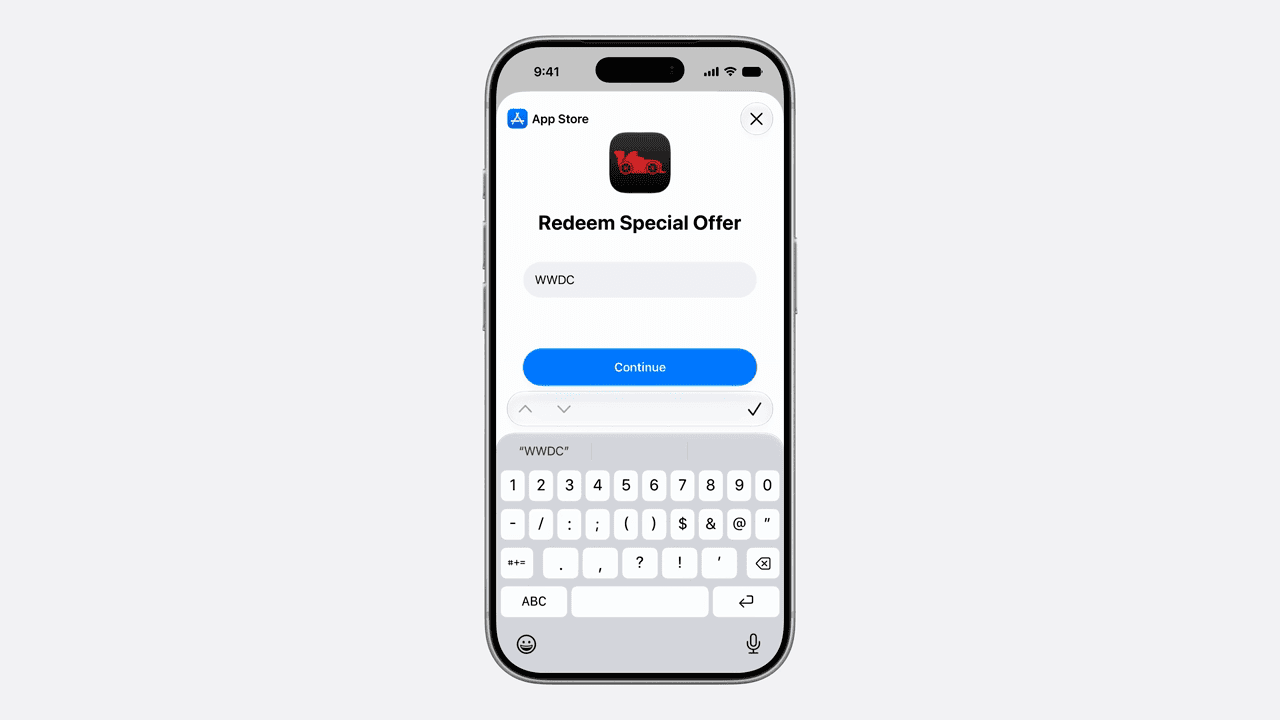 출처: WWDC26 - What’s new in Apple In-App Purchase
API 가 띄우는 sheet 다. App Store 표시와 SKDemo icon 아래에 “Redeem Special Offer” 라는 제목, code 입력 칸, Continue button 이 있다. 화면에서는 WWDC 까지 입력된 상태다.
Xcode 에서 테스트
Xcode 27 에서는 offer code 를 붙일 수 있는 모든 product type 에서 새 API 로 redemption 을 테스트할 수 있다.
 출처: WWDC26 - What’s new in Apple In-App Purchase
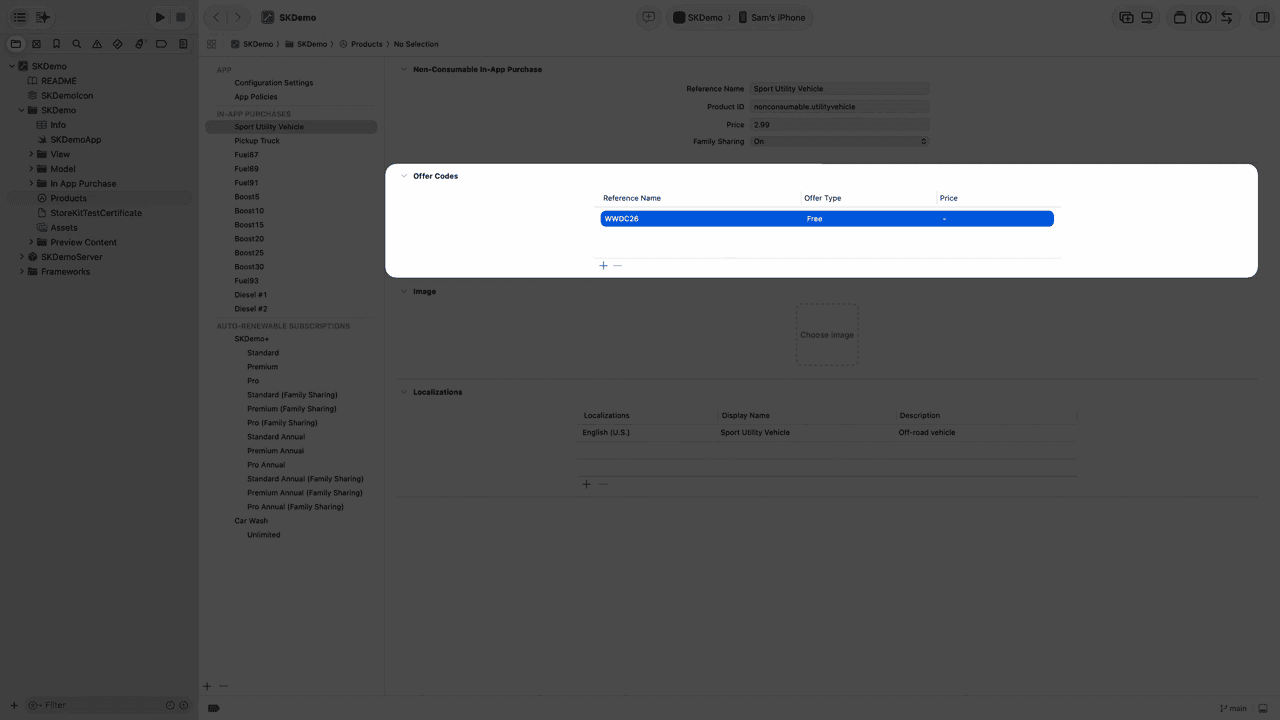
StoreKit configuration file 에서 non-consumable 인 Sport Utility Vehicle 을 고른 화면이다. 강조된 Offer Codes 표에 Reference Name 이 WWDC26, Offer Type 이 Free 인 행이 있다. 구독이 아닌 product 에도 offer code 를 만들어 둘 수 있다는 것을 보여 준다.
제출 과정의 변화
마지막은 code 가 아니라 App Store Connect 의 이야기다. In-App Purchase 를 심사에 올리는 방식이 앱 version 이나 in-app event 와 같은 틀로 합쳐진다.
 출처: WWDC26 - What’s new in Apple In-App Purchase
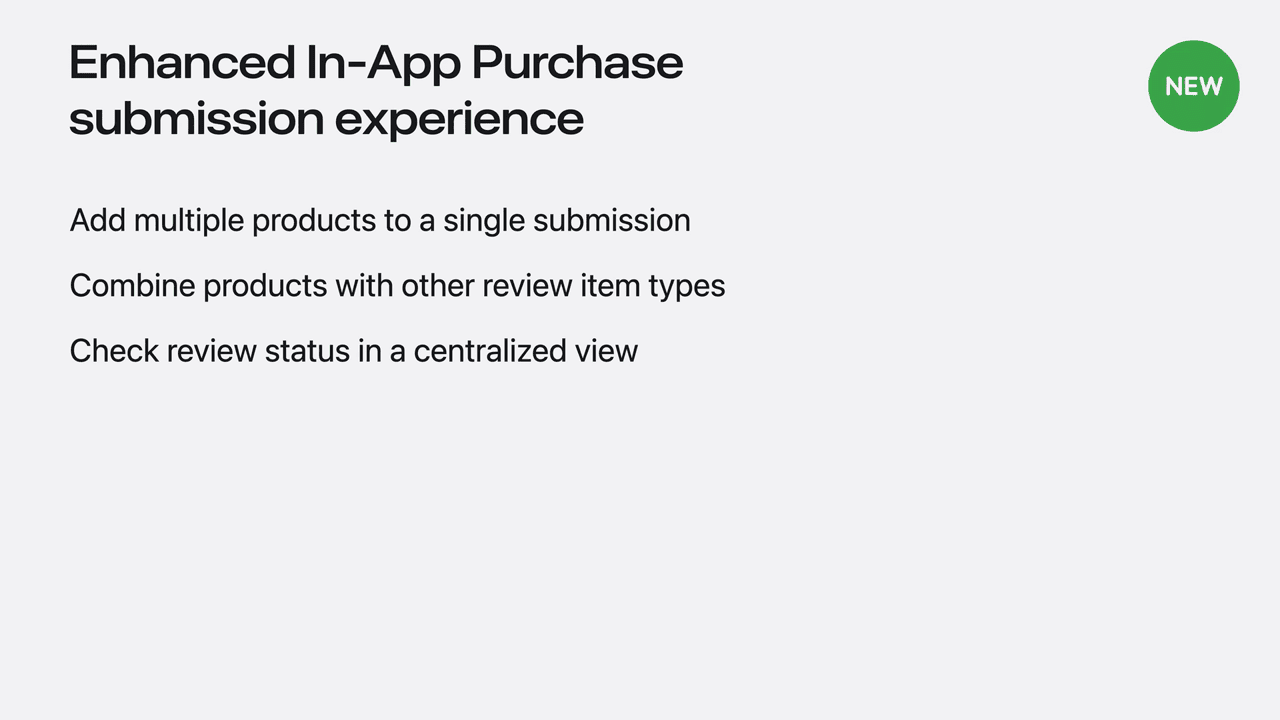
NEW 표시가 붙은 slide 에 세 줄이 있다. product 여러 개를 submission 하나에 넣을 수 있고, 다른 종류의 review item 과 섞을 수 있고, 심사 상태를 한 곳에서 확인할 수 있다. 섞을 수 있는 것으로 발표자가 든 것은 in-app event, custom product page, product page optimization 이다.
App Store Connect 화면
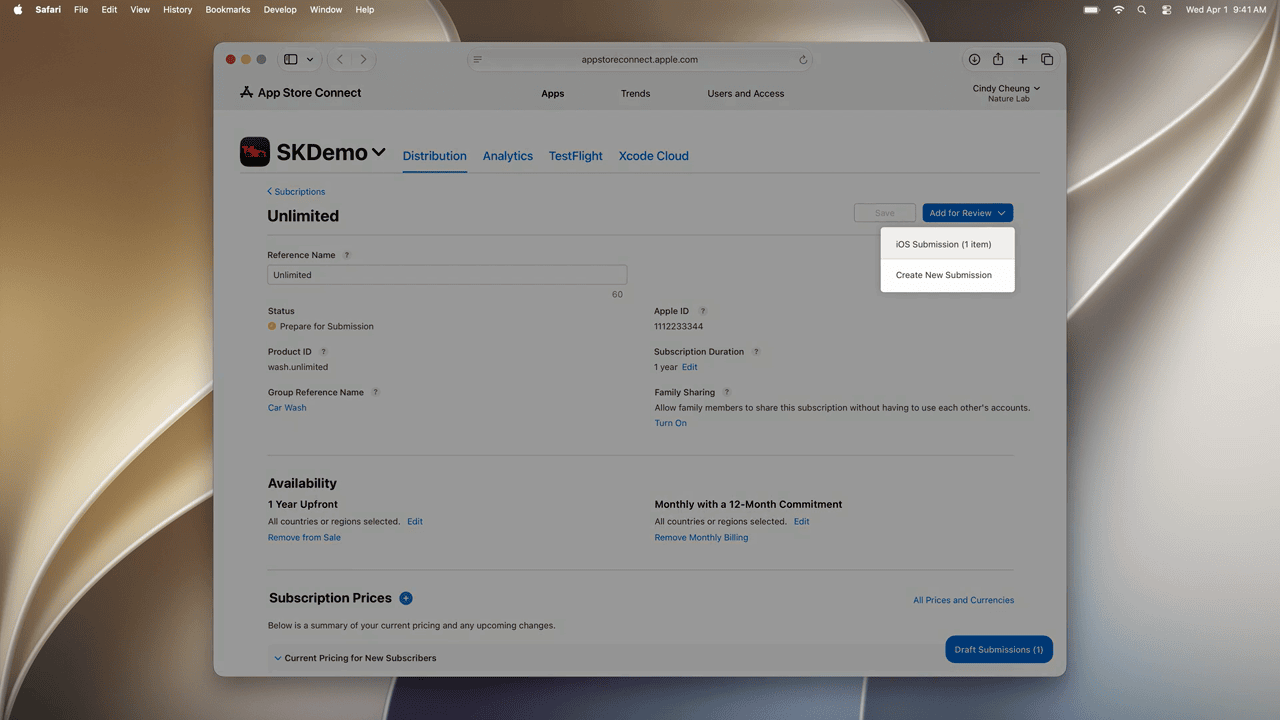
시연은 Car Wash group 의 Unlimited (wash.unlimited) 라는 구독으로 한다.
 출처: WWDC26 - What’s new in Apple In-App Purchase
product 상세 화면의 오른쪽 위에 Add for Review 라는 drop-down 이 있다. 펼치면 “iOS Submission (1 item)” 과 “Create New Submission” 이 나온다. 이미 만들어 둔 draft 에 넣을지 새로 만들지를 고르는 것이다. 화면 오른쪽 아래에는 “Draft Submissions (1)” 이라는 button 이 떠 있다.
 출처: WWDC26 - What’s new in Apple In-App Purchase
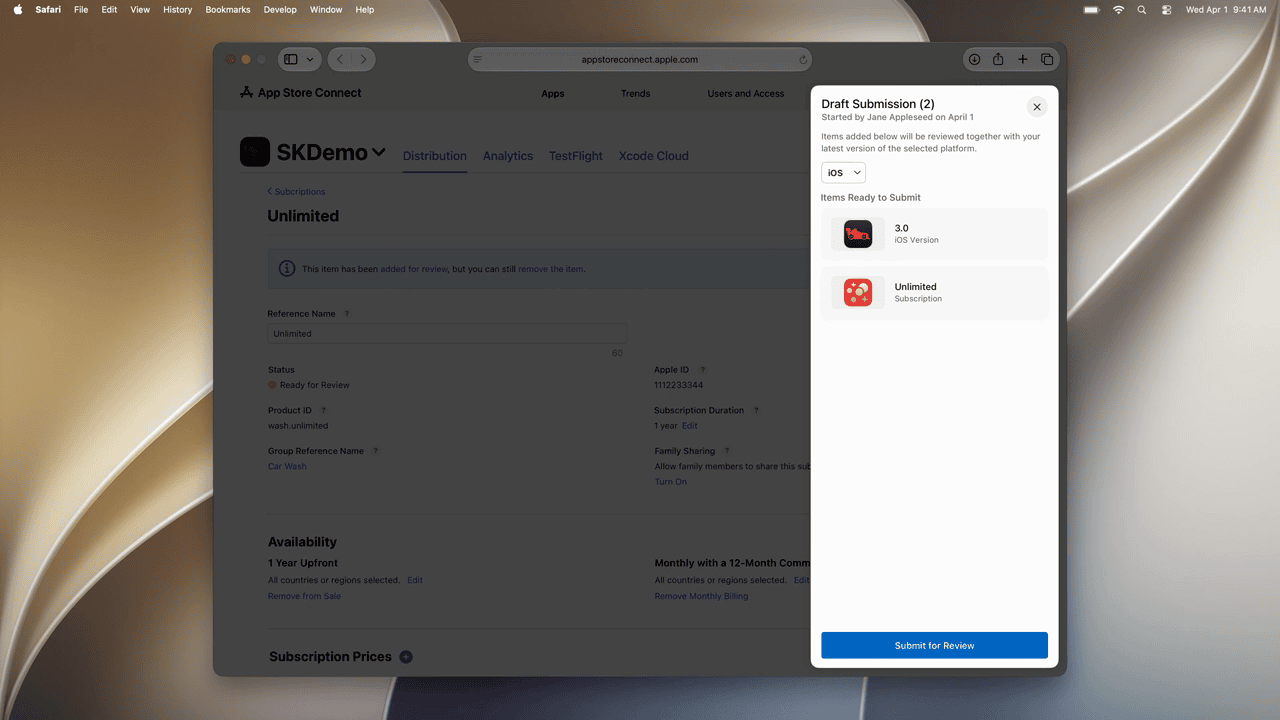
draft 를 누르면 나오는 panel 이다. 제목은 “Draft Submission (2)” 이고, 추가한 항목은 선택한 platform 의 최신 version 과 함께 심사된다는 안내가 있다. Items Ready to Submit 에 iOS Version 3.0 과 Subscription 인 Unlimited 가 나란히 있고 맨 아래에 Submit for Review 가 있다. 뒤쪽 화면에서 Unlimited 의 Status 는 Ready for Review 로 바뀌어 있다.
 출처: WWDC26 - What’s new in Apple In-App Purchase
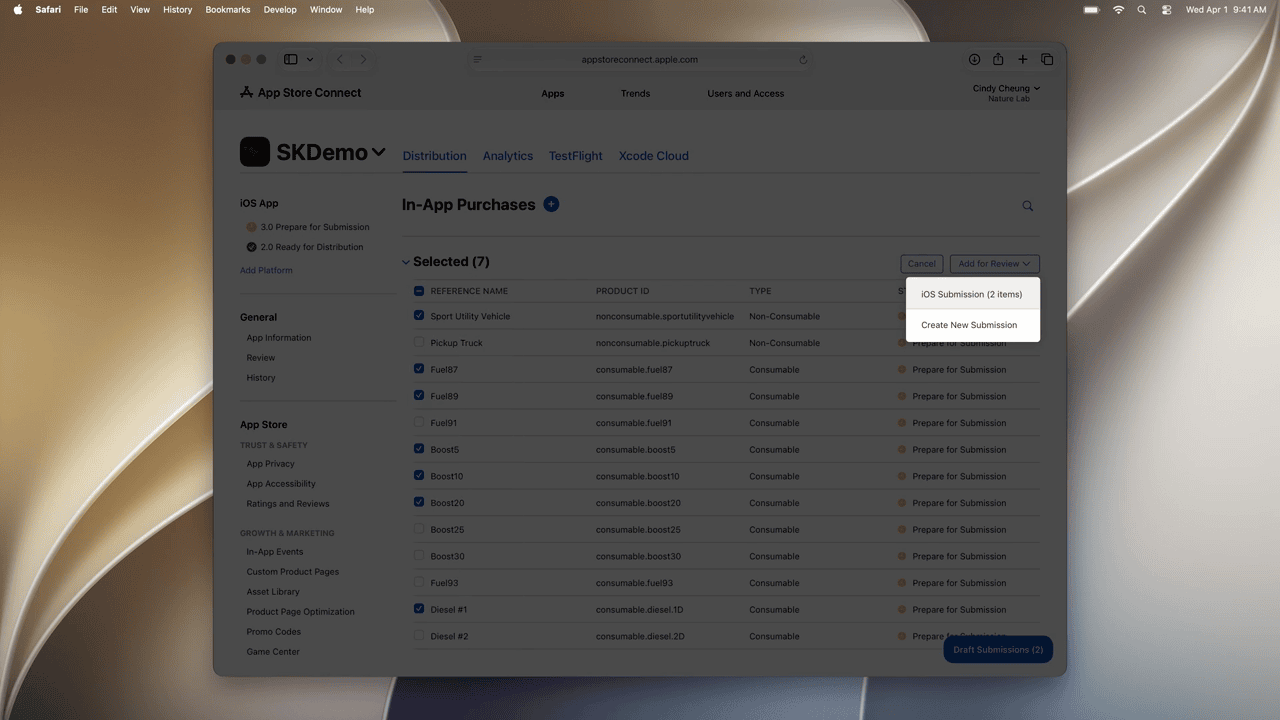
여러 개를 한꺼번에 넣는 화면이다. In-App Purchases 목록에서 checkbox 로 일곱 개를 골랐고 (“Selected (7)”), Add for Review 를 펼치자 “iOS Submission (2 items)” 과 “Create New Submission” 이 나온다. 목록의 product 는 consumable 과 non-consumable 이 섞여 있고 Status 는 모두 Prepare for Submission 이다.
App Store Connect API
같은 변화가 App Store Connect API 에도 온다.
 출처: WWDC26 - What’s new in Apple In-App Purchase
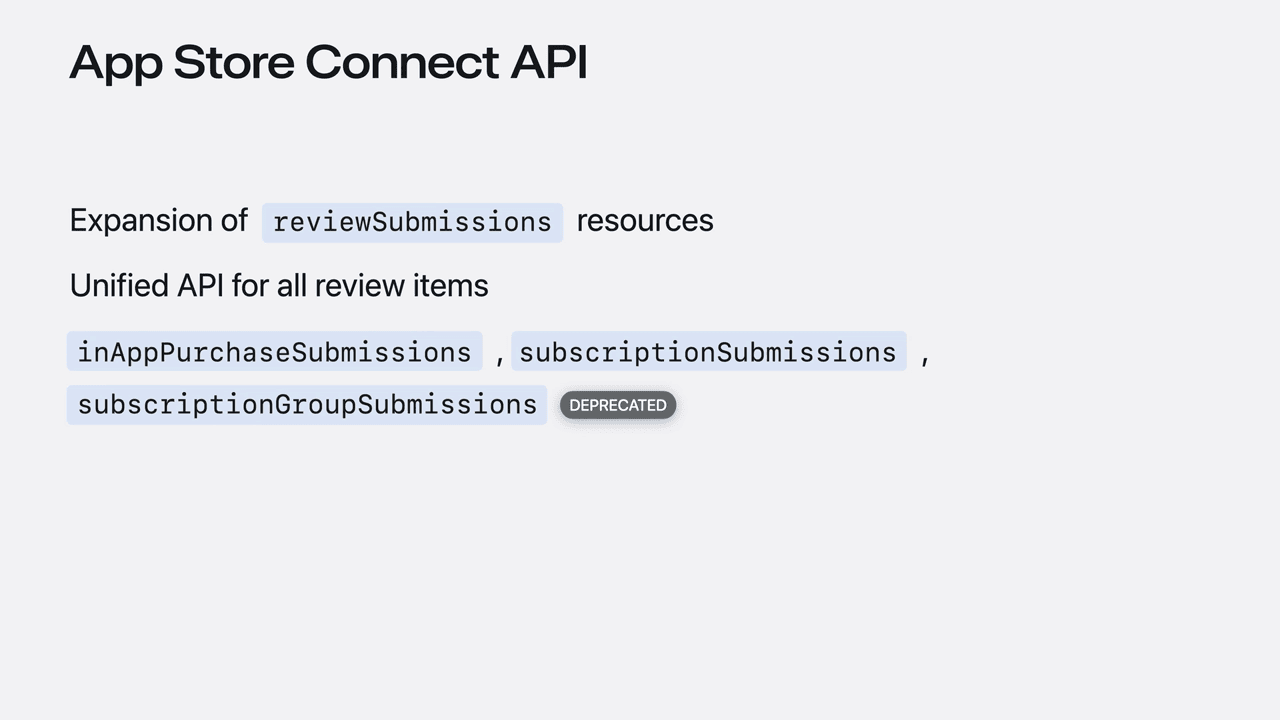
slide 는 reviewSubmissions resource 의 확장과 모든 review item 을 다루는 통합 API 를 말하고, 그 아래에 inAppPurchaseSubmissions, subscriptionSubmissions, subscriptionGroupSubmissions 세 개를 DEPRECATED 표시와 함께 나열한다.
정리하면 reviewSubmissions 가 In-App Purchase, subscription, subscription group 을 받게 되고, product 종류마다 따로 있던 submission resource 세 개는 reviewSubmissions 와 reviewSubmissionItems 로 대체된다. 발표자의 표현은 “will be deprecated” 여서 시점은 알 수 없지만, 지금 옮기기 시작하라고 했다. 제출을 script 로 자동화해 둔 곳이라면 확인할 부분이다. resource 는 Review Submissions 문서에 있고, review item 의 개념은 What’s new in App Store Connect 가 설명한다.
세션의 마무리
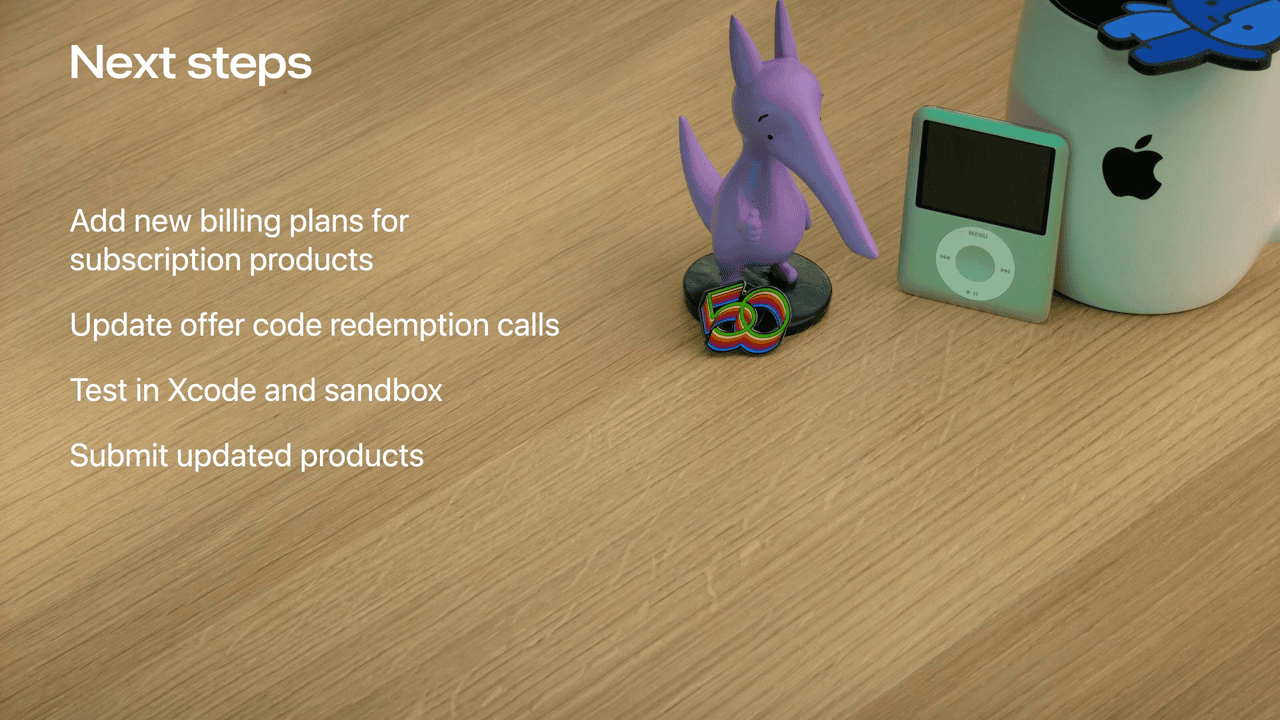
발표자는 네 가지를 권하며 끝낸다.
 출처: WWDC26 - What’s new in Apple In-App Purchase
- 연간 구독 product 에 새 billing plan 을 추가한다.
- offer code redemption 호출부를 새 API 로 바꾼다.
- Xcode 27 과 sandbox 에서 테스트한다.
- 바뀐 product 를 새 제출 방식으로 심사에 올린다.
정리
세션의 내용을 기능과 손댈 곳으로 나누면 다음과 같다.
| 기능 | 손댈 곳 | 쓸 수 있는 시점 |
|---|---|---|
| 약정 plan 설정 | App Store Connect 의 1년 구독 product | 26.5 SDK, 26.4 기기 |
| 약정 plan 판매 | pricingTerms, preferredSubscriptionPricingTerms, .billingPlanType(.monthly) | 26.4 |
| 약정 상태 조회 | Transaction 과 RenewalInfo 의 commitmentInfo | 26.4 |
| server 처리 | JWSTransaction, JWSRenewalInfo 의 새 field 와 notification | 지금 |
| Bundles 와 Suites | 아직 없음 | Xcode 27 에서 테스트, 세부는 2026년 후반 |
| offer code 결과 받기 | offerCodeRedemption(options:isPresented:onCompletion:) | 27.0 |
| 묶음 제출 | App Store Connect 의 Add for Review, reviewSubmissions | 세션은 시점을 말하지 않음 |
실제 프로젝트에 가져갈 점은 다음과 같다.
- 약정 plan 은 새 product 가 아니라 기존 1년 구독의 billing plan 이다. product ID 로 분기하던 code 는 그대로 두고
billingPlanType을 추가로 본다. - 구매 전에 월 금액과 약정 총액을 둘 다 보여 준다.
SubscriptionStoreView는 알아서 하고, 직접 만든 UI 는billingDisplayPrice와commitmentInfo.displayPrice를 쓴다. .monthly항목은 storefront 에 따라 없을 수 있다. 없을 때의 화면을 먼저 정한다.- 접근 권한은
Transaction.expirationDate로, 진행 상황 표시는CommitmentInfo.expirationDate로 판단한다. 둘을 섞지 않는다. - server 가
AUTO_RENEW_DISABLED를 받았을 때 billing plan 이MONTHLY면 권한을 유지한다. grace period 도 적용되지 않는다. - offer 와 offer code 는 billing plan 별로 만든다. 약정 plan 에만 무료 체험을 주는 구성이 가능하다.
- offer code 화면을 띄우는 곳이 있다면 새 API 로 바꿔서 transaction 을 바로 받는다. 지금
options에 넣을 값은 없다.
참고자료
- Supporting offer codes in your app (Apple Developer Documentation)
- App Store Server Notifications V2 (Apple Developer Documentation)
- In-App Purchase types (App Store Connect Help)
- Setting up StoreKit Testing in Xcode (Apple Developer Documentation)
- Retention Messaging API (Apple Developer Documentation)